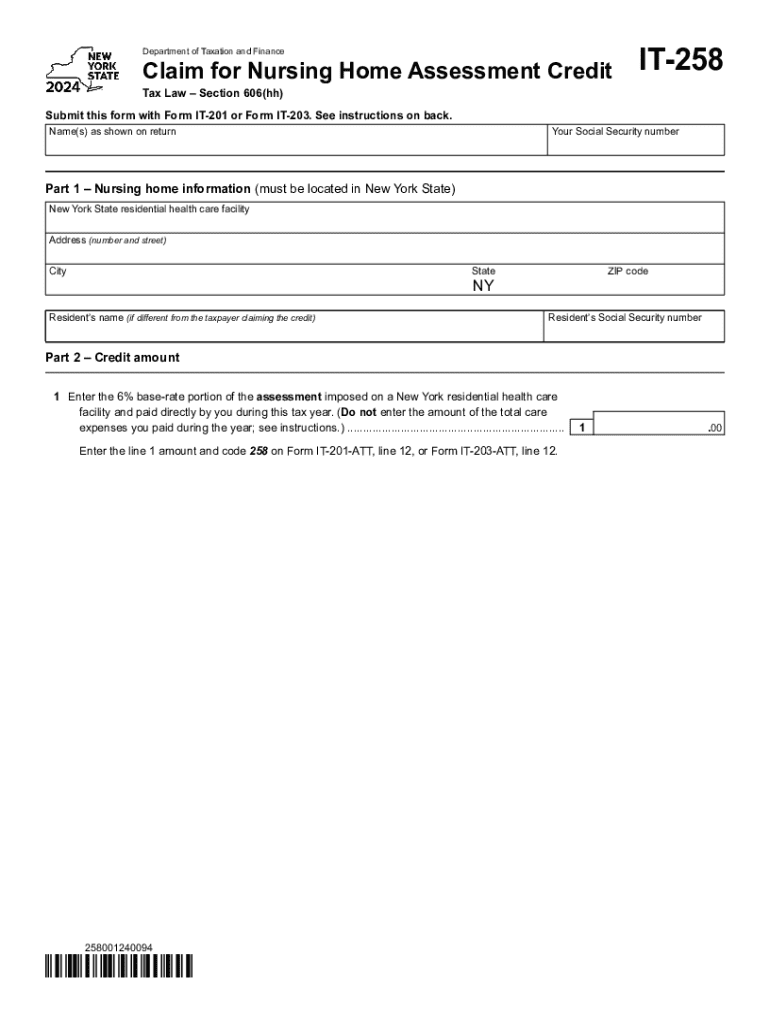
Form it 258 Claim for Nursing Home Assessment Credit Tax Year 2024-2026


Understanding the New York Nursing Home Assessment Credit
The New York nursing home assessment credit is a tax benefit designed to assist individuals who incur costs related to nursing home care. This credit aims to alleviate some financial burdens associated with long-term care. It is essential for eligible taxpayers to understand the specific criteria and how this credit can impact their overall tax liability.
Eligibility Criteria for the Nursing Home Assessment Credit
To qualify for the New York nursing home assessment credit, taxpayers must meet specific eligibility requirements. Generally, the individual must be a resident of New York State and have incurred nursing home expenses that qualify under state guidelines. Additionally, the taxpayer must provide documentation proving the expenses incurred, which may include receipts or billing statements from the nursing facility.
Steps to Complete the Form IT-258
Completing the Form IT-258 for the nursing home assessment credit involves several steps:
- Gather necessary documentation, including proof of nursing home expenses.
- Fill out personal information, including your name, address, and Social Security number.
- Detail the nursing home expenses incurred, ensuring all entries are accurate and supported by documentation.
- Calculate the credit amount based on the provided expenses and any applicable state guidelines.
- Review the completed form for accuracy before submission.
Required Documents for Submission
When submitting the Form IT-258, certain documents are essential to support your claim. These typically include:
- Receipts or invoices from the nursing home.
- Proof of payment for the nursing home services.
- Any additional documentation required by the state to verify eligibility.
Filing Deadlines for the Nursing Home Assessment Credit
It is crucial for taxpayers to be aware of the filing deadlines associated with the nursing home assessment credit. Generally, the form must be submitted by the state’s tax filing deadline, which aligns with the federal tax deadline. Late submissions may result in the loss of the credit, so timely filing is essential.
Form Submission Methods
The Form IT-258 can be submitted through various methods to ensure convenience for taxpayers. Options typically include:
- Online submission through the state tax department’s website.
- Mailing the completed form to the appropriate state tax office.
- In-person submission at designated tax offices, if available.
Legal Use of the Nursing Home Assessment Credit
The nursing home assessment credit is legally available to eligible taxpayers under New York State tax law. It is important to ensure that all claims for the credit are based on genuine expenses and meet the established criteria. Misrepresentation or fraudulent claims can lead to penalties and legal repercussions.
Create this form in 5 minutes or less
Find and fill out the correct form it 258 claim for nursing home assessment credit tax year
Create this form in 5 minutes!
How to create an eSignature for the form it 258 claim for nursing home assessment credit tax year
How to create an electronic signature for a PDF online
How to create an electronic signature for a PDF in Google Chrome
How to create an e-signature for signing PDFs in Gmail
How to create an e-signature right from your smartphone
How to create an e-signature for a PDF on iOS
How to create an e-signature for a PDF on Android
People also ask
-
What is a New York nursing home assessment?
A New York nursing home assessment is a comprehensive evaluation process that determines the eligibility of individuals for nursing home care in New York. This assessment considers medical, psychological, and social factors to ensure that the individual receives appropriate care. Understanding this process is crucial for families seeking nursing home placement.
-
How does airSlate SignNow facilitate the New York nursing home assessment process?
airSlate SignNow streamlines the New York nursing home assessment process by allowing users to easily send and eSign necessary documents online. This eliminates the need for physical paperwork, making the process faster and more efficient. With our platform, families can focus on care rather than administrative tasks.
-
What are the pricing options for using airSlate SignNow for New York nursing home assessments?
airSlate SignNow offers flexible pricing plans tailored to meet the needs of various users, including those involved in New York nursing home assessments. Our cost-effective solutions ensure that you can manage your documentation without breaking the bank. For detailed pricing information, please visit our website.
-
What features does airSlate SignNow offer for New York nursing home assessments?
airSlate SignNow provides features such as customizable templates, secure eSigning, and document tracking, all of which are essential for New York nursing home assessments. These tools help ensure that all necessary documents are completed accurately and efficiently. Our user-friendly interface makes it easy for anyone to navigate the process.
-
What are the benefits of using airSlate SignNow for nursing home assessments in New York?
Using airSlate SignNow for nursing home assessments in New York offers numerous benefits, including increased efficiency, reduced paperwork, and enhanced security. Our platform allows for real-time collaboration, ensuring that all stakeholders can access and sign documents promptly. This ultimately leads to a smoother assessment process.
-
Can airSlate SignNow integrate with other tools for New York nursing home assessments?
Yes, airSlate SignNow can integrate with various tools and software commonly used in the healthcare sector, enhancing the New York nursing home assessment process. These integrations allow for seamless data transfer and improved workflow management. This ensures that all relevant information is readily available when needed.
-
Is airSlate SignNow compliant with regulations for New York nursing home assessments?
Absolutely, airSlate SignNow is designed to comply with all relevant regulations and standards for New York nursing home assessments. Our platform prioritizes data security and privacy, ensuring that sensitive information is protected. Users can trust that their documents are handled in accordance with legal requirements.
Get more for Form IT 258 Claim For Nursing Home Assessment Credit Tax Year
Find out other Form IT 258 Claim For Nursing Home Assessment Credit Tax Year
- eSignature Kansas Plumbing Lease Agreement Template Myself
- eSignature Louisiana Plumbing Rental Application Secure
- eSignature Maine Plumbing Business Plan Template Simple
- Can I eSignature Massachusetts Plumbing Business Plan Template
- eSignature Mississippi Plumbing Emergency Contact Form Later
- eSignature Plumbing Form Nebraska Free
- How Do I eSignature Alaska Real Estate Last Will And Testament
- Can I eSignature Alaska Real Estate Rental Lease Agreement
- eSignature New Jersey Plumbing Business Plan Template Fast
- Can I eSignature California Real Estate Contract
- eSignature Oklahoma Plumbing Rental Application Secure
- How Can I eSignature Connecticut Real Estate Quitclaim Deed
- eSignature Pennsylvania Plumbing Business Plan Template Safe
- eSignature Florida Real Estate Quitclaim Deed Online
- eSignature Arizona Sports Moving Checklist Now
- eSignature South Dakota Plumbing Emergency Contact Form Mobile
- eSignature South Dakota Plumbing Emergency Contact Form Safe
- Can I eSignature South Dakota Plumbing Emergency Contact Form
- eSignature Georgia Real Estate Affidavit Of Heirship Later
- eSignature Hawaii Real Estate Operating Agreement Online