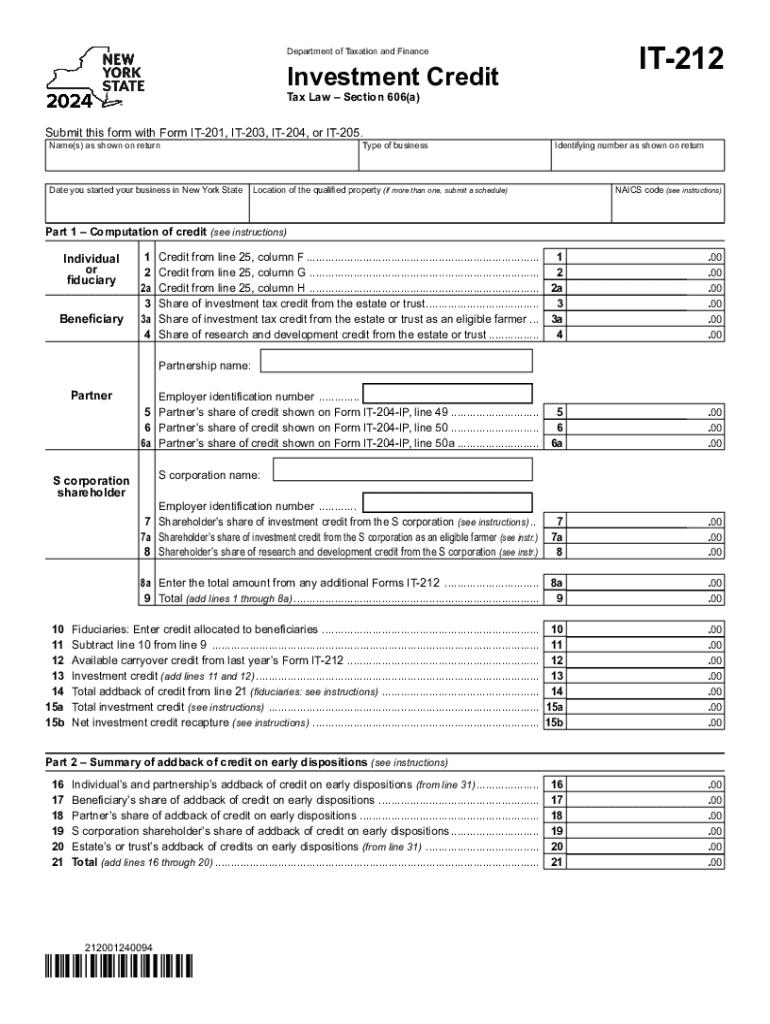
Form it 212 Investment Credit Tax Year 2024-2026


Understanding the IT 212 Investment Credit Tax Year
The IT 212 form, also known as the Investment Credit form, is utilized in New York for claiming investment credits against state taxes. This form is specifically designed for taxpayers who have made qualified investments in certain property types during the tax year. The investment credit can significantly reduce tax liability, making it an essential form for eligible taxpayers. It is crucial to understand the specific tax year for which the form is being filed, as this determines the applicable credits and regulations.
Steps to Complete the IT 212 Investment Credit Tax Year
Completing the IT 212 form involves several key steps to ensure accuracy and compliance. First, gather all necessary documentation related to your investments, including purchase receipts and any relevant financial statements. Next, fill out the form by providing your personal information, detailing the investments made, and calculating the credit amount based on the instructions provided. Finally, review the completed form for any errors before submission. It is advisable to keep copies of all documents for your records.
Eligibility Criteria for the IT 212 Investment Credit Tax Year
To qualify for the IT 212 investment credit, taxpayers must meet specific eligibility criteria. Generally, the investments must be made in qualified property types, such as machinery, equipment, or certain types of real estate. Additionally, the taxpayer must be subject to New York State tax and must have incurred the investment expenses during the tax year for which they are claiming the credit. It is essential to review the detailed eligibility requirements outlined in the form instructions to ensure compliance.
Required Documents for the IT 212 Investment Credit Tax Year
When filing the IT 212 form, certain documents are required to substantiate your claim. These typically include proof of purchase for the qualified investments, such as invoices or receipts, and any relevant financial records that demonstrate the investment's impact on your business. Additionally, if applicable, documentation showing prior year credits or adjustments may also be necessary. Having these documents readily available can streamline the filing process and help avoid delays.
Filing Deadlines for the IT 212 Investment Credit Tax Year
It is important to be aware of the filing deadlines associated with the IT 212 form. Generally, the form must be submitted by the same deadline as your state income tax return. This means that if you are filing your taxes by April 15, your IT 212 form should also be submitted by this date. In some cases, extensions may be available, but it is crucial to check with the New York State Department of Taxation and Finance for the most current deadlines and any potential changes.
Form Submission Methods for the IT 212 Investment Credit Tax Year
The IT 212 form can be submitted through various methods, providing flexibility for taxpayers. Options typically include online submission via the New York State Department of Taxation and Finance website, mailing a paper form, or delivering it in person to a local tax office. Each method has its advantages, such as the speed of online filing or the personal touch of in-person submission. Be sure to choose the method that best suits your needs and ensures timely processing of your claim.
Create this form in 5 minutes or less
Find and fill out the correct form it 212 investment credit tax year
Create this form in 5 minutes!
How to create an eSignature for the form it 212 investment credit tax year
How to create an electronic signature for a PDF online
How to create an electronic signature for a PDF in Google Chrome
How to create an e-signature for signing PDFs in Gmail
How to create an e-signature right from your smartphone
How to create an e-signature for a PDF on iOS
How to create an e-signature for a PDF on Android
People also ask
-
What are the IT 212 instructions for using airSlate SignNow?
The IT 212 instructions for airSlate SignNow guide users through the process of sending and eSigning documents efficiently. These instructions cover everything from setting up your account to managing your documents securely. By following these steps, you can ensure a smooth experience while utilizing our platform.
-
How much does airSlate SignNow cost?
Pricing for airSlate SignNow varies based on the plan you choose, but it remains a cost-effective solution for businesses of all sizes. We offer different tiers that cater to various needs, ensuring you get the best value for your investment. For detailed pricing and features, refer to our pricing page.
-
What features does airSlate SignNow offer?
airSlate SignNow includes a range of features designed to streamline document management, including eSigning, document templates, and real-time collaboration. The platform also provides secure storage and tracking capabilities, making it easier to manage your documents. These features are all detailed in the IT 212 instructions for optimal use.
-
How can airSlate SignNow benefit my business?
By using airSlate SignNow, your business can enhance productivity and reduce turnaround times for document signing. The platform simplifies the eSigning process, allowing you to focus on core business activities. The benefits outlined in the IT 212 instructions highlight how our solution can transform your document workflows.
-
Does airSlate SignNow integrate with other software?
Yes, airSlate SignNow offers integrations with various software applications, enhancing its functionality. You can connect it with popular tools like Google Drive, Salesforce, and more to streamline your workflows. The IT 212 instructions provide guidance on how to set up these integrations effectively.
-
Is airSlate SignNow secure for sensitive documents?
Absolutely, airSlate SignNow prioritizes security and compliance, ensuring that your sensitive documents are protected. We implement industry-standard encryption and adhere to regulations to safeguard your data. The IT 212 instructions include information on our security measures and best practices for document handling.
-
Can I customize my documents in airSlate SignNow?
Yes, airSlate SignNow allows you to customize your documents easily using templates and editing tools. This feature enables you to create personalized documents that meet your specific needs. The IT 212 instructions provide detailed steps on how to utilize these customization options effectively.
Get more for Form IT 212 Investment Credit Tax Year
- Certificate of quality template form
- Reservation agreement letter sample form
- Affidavit of non use of vehicle affidavit of out of state drive insured form
- New jersey state police firearms consent for mental health records search sp 66 form
- Fitz patrick skin type quiz printable form
- Petitioner 2 form
- 12 901 b 1 form
- Form mdc 1016
Find out other Form IT 212 Investment Credit Tax Year
- eSign Washington Notice of Rent Increase Computer
- How To eSign Florida Notice to Quit
- How To eSign Hawaii Notice to Quit
- eSign Montana Pet Addendum to Lease Agreement Online
- How To eSign Florida Tenant Removal
- How To eSign Hawaii Tenant Removal
- eSign Hawaii Tenant Removal Simple
- eSign Arkansas Vacation Rental Short Term Lease Agreement Easy
- Can I eSign North Carolina Vacation Rental Short Term Lease Agreement
- eSign Michigan Escrow Agreement Now
- eSign Hawaii Sales Receipt Template Online
- eSign Utah Sales Receipt Template Free
- eSign Alabama Sales Invoice Template Online
- eSign Vermont Escrow Agreement Easy
- How Can I eSign Wisconsin Escrow Agreement
- How To eSign Nebraska Sales Invoice Template
- eSign Nebraska Sales Invoice Template Simple
- eSign New York Sales Invoice Template Now
- eSign Pennsylvania Sales Invoice Template Computer
- eSign Virginia Sales Invoice Template Computer