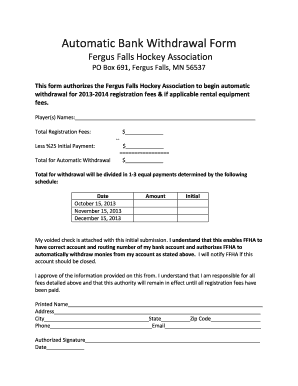
Automatic Bank Withdrawal Form


What is the Automatic Bank Withdrawal Form
The Automatic Bank Withdrawal Form is a document that allows individuals or businesses to authorize a financial institution to withdraw funds directly from their bank account on a recurring basis. This form is commonly used for payments such as utility bills, loan repayments, or subscription services. By completing this form, the account holder provides consent for automatic deductions, ensuring timely payments without the need for manual intervention.
How to use the Automatic Bank Withdrawal Form
Using the Automatic Bank Withdrawal Form involves several straightforward steps. First, obtain the form from your financial institution or the service provider requiring the automatic withdrawal. Next, fill in the necessary details, including your bank account information, the amount to be withdrawn, and the frequency of the withdrawals. After completing the form, review it for accuracy and sign it to authorize the transactions. Finally, submit the form to the designated entity, either online or via mail, depending on their submission guidelines.
Steps to complete the Automatic Bank Withdrawal Form
Completing the Automatic Bank Withdrawal Form requires attention to detail. Follow these steps for a smooth process:
- Gather your bank account details, including the account number and routing number.
- Indicate the amount you wish to withdraw and the frequency, such as weekly, monthly, or quarterly.
- Provide your personal information, including your name and contact details.
- Review the terms and conditions associated with the automatic withdrawal.
- Sign and date the form to authorize the withdrawals.
- Submit the completed form to the appropriate party.
Key elements of the Automatic Bank Withdrawal Form
The Automatic Bank Withdrawal Form contains several key elements that are essential for processing automatic payments. These elements typically include:
- Account Holder Information: Name, address, and contact details of the individual or business.
- Bank Account Details: Account number and routing number, which are necessary for the financial institution to process withdrawals.
- Withdrawal Amount: The specific amount to be deducted from the account.
- Withdrawal Frequency: How often the funds will be withdrawn, such as weekly or monthly.
- Authorization Signature: A signature indicating consent for the automatic withdrawals.
Legal use of the Automatic Bank Withdrawal Form
The Automatic Bank Withdrawal Form is legally binding once signed by the account holder. It is important to ensure that the form complies with applicable laws and regulations governing electronic fund transfers. This includes the Electronic Fund Transfer Act, which protects consumers in the United States. Users should retain a copy of the signed form for their records and review the terms of service of the entity requesting the automatic withdrawal to understand their rights and responsibilities.
Form Submission Methods
Submitting the Automatic Bank Withdrawal Form can typically be done through various methods, depending on the requirements of the financial institution or service provider. Common submission methods include:
- Online Submission: Many providers offer a secure online portal where users can fill out and submit the form electronically.
- Mail: Users may print the completed form and send it via postal service to the designated address.
- In-Person: Some institutions allow users to submit the form in person at a branch location for immediate processing.
Create this form in 5 minutes or less
Create this form in 5 minutes!
How to create an eSignature for the automatic bank withdrawal form
How to create an electronic signature for a PDF online
How to create an electronic signature for a PDF in Google Chrome
How to create an e-signature for signing PDFs in Gmail
How to create an e-signature right from your smartphone
How to create an e-signature for a PDF on iOS
How to create an e-signature for a PDF on Android
People also ask
-
What is an Automatic Bank Withdrawal Form?
An Automatic Bank Withdrawal Form is a document that authorizes a business or organization to withdraw funds directly from a customer's bank account on a recurring basis. This form simplifies payment processes for subscriptions, memberships, or services, ensuring timely transactions without manual intervention.
-
How does airSlate SignNow facilitate the use of an Automatic Bank Withdrawal Form?
airSlate SignNow allows users to create, send, and eSign Automatic Bank Withdrawal Forms seamlessly. With its user-friendly interface, businesses can easily customize the form to meet their specific needs, ensuring a smooth experience for both the sender and the recipient.
-
What are the benefits of using an Automatic Bank Withdrawal Form?
Using an Automatic Bank Withdrawal Form streamlines payment collection, reduces late payments, and enhances cash flow management. It also minimizes administrative tasks, allowing businesses to focus on growth while ensuring customers enjoy a hassle-free payment experience.
-
Is there a cost associated with using airSlate SignNow for Automatic Bank Withdrawal Forms?
Yes, airSlate SignNow offers various pricing plans that cater to different business needs. These plans provide access to features that enhance the creation and management of Automatic Bank Withdrawal Forms, ensuring you get the best value for your investment.
-
Can I integrate airSlate SignNow with other software for managing Automatic Bank Withdrawal Forms?
Absolutely! airSlate SignNow supports integrations with various software applications, allowing you to manage your Automatic Bank Withdrawal Forms alongside your existing tools. This integration capability enhances workflow efficiency and ensures a seamless experience across platforms.
-
How secure is the information on the Automatic Bank Withdrawal Form?
Security is a top priority at airSlate SignNow. The platform employs advanced encryption and security protocols to protect sensitive information on your Automatic Bank Withdrawal Forms, ensuring that both your data and your customers' data remain safe and confidential.
-
Can I customize my Automatic Bank Withdrawal Form?
Yes, airSlate SignNow provides extensive customization options for your Automatic Bank Withdrawal Form. You can tailor the form's layout, fields, and branding to align with your business's identity, making it a perfect fit for your specific requirements.
Get more for Automatic Bank Withdrawal Form
Find out other Automatic Bank Withdrawal Form
- How To eSign Vermont Digital contracts
- eSign Vermont Digital contracts Now
- eSign Vermont Digital contracts Later
- How Can I eSign New Jersey Contract of employment
- eSignature Kansas Travel Agency Agreement Now
- How Can I eSign Texas Contract of employment
- eSignature Tennessee Travel Agency Agreement Mobile
- eSignature Oregon Amendment to an LLC Operating Agreement Free
- Can I eSign Hawaii Managed services contract template
- How Do I eSign Iowa Managed services contract template
- Can I eSignature Wyoming Amendment to an LLC Operating Agreement
- eSign Massachusetts Personal loan contract template Simple
- How Do I eSign Massachusetts Personal loan contract template
- How To eSign Mississippi Personal loan contract template
- How Do I eSign Oklahoma Personal loan contract template
- eSign Oklahoma Managed services contract template Easy
- Can I eSign South Carolina Real estate contracts
- eSign Texas Renter's contract Mobile
- How Do I eSign Texas Renter's contract
- eSign Hawaii Sales contract template Myself