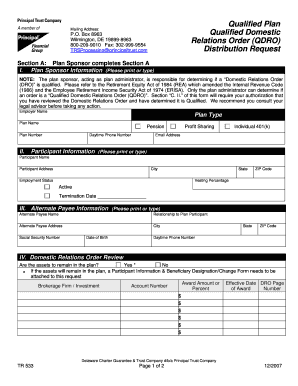
Qualified Plan QDRO Distribution Request Principal Trust Company Form


What is the Qualified Plan QDRO Distribution Request Principal Trust Company
The Qualified Plan QDRO Distribution Request is a legal document used to divide retirement plan assets in accordance with a Qualified Domestic Relations Order (QDRO). This request is specifically tailored for plans managed by Principal Trust Company, allowing for the distribution of benefits to an alternate payee, typically in the context of divorce or legal separation. The QDRO ensures that the division of retirement assets complies with federal and state laws, protecting both the plan participant and the alternate payee.
How to use the Qualified Plan QDRO Distribution Request Principal Trust Company
To use the Qualified Plan QDRO Distribution Request, individuals must first obtain the form from Principal Trust Company. Once acquired, the form needs to be completed with accurate information regarding the plan participant and the alternate payee. It is essential to provide all required details, such as the names, addresses, and Social Security numbers of both parties. After filling out the form, it should be submitted according to the guidelines provided by Principal Trust Company, ensuring that all legal requirements are met for the distribution of funds.
Steps to complete the Qualified Plan QDRO Distribution Request Principal Trust Company
Completing the Qualified Plan QDRO Distribution Request involves several key steps:
- Obtain the form from Principal Trust Company.
- Fill in the participant's and alternate payee's information accurately.
- Specify the percentage or amount of the retirement benefits to be distributed.
- Include any additional information required by Principal Trust Company.
- Review the completed form for accuracy and completeness.
- Submit the form as instructed, either online or via mail.
Required Documents
When submitting the Qualified Plan QDRO Distribution Request, certain documents may be required to support the request. These typically include:
- A copy of the divorce decree or legal separation agreement.
- The original QDRO, if applicable, that has been signed by the court.
- Identification documents for both the plan participant and the alternate payee.
Ensuring that all necessary documentation is submitted can help expedite the processing of the distribution request.
Legal use of the Qualified Plan QDRO Distribution Request Principal Trust Company
The Qualified Plan QDRO Distribution Request serves a crucial legal function in the division of retirement assets. It must comply with specific legal standards to be valid. The QDRO must be approved by a court and should clearly outline the terms of the asset division. This legal framework protects the rights of both the plan participant and the alternate payee, ensuring that the distribution of retirement benefits is executed fairly and in accordance with the law.
Eligibility Criteria
Eligibility to submit a Qualified Plan QDRO Distribution Request generally requires that the individual is either the plan participant or an alternate payee as defined in the QDRO. Typically, alternate payees are former spouses or dependents entitled to a portion of the retirement benefits due to a divorce or separation. It is important for individuals to confirm their eligibility based on the specific terms outlined in the QDRO and the policies of Principal Trust Company.
Create this form in 5 minutes or less
Create this form in 5 minutes!
How to create an eSignature for the qualified plan qdro distribution request principal trust company
How to create an electronic signature for a PDF online
How to create an electronic signature for a PDF in Google Chrome
How to create an e-signature for signing PDFs in Gmail
How to create an e-signature right from your smartphone
How to create an e-signature for a PDF on iOS
How to create an e-signature for a PDF on Android
People also ask
-
What is a Qualified Plan QDRO Distribution Request with Principal Trust Company?
A Qualified Plan QDRO Distribution Request with Principal Trust Company is a legal document that allows for the division of retirement plan assets in a divorce or legal separation. This request ensures that the distribution complies with federal laws and the specific plan's requirements, making it essential for individuals navigating these situations.
-
How can airSlate SignNow assist with the Qualified Plan QDRO Distribution Request process?
airSlate SignNow streamlines the Qualified Plan QDRO Distribution Request process by providing an easy-to-use platform for document creation and eSigning. Our solution simplifies the workflow, ensuring that all necessary parties can review and sign documents quickly and securely.
-
What are the costs associated with using airSlate SignNow for Qualified Plan QDRO Distribution Requests?
The pricing for using airSlate SignNow for Qualified Plan QDRO Distribution Requests is competitive and designed to be cost-effective for businesses and individuals. We offer various subscription plans that cater to different needs, ensuring you only pay for what you use while accessing all essential features.
-
What features does airSlate SignNow offer for managing Qualified Plan QDRO Distribution Requests?
airSlate SignNow offers a range of features for managing Qualified Plan QDRO Distribution Requests, including customizable templates, secure eSigning, and real-time tracking of document status. These features enhance efficiency and ensure that all parties are kept informed throughout the process.
-
Are there any integrations available with airSlate SignNow for Qualified Plan QDRO Distribution Requests?
Yes, airSlate SignNow integrates seamlessly with various applications and platforms, enhancing the management of Qualified Plan QDRO Distribution Requests. These integrations allow users to connect their existing tools, making it easier to streamline workflows and improve productivity.
-
What benefits does airSlate SignNow provide for handling Qualified Plan QDRO Distribution Requests?
Using airSlate SignNow for Qualified Plan QDRO Distribution Requests offers numerous benefits, including increased efficiency, reduced paperwork, and enhanced security. Our platform ensures that sensitive information is protected while simplifying the entire process for users.
-
How does airSlate SignNow ensure the security of Qualified Plan QDRO Distribution Requests?
airSlate SignNow prioritizes security by employing advanced encryption and compliance measures to protect Qualified Plan QDRO Distribution Requests. Our platform is designed to safeguard sensitive data, ensuring that all documents are securely stored and transmitted.
Get more for Qualified Plan QDRO Distribution Request Principal Trust Company
Find out other Qualified Plan QDRO Distribution Request Principal Trust Company
- eSignature Washington Government Arbitration Agreement Simple
- Can I eSignature Massachusetts Finance & Tax Accounting Business Plan Template
- Help Me With eSignature Massachusetts Finance & Tax Accounting Work Order
- eSignature Delaware Healthcare / Medical NDA Secure
- eSignature Florida Healthcare / Medical Rental Lease Agreement Safe
- eSignature Nebraska Finance & Tax Accounting Business Letter Template Online
- Help Me With eSignature Indiana Healthcare / Medical Notice To Quit
- eSignature New Jersey Healthcare / Medical Credit Memo Myself
- eSignature North Dakota Healthcare / Medical Medical History Simple
- Help Me With eSignature Arkansas High Tech Arbitration Agreement
- eSignature Ohio Healthcare / Medical Operating Agreement Simple
- eSignature Oregon Healthcare / Medical Limited Power Of Attorney Computer
- eSignature Pennsylvania Healthcare / Medical Warranty Deed Computer
- eSignature Texas Healthcare / Medical Bill Of Lading Simple
- eSignature Virginia Healthcare / Medical Living Will Computer
- eSignature West Virginia Healthcare / Medical Claim Free
- How To eSignature Kansas High Tech Business Plan Template
- eSignature Kansas High Tech Lease Agreement Template Online
- eSignature Alabama Insurance Forbearance Agreement Safe
- How Can I eSignature Arkansas Insurance LLC Operating Agreement