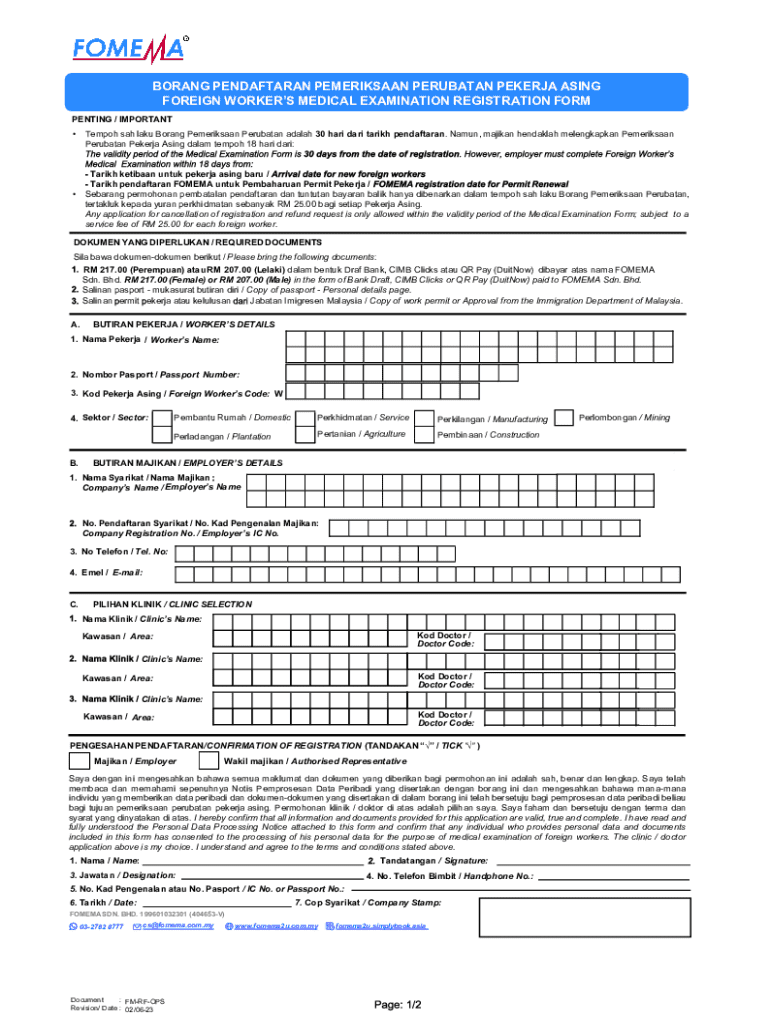
Foreign Worker Medical Examination Registration Formv2 15062023 2023-2026


What is the Foreign Worker Medical Examination Registration Formv2 15062023
The Foreign Worker Medical Examination Registration Formv2 15062023 is a crucial document used in the United States for individuals seeking employment as foreign workers. This form is designed to facilitate the medical examination process required for foreign workers to ensure they meet health and safety standards. It collects essential information about the applicant, including personal details, medical history, and the results of required medical tests. Completing this form accurately is vital for compliance with immigration and labor regulations.
How to use the Foreign Worker Medical Examination Registration Formv2 15062023
Using the Foreign Worker Medical Examination Registration Formv2 15062023 involves several steps. First, obtain the form from a reliable source. Next, fill in the required fields with accurate information, ensuring that all personal and medical details are correct. After completing the form, submit it to the designated medical facility or authority responsible for conducting the examination. It is important to keep a copy of the completed form for your records, as it may be needed for future reference or verification.
Steps to complete the Foreign Worker Medical Examination Registration Formv2 15062023
Completing the Foreign Worker Medical Examination Registration Formv2 15062023 requires attention to detail. Here are the key steps:
- Download or obtain the form from a trusted source.
- Fill in your personal information, including name, date of birth, and contact details.
- Provide your medical history, including any pre-existing conditions or previous surgeries.
- Complete sections related to the medical examination requirements, ensuring all necessary tests are included.
- Review the form for accuracy and completeness before submission.
Required Documents
When submitting the Foreign Worker Medical Examination Registration Formv2 15062023, several supporting documents may be required. These typically include:
- A valid passport or identification document.
- Proof of employment or job offer in the United States.
- Any previous medical records relevant to your health status.
- Results from any required medical tests, such as tuberculosis screening.
Legal use of the Foreign Worker Medical Examination Registration Formv2 15062023
The Foreign Worker Medical Examination Registration Formv2 15062023 is legally mandated for foreign workers entering the United States. Employers must ensure that prospective employees complete this form as part of the hiring process. Failure to comply with the requirements may lead to legal repercussions for both the employer and the employee. Adhering to the guidelines set forth by immigration authorities is essential to maintain lawful employment status.
Who Issues the Form
The Foreign Worker Medical Examination Registration Formv2 15062023 is typically issued by the U.S. Department of Labor or designated medical examination facilities. These entities are responsible for ensuring that the form is used correctly and that all medical examinations meet federal standards. It is important to obtain the form from official sources to ensure its validity and compliance with current regulations.
Create this form in 5 minutes or less
Find and fill out the correct foreign worker medical examination registration formv2 15062023
Create this form in 5 minutes!
How to create an eSignature for the foreign worker medical examination registration formv2 15062023
How to create an electronic signature for a PDF online
How to create an electronic signature for a PDF in Google Chrome
How to create an e-signature for signing PDFs in Gmail
How to create an e-signature right from your smartphone
How to create an e-signature for a PDF on iOS
How to create an e-signature for a PDF on Android
People also ask
-
What is the Foreign Worker Medical Examination Registration Formv2 15062023?
The Foreign Worker Medical Examination Registration Formv2 15062023 is a crucial document required for foreign workers to undergo medical examinations. This form ensures compliance with health regulations and facilitates the smooth processing of employment for foreign workers. By using airSlate SignNow, you can easily manage and eSign this form.
-
How can I access the Foreign Worker Medical Examination Registration Formv2 15062023?
You can access the Foreign Worker Medical Examination Registration Formv2 15062023 through the airSlate SignNow platform. Simply log in to your account, navigate to the document section, and search for the form. Our user-friendly interface makes it easy to find and manage your documents.
-
What are the benefits of using airSlate SignNow for the Foreign Worker Medical Examination Registration Formv2 15062023?
Using airSlate SignNow for the Foreign Worker Medical Examination Registration Formv2 15062023 offers numerous benefits, including streamlined document management, secure eSigning, and compliance with legal requirements. Our platform enhances efficiency and reduces the time spent on paperwork, allowing you to focus on your core business activities.
-
Is there a cost associated with the Foreign Worker Medical Examination Registration Formv2 15062023?
While the Foreign Worker Medical Examination Registration Formv2 15062023 itself may not have a direct cost, using airSlate SignNow does involve subscription fees. However, our pricing plans are designed to be cost-effective, providing excellent value for businesses looking to streamline their document processes.
-
Can I integrate airSlate SignNow with other software for the Foreign Worker Medical Examination Registration Formv2 15062023?
Yes, airSlate SignNow offers integrations with various software applications, enhancing your workflow for the Foreign Worker Medical Examination Registration Formv2 15062023. You can connect with popular tools like Google Drive, Salesforce, and more, ensuring seamless document management across platforms.
-
How secure is the Foreign Worker Medical Examination Registration Formv2 15062023 on airSlate SignNow?
Security is a top priority at airSlate SignNow. The Foreign Worker Medical Examination Registration Formv2 15062023 is protected with advanced encryption and secure access controls, ensuring that your sensitive information remains confidential and safe from unauthorized access.
-
What features does airSlate SignNow offer for the Foreign Worker Medical Examination Registration Formv2 15062023?
airSlate SignNow provides a range of features for the Foreign Worker Medical Examination Registration Formv2 15062023, including customizable templates, automated workflows, and real-time tracking of document status. These features help you manage your documents efficiently and ensure timely completion.
Get more for Foreign Worker Medical Examination Registration Formv2 15062023
Find out other Foreign Worker Medical Examination Registration Formv2 15062023
- How To Sign Nevada Life Sciences LLC Operating Agreement
- Sign Montana Non-Profit Warranty Deed Mobile
- Sign Nebraska Non-Profit Residential Lease Agreement Easy
- Sign Nevada Non-Profit LLC Operating Agreement Free
- Sign Non-Profit Document New Mexico Mobile
- Sign Alaska Orthodontists Business Plan Template Free
- Sign North Carolina Life Sciences Purchase Order Template Computer
- Sign Ohio Non-Profit LLC Operating Agreement Secure
- Can I Sign Ohio Non-Profit LLC Operating Agreement
- Sign South Dakota Non-Profit Business Plan Template Myself
- Sign Rhode Island Non-Profit Residential Lease Agreement Computer
- Sign South Carolina Non-Profit Promissory Note Template Mobile
- Sign South Carolina Non-Profit Lease Agreement Template Online
- Sign Oregon Life Sciences LLC Operating Agreement Online
- Sign Texas Non-Profit LLC Operating Agreement Online
- Can I Sign Colorado Orthodontists Month To Month Lease
- How Do I Sign Utah Non-Profit Warranty Deed
- Help Me With Sign Colorado Orthodontists Purchase Order Template
- Sign Virginia Non-Profit Living Will Fast
- How To Sign Virginia Non-Profit Lease Agreement Template