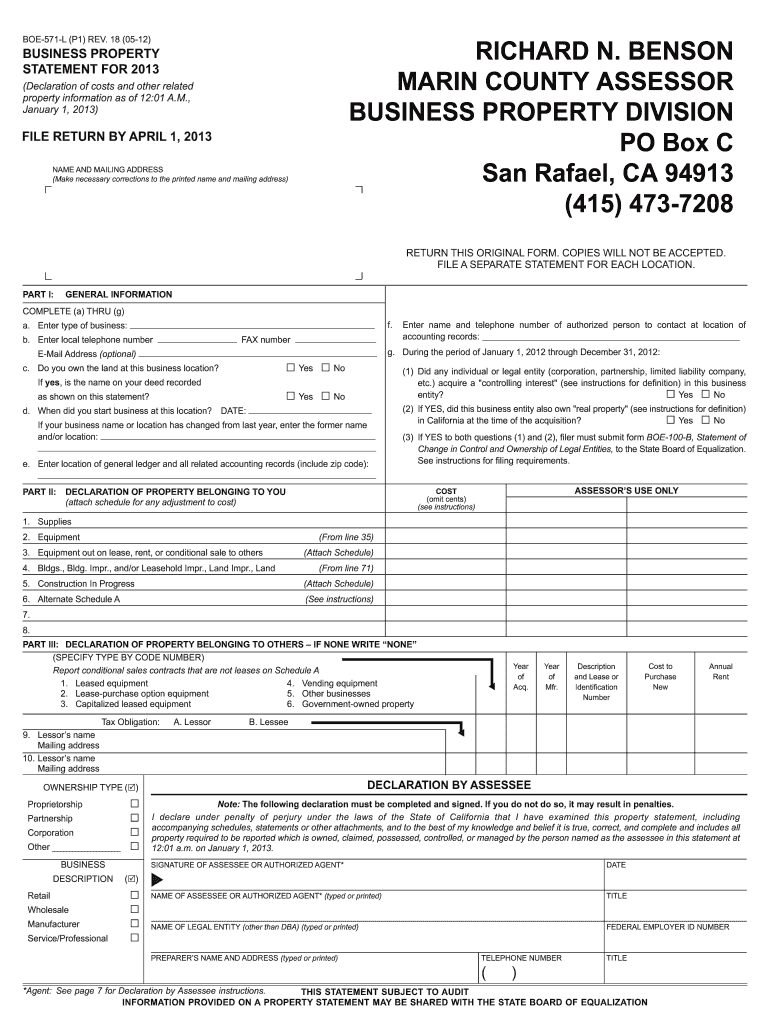
Form 571 L Marin County 2013


What is the Form 571 L Marin County
The Form 571 L Marin County is a property tax assessment form utilized by property owners to report the value of their personal property to the Marin County Assessor's Office. This form is essential for ensuring accurate property tax assessments and is typically required for businesses that own personal property, such as equipment, machinery, and furnishings. By submitting this form, property owners provide the necessary information for the county to determine the assessed value of their assets, which in turn affects the property taxes owed.
How to use the Form 571 L Marin County
Using the Form 571 L Marin County involves a straightforward process. Property owners must first obtain the form, which can be accessed online or through the Marin County Assessor's Office. After acquiring the form, the next step is to accurately fill it out, providing details about the personal property owned, including descriptions, purchase dates, and values. Once completed, the form must be submitted to the Assessor's Office by the specified deadline to ensure compliance with local regulations.
Steps to complete the Form 571 L Marin County
Completing the Form 571 L Marin County requires several key steps:
- Obtain the form from the Marin County Assessor's Office or their website.
- Gather necessary information about your personal property, including descriptions and values.
- Fill out the form accurately, ensuring all required fields are completed.
- Review the form for any errors or omissions before submission.
- Submit the completed form to the Assessor's Office by the deadline.
Legal use of the Form 571 L Marin County
The legal use of the Form 571 L Marin County is governed by state and local property tax laws. Properly completing and submitting this form is crucial for compliance, as it provides the necessary information for the county to assess property taxes accurately. Failure to submit the form or providing inaccurate information can result in penalties, including fines or increased assessments. Therefore, it is important for property owners to understand their responsibilities and ensure that the form is used correctly.
Key elements of the Form 571 L Marin County
Key elements of the Form 571 L Marin County include:
- Property owner information, including name and address.
- Detailed descriptions of personal property owned.
- Purchase dates and values of the property.
- Signature of the property owner or authorized representative.
- Submission date to ensure timely processing.
Required Documents
When submitting the Form 571 L Marin County, property owners may need to provide additional documentation to support the information reported. This may include:
- Invoices or receipts for purchased equipment and furnishings.
- Previous assessment notices for reference.
- Any relevant financial statements that detail property values.
Form Submission Methods (Online / Mail / In-Person)
The Form 571 L Marin County can be submitted through various methods to accommodate property owners' preferences. These methods include:
- Online submission via the Marin County Assessor's Office website.
- Mailing the completed form to the Assessor's Office address.
- In-person submission at the Assessor's Office during business hours.
Quick guide on how to complete form 571 l marin county 2013
Complete Form 571 L Marin County effortlessly on any device
Online document management has become widely embraced by organizations and individuals. It serves as an ideal eco-friendly substitute for traditional printed and signed documents, allowing you to locate the appropriate form and securely store it online. airSlate SignNow equips you with all the resources needed to create, modify, and electronically sign your documents swiftly and without interruptions. Manage Form 571 L Marin County on any device with the airSlate SignNow Android or iOS applications and simplify your document-related tasks today.
How to modify and eSign Form 571 L Marin County effortlessly
- Obtain Form 571 L Marin County and click on Get Form to begin.
- Leverage the tools we offer to fill out your document.
- Select relevant sections of your documents or redact sensitive information with tools that airSlate SignNow specifically provides for that purpose.
- Generate your eSignature using the Sign tool, which takes moments and carries the same legal validity as a conventional wet ink signature.
- Review all the details and click on the Done button to save your modifications.
- Select your preferred delivery method for your form, whether by email, text message (SMS), invitation link, or download it to your computer.
Forget about lost or misplaced files, tedious document searches, or errors that necessitate printing new copies. airSlate SignNow addresses your document management needs in just a few clicks from any device of your choosing. Edit and eSign Form 571 L Marin County and ensure effective communication at every step of the form preparation journey with airSlate SignNow.
Create this form in 5 minutes or less
Find and fill out the correct form 571 l marin county 2013
Create this form in 5 minutes!
How to create an eSignature for the form 571 l marin county 2013
How to generate an electronic signature for a PDF file in the online mode
How to generate an electronic signature for a PDF file in Chrome
The way to create an electronic signature for putting it on PDFs in Gmail
The way to generate an electronic signature right from your smartphone
How to make an eSignature for a PDF file on iOS devices
The way to generate an electronic signature for a PDF on Android
People also ask
-
What is Form 571 L Marin County and who needs it?
Form 571 L Marin County is a property tax form used by property owners to report their property's value to the Marin County Assessor's Office. It is essential for businesses and individuals who own taxable property in Marin County to ensure accurate assessments and tax calculations.
-
How can airSlate SignNow help with Form 571 L Marin County?
airSlate SignNow streamlines the process of completing and eSigning Form 571 L Marin County by providing a user-friendly platform for document management. Users can easily fill out, sign, and send the form electronically, saving time and reducing paperwork.
-
Is there a cost to using airSlate SignNow for Form 571 L Marin County?
Yes, airSlate SignNow offers various pricing plans to cater to different needs. The cost of using airSlate SignNow for Form 571 L Marin County depends on the selected plan, which includes features such as unlimited eSigning and document sharing.
-
What features does airSlate SignNow offer for completing Form 571 L Marin County?
airSlate SignNow provides features such as customizable templates, secure cloud storage, and real-time tracking for Form 571 L Marin County. These tools enhance the efficiency of the signing process and help ensure all forms are accurately filled out and submitted.
-
Can I integrate airSlate SignNow with other software for Form 571 L Marin County?
Absolutely! airSlate SignNow easily integrates with various software applications, enabling seamless workflows for completing Form 571 L Marin County. Popular integrations include Google Drive, Dropbox, and CRM systems, allowing for a streamlined document management experience.
-
What are the benefits of using airSlate SignNow for Form 571 L Marin County?
Using airSlate SignNow for Form 571 L Marin County offers numerous benefits, including enhanced efficiency, ease of use, and cost savings. The platform eliminates the need for paper documents and in-person signatures, making the process faster and more environmentally friendly.
-
Is airSlate SignNow secure for handling Form 571 L Marin County?
Yes, airSlate SignNow prioritizes security, ensuring that all documents, including Form 571 L Marin County, are protected with advanced encryption and secure cloud storage. Users can trust that their sensitive information is safe during the signing process.
Get more for Form 571 L Marin County
Find out other Form 571 L Marin County
- How To Integrate Sign in Banking
- How To Use Sign in Banking
- Help Me With Use Sign in Banking
- Can I Use Sign in Banking
- How Do I Install Sign in Banking
- How To Add Sign in Banking
- How Do I Add Sign in Banking
- How Can I Add Sign in Banking
- Can I Add Sign in Banking
- Help Me With Set Up Sign in Government
- How To Integrate eSign in Banking
- How To Use eSign in Banking
- How To Install eSign in Banking
- How To Add eSign in Banking
- How To Set Up eSign in Banking
- How To Save eSign in Banking
- How To Implement eSign in Banking
- How To Set Up eSign in Construction
- How To Integrate eSign in Doctors
- How To Use eSign in Doctors