Oral Observation 2002-2026


What is the Oral Observation
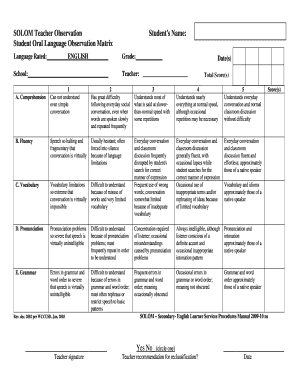
The oral observation is a structured assessment tool used primarily in educational settings to evaluate a student's language skills through direct interaction. This method allows educators to observe and assess a student's oral communication abilities, including vocabulary usage, sentence structure, and overall fluency. The oral observation can be particularly beneficial for identifying areas where a student may need additional support or enhancement in their language development.
How to Use the Oral Observation
To effectively use the oral observation, educators should create a comfortable environment that encourages students to express themselves freely. The process typically involves setting specific criteria for assessment, such as clarity of speech, coherence in responses, and engagement during the conversation. Educators can take notes or record the session to ensure accurate evaluation. It is essential to provide constructive feedback to students after the observation, highlighting strengths and areas for improvement.
Steps to Complete the Oral Observation
Completing an oral observation involves several key steps:
- Preparation: Define the objectives and criteria for the assessment.
- Environment: Create a welcoming space for the student to feel at ease.
- Observation: Engage the student in conversation, asking open-ended questions that prompt detailed responses.
- Documentation: Record observations accurately, noting specific examples of language use.
- Feedback: Provide the student with insights on their performance, focusing on both strengths and areas for growth.
Legal Use of the Oral Observation
The oral observation must be conducted in compliance with educational standards and regulations. It is important to ensure that the assessment process respects the privacy and rights of the student. Educators should obtain consent from guardians when necessary, especially when recording sessions. Additionally, maintaining confidentiality of the results is crucial to protect the student’s personal information and educational records.
Key Elements of the Oral Observation
Several key elements contribute to the effectiveness of an oral observation:
- Clear Objectives: Establish what specific skills or competencies are being assessed.
- Structured Format: Use a consistent approach to ensure fairness and reliability in assessment.
- Engagement Techniques: Employ strategies that encourage student participation and comfort.
- Follow-Up: Implement strategies for ongoing support based on the assessment results.
Examples of Using the Oral Observation
Examples of effective oral observation can include scenarios such as:
- Assessing a student’s ability to describe a favorite book in detail.
- Evaluating a student's participation in a group discussion on a specific topic.
- Observing a student's storytelling skills during a creative writing exercise.
These examples illustrate how oral observations can be tailored to different contexts and objectives, providing valuable insights into a student's language abilities.
Quick guide on how to complete oral observation
Manage Oral Observation seamlessly on any device
Digital document administration has become increasingly popular among businesses and individuals. It offers an ideal eco-friendly alternative to traditional printed and signed documents, allowing you to access the right form and securely store it online. airSlate SignNow equips you with all the necessary tools to create, modify, and electronically sign your documents quickly and effortlessly. Handle Oral Observation on any platform using airSlate SignNow's Android or iOS applications and enhance any document-related process today.
The simplest way to modify and electronically sign Oral Observation with ease
- Obtain Oral Observation and click on Get Form to initiate the process.
- Make use of the tools we offer to complete your document.
- Emphasize important parts of the documents or redact sensitive information using tools specifically provided by airSlate SignNow for that purpose.
- Generate your eSignature with the Sign feature, which takes mere seconds and holds the same legal validity as a conventional wet ink signature.
- Review the details and click on the Done button to save your modifications.
- Choose how you want to send your form, via email, SMS, or an invite link, or download it to your computer.
Eliminate concerns about lost or misplaced documents, tedious form searching, or mistakes that require reprinting new document copies. airSlate SignNow addresses all your document management needs in just a few clicks from any device you prefer. Revise and electronically sign Oral Observation to ensure outstanding communication at every phase of the document preparation process with airSlate SignNow.
Create this form in 5 minutes or less
Create this form in 5 minutes!
How to create an eSignature for the oral observation
How to make an electronic signature for a PDF online
How to make an electronic signature for a PDF in Google Chrome
The best way to create an eSignature for signing PDFs in Gmail
The best way to make an electronic signature from your smartphone
The best way to generate an eSignature for a PDF on iOS
The best way to make an electronic signature for a PDF file on Android
People also ask
-
What is Oral Observation and how does it relate to airSlate SignNow?
Oral Observation refers to the method of assessing a person's spoken communication skills. In the context of airSlate SignNow, it can be used to facilitate the documentation and signing of assessments related to Oral Observation, ensuring that all necessary forms are easily accessible and securely signed.
-
How can airSlate SignNow enhance my Oral Observation assessments?
airSlate SignNow streamlines the process of creating, sending, and signing documents required for Oral Observation assessments. With its user-friendly interface, you can quickly generate forms, gather feedback, and ensure that all stakeholders can eSign the necessary documents with ease.
-
What are the pricing options for airSlate SignNow’s features related to Oral Observation?
airSlate SignNow offers various pricing plans that cater to different business needs, including features specifically useful for Oral Observation. You can choose from monthly or annual subscriptions, with pricing tiers that offer access to advanced features for managing and signing documents related to oral assessments.
-
Is it easy to integrate airSlate SignNow with other tools for Oral Observation documentation?
Yes, airSlate SignNow seamlessly integrates with numerous third-party applications, making it easy to incorporate into your existing workflow for Oral Observation documentation. Whether you use CRM systems, project management tools, or education platforms, you can easily sync your data and improve efficiency.
-
What benefits does airSlate SignNow offer for managing Oral Observation forms?
Using airSlate SignNow for your Oral Observation forms provides numerous benefits, including enhanced security, ease of access, and time-saving features. You can track document status in real-time, ensuring that all required signatures are collected promptly and securely.
-
Can I customize my Oral Observation forms with airSlate SignNow?
Absolutely! airSlate SignNow allows you to fully customize your Oral Observation forms to meet your specific requirements. You can add fields, branding, and other elements to create a professional-looking document tailored to your needs.
-
How secure is airSlate SignNow for handling Oral Observation documents?
airSlate SignNow prioritizes security with features like encryption, secure cloud storage, and compliance with industry standards. This ensures that all Oral Observation documents are protected, giving you peace of mind when handling sensitive information.
Get more for Oral Observation
- Fully completed and signed applications must be submitted electronically to cemenova form
- Professors in the united states wikipedia form
- Clla staff scholarship form texas aampampm university
- Intake form supporting student gender identity mcps form 560 80
- College of nursing undergraduate petition guidelines ucf form
- Proof of signature form
- Studentspouse non filing statement form
- Membership intakerecruitment packet checklist university of form
Find out other Oral Observation
- Help Me With Sign Kansas Car Dealer POA
- How Do I Sign Massachusetts Car Dealer Warranty Deed
- How To Sign Nebraska Car Dealer Resignation Letter
- How Can I Sign New Jersey Car Dealer Arbitration Agreement
- How Can I Sign Ohio Car Dealer Cease And Desist Letter
- How To Sign Ohio Car Dealer Arbitration Agreement
- How To Sign Oregon Car Dealer Limited Power Of Attorney
- How To Sign Pennsylvania Car Dealer Quitclaim Deed
- How Can I Sign Pennsylvania Car Dealer Quitclaim Deed
- Sign Rhode Island Car Dealer Agreement Safe
- Sign South Dakota Car Dealer Limited Power Of Attorney Now
- Sign Wisconsin Car Dealer Quitclaim Deed Myself
- Sign Wisconsin Car Dealer Quitclaim Deed Free
- Sign Virginia Car Dealer POA Safe
- Sign Wisconsin Car Dealer Quitclaim Deed Fast
- How To Sign Wisconsin Car Dealer Rental Lease Agreement
- How To Sign Wisconsin Car Dealer Quitclaim Deed
- How Do I Sign Wisconsin Car Dealer Quitclaim Deed
- Sign Wyoming Car Dealer Purchase Order Template Mobile
- Sign Arizona Charity Business Plan Template Easy