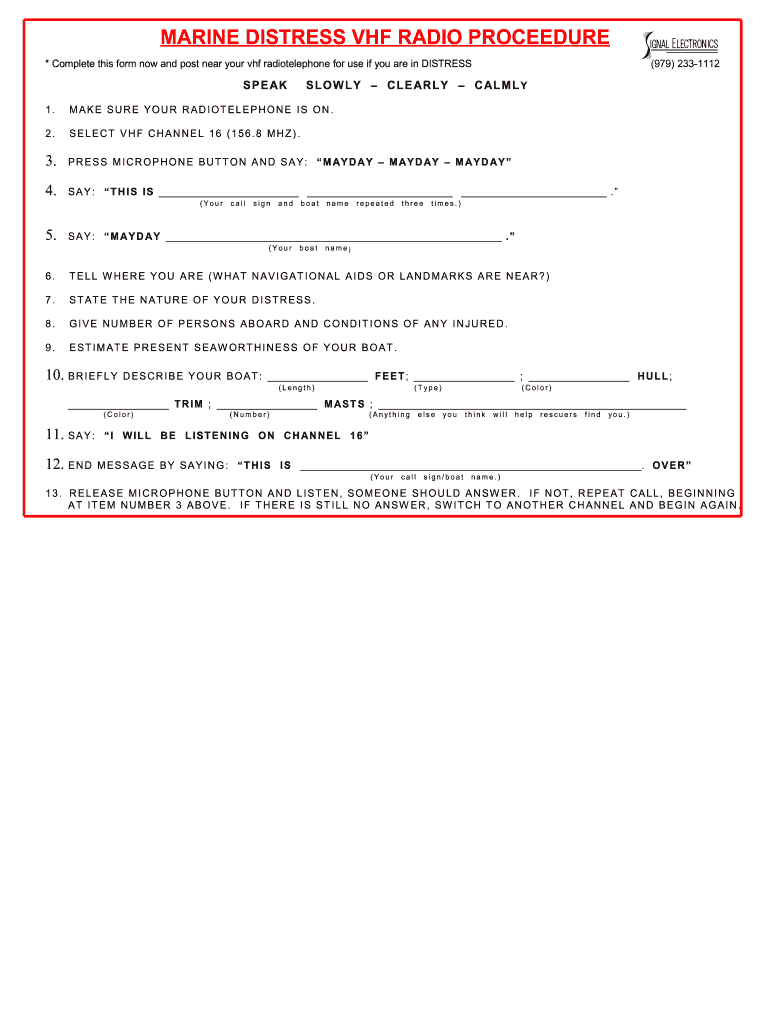
Marine Emergency Distress Form


What is the Marine Emergency Distress Form
The Marine Emergency Distress Form is a crucial document used by mariners to report emergencies at sea. This form is designed to communicate critical information regarding the nature of the distress, the location of the vessel, and the number of people on board. It serves as an essential tool for ensuring timely assistance from rescue services and other vessels in the vicinity. The form typically includes sections for detailing the type of emergency, such as mechanical failure, medical emergencies, or severe weather conditions.
How to use the Marine Emergency Distress Form
Using the Marine Emergency Distress Form involves several key steps. First, ensure that you have the form readily accessible, either in a physical format or digitally on your device. In the event of an emergency, fill out the form with accurate and concise information. Include your vessel's name, current position (latitude and longitude), and the nature of the distress. Once completed, communicate the information through your VHF marine radio or other communication devices to alert nearby vessels and emergency services.
Key elements of the Marine Emergency Distress Form
The Marine Emergency Distress Form contains several key elements that are vital for effective communication during emergencies. These include:
- Vessel Information: Name, registration number, and type of vessel.
- Location: Current position using latitude and longitude coordinates.
- Nature of Distress: A clear description of the emergency situation.
- Number of Persons Onboard: Total count of individuals on the vessel.
- Contact Information: Details for follow-up communication if necessary.
Steps to complete the Marine Emergency Distress Form
Completing the Marine Emergency Distress Form requires careful attention to detail. Follow these steps:
- Gather necessary information about your vessel and the situation.
- Open the Marine Emergency Distress Form on your device or use a printed copy.
- Fill in the vessel information, including name and registration.
- Provide your exact location using latitude and longitude.
- Clearly describe the nature of the distress.
- Indicate the number of persons onboard.
- Review the form for accuracy before submission.
Legal use of the Marine Emergency Distress Form
The Marine Emergency Distress Form is legally recognized as a means of reporting emergencies at sea. Proper use of this form can facilitate a swift response from rescue services. It is important to ensure that the information provided is truthful and accurate, as false reporting can lead to legal consequences. Familiarizing yourself with local maritime laws and regulations regarding emergency reporting can enhance compliance and ensure effective communication during distress situations.
Examples of using the Marine Emergency Distress Form
Real-world scenarios illustrate the importance of the Marine Emergency Distress Form. For instance, a vessel experiencing engine failure in rough seas can use the form to communicate their situation to nearby boats, allowing for a coordinated rescue effort. Another example is a medical emergency onboard, where the form can provide vital information to emergency services about the nature of the medical issue, enabling them to prepare for immediate assistance upon arrival. These examples highlight the form's role in facilitating effective maritime safety practices.
Quick guide on how to complete marine emergency distress form
Prepare Marine Emergency Distress Form seamlessly on any device
Web-based document management has become increasingly popular among organizations and individuals. It offers an excellent eco-friendly substitute to traditional printed and signed documents, as you can obtain the necessary form and securely save it online. airSlate SignNow provides all the resources needed to create, modify, and eSign your documents swiftly without delays. Manage Marine Emergency Distress Form on any platform using airSlate SignNow Android or iOS applications and enhance any document-related task today.
The easiest way to modify and eSign Marine Emergency Distress Form effortlessly
- Obtain Marine Emergency Distress Form and click Get Form to initiate.
- Utilize the tools we offer to finalize your form.
- Emphasize pertinent sections of your documents or obscure sensitive information using tools specifically designed for that purpose by airSlate SignNow.
- Create your eSignature with the Sign tool, which only takes seconds and has the same legal validity as a conventional wet ink signature.
- Review all the details and click on the Done button to save your changes.
- Choose how you wish to send your form, whether by email, SMS, or invitation link, or download it to your computer.
Eliminate concerns over lost or misplaced files, tedious form navigation, or mistakes that necessitate printing new document copies. airSlate SignNow caters to your needs in document management in just a few clicks from any device you prefer. Modify and eSign Marine Emergency Distress Form while ensuring effective communication throughout your form preparation process with airSlate SignNow.
Create this form in 5 minutes or less
Create this form in 5 minutes!
How to create an eSignature for the marine emergency distress form
The best way to make an electronic signature for a PDF file online
The best way to make an electronic signature for a PDF file in Google Chrome
The best way to create an electronic signature for signing PDFs in Gmail
How to create an electronic signature from your mobile device
How to generate an eSignature for a PDF file on iOS
How to create an electronic signature for a PDF file on Android devices
People also ask
-
What is a Marine Emergency Distress Form and why is it important?
A Marine Emergency Distress Form is a critical document used in maritime operations to report emergencies effectively. It ensures that all necessary information is conveyed quickly to the appropriate authorities, which can be vital for the safety of those at sea. Utilizing a streamlined Marine Emergency Distress Form can enhance response times and save lives in emergency situations.
-
How can airSlate SignNow help me with the Marine Emergency Distress Form?
airSlate SignNow offers an easy-to-use platform that allows you to create, send, and eSign your Marine Emergency Distress Form efficiently. With our solution, you can customize the form to meet your specific needs, ensuring that all relevant details are captured. The platform's user-friendly interface makes it simple to manage and track your forms, facilitating prompt action when emergencies arise.
-
Is there a cost associated with using the Marine Emergency Distress Form on airSlate SignNow?
Yes, airSlate SignNow offers various pricing plans to accommodate different business needs while using the Marine Emergency Distress Form. Our plans are designed to be cost-effective and include features that ensure you can manage your forms without breaking the bank. You can choose a plan that fits your requirements and budget.
-
What features does airSlate SignNow provide for the Marine Emergency Distress Form?
AirSlate SignNow provides several features for the Marine Emergency Distress Form, including customizable templates, eSigning capabilities, and real-time tracking. These features ensure that you can quickly fill out and send your forms while maintaining compliance and security. Additionally, our platform supports team collaboration, allowing multiple users to work on the form simultaneously.
-
Can I integrate the Marine Emergency Distress Form with other software?
Absolutely! airSlate SignNow allows you to integrate the Marine Emergency Distress Form with various software applications, enhancing workflow efficiency. Our platform supports integration with popular tools such as Google Drive, Dropbox, and various CRM systems, making it easier to manage your documents and streamline your processes.
-
How secure is the Marine Emergency Distress Form when using airSlate SignNow?
Security is a top priority at airSlate SignNow, especially for sensitive documents like the Marine Emergency Distress Form. We employ advanced encryption protocols and security measures to ensure that your data is protected at all times. You can trust that your forms and information are safe from unauthorized access.
-
How can I customize my Marine Emergency Distress Form in airSlate SignNow?
Customizing your Marine Emergency Distress Form in airSlate SignNow is simple and user-friendly. You can easily add fields, change the layout, and include your branding elements to make the form uniquely yours. This flexibility allows you to tailor the form to meet specific requirements and ensure that it captures all necessary information effectively.
Get more for Marine Emergency Distress Form
Find out other Marine Emergency Distress Form
- Sign Rhode Island Finance & Tax Accounting Cease And Desist Letter Computer
- Sign Vermont Finance & Tax Accounting RFP Later
- Can I Sign Wyoming Finance & Tax Accounting Cease And Desist Letter
- Sign California Government Job Offer Now
- How Do I Sign Colorado Government Cease And Desist Letter
- How To Sign Connecticut Government LLC Operating Agreement
- How Can I Sign Delaware Government Residential Lease Agreement
- Sign Florida Government Cease And Desist Letter Online
- Sign Georgia Government Separation Agreement Simple
- Sign Kansas Government LLC Operating Agreement Secure
- How Can I Sign Indiana Government POA
- Sign Maryland Government Quitclaim Deed Safe
- Sign Louisiana Government Warranty Deed Easy
- Sign Government Presentation Massachusetts Secure
- How Can I Sign Louisiana Government Quitclaim Deed
- Help Me With Sign Michigan Government LLC Operating Agreement
- How Do I Sign Minnesota Government Quitclaim Deed
- Sign Minnesota Government Affidavit Of Heirship Simple
- Sign Missouri Government Promissory Note Template Fast
- Can I Sign Missouri Government Promissory Note Template