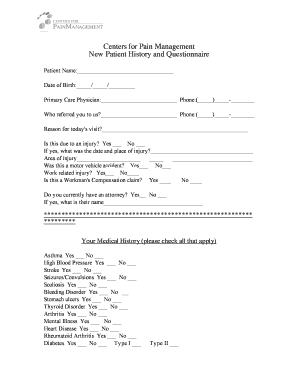
Centers for Pain Management New Patient History and Form


What is the Centers For Pain Management New Patient History And
The Centers For Pain Management New Patient History And form is a crucial document that collects essential information from patients seeking treatment for pain management. This form typically includes sections for personal details, medical history, current medications, and pain-related conditions. Completing this form accurately is vital for healthcare providers to assess each patient's unique situation and develop an effective treatment plan tailored to their needs.
How to use the Centers For Pain Management New Patient History And
Using the Centers For Pain Management New Patient History And form involves several straightforward steps. First, gather all necessary personal and medical information, including your identification, insurance details, and a list of medications. Next, access the form through your healthcare provider's website or request a paper copy. Carefully fill out each section, ensuring that all information is accurate and complete. Once finished, review the form for any errors before submitting it electronically or in person, as directed by your healthcare provider.
Steps to complete the Centers For Pain Management New Patient History And
Completing the Centers For Pain Management New Patient History And form can be done efficiently by following these steps:
- Gather your personal information, including your full name, address, and contact details.
- Compile your medical history, noting any previous surgeries, chronic conditions, or ongoing treatments.
- List all current medications, including dosages and frequency.
- Answer questions related to your pain symptoms, including duration, intensity, and any factors that alleviate or worsen the pain.
- Review the completed form for accuracy and completeness.
- Submit the form according to your provider's instructions, either digitally or in person.
Legal use of the Centers For Pain Management New Patient History And
The legal use of the Centers For Pain Management New Patient History And form is governed by various regulations to ensure patient confidentiality and data protection. When completed electronically, the form must comply with the Electronic Signatures in Global and National Commerce (ESIGN) Act and the Uniform Electronic Transactions Act (UETA). These laws validate electronic signatures and ensure that digital submissions are legally binding. Healthcare providers must also adhere to the Health Insurance Portability and Accountability Act (HIPAA) to protect patient information throughout the process.
Key elements of the Centers For Pain Management New Patient History And
Key elements of the Centers For Pain Management New Patient History And form include:
- Personal Information: Name, date of birth, contact information, and insurance details.
- Medical History: Previous medical conditions, surgeries, and family medical history.
- Current Medications: A comprehensive list of medications and dosages.
- Pain Assessment: Details regarding pain location, intensity, duration, and triggers.
- Allergies: Any known allergies to medications or other substances.
Form Submission Methods
The Centers For Pain Management New Patient History And form can typically be submitted through various methods, depending on the healthcare provider's preferences. Common submission methods include:
- Online Submission: Many providers offer a secure online portal where patients can fill out and submit the form digitally.
- Email: Patients may have the option to complete the form and send it via email to their healthcare provider.
- In-Person Submission: Patients can also print the form, complete it manually, and bring it to their appointment.
Quick guide on how to complete centers for pain management new patient history and
Prepare Centers For Pain Management New Patient History And effortlessly on any device
Web-based document management has become favored by businesses and individuals alike. It offers an excellent eco-friendly substitute for traditional printed and signed documents, allowing you to access the correct form and securely keep it online. airSlate SignNow supplies you with all the tools you require to create, edit, and eSign your files swiftly without unnecessary delays. Manage Centers For Pain Management New Patient History And on any device with airSlate SignNow Android or iOS applications and simplify any document-related task today.
The easiest way to edit and eSign Centers For Pain Management New Patient History And without hassle
- Locate Centers For Pain Management New Patient History And and click Get Form to begin.
- Utilize the tools we provide to fill out your form.
- Select pertinent sections of your documents or obscure sensitive details with features that airSlate SignNow offers specifically for that purpose.
- Generate your eSignature using the Sign tool, which takes mere seconds and carries the same legal validity as a conventional wet ink signature.
- Review all the information and click the Done button to save your modifications.
- Decide how you want to share your form, whether by email, text message (SMS), or invitation link, or download it to your computer.
No more lost or misplaced documents, tedious form searching, or mistakes that necessitate printing new document copies. airSlate SignNow meets your document management needs in just a few clicks from a device of your choice. Edit and eSign Centers For Pain Management New Patient History And and ensure exceptional communication at any stage of the form preparation process with airSlate SignNow.
Create this form in 5 minutes or less
Create this form in 5 minutes!
How to create an eSignature for the centers for pain management new patient history and
The best way to generate an electronic signature for a PDF online
The best way to generate an electronic signature for a PDF in Google Chrome
The way to create an eSignature for signing PDFs in Gmail
The way to make an eSignature straight from your smartphone
The way to make an eSignature for a PDF on iOS
The way to make an eSignature for a PDF document on Android
People also ask
-
What is the process for filling out the Centers For Pain Management New Patient History And forms?
The process for filling out the Centers For Pain Management New Patient History And forms is simple and user-friendly with airSlate SignNow. You can easily access the forms online, complete them at your convenience, and securely eSign them. Our platform ensures that all patient information is handled with the utmost confidentiality and security.
-
Are there any costs associated with using airSlate SignNow for Centers For Pain Management New Patient History And forms?
Using airSlate SignNow for Centers For Pain Management New Patient History And forms is a cost-effective solution. We offer various pricing plans to fit the needs of different clinics and practices, ensuring you only pay for what you need. Additionally, the savings on paper and printing costs make it an economical choice for managing patient documentation.
-
What features does airSlate SignNow offer for Centers For Pain Management New Patient History And?
airSlate SignNow offers a range of features tailored for Centers For Pain Management New Patient History And, including customizable templates, easy eSigning, and secure data storage. You can also track the status of your documents and get notifications when forms are completed, streamlining your patient intake process.
-
How does airSlate SignNow protect patient information in Centers For Pain Management New Patient History And?
Patient information is a top priority for airSlate SignNow. Our platform employs advanced security measures, including encryption and secure cloud storage, to protect all data related to Centers For Pain Management New Patient History And. We also comply with HIPAA regulations to ensure that patient privacy is maintained.
-
Can airSlate SignNow integrate with other systems used in Centers For Pain Management?
Yes, airSlate SignNow can integrate seamlessly with various healthcare systems and electronic health records (EHR) platforms commonly used in Centers For Pain Management. This integration allows for a more streamlined workflow, ensuring that patient history and documentation are easily accessible and managed within your existing systems.
-
What benefits does airSlate SignNow provide for managing Centers For Pain Management New Patient History And?
airSlate SignNow provides numerous benefits for managing Centers For Pain Management New Patient History And, including increased efficiency and reduced administrative workload. By digitizing your patient intake process, you can minimize paperwork, speed up the onboarding of new patients, and enhance overall patient satisfaction.
-
How user-friendly is the airSlate SignNow platform for Centers For Pain Management staff?
The airSlate SignNow platform is designed to be highly user-friendly, making it easy for staff at Centers For Pain Management to navigate. With intuitive interfaces and straightforward tools, even those with minimal technical expertise can effectively manage New Patient History And forms, ensuring a smooth experience for both staff and patients.
Get more for Centers For Pain Management New Patient History And
- Co business form
- Colorado property management package colorado form
- New resident guide colorado form
- Satisfaction release or cancellation of deed of trust by corporation colorado form
- Colorado trust 497300747 form
- Partial release of property from deed of trust for corporation colorado form
- Colorado release deed trust form
- Colorado tenancy joint form
Find out other Centers For Pain Management New Patient History And
- How To Sign Ohio Government Form
- Help Me With Sign Washington Government Presentation
- How To Sign Maine Healthcare / Medical PPT
- How Do I Sign Nebraska Healthcare / Medical Word
- How Do I Sign Washington Healthcare / Medical Word
- How Can I Sign Indiana High Tech PDF
- How To Sign Oregon High Tech Document
- How Do I Sign California Insurance PDF
- Help Me With Sign Wyoming High Tech Presentation
- How Do I Sign Florida Insurance PPT
- How To Sign Indiana Insurance Document
- Can I Sign Illinois Lawers Form
- How To Sign Indiana Lawers Document
- How To Sign Michigan Lawers Document
- How To Sign New Jersey Lawers PPT
- How Do I Sign Arkansas Legal Document
- How Can I Sign Connecticut Legal Document
- How Can I Sign Indiana Legal Form
- Can I Sign Iowa Legal Document
- How Can I Sign Nebraska Legal Document