North Carolina Department of Transportation Citizen Incident Statement 2005-2026


Understanding the North Carolina Department of Transportation Citizen Incident Statement
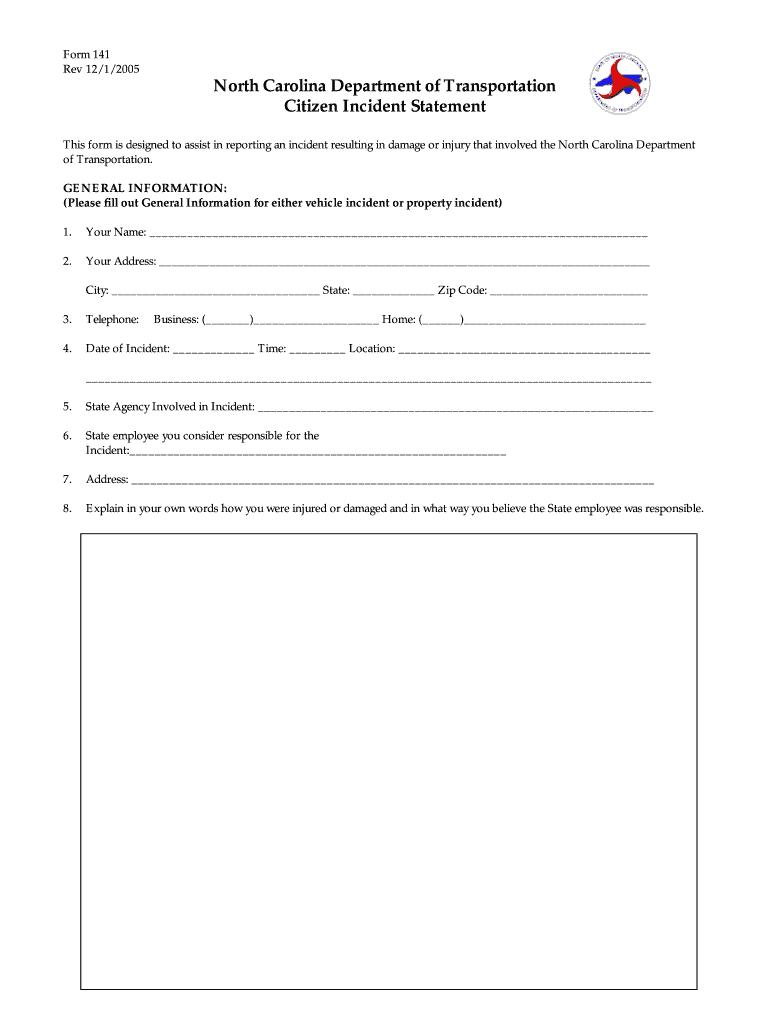
The North Carolina Department of Transportation Citizen Incident Statement, commonly referred to as the nc dot 141, is a crucial document used to report incidents involving transportation in the state. This form is essential for documenting accidents, damages, or any other transportation-related events that require official recognition. Completing this form accurately ensures that all relevant details are recorded, which can be vital for legal and insurance purposes. The nc dot 141 serves as a formal statement that can be used in various legal contexts, making its proper completion important for all parties involved.
Steps to Complete the North Carolina Department of Transportation Citizen Incident Statement
Filling out the nc dot 141 requires careful attention to detail. Follow these steps to ensure accuracy:
- Begin by providing your personal information, including your name, address, and contact details.
- Document the specifics of the incident, including the date, time, and location where it occurred.
- Include a detailed description of the incident, noting any vehicles involved and the circumstances surrounding the event.
- Attach any relevant evidence, such as photographs or witness statements, to support your report.
- Review the completed form for accuracy before signing and dating it to affirm its validity.
Legal Use of the North Carolina Department of Transportation Citizen Incident Statement
The nc dot 141 is legally binding when completed correctly, serving as an official record of the incident. This document can be used in legal proceedings, insurance claims, and for personal records. To ensure its legal standing, it must comply with relevant regulations, including the ESIGN Act and UETA, which govern electronic signatures. Using a compliant eSignature solution, such as signNow, can enhance the document's validity and streamline the signing process.
Obtaining the North Carolina Department of Transportation Citizen Incident Statement
The nc dot 141 can be obtained through various channels. It is typically available on the North Carolina Department of Transportation's official website, where users can download the form directly. Additionally, physical copies may be accessible at local DOT offices or through law enforcement agencies. For those preferring a digital approach, utilizing an eSignature platform can facilitate the completion and submission of the form online, ensuring compliance with all legal requirements.
Key Elements of the North Carolina Department of Transportation Citizen Incident Statement
When completing the nc dot 141, certain key elements must be included to ensure its effectiveness:
- Personal Information: Full name, address, and contact information of the individual filing the report.
- Incident Details: Date, time, and specific location of the incident.
- Description: A clear and concise account of what transpired during the incident.
- Witness Information: Names and contact details of any witnesses present during the incident.
- Signature: The form must be signed and dated by the individual completing it to validate the information provided.
State-Specific Rules for the North Carolina Department of Transportation Citizen Incident Statement
Each state has its own regulations regarding incident reporting. In North Carolina, it is essential to follow specific guidelines when completing the nc dot 141. These include ensuring that all information is accurate and truthful, as providing false information can lead to legal repercussions. Additionally, timely submission of the form is crucial, especially in cases involving insurance claims or legal actions. Familiarizing oneself with state-specific rules can help avoid complications and ensure compliance with local laws.
Quick guide on how to complete north carolina department of transportation citizen incident statement form
Simplify your existence by filling out the North Carolina Department Of Transportation Citizen Incident Statement form with airSlate SignNow
Whether you need to register a new vehicle, apply for a driver's license, transfer ownership, or carry out any other task related to motor vehicles, dealing with such RMV forms as North Carolina Department Of Transportation Citizen Incident Statement is an unavoidable necessity.
You have several options to access them: via mail, at the RMV service center, or by downloading them online from your local RMV website and printing them. All of these methods consume a lot of time. If you're searching for a quicker way to complete and sign them with a legally-recognized eSignature, airSlate SignNow is your ideal solution.
How to complete North Carolina Department Of Transportation Citizen Incident Statement efficiently
- Click Show details to view a brief summary of the document that interests you.
- Select Get document to begin and open the form.
- Pay attention to the green tag indicating mandatory fields if applicable.
- Utilize the top toolbar and employ our advanced feature set to modify, annotate, and enhance your form.
- Add text, your initials, shapes, images, and other elements.
- Click Sign in in the same toolbar to create a legally-recognized eSignature.
- Review the form text to ensure it’s free from mistakes and inconsistencies.
- Press Done to complete the form submission.
Using our platform to fill out your North Carolina Department Of Transportation Citizen Incident Statement and other related forms will save you signNow time and frustration. Simplify your RMV document processing right from the beginning!
Create this form in 5 minutes or less
FAQs
-
What is the total number of federal applications, documents, or forms from all the departments of government that US citizens are required by law to fill out?
I am not an American. But it would depend on the person's circumstances. How much do they earn? If you earn little then you don't need to file a tax return. How do they earn it? Self employed or employed?Do they travel? You need a passport.How long do they live? - if they die after birth then it is very little. Do they live in the USA?What entitlements do they have?Do they have dialysis? This is federally funded.Are they on medicaid/medicare?.Are they in jail or been charged with a crime?Then how do you count it? Do you count forms filled in by the parents?Then there is the census the Constitution which held every ten years.
Create this form in 5 minutes!
How to create an eSignature for the north carolina department of transportation citizen incident statement form
How to make an electronic signature for your North Carolina Department Of Transportation Citizen Incident Statement Form online
How to generate an eSignature for your North Carolina Department Of Transportation Citizen Incident Statement Form in Chrome
How to generate an eSignature for signing the North Carolina Department Of Transportation Citizen Incident Statement Form in Gmail
How to create an electronic signature for the North Carolina Department Of Transportation Citizen Incident Statement Form from your smartphone
How to generate an eSignature for the North Carolina Department Of Transportation Citizen Incident Statement Form on iOS devices
How to make an electronic signature for the North Carolina Department Of Transportation Citizen Incident Statement Form on Android devices
People also ask
-
What is the North Carolina Department Of Transportation Citizen Incident Statement?
The North Carolina Department Of Transportation Citizen Incident Statement is a formal document that allows citizens to report incidents related to transportation within the state. It helps ensure that issues are addressed promptly and can be used for accountability and record-keeping. Utilizing airSlate SignNow can simplify the process of completing and submitting this statement electronically.
-
How can airSlate SignNow assist with the North Carolina Department Of Transportation Citizen Incident Statement?
airSlate SignNow streamlines the process of filling out the North Carolina Department Of Transportation Citizen Incident Statement by allowing users to fill, sign, and send documents quickly and securely. Our platform provides an intuitive interface that makes it easy for users to complete their statements without any hassle.
-
Is airSlate SignNow affordable for submitting the North Carolina Department Of Transportation Citizen Incident Statement?
Yes, airSlate SignNow offers cost-effective pricing plans that are suitable for individuals and businesses alike. Our pricing structure is designed to ensure that you can efficiently manage and submit the North Carolina Department Of Transportation Citizen Incident Statement without incurring excessive costs.
-
What features does airSlate SignNow offer for the North Carolina Department Of Transportation Citizen Incident Statement?
airSlate SignNow provides features such as electronic signatures, document templates, and cloud storage to facilitate the completion of the North Carolina Department Of Transportation Citizen Incident Statement. Additionally, users can track the status of their documents in real-time, ensuring a smooth submission process.
-
Can I integrate airSlate SignNow with other platforms for the North Carolina Department Of Transportation Citizen Incident Statement?
Absolutely! airSlate SignNow offers integration capabilities with various platforms, such as Google Drive, Dropbox, and CRM systems. This allows users to seamlessly manage their documents, including the North Carolina Department Of Transportation Citizen Incident Statement, from multiple applications.
-
How secure is airSlate SignNow when handling the North Carolina Department Of Transportation Citizen Incident Statement?
Security is a top priority at airSlate SignNow. We implement robust encryption and compliance measures to protect your data while you complete and submit the North Carolina Department Of Transportation Citizen Incident Statement. Our platform adheres to industry standards to ensure your information remains safe.
-
What are the benefits of using airSlate SignNow for the North Carolina Department Of Transportation Citizen Incident Statement?
Using airSlate SignNow for the North Carolina Department Of Transportation Citizen Incident Statement provides numerous benefits, including increased efficiency, reduced paperwork, and enhanced accuracy. With our electronic signing capabilities, you can complete and submit statements quickly, saving time and effort.
Get more for North Carolina Department Of Transportation Citizen Incident Statement
- Rev 12017 ksjc 1 kansas judicial council kansasjudicialcouncil form
- Rtf kansas judicial council kansasjudicialcouncil form
- In the judicial district district court of kansasjudicialcouncil form
- Lifeboat foundation whats new kansasjudicialcouncil form
- Name of perso kansas judicial council kansasjudicialcouncil form
- Name kansas judicial council kansasjudicialcouncil 6969246 form
- Small claims forms kansas
Find out other North Carolina Department Of Transportation Citizen Incident Statement
- How To eSign Hawaii Acknowledgement of Resignation
- How Can I eSign New Jersey Resignation Letter
- How Do I eSign Ohio Resignation Letter
- eSign Arkansas Military Leave Policy Myself
- How To eSign Hawaii Time Off Policy
- How Do I eSign Hawaii Time Off Policy
- Help Me With eSign Hawaii Time Off Policy
- How To eSign Hawaii Addressing Harassement
- How To eSign Arkansas Company Bonus Letter
- eSign Hawaii Promotion Announcement Secure
- eSign Alaska Worksheet Strengths and Weaknesses Myself
- How To eSign Rhode Island Overtime Authorization Form
- eSign Florida Payroll Deduction Authorization Safe
- eSign Delaware Termination of Employment Worksheet Safe
- Can I eSign New Jersey Job Description Form
- Can I eSign Hawaii Reference Checking Form
- Help Me With eSign Hawaii Acknowledgement Letter
- eSign Rhode Island Deed of Indemnity Template Secure
- eSign Illinois Car Lease Agreement Template Fast
- eSign Delaware Retainer Agreement Template Later