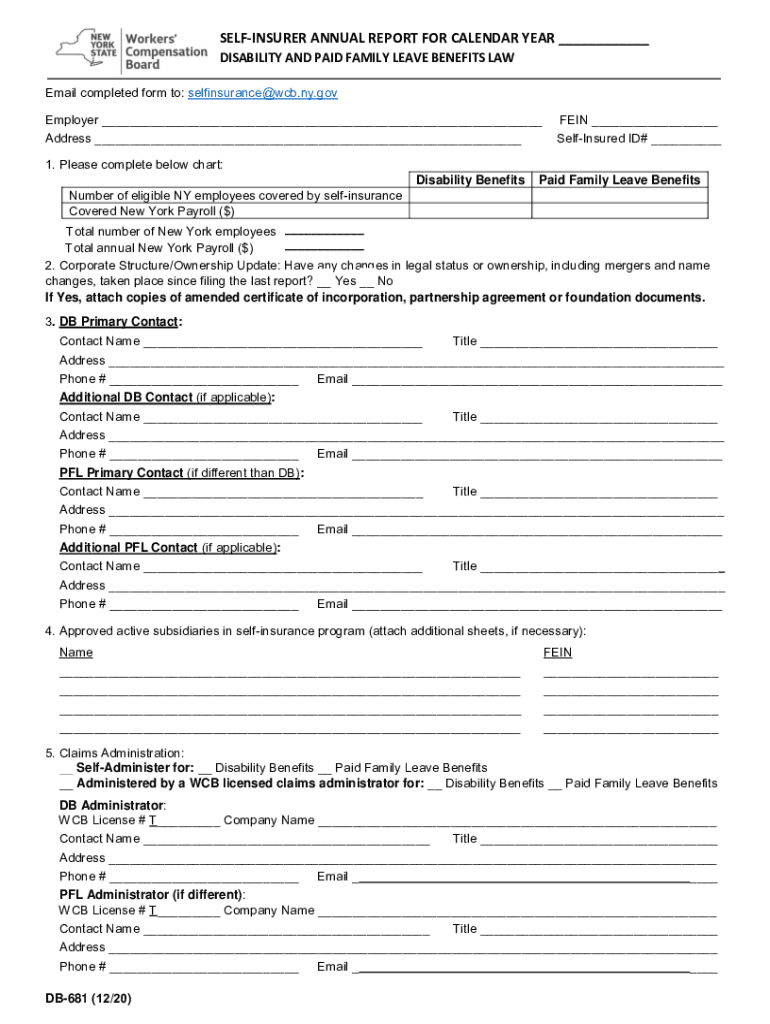
Form DB 681 'Self Insurer's Annual Report for Calendar Year


What is the Form DB 681 'Self insurer's Annual Report For Calendar Year
The Form DB 681, known as the Self insurer's Annual Report for Calendar Year, is a crucial document for self-insured employers in New York State. This form is used to report information regarding the self-insured employer's disability benefits, ensuring compliance with state regulations. It provides the necessary data for the New York State Workers' Compensation Board to monitor and assess the financial stability and operational status of self-insured entities. Completing this form accurately is essential for maintaining good standing and fulfilling legal obligations.
Steps to complete the Form DB 681 'Self insurer's Annual Report For Calendar Year
Completing the Form DB 681 involves several key steps to ensure accuracy and compliance. First, gather all necessary financial data, including total disability benefits paid and any claims processed during the calendar year. Next, fill out the form with the required information, ensuring that all sections are completed thoroughly. It is important to double-check the figures for accuracy before submission. Finally, submit the completed form by the designated deadline to avoid penalties. Utilizing digital tools can streamline this process, making it easier to fill out and sign the form securely.
Legal use of the Form DB 681 'Self insurer's Annual Report For Calendar Year
The legal use of the Form DB 681 is governed by New York State laws regarding self-insurance and disability benefits. This form must be completed and submitted annually to demonstrate compliance with state regulations. It is considered a legal document, and any inaccuracies or omissions may result in penalties or legal repercussions. Therefore, it is crucial for self-insured employers to understand the legal implications of the information reported on this form, ensuring that all data is truthful and complete.
Key elements of the Form DB 681 'Self insurer's Annual Report For Calendar Year
The Form DB 681 contains several key elements that must be accurately reported. These include the employer's identification details, total disability benefits paid, claims information, and any relevant financial data related to the self-insured program. Additionally, the form may require disclosures regarding the employer's compliance with state regulations and any changes in the self-insured status. Understanding these elements is vital for ensuring that the form is filled out correctly and meets all legal requirements.
Form Submission Methods (Online / Mail / In-Person)
The Form DB 681 can be submitted through various methods, providing flexibility for self-insured employers. The preferred method is online submission, which allows for quicker processing and confirmation of receipt. Alternatively, employers can choose to mail the completed form to the appropriate state office or submit it in person. Each method has its own guidelines and deadlines, so it is important to follow the instructions provided by the New York State Workers' Compensation Board to ensure timely and accurate submission.
Filing Deadlines / Important Dates
Filing deadlines for the Form DB 681 are critical for compliance. Typically, the form must be submitted annually by a specific date set by the New York State Workers' Compensation Board. Missing this deadline can result in penalties or other legal consequences. It is essential for employers to stay informed about these important dates and to plan accordingly to ensure that the form is completed and submitted on time.
Quick guide on how to complete form db 681 ampquotself insurers annual report for calendar year
Easily Prepare Form DB 681 'Self insurer's Annual Report For Calendar Year on Any Device
Managing documents online has gained traction among businesses and individuals. It offers an ideal environmentally friendly alternative to traditional printed and signed documents, as you can locate the necessary form and securely keep it online. airSlate SignNow provides you with all the tools required to create, edit, and eSign your documents swiftly without waiting. Handle Form DB 681 'Self insurer's Annual Report For Calendar Year on any device using airSlate SignNow's Android or iOS applications and simplify your document-related tasks today.
How to Modify and eSign Form DB 681 'Self insurer's Annual Report For Calendar Year Effortlessly
- Obtain Form DB 681 'Self insurer's Annual Report For Calendar Year and click Get Form to initiate the process.
- Utilize the tools we provide to fill out your form.
- Highlight important sections of your documents or obscure sensitive details with tools specifically offered by airSlate SignNow for that purpose.
- Generate your eSignature with the Sign feature, which takes mere seconds and carries the same legal validity as a conventional wet ink signature.
- Review all the details and click the Done button to save your changes.
- Decide how you wish to share your form, whether by email, SMS, invitation link, or download it to your computer.
Say goodbye to lost or mislaid files, tedious form searches, or errors that necessitate printing fresh document copies. airSlate SignNow meets all your document management needs in just a few clicks from any device you prefer. Edit and eSign Form DB 681 'Self insurer's Annual Report For Calendar Year and guarantee seamless communication at every stage of the form preparation process with airSlate SignNow.
Create this form in 5 minutes or less
Create this form in 5 minutes!
How to create an eSignature for the form db 681 ampquotself insurers annual report for calendar year
The best way to make an eSignature for a PDF online
The best way to make an eSignature for a PDF in Google Chrome
The way to create an eSignature for signing PDFs in Gmail
How to generate an eSignature straight from your smartphone
How to make an eSignature for a PDF on iOS
How to generate an eSignature for a PDF document on Android
People also ask
-
What is the 'form db 681' and how does it work?
The 'form db 681' is a customizable document template that allows users to create, send, and manage forms seamlessly. It integrates with airSlate SignNow's eSignature capabilities, making it easy to collect signatures on important documents. This streamlined process enhances efficiency and reduces the reliance on paper-based forms.
-
How much does it cost to use the 'form db 681' template?
The pricing for the 'form db 681' template varies based on the specific airSlate SignNow plan selected. We offer different subscription tiers designed to suit the needs of any business, including free trials that allow users to test the features. For detailed pricing information, visit our pricing page.
-
What features are included with the 'form db 681'?
The 'form db 681' template includes features such as customizable fields, automated workflows, and real-time tracking of document status. Additionally, it provides secure eSigning options to ensure the authenticity of your agreements. These features enhance the user experience and boost productivity.
-
Can I integrate 'form db 681' with other applications?
Yes, the 'form db 681' template can be integrated with various applications to enhance functionality. airSlate SignNow offers integrations with popular software including CRMs, project management tools, and cloud storage providers. This makes it easier to manage your documents within your existing workflow.
-
What are the benefits of using the 'form db 681' for my business?
Using the 'form db 681' can signNowly improve your document management processes. It reduces turnaround time for contracts and agreements, increases accuracy by minimizing errors, and provides a professional appearance for your business. Adopting this template can ultimately lead to increased customer satisfaction.
-
Is the 'form db 681' template easy to use?
Absolutely! The 'form db 681' template is designed with user-friendliness in mind. With an intuitive interface, users can easily customize their forms, add necessary fields, and send them for eSignature, all without needing extensive technical knowledge.
-
How can 'form db 681' help in compliance management?
The 'form db 681' helps ensure compliance by providing features like audit trails and secure storage of signed documents. These features allow businesses to maintain accurate records and adhere to regulations governing electronic signatures and document retention. This promotes accountability and transparency in your operations.
Get more for Form DB 681 'Self insurer's Annual Report For Calendar Year
Find out other Form DB 681 'Self insurer's Annual Report For Calendar Year
- Can I Electronic signature Maryland High Tech RFP
- Electronic signature Vermont Insurance Arbitration Agreement Safe
- Electronic signature Massachusetts High Tech Quitclaim Deed Fast
- Electronic signature Vermont Insurance Limited Power Of Attorney Easy
- Electronic signature Washington Insurance Last Will And Testament Later
- Electronic signature Washington Insurance Last Will And Testament Secure
- Electronic signature Wyoming Insurance LLC Operating Agreement Computer
- How To Electronic signature Missouri High Tech Lease Termination Letter
- Electronic signature Montana High Tech Warranty Deed Mobile
- Electronic signature Florida Lawers Cease And Desist Letter Fast
- Electronic signature Lawers Form Idaho Fast
- Electronic signature Georgia Lawers Rental Lease Agreement Online
- How Do I Electronic signature Indiana Lawers Quitclaim Deed
- How To Electronic signature Maryland Lawers Month To Month Lease
- Electronic signature North Carolina High Tech IOU Fast
- How Do I Electronic signature Michigan Lawers Warranty Deed
- Help Me With Electronic signature Minnesota Lawers Moving Checklist
- Can I Electronic signature Michigan Lawers Last Will And Testament
- Electronic signature Minnesota Lawers Lease Termination Letter Free
- Electronic signature Michigan Lawers Stock Certificate Mobile