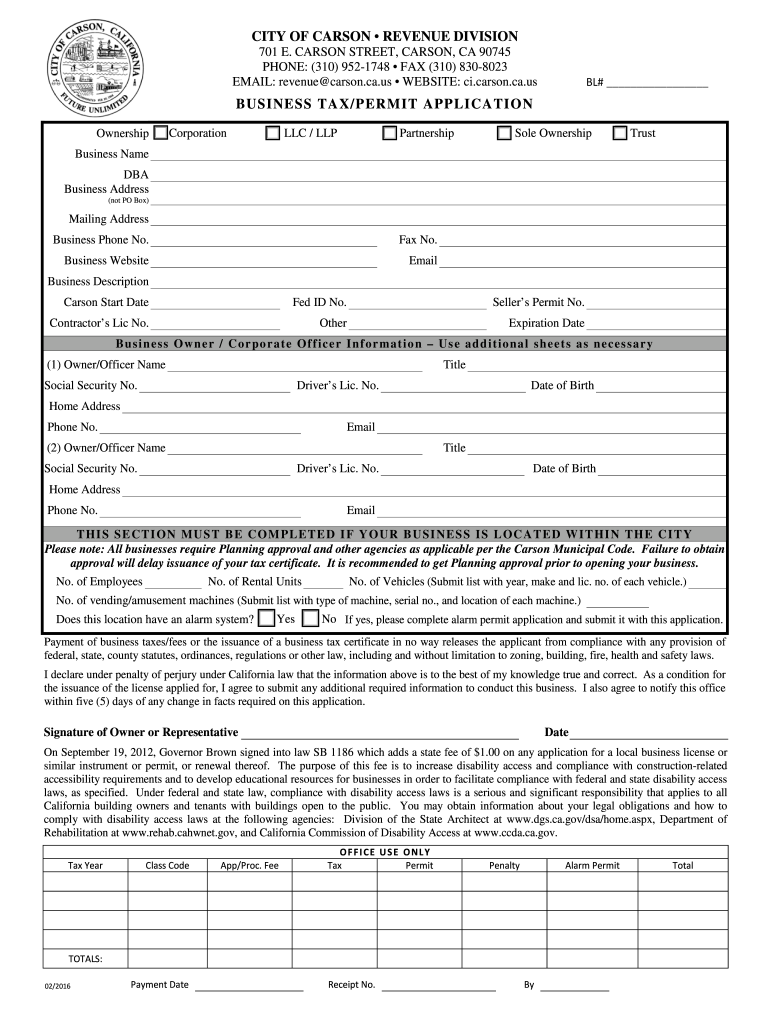
Carson Ca Business License Form


What is the Carson CA Business License
The Carson CA business license is a legal document required for individuals or entities operating a business within the city of Carson, California. This license serves to ensure that businesses comply with local regulations and contribute to the city's revenue system. It is essential for various business types, including retail shops, service providers, and contractors, to obtain this license before commencing operations. The license indicates that the business has met specific requirements set forth by the city, including zoning laws and health regulations.
How to Obtain the Carson CA Business License
To obtain a Carson CA business license, applicants must follow a structured process. First, they need to complete the business license application form, which can typically be found on the city’s official website or at the city hall. Next, applicants must provide necessary documentation, such as proof of identity, business structure, and location. After submitting the application, the city will review it for compliance with local regulations. Once approved, the business owner will receive their license, allowing them to operate legally within Carson.
Steps to Complete the Carson CA Business License
Completing the Carson CA business license involves several key steps:
- Determine the type of business entity you are operating (e.g., sole proprietorship, LLC, corporation).
- Gather required documentation, including identification and proof of business location.
- Fill out the business license application form accurately.
- Submit the application along with any required fees to the city’s revenue division.
- Await approval from the city, which may include inspections or additional information requests.
- Receive your business license and ensure compliance with any ongoing requirements.
Key Elements of the Carson CA Business License
The Carson CA business license includes several key elements that are important for both the business owner and city officials. These elements typically include:
- Business Name: The registered name under which the business operates.
- Business Address: The physical location of the business.
- Owner Information: Details about the business owner or responsible party.
- License Number: A unique identifier assigned to the business license.
- Expiration Date: The date by which the license must be renewed.
Legal Use of the Carson CA Business License
The legal use of the Carson CA business license is crucial for maintaining compliance with local laws. This license grants businesses the authority to operate legally within the city limits. It also serves as proof that the business adheres to local regulations concerning health, safety, and zoning. Failure to obtain or renew the business license can result in penalties, including fines or the closure of the business. Therefore, it is important for business owners to understand the legal implications of their license and to keep it updated.
Required Documents for the Carson CA Business License
When applying for a Carson CA business license, several documents are typically required. These may include:
- Completed business license application form.
- Proof of identity, such as a government-issued ID.
- Documentation of the business structure, such as Articles of Incorporation for corporations.
- Proof of business location, like a lease agreement or property deed.
- Any additional permits or licenses required for specific business types.
Quick guide on how to complete city of carson business license form
Complete Carson Ca Business License seamlessly on any device
Online document management has gained traction among businesses and individuals. It serves as an ideal eco-friendly alternative to conventional printed and signed documents, allowing you to access the correct format and securely retain it online. airSlate SignNow equips you with all the tools necessary to create, modify, and electronically sign your documents swiftly without delays. Manage Carson Ca Business License on any device with airSlate SignNow Android or iOS applications and enhance any document-centric workflow today.
The easiest way to modify and eSign Carson Ca Business License effortlessly
- Obtain Carson Ca Business License and click on Get Form to initiate.
- Utilize the tools we provide to finalize your form.
- Emphasize important sections of the documents or redact sensitive information with tools that airSlate SignNow specifically provides for that purpose.
- Create your electronic signature using the Sign tool, which takes mere seconds and holds the same legal validity as a traditional handwritten signature.
- Review the details and click on the Done button to store your changes.
- Select your preferred method to send your form, via email, SMS, or invitation link, or download it to your computer.
Eliminate concerns about lost or misplaced documents, tedious form searching, or mistakes that necessitate printing new document copies. airSlate SignNow meets your document management needs in just a few clicks from any device of your selection. Edit and eSign Carson Ca Business License and maintain excellent communication throughout your form preparation journey with airSlate SignNow.
Create this form in 5 minutes or less
FAQs
-
How to decide my bank name city and state if filling out a form, if the bank is a national bank?
Somewhere on that form should be a blank for routing number and account number. Those are available from your check and/or your bank statements. If you can't find them, call the bank and ask or go by their office for help with the form. As long as those numbers are entered correctly, any error you make in spelling, location or naming should not influence the eventual deposit into your proper account.
-
How can I add my business location on instagram"s suggested locations?
Making a custom location on Instagram is actually quite easy and gives you an advantage to other businesses because it allows you to drive traffic via location.First off, Facebook owns Instagram; therefore, any location listed on Facebook also appears on Instagram. So you are going to need to create a business location on Facebook.So let’s dive into how to create a business location on Instagram.Make sure that you have enabled location services through the Facebook App or in your phone settings. If you are using an iPhone, select “Settings” → “Account Settings” → “Location” → “While Using The App”You need to create a Facebook check-in status. You do this by making a status and type the name of what you want your location to be called. For example “Growth Hustlers HQ”. Scroll to the bottom of the options and select “Add Custom Location” then tap on it!Now that you’ve created a custom location you need to describe it. It will ask you to choose which category describes your location, which you will answer “Business”.After choosing a category Facebook will ask you to choose a location. You can either choose “I’m currently here” or you can search for a location that you want to create for your business.Finally, publish your status. Congratulations! You have just created a custom location to be used on Facebook and Instagram.Now you are able to tag your business or a custom location on Instagram.If you have any questions about Social Media Marketing for businesses feel free to check out GrowthHustlers.com where you can find tons of resources about growing your Instagram following.
-
How can I fill out Google's intern host matching form to optimize my chances of receiving a match?
I was selected for a summer internship 2016.I tried to be very open while filling the preference form: I choose many products as my favorite products and I said I'm open about the team I want to join.I even was very open in the location and start date to get host matching interviews (I negotiated the start date in the interview until both me and my host were happy.) You could ask your recruiter to review your form (there are very cool and could help you a lot since they have a bigger experience).Do a search on the potential team.Before the interviews, try to find smart question that you are going to ask for the potential host (do a search on the team to find nice and deep questions to impress your host). Prepare well your resume.You are very likely not going to get algorithm/data structure questions like in the first round. It's going to be just some friendly chat if you are lucky. If your potential team is working on something like machine learning, expect that they are going to ask you questions about machine learning, courses related to machine learning you have and relevant experience (projects, internship). Of course you have to study that before the interview. Take as long time as you need if you feel rusty. It takes some time to get ready for the host matching (it's less than the technical interview) but it's worth it of course.
-
How do I fill out the form of DU CIC? I couldn't find the link to fill out the form.
Just register on the admission portal and during registration you will get an option for the entrance based course. Just register there. There is no separate form for DU CIC.
-
What are the good ways to fill out 1120 form if my business is inactive?
While you might not have been “active” throughout the year, by filing a “no activity” return you may be throwing away potential deductions! Most businesses (even unprofitable ones) will have some form of expenses – think tax prep fees, taxes, filing fees, home office, phone, etc. Don’t miss out on your chance to preserve these valuable deductions. You can carry these forward to more profitable years by using the Net Operating Loss Carry-forward rules. But you must report them to take advantage of this break. If you honestly did not have any expenses or income during the tax year, simply file form 1120 by the due date (no later than 2 and one half months after the close of the business tax year – March 15 for calendar year businesses). Complete sections A-E on the front page of the return and make sure you sign the bottom – that’s it!
-
What forms should I fill out to start a business?
From a legal business entity standpoint, one does not normally have to file any forms with the state the business is located in to be considered a sole proprietor (SP). However, this highly unadvisable since a SP provides no liability protection.The most popular, and most advisable business entities are a Limited Liability Company (LLC) and a Corporation. These entities are state created entities meaning that you must file the necessary paperwork in the state where you will have the business headquarters. The state’s secretary of state’s office will have all the necessary documents, forms, and rules needed to create the entity of your choice. You will also have to pay a filing fee.It is important that you further discuss the issue with experienced counsel as they will be able to help you decide which entity is best for you, and help you with the filing.
Create this form in 5 minutes!
How to create an eSignature for the city of carson business license form
How to make an eSignature for your City Of Carson Business License Form online
How to generate an electronic signature for the City Of Carson Business License Form in Google Chrome
How to generate an eSignature for signing the City Of Carson Business License Form in Gmail
How to generate an electronic signature for the City Of Carson Business License Form straight from your smart phone
How to generate an electronic signature for the City Of Carson Business License Form on iOS
How to make an electronic signature for the City Of Carson Business License Form on Android
People also ask
-
What is the process to obtain a Carson CA business license?
To obtain a Carson CA business license, you must first complete the necessary application available through the city’s official website. You'll need to provide information about your business structure and its location. Once submitted, you may need to pay a fee and await approval before you can legally operate your business in Carson.
-
How much does a Carson CA business license cost?
The cost of a Carson CA business license can vary depending on the type of business you are starting and your projected revenue. Typically, fees range from $50 to several hundred dollars. It's essential to check the city’s official website for specific pricing related to your business type.
-
What are the benefits of using airSlate SignNow for my business documents?
Using airSlate SignNow for your business documents streamlines the signing process, allowing you to send and eSign contracts quickly and efficiently. This tool is especially beneficial for securing agreements required for your Carson CA business license, as it enhances compliance and ensures timely transactions.
-
Can airSlate SignNow help with compliance for my Carson CA business license?
Yes, airSlate SignNow can aid in compliance by providing templates and tools that ensure your documents meet the necessary legal standards. This is crucial for maintaining the validity of your Carson CA business license and avoiding potential fines or penalties.
-
Does airSlate SignNow integrate with other business tools?
Absolutely! airSlate SignNow offers seamless integrations with popular business applications such as Google Workspace, Salesforce, and more. This connectivity is beneficial for managing documents related to your Carson CA business license and coordinating with your team.
-
Is airSlate SignNow suitable for all types of businesses in Carson?
Yes, airSlate SignNow is designed to accommodate businesses of all sizes and industries in Carson. Whether you run a small local shop or a larger enterprise, the platform provides the flexibility and features needed to facilitate document signing and management, essential for your Carson CA business license.
-
How secure is the document signing process with airSlate SignNow?
The document signing process with airSlate SignNow is highly secure, utilizing state-of-the-art encryption and authentication methods. This security is vital for protecting sensitive information related to your Carson CA business license, ensuring that your documents are safe from unauthorized access.
Get more for Carson Ca Business License
- Original application for homestead exemptions form
- Form 1099 ls rev december 2019 internal revenue service
- Pdf po box 3138 greensboro nc 27402 3138 guilford county form
- 3602 ez form
- Form nc 4p ncgov
- North carolina form cd 401s s corporation tax return
- Nc av 9 2019 fill out tax template onlineus legal forms
- Pdf form il 941 x 2020 amended illinois withholding illinoisgov
Find out other Carson Ca Business License
- Can I eSignature Oregon Orthodontists LLC Operating Agreement
- How To eSignature Rhode Island Orthodontists LLC Operating Agreement
- Can I eSignature West Virginia Lawers Cease And Desist Letter
- eSignature Alabama Plumbing Confidentiality Agreement Later
- How Can I eSignature Wyoming Lawers Quitclaim Deed
- eSignature California Plumbing Profit And Loss Statement Easy
- How To eSignature California Plumbing Business Letter Template
- eSignature Kansas Plumbing Lease Agreement Template Myself
- eSignature Louisiana Plumbing Rental Application Secure
- eSignature Maine Plumbing Business Plan Template Simple
- Can I eSignature Massachusetts Plumbing Business Plan Template
- eSignature Mississippi Plumbing Emergency Contact Form Later
- eSignature Plumbing Form Nebraska Free
- How Do I eSignature Alaska Real Estate Last Will And Testament
- Can I eSignature Alaska Real Estate Rental Lease Agreement
- eSignature New Jersey Plumbing Business Plan Template Fast
- Can I eSignature California Real Estate Contract
- eSignature Oklahoma Plumbing Rental Application Secure
- How Can I eSignature Connecticut Real Estate Quitclaim Deed
- eSignature Pennsylvania Plumbing Business Plan Template Safe