Benefits of electronic signatures: 7 powerful reasons to switch from paper contracts in 2026

Paper-based signing workflows cost businesses more than they realize — in time, money, security exposure, and missed deals. Think of switching to eSignatures like replacing a postal service with email: both deliver the same message, but one does it in seconds, with a timestamped record of every action, at a fraction of the cost. According to MarketsandMarkets research, the global digital signature market is projected to grow from USD 7.1 billion in 2024 to between USD 35.3 billion and USD 70 billion by 2030. This massive growth shows that most organizations are already making the switch to digital signing. The only remaining question is whether your organization will be part of this transition.
- Eliminate print-mail-scan delays by sending electronic documents for signing
- Reduce per-document costs by removing paper, postage, and physical storage expenses
- Protect every transaction with AES-256 encryption, audit trails, and two-factor authentication
- Verify compliance with ESIGN, UETA, eIDAS, HIPAA, and other applicable regulations before deployment
- Choose a platform with a mobile-first signing experience rated above 9.0 for ease of use
- Integrate your eSignature tool with existing CRM, ERP, and cloud storage systems
- Track ESG impact by measuring the paper consumption eliminated after switching
This guide is for SMB and mid-market teams evaluating why use eSignatures in the first place and how to move faster, reduce costs, and improve security. It covers seven reasons to switch from paper contracts to electronic signatures, common mistakes to avoid, and how to measure the results. We’ll also show how SignNow provides an easy-to-use, cost-effective eSignature solution to help you get there.
1. Radically accelerate document turnaround times
Switching to electronic signatures eliminates the days-long delays that paper-based signing introduces into every contract, onboarding form, and approval workflow.
Why it matters
According to AIIM’s 2024 research on process automation, implementing eSignatures and intelligent document processing improved productivity by more than 50%. Similarly, a 2023 Forrester Consulting study found that electronic signature solutions can reduce document turnaround times by an average of 85%. For sales teams specifically, SignNow data shows that faster signing improves deal-closing rates by an average of 8%.
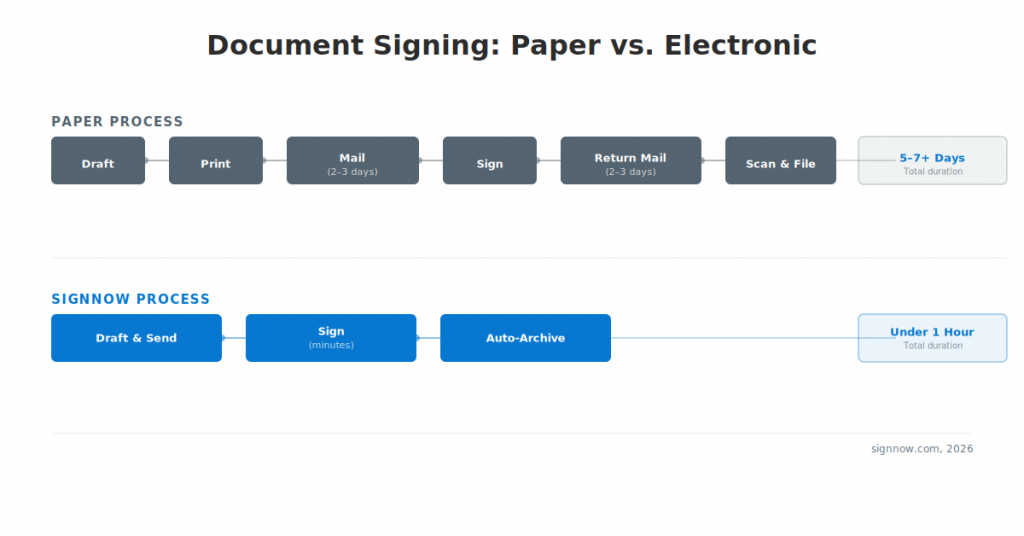
Here’s how paper and digital processes compare:
| Stage | Paper process | SignNow process |
| Document preparation | Draft → Print | Draft → Upload |
| Delivery | Mail (2–3 days) | Send secure link (seconds) |
| Signing | Recipient signs, returns by mail (2–3 days) | Recipient clicks, signs on any device (minutes) |
| Filing | Scan → Manual archive | Auto-archive with audit trail |
| Total time | 5–7+ days | Under 1 hour |
How it works
For teams new to the category, this is also where you can see how electronic signatures work in practice.
- Upload your document (PDF, DOCX, or XLSX) to your eSignature platform.
- Place signature, date, and initials fields where required using drag-and-drop field placement.
- Add recipient emails and set a signing order if needed.
- Enable automated reminders so the platform follows up on unsigned documents without manual intervention.
- Receive a completion notification and access the signed document instantly in your document library.
Real-world example
Suresh Balasubramanian, CEO of LiveHive, resent a contract via SignNow and reported: “Voila! I had my signed contract in 30 mins!” — a process that would have taken several days by post or courier. For teams that handle high volumes, SignNow bulk sending lets a single sender send the same document to hundreds of recipients simultaneously, turning weeks of work into a single step.
2. Dramatically reduce operational costs — save up to $20 per document
The paperless contract benefits become especially clear when you look at total administrative costs. Electronic signatures eliminate the costs that invisibly accumulate in paper-based workflows: paper stock, printer ink, postage, courier fees, and physical storage space.
Why it matters
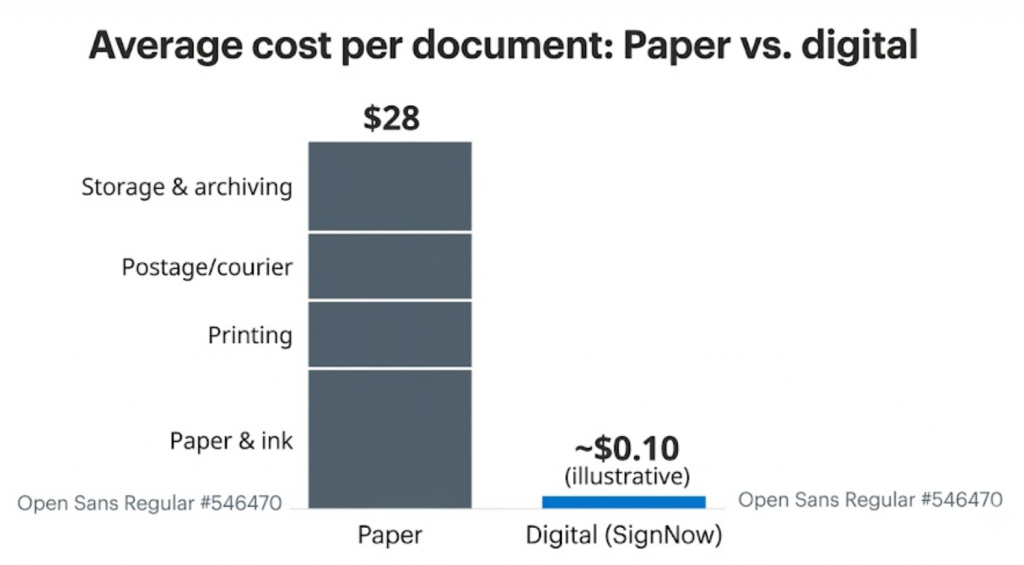
According to Exploding Topics, switching to eSignatures saves businesses an average of $28 per document on paper, printing, mailing, and storage costs. Even at a modest volume of 100 documents per month, that’s $24,000 in annual savings—before accounting for staff time. For large companies, the savings are even more substantial. On average, SignNow customers see a 700% ROI in their first year.
How to do it
- Audit your current paper-based signing volume — count documents sent per month across all departments.
- Calculate your current per-document cost by adding printing, postage, storage, and staff time for manual filing.
- Compare against an eSignature platform’s per-user monthly cost. SignNow’s Business plan pricing starts at $8/user/month (billed annually), which includes unlimited documents, templates, and cloud storage.
- Run a 90-day pilot with one department and measure the cost difference before a company-wide rollout.
- Redirect the freed budget to higher-value activities. Most organizations reallocate administrative hours to client-facing work.
Real-world example
Nicholas Tovar, SHRM-CP at LEARN, reported: “SignNow has changed our workflows to be more streamlined and efficient. We saved more than 1,500 pieces of paper converting to an electronic format.“
For organizations with 1,000+ documents per year, the Site License plan at $1.50 per signature invite offers a usage-based model that can further reduce per-transaction costs.
3. Enhance security and minimize risk with a tamper-evident audit trail
Security concerns are one of the biggest barriers to adopting electronic signatures, which is why audit trails and authentication matter so much. A properly implemented electronic signature is more secure than a wet-ink signature because it creates a permanent, tamper-evident record that a paper document can’t replicate.
Why it matters
Research published in the Journal of Enterprise Information Management (2024) identified “perceived security” and “perceived legal validity” as the two most significant factors driving eSignature adoption. The security concern is often a reason organizations delay switching — but it is also the strongest argument for switching. As mentioned in the Forrester report, “It’s now about the entire chain of trust. Who is signing? How was their identity verified? How is the document protected from tampering for the next ten years?”
IDC found that human error in manual document handling is reduced by up to 90% with guided signing workflows (data from 2023), since the platform validates required fields before allowing submission.
How to do it
- Choose a platform that encrypts data in transit using TLS 1.2 or 1.3 and at rest using AES-256 — these are the same standards financial institutions use.
- Enable two-factor authentication for signers, requiring verification via SMS, phone call, or password before they can access the document.
- Review the audit trail after each completed signing to confirm it captures full names, email addresses, IP addresses, and timestamps for every action.
- Choose a platform that assigns each document a unique ID and generates a tamper-evident certificate of completion. If anyone alters the document after it’s signed, the seal breaks, making the change easy to detect.
- Store completed digital documents in encrypted cloud storage with access controls limiting who can view, download, or share them.
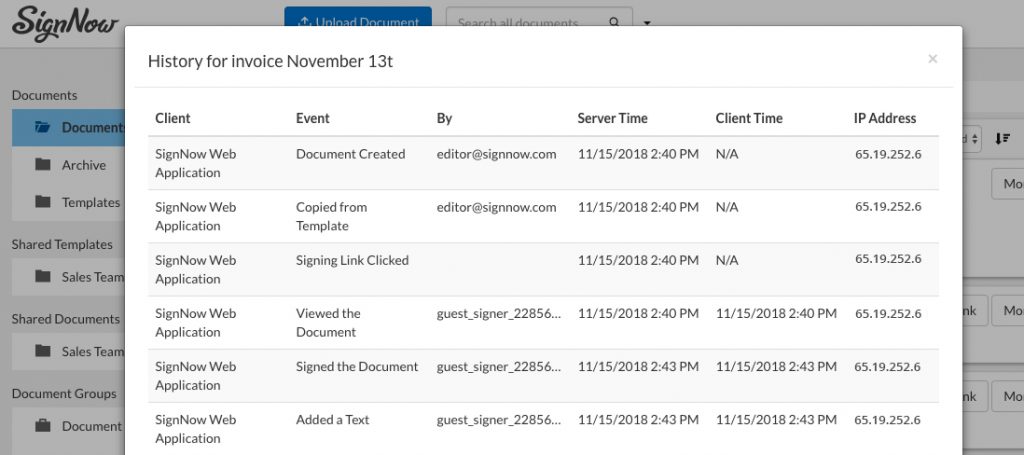
SignNow’s security and compliance features include AES-256 encryption at rest, TLS 1.2/1.3 in transit, a full audit trail with IP addresses and timestamps, and two-factor signer authentication. The platform holds SOC 2 Type II certification, meaning its security controls are independently audited on an ongoing basis.
Real-world example
Dan Rotelli, CEO of BIS, a legal services provider, stated: “We felt most comfortable investing with SignNow given their SOC 2 certification and strict focus on ESIGN and UETA act compliance.“
4. Stay compliant with legal and regulatory requirements
Electronic signatures carry the same legal weight as handwritten signatures in the United States, the European Union, and more than 30 other countries, as long as the signing process meets the requirements of applicable law.
Why it matters
The legal foundation for eSignatures is well established. In the United States, the ESIGN Act and the Uniform Electronic Transactions Act (UETA) provide the legal framework, ensuring that electronic signatures are legally binding and enforceable for commercial transactions. In the European Union, the eIDAS regulation governs electronic signatures and establishes three tiers: Simple Electronic Signatures (SES), Advanced Electronic Signatures (AES), and Qualified Electronic Signatures (QES). Most business contracts require SES or AES.
Certain industries have extra rules. For example, healthcare organizations must comply with HIPAA to protect patient information. Life sciences companies must follow 21 CFR Part 11 when submitting electronic records and signatures to the FDA.
How to do it
- Identify which legal frameworks apply to your organization based on geography and industry.
- Confirm your eSignature platform complies with ESIGN and UETA for US-based transactions.
- For transactions in the EU, ensure your platform complies with eIDAS requirements. This includes SES for all documents and AES for those requiring identity verification.
- For healthcare organizations, sign a Business Associate Agreement (BAA) with your platform provider to enable HIPAA-compliant workflows.
- For FDA-regulated industries, ensure your platform supports 21 CFR Part 11 compliance with features like audit trails, access controls, and electronic signature timestamps.
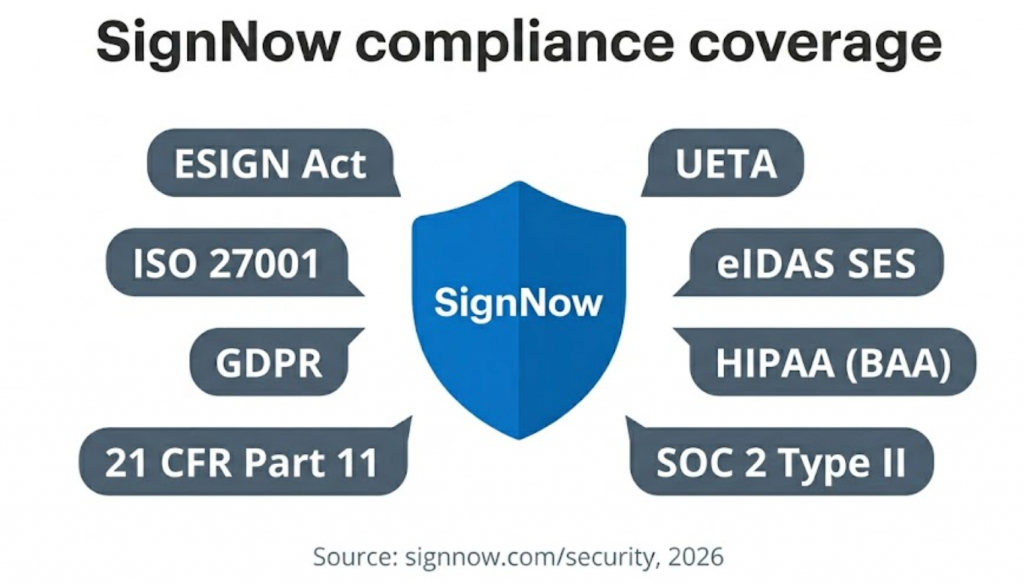
SignNow complies with ESIGN and UETA for US transactions, supports eIDAS SES on all plans, and enables HIPAA compliance once an organization signs a BAA. The platform also supports 21 CFR Part 11 compliant features and holds GDPR, SOC 2 Type II, ISO 27001, and PCI DSS certifications. Learn more on the SignNow security and compliance page.
5. Improve customer and employee experience with a 9.0/10 ease-of-use rating
A slow, complicated signing process creates friction at the worst possible time — when a customer is ready to commit, or a new hire is filling out paperwork. eSignatures eliminate that friction.
Why it matters
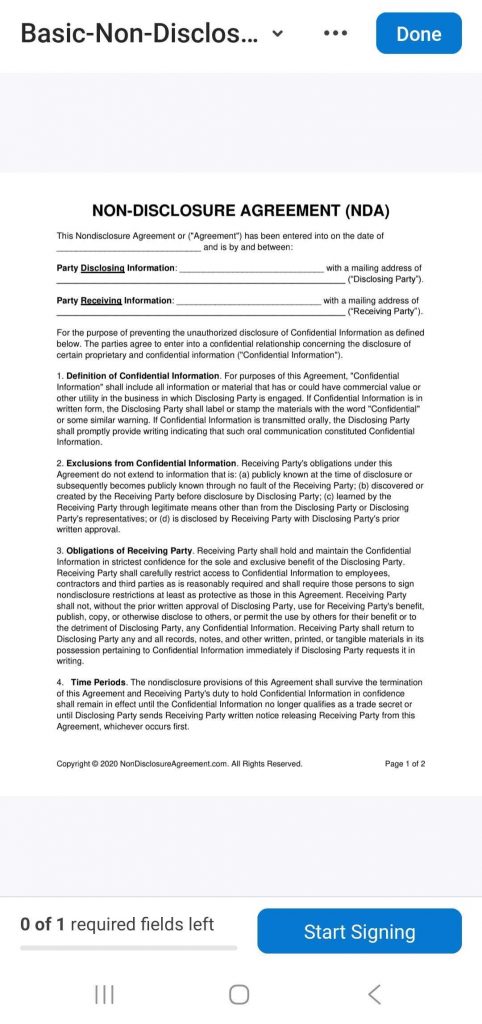
The Forrester Wave (2024) found that the mobile experience is now paramount, with a majority of simple signing ceremonies initiated or completed on mobile devices. A platform that does not work cleanly on a smartphone will cause recipients to abandon the process or delay signing — the digital equivalent of losing a document in the mail. SignNow holds a G2 ease-of-use score of 9.0/10 across more than 1,700 verified reviews, and its mobile apps have high ratings on the Apple App Store and on Google Play.
How to do it
- Choose a platform with native iOS and Android apps, not just a mobile-friendly browser view.
- Send yourself a test document to try the recipient experience on a smartphone before you deploy the solution.
- Turn on guided signing to walk recipients through each required field so they don’t miss anything.
- Customize the signing page and email invitations with your company’s branding to create a trusted experience.
- Set up automatic reminders to follow up with recipients who haven’t signed, which eliminates the need for manual follow-up.
Real-world example
Brian Fitzgibbons, COO of Optica Ventures LLC, described the impact on both sides of the transaction: “The interface is simple and easy-to-use for our team; more importantly, it is just as easy for our customers.“
For in-person signing at trade shows, retail stores, or in the field, SignNow’s kiosk mode turns a tablet into a shared signing station. This feature allows multiple people to sign documents electronically, one after another, on a single device, no account required.
6. Eliminate paper waste to meet sustainability and ESG goals
Reducing paper consumption through digital signing is one of the most direct and measurable contributions an organization can make toward its Environmental, Social, and Governance (ESG) targets.
Why it matters
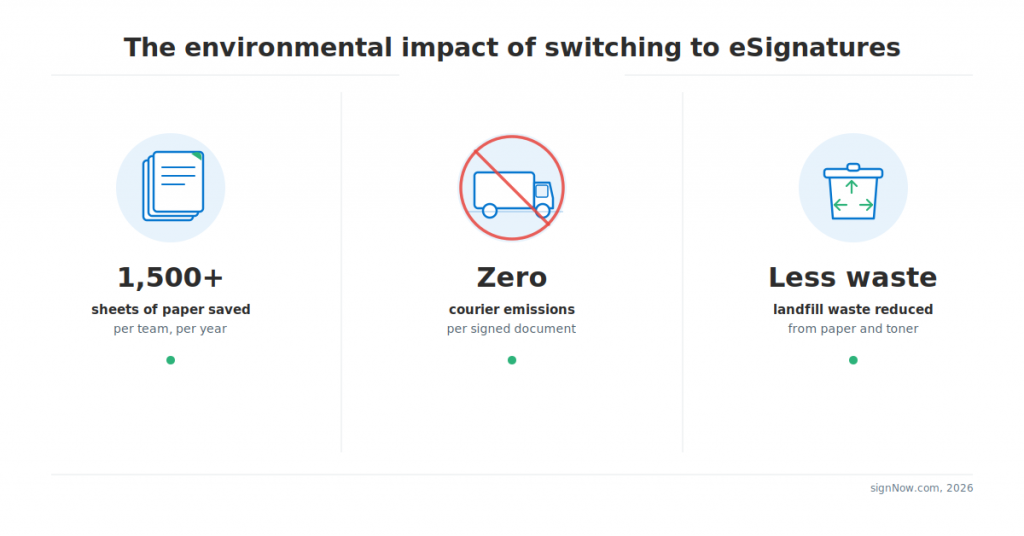
A 2024 PwC study identified sustainability as a key driver of eSignature adoption. More organizations now treat paperless workflows as a formal ESG commitment, not just an operational preference. The environmental case is clear: paper production is energy-intensive, shipping physical documents generates carbon emissions, and paper waste ends up in landfills. Eliminating paper from signing workflows addresses all three issues.
How to do it
- Start by tracking the number of documents your teams print for signing each month to establish a baseline.
- Prioritize converting high-volume documents like offer letters, NDAs, and vendor agreements, as they typically account for the most paper usage.
- Track the paper you save each quarter and convert it into tangible metrics (e.g., sheets saved, CO₂ avoided) for ESG reports.
- Showcase your eSignature adoption in your annual sustainability report with before-and-after data to quantify your impact.
Real-world example
Nicholas Tovar, SHRM-CP at LEARN, reported saving more than 1,500 pieces of paper after converting to electronic signing — a result from a single organization’s HR and onboarding workflows. Scaled across an enterprise with multiple departments, the reduction is substantially larger.
7. Integrate with your existing business workflows without custom development
An eSignature tool that operates in a silo forces users to switch between apps, slowing down adoption and creating data gaps. To see the real benefits of electronic signatures, embed them into the workflows your team already uses.
Why it matters
In 2024, Forrester identified integration capabilities with core business systems — CRM, ERP, and HRIS — as a critical factor for enterprise eSignature adoption. Integrations help route signed electronic documents automatically into CRM, ERP, and cloud storage systems. When a sales rep can send a contract for signature directly from Salesforce, and the signed document automatically syncs back to the opportunity record, the process requires no manual steps or context switching.
How to do it
- Map your document workflows to see which systems (CRM, ERP, etc.) generate documents that need signatures.
- Prioritize native integrations over custom API work for faster deployment. Most platforms offer pre-built connectors.
- Connect your eSignature platform to your CRM so that signed contracts automatically update the deal status and attach to the record.
- Integrate with cloud storage (Box, Google Drive, etc.) to automatically export completed documents to the correct folder.
- Use webhooks or reporting to trigger downstream actions—like invoicing or project kickoffs—as soon as a document is completed.
A robust library of SignNow integrations lets you connect to systems like Salesforce, Microsoft Dynamics 365, and NetSuite without complex custom development. SignNow offers 270+ integrations across CRM, ERP, HR management, accounting, cloud storage, and project management categories.
Real-world example
Kodi-Marie Evans, Director of NetSuite Operations at Xerox, explained the operational value directly: “SignNow provides us with the flexibility needed to get the right signatures on the right documents, in the right formats, based on our integration with NetSuite. This flexibility will assist us with reducing our turnaround time on signatures so that we can get to the business of doing business.”
For development teams building signing into their own applications, SignNow API access supports Node.js, C#, Java, Python, and PHP, with OAuth 2.0 authentication and a sandbox environment for testing.
Common mistakes to avoid when adopting electronic signatures
Switching to eSignatures can streamline your workflows, but only if you avoid common pitfalls. Here are some frequent mistakes that can compromise security, legal standing, and your budget.
- Mistaking an eSignature for a scanned image of a handwritten signature. A scanned image lacks cryptographic properties, an audit trail, and tamper-evidence, offering none of the legal or security protections of a proper electronic signature. A legitimate eSignature is tied to a unique document hash and a certificate, proving the document hasn’t been altered since it was signed.
- Assuming paper is more secure than digital. Paper documents can be lost, altered, or destroyed without a trace. A secure eSignature platform creates a detailed audit trail — including names, email addresses, IP addresses, and timestamps — that a wet-ink signature can’t provide.
- Believing all electronic signatures are legally equivalent. Not all electronic signatures are the same. The EU’s eIDAS regulation defines three tiers: Simple (SES), Advanced (AES), and Qualified (QES). The right one depends on the transaction and jurisdiction. Most commercial contracts use SES or AES, but some regulated transactions require QES, which uses a qualified trust service provider and in-person identity verification. Using the wrong tier for a high-value transaction can impact its legal standing.
- Thinking eSignature is too complex or expensive for SMBs. SignNow’s Business plan is a cost-effective solution at just $8 per user per month (billed annually). The plan includes unlimited documents and templates, audit trails, mobile app access, and cloud storage integration. Most teams can get started in less than a day without IT support, reflected in SignNow’s 8.9/10 ease-of-setup score on G2. While custom APIs can be complex, standard deployment is straightforward.
Best practices checklist: Switching from paper to electronic signatures
Use this checklist to plan a smooth switch to digital signing across teams and workflows.
- Audit the current paper signing volume and calculate the per-document cost before switching
- Select a platform compliant with ESIGN, UETA, and eIDAS SES at a minimum
- Verify industry-specific compliance requirements (HIPAA BAA, 21 CFR Part 11) before deployment
- Enable AES-256 encryption at rest and TLS 1.2/1.3 in transit on your chosen platform
- Activate two-factor authentication for all signers handling sensitive documents
- Test the recipient signing experience on a smartphone before rolling out to customers
- Connect the eSignature platform to your CRM, ERP, or cloud storage via native integration
- Enable automated reminders to eliminate manual follow-up on unsigned documents
- Set up a court-admissible audit trail and confirm it captures IP addresses and timestamps
- Track paper eliminated quarterly and include the metric in ESG reporting
- Run a 90-day pilot with one department before organization-wide rollout
- Measure document turnaround time, cost per agreement, and error rate before and after
How to measure the success of your eSignature implementation
Tracking the right metrics will confirm your eSignature solution is delivering results and show you where to optimize.
- Document turnaround time. Measure the average time from document sent to document fully signed. Forrester Consulting found that organizations achieve an average 85% reduction after implementing eSignatures (data from 2023). A process that previously took 5–7 days should compress to under 2 hours for most document types.
- Cost per agreement. Calculate total signing-related costs (staff time, materials, postage, storage) divided by the number of documents processed per month. According to Exploding Topics statistics, the average cost for a paper-based process is $28 per document. Digital costs should drop to a fraction of that figure within the first quarter.
- Error rate and incomplete submissions. Track the percentage of documents returned with missing signatures, incorrect fields, or incomplete data. According to a 2023 IDC report, guided signing workflows can reduce human error by up to 90%, since the platform validates required fields before submission.
- Return on investment. Calculate total cost savings plus productivity gains against the platform subscription cost. SignNow customers report an average ROI of 700% in the first year of deployment. AIIM data indicates most organizations reach payback within 12 months.
- Deal closing rate. For sales teams, track the percentage of proposals that become signed agreements within a specific timeframe. Removing friction from the signing process—especially for customers on mobile devices—has a direct impact on conversion. SignNow data shows an average 8% improvement in deal closing rates after adoption.
Final thoughts
The benefits of electronic signatures are clear and immediate: faster document turnaround, lower costs, stronger security, and built-in compliance. Best of all, they don’t require a significant technical investment or disrupt existing workflows. Data shows that organizations switching to digital signing recover their costs within the first year and continue to see gains as they grow.
The best way to start is small. Pick your highest-volume document type, run a 90-day pilot with one team, and measure the turnaround time and cost before and after. The results usually make the case for a broader rollout on their own.
Start your SignNow free trial to see the results for yourself. Get 7-day full access to features like audit trails, mobile apps, templates, and cloud storage integration -no credit card required.
Glossary
- Audit trail: A chronological, tamper-evident log of every action taken on a document, including the signer’s full name, email address, IP address, and timestamp for each event. Court-admissible and required for HIPAA, 21 CFR Part 11, and other regulated use cases.
- eIDAS: The European Union’s regulation on electronic identification and trust services, establishing the legal framework for electronic signatures across EU member states. Defines three tiers: Simple Electronic Signatures (SES), Advanced Electronic Signatures (AES), and Qualified Electronic Signatures (QES).
- ESIGN Act: The Electronic Signatures in Global and National Commerce Act (2000), the US federal law that gives electronic signatures the same legal standing as handwritten signatures in interstate and international commercial transactions.
- PKI (Public Key Infrastructure): A cryptographic system that uses a pair of public and private keys to verify a signer’s identity and link their signature to a document. PKI is used in digital signatures to provide non-repudiation, which is proof that a specific person signed a specific document version.
- SOC 2 Type II: An independent security audit that confirms a service provider’s controls for security, availability, and confidentiality meet set criteria over several months. This is relevant when evaluating cloud platforms that handle sensitive documents.
FAQ
Are electronic signatures legally binding in the US and Europe?
Yes. In the US, the ESIGN Act and UETA give electronic signatures the same legal status as handwritten ones. In the EU, the eIDAS regulation provides a legal framework for electronic signatures like SES, AES, and QES. All are legally admissible in court. SignNow complies with both US and EU frameworks and provides the necessary audit trails to prove validity. SignNow also maintains dedicated eSignature legality resources for more than 30 countries.
What is the difference between electronic and digital signatures?
An electronic signature is an electronic indication of intent to agree, like a typed name, a drawn signature, or a click. A digital signature is a more secure type of electronic signature that uses Public Key Infrastructure (PKI) to link the signer’s identity to the document. While digital signatures are technically a form of electronic signature, they offer a higher level of security and tamper-evidence. Standard electronic signatures with audit trails are sufficient for most business contracts. Digital signatures are typically reserved for specific regulated transactions or high-value contracts where identity verification must be cryptographically provable.
How much can a business save by switching to eSignatures?
Studies show an average saving of $28 per document by eliminating paper, printing, mailing, and storage costs. For a company processing 200 documents a month, that’s a direct cost reduction of over $67,000 per year — not including the staff time recovered from manual filing and follow-up. SignNow customers report an average 700% ROI in their first year, reflecting both cost savings and productivity gains from faster document turnaround.
Can an email count as an electronic signature?
While an email can show intent, it lacks the security, audit trails, and identity verification of a true eSignature. A dedicated platform creates a legally defensible record that tracks who signed, when, and from where, and confirms the document hasn’t been altered. An email thread cannot provide this level of security.
What is the most important best practice to start with?
Before choosing a platform, audit your current signing volume and identify your two or three most frequent document types. Teams that start with their most common documents, like offer letters, NDAs, or vendor agreements, see the fastest ROI. This approach builds confidence before you tackle more complex workflows.
Sources
- MarketsandMarkets Digital Signature Market Report, 2024
- AIIM ‘How Intelligent Document Processing is Revolutionizing Document Management’, 2024
- Forrester Consulting Total Economic Impact of eSignature Solutions, 2023
- Exploding Topics: 20+ E-Signature and Digital Document Statistics, 2024
- Forrester Wave: E-Signature Software, 2024
- IDC MarketScape Worldwide eSignature Software Vendor Assessment, 2023
- PwC Global Workforce ESG Preferences Study 2024
- AIIM Paper-Free Progress: Measuring Outcomes, 2025
- Electronic Signatures In Global And National Commerce (Chapter 96), United States Code
- UETA, Uniform Law Commission
- eIDAS Regulation (910/2014) — EU-Lex
- SignNow Customer Reviews — SignNow, 2026
- SignNow solutions
- 1. Radically accelerate document turnaround times
- 2. Dramatically reduce operational costs — save up to $20 per document
- 3. Enhance security and minimize risk with a tamper-evident audit trail
- 4. Stay compliant with legal and regulatory requirements
- 5. Improve customer and employee experience with a 9.0/10 ease-of-use rating
- 6. Eliminate paper waste to meet sustainability and ESG goals
- 7. Integrate with your existing business workflows without custom development
- Common mistakes to avoid when adopting electronic signatures
- Best practices checklist: Switching from paper to electronic signatures
- How to measure the success of your eSignature implementation
- Final thoughts
- Glossary
- FAQ
- Sources
