Electronic signature employee onboarding: Cut document turnaround by 80%

Paper-based onboarding creates frustrating bottlenecks for everyone. Physical paperwork gets lost, new hires delay their start dates, and HR managers waste time chasing signatures. Instead of a process that feels like mailing a package back and forth, you can give new and remote hires a secure folder they can open, sign, and return instantly from their phone.
According to SHRM’s 2024 research, organizations with standardized employee onboarding processes improve new hire retention by 82% and productivity by over 70%. The shift to digital onboarding documents is no longer optional — it is the operational standard.
This guide shows HR teams and operations managers exactly how to build a complete digital employee onboarding process — from uploading documents to tracking completed packets — using a secure and compliant electronic signature solution like SignNow.
TL;DR: Your onboarding eSignature workflow
- Prepare your documents: Gather all HR onboarding forms (offer letter, W-4, I-9, NDA, handbook acknowledgment) and convert them to PDF.
- Build a reusable template: Upload your packet to SignNow once, place all signature and fillable fields, and save as a template — all paid plans include unlimited templates.
- Set a signing order: Configure who signs first (e.g., the hiring manager), then second (a new hire), with automatic routing between signers.
- Send individually or in bulk: Send to a single new hire via email or SMS, or use Bulk Send (available within the Business Premium plan at $15/user/month) to deploy to an entire hiring cohort from a CSV file.
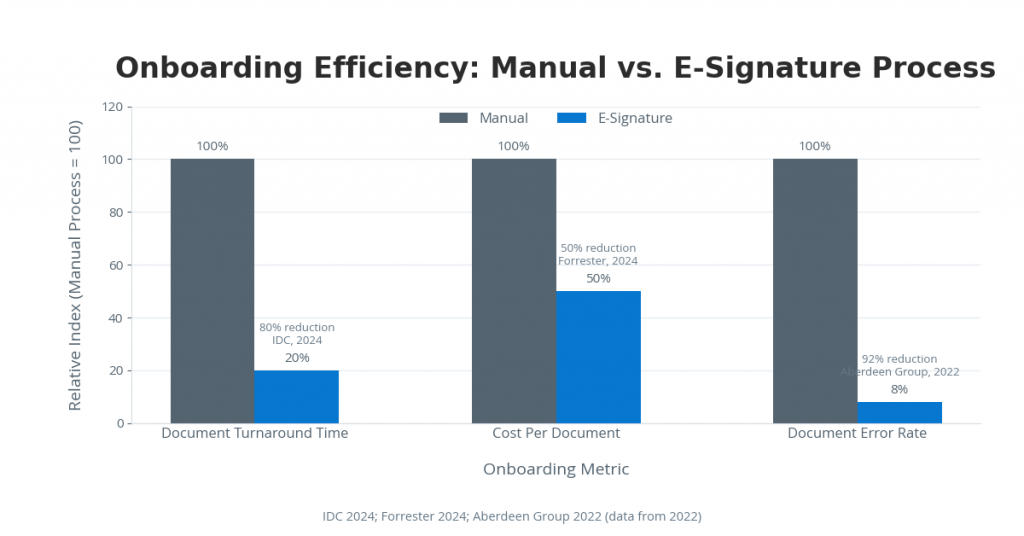
- Track and store: Monitor real-time signing status, receive automatic notifications, and access a court-admissible audit trail for all electronically signed documents. Switching to this digital process can reduce document turnaround time by up to 80%.
Before you begin
To configure an eSign HR onboarding workflow in SignNow, confirm you have the following in place before starting:
- SignNow account: Any paid plan works for single-hire onboarding. The SignNow Business plan ($8/user/month, billed annually) includes unlimited templates, signing orders, audit trail, and automated notifications.
- Bulk Send capability: Required for onboarding cohorts. Available on the SignNow Business Premium plan ($15/user/month, billed annually).
- Documents in digital format: PDF is recommended for consistent field placement. SignNow also accepts Word (DOCX) files, which are automatically converted upon upload.
- New hire email addresses: Required to send signature invitations. SMS delivery is available as an alternative on all paid plans.
- Admin or sender permissions: The HR team member configuring the workflow needs a sender seat on the account.
SignNow offers a 7-day free trial with full access to all features. No credit card is required to test your workflow.
Step 1: Prepare and upload your onboarding document packet
Organizing your digital onboarding documents before uploading prevents field-placement errors and ensures every new hire receives a complete, consistent packet.
The following documents are commonly included in an onboarding packet and are legally signable electronically under the ESIGN Act and UETA:
| Document | Notes |
| Offer letter | Primary document; typically signed first by the hiring manager |
| Form W-4 | Federal tax withholding — IRS accepts electronic completion |
| Form I-9 | Employment eligibility — see FAQ for specific compliance notes |
| NDA / Confidentiality agreement | Standard for most roles |
| Employee handbook acknowledgment | Checkbox or signature confirmation |
| Direct deposit authorization | Bank details + signature |
How to upload your documents
- Open the SignNow website, log in to your account, and navigate to the main dashboard.
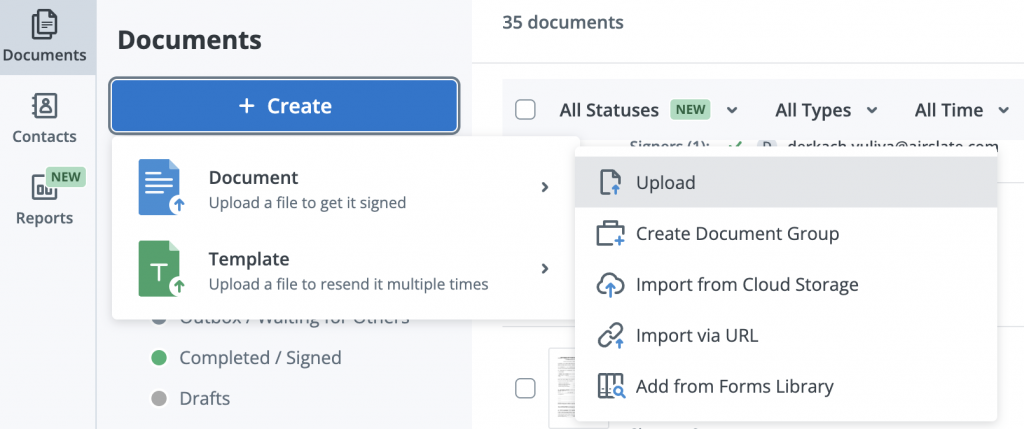
- Click +Create > Document > Upload to select your PDF or DOCX file from your device. Choose the Import from Cloud Storage option to upload documents from your Google Drive, Dropbox, Box, OneDrive, Egnyte, or DocuShare.
- To keep new-hire onboarding forms together, use the Create Document Group feature. This bundles multiple documents into one sending event, so the new hire can sign everything in a single session instead of managing separate emails.
- If you upload a Word file, SignNow automatically converts it to a PDF. Review the PDF to make sure the formatting is correct before proceeding.
- Rename each document clearly (e.g., “Offer Letter — [Role] 2026“) to distinguish templates as your library grows.
Taking a few moments to organize your documents now can save you from having to rebuild templates later. Clear naming prevents confusion and ensures new hires receive all the correct forms on their first day.
Step 2: Create a reusable onboarding template
Converting your uploaded document into a template means you configure field placement and workflow settings once, then reuse that configuration for every subsequent hire, without starting from scratch.
A template acts as a master copy of your onboarding packet. Instead of adding signature boxes and date fields to a new document for every hire, you simply make a copy of the template, add the new employee’s details, and send it. All fields will already be in the correct place.
All SignNow paid plans include unlimited templates, which makes this the right investment of setup time regardless of hiring volume.
How to save a document as a template
- Upload your document to SignNow.
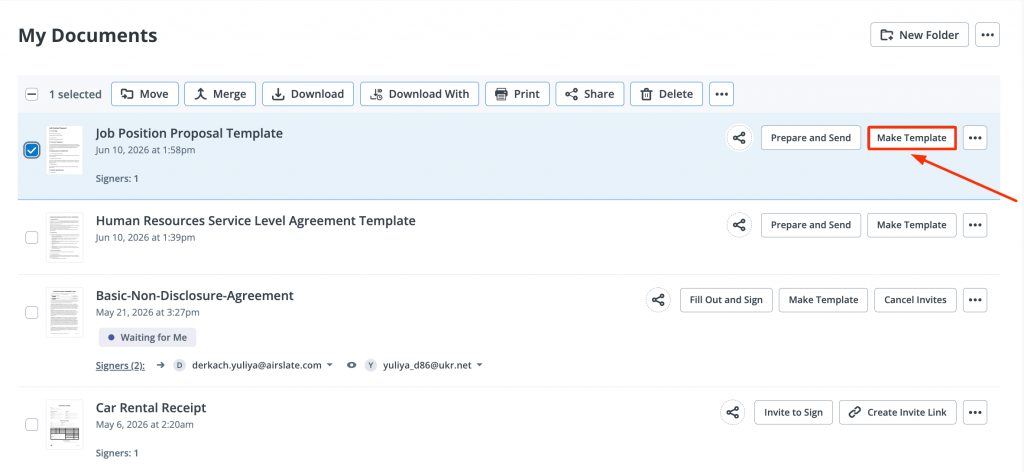
- In the dashboard, click Make Template next to the document title.
- Name the template descriptively (e.g., “Standard Onboarding Packet — Full-Time 2026”) and click Create Template.
- Repeat for each document in your packet, or group them into a single template if using Document Groups.
For organizations using SignNow’s HR management suite integrations, templates can be pre-populated with data pulled from your HRIS or ATS, eliminating manual entry of the new hire’s name, role, and start date.
Step 3: Add and assign fillable fields to your digital onboarding documents
Placing fields on your template shows signers exactly what to complete and where. This prevents incomplete submissions and eliminates the need for corrections.
To add fields to your template:
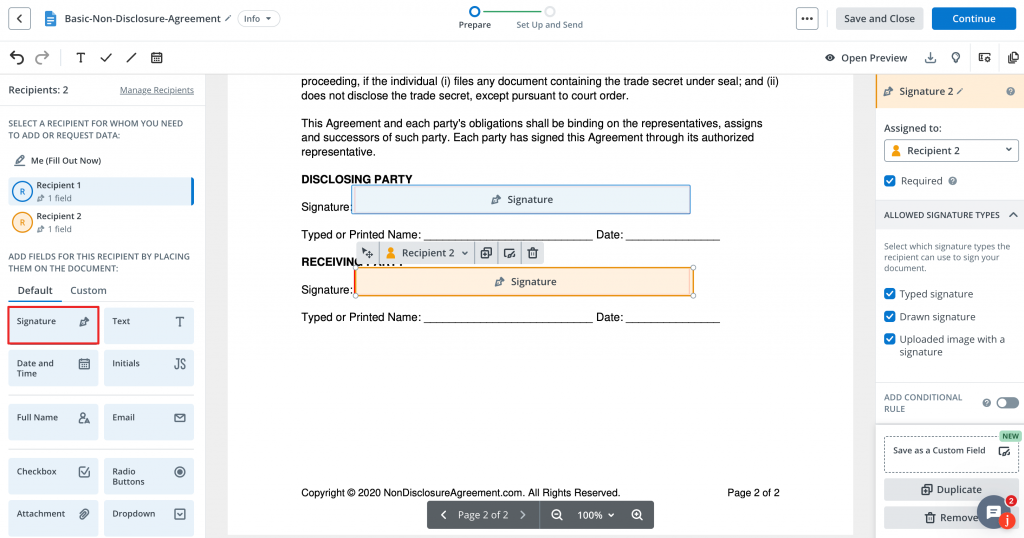
- Go to the My Templates folder and click the required file title to open it. Once it opens in the SignNow editor, the left-hand panel will display all available field types.
- Drag and drop the fields you need onto the document. For HR documents, the most common field types are:
- Signature — required on offer letters, NDAs, and acknowledgment forms
- Initials — used on multi-page documents to confirm each page was reviewed
- Date and Time — auto-populates with the signing date when the signer completes their session
- Text — for addresses, job titles, employee IDs, and other free-form entries
- Checkbox — for policy acknowledgments and benefit elections
- Assign each field to a specific Recipient and enter roles as pre-field text in the right-side field properties panel (e.g., “New Hire Name”). This ensures the right person sees and completes only their assigned fields.
- For more complex forms, such as benefit election sheets with calculated totals, the Enterprise plan includes Calculated fields and Conditional fields that show or hide sections based on prior answers.
Use field validation settings to reduce errors on documents like direct deposit forms, where account numbers or dates must be in a specific format. Set validation rules in the field properties panel after placing each field.
Step 4: Define the signing order and HR eSignature workflow
For documents that require multiple signers, configuring a signing order ensures each person receives the document at the right time and in the right sequence, with no manual forwarding required.
Here’s an example of an HR eSignature workflow for a standard offer letter.
Scenario: Offer letter for a new sales manager
- HR administrator uploads the completed offer letter template and enters the hiring manager’s email as Signer 1.
- Hiring manager receives the document, reviews the compensation terms, and signs. The document does not move to the next signer until this step is complete.
- New hire automatically receives the countersigned offer letter via email (or SMS), reviews it, and signs electronically to accept the offer.
- HR department is CC’d and receives the fully executed document immediately upon the new hire’s signature — no manual collection required.
How to configure HR eSignature in SignNow
- Select your template and click menu > Edit Signing Order.
- Add each recipient by entering their email address.
- Enable Set Document Signing Order and drag recipients into the correct sequence.
- Provide the CC recipient emails who will have view-only access to the completed document.
- Save the workflow configuration to the template so it applies automatically whenever you send from it.
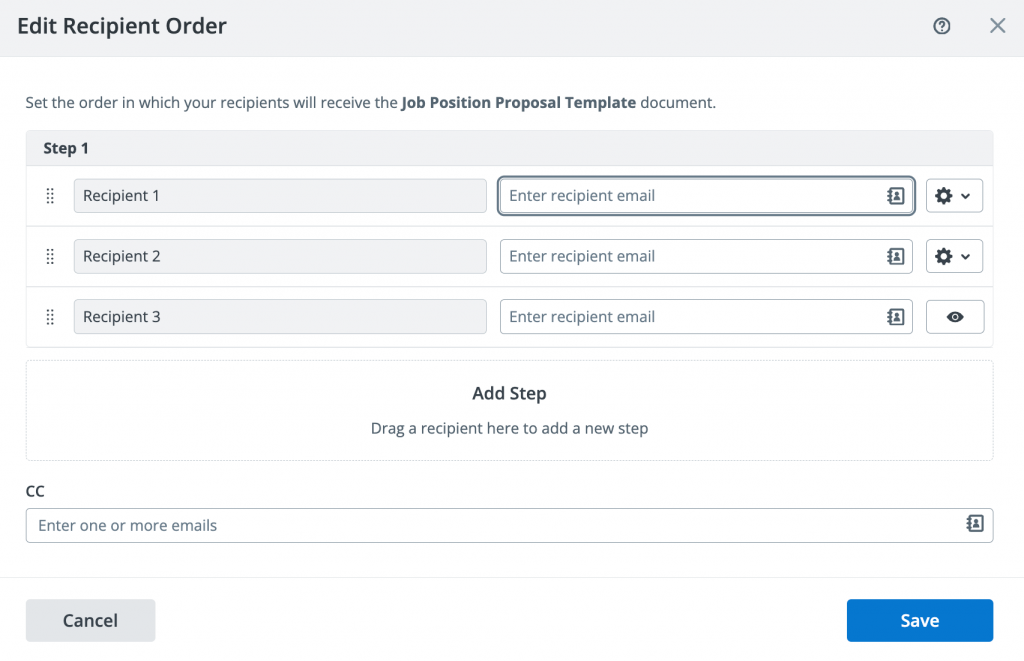
This workflow applies to any HR team member sending documents, from a generalist at a small company to a recruiting coordinator at a large enterprise. Configure the template once, and individual senders won’t have to rebuild the workflow for each new hire.
Step 5: Send the onboarding packet for signature
With your template and workflow configured, you can now deliver digital onboarding documents to one new hire or an entire cohort in a single operation.
Sending to a single new hire
- Select your onboarding template and click Invite to Sign > Single Invite.
- In the Send Invite window, provide each recipient’s email address. You can enter them manually or select them from Contacts.
- Enable Set Document Signing Order to ensure recipients get it in the correct sequence.
- Add a personalized message in the email body — SignNow allows customizable recipient emails so the invitation reflects your brand and tone.
- Optionally, choose Send via SMS to deliver the signing link to the new hire’s mobile number instead of email. This is available on all paid plans and improves completion rates for new hires who are not yet monitoring a work email.
- Enable Recipients receive document in order and drag recipients into the correct sequence.
- Click Send Invite to dispatch the invitation. The new hire receives a link that opens the document in a browser — no account or app download required on their end to complete and sign the document.
Sending HR documents to multiple signers
For organizations onboarding multiple employees simultaneously — a seasonal intake, a post-acquisition integration, or a new office opening — the SignNow Bulk Send feature eliminates repetitive manual sending. This feature is available on the Business Premium plan ($15/user/month).
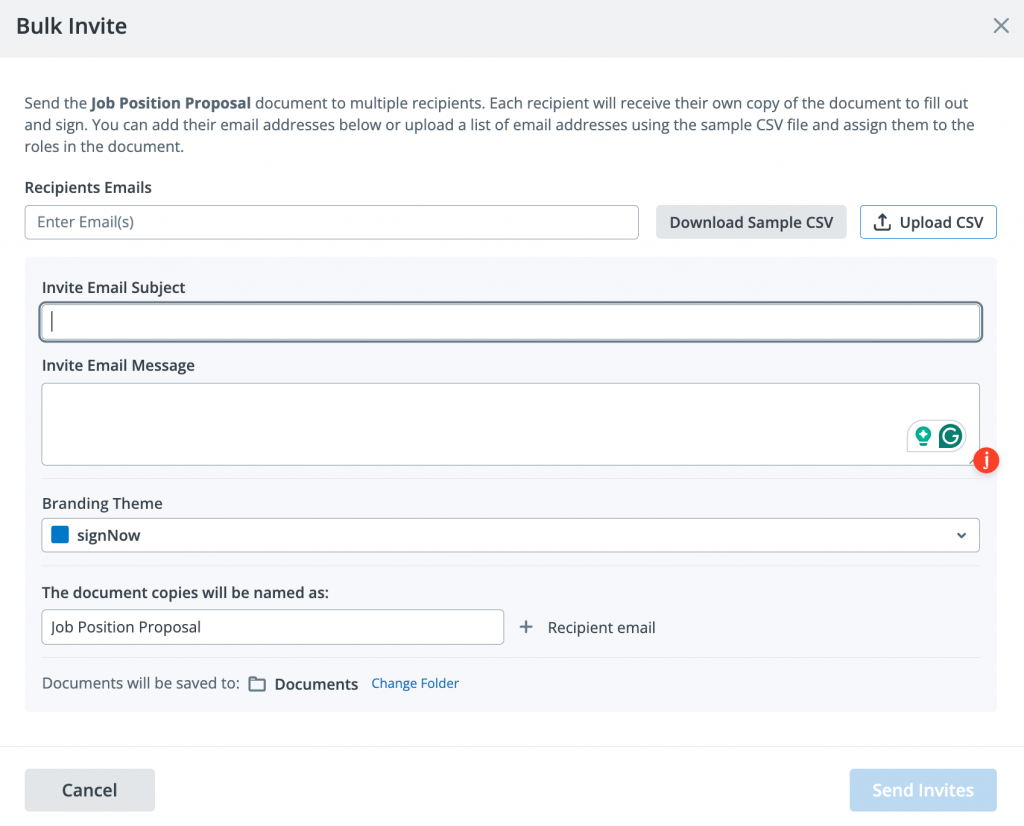
- Prepare a CSV file with one row per new hire, including their name and email address.
- Navigate to the Templates folder, select your onboarding template, and click Invite to Sign > Bulk Invite.
- Upload the CSV file. SignNow generates a personalized copy of the template for each recipient, pre-filled with their individual data.
- Enter the email subject and message, define how document copies will be named, and choose their destination folder upon completion.
- Review the recipient list and click Send Invites. Each new hire receives their own unique signing link.
Brian Fitzgibbons, COO of Optica Ventures LLC, described the impact directly: “SignNow now drives our onboarding for new employees; non-disclosure agreements and more. The interface is simple and easy-to-use for our team; more importantly, it is just as easy for our customers.“
Step 6: Track progress and securely store completed documents
After sending, SignNow provides real-time visibility into every document’s status and generates a court-admissible audit trail for every completed signing event.
The importance of the audit trail extends beyond internal record-keeping. An electronic signature’s legal defensibility comes from its auditable trail, which records who signed, when and where they signed, and how their identity was verified.
What the SignNow Audit Trail records for each document:
- Full name and email address of every signer and viewer
- IP address at the time of each action
- Timestamp for every event: document opened, field completed, signature applied, document finalized
- Unique Document ID for each signing instance
How to monitor and manage completed documents
- Open the Documents section of your SignNow dashboard to view the status of all sent documents: Pending, Viewed, Waiting for Me, Signed, or Declined.
- Get automatic notifications when a document is opened and when each signer has completed their part.
- Once all parties have signed, download the completed document with its embedded audit trail.
- Access the full document history and audit trail for any document by clicking menu > History.
All SignNow plans include SOC 2 Type II certification, ISO 27001 compliance, GDPR compliance, and data encryption at rest (AES-256) and in transit (TLS 1.2/1.3), meaning completed onboarding paperwork meets enterprise security standards from day one. For organizations in regulated industries, SignNow’s HIPAA compliance is available as an add-on through a Business Associate Agreement.
Troubleshooting common onboarding signature issues
Issue: The new hire did not receive the signing invitation email.
- Cause: The invitation landed in the new hire’s spam or junk folder, or the email address was entered incorrectly.
- Solution: Ask the new hire to check their spam folder and confirm that your email sender is whitelisted. If the email is still missing, go to your SignNow dashboard to void the invitation, correct the email address, and resend it. Avoid sending a new document without voiding the original to prevent creating a duplicate signing session.
Issue: The signer declined to sign the document.
- Cause: SignNow includes a Decline to Sign option for all recipients. The signer may have questions about the document content, or the wrong version was sent.
- Solution: SignNow captures an optional reason when a signer declines. Check this reason in the document’s activity log, address the issue (e.g., clarify terms or correct an error), then send the updated document. Remember to manually void the declined document before resending a new version.
Issue: A document was sent with an error — a wrong compensation figure or an incorrect start date.
- Cause: The template was sent before a final review, or details were pre-filled incorrectly.
- Solution: Void the original invitation immediately from the document’s action menu. This invalidates the signing link for all recipients and prevents anyone from signing an incorrect document. Correct the template or the pre-filled fields, then send a fresh invitation. Communicate the change to all affected recipients to avoid confusion.
Issue: The signing link expired before the new hire completed the document.
- Cause: The Document Expiration setting was configured with too short a window, or the new hire delayed action.
- Solution: For future sends, set a longer expiration window in the Document Expiration settings — 14 to 30 days is standard for onboarding. For an already-expired invitation, resend the document from your dashboard. The new hire will receive a fresh link with the updated expiration date.
Issue: The new hire cannot access the document on their mobile device.
- Cause: The signing link opened in an incompatible browser, or the new hire attempted to download a native app before signing.
- Solution: SignNow’s signing experience is fully browser-based — no app download is required for signers. Direct the new hire to open the invitation link in Chrome or Safari on their mobile device. If they receive the invitation via SMS, the link opens directly in the mobile browser. SignNow mobile signing experience is optimized for iOS and Android, and it doesn’t require your recipients to create an account to sign your digital onboarding documents.
Streamline your onboarding today
HR professionals who replace paper-based onboarding with a structured digital onboarding process gain measurable results on three dimensions:
- speed (document turnaround reduced by up to 80%, per IDC 2024 Open),
- cost (an average of $28 saved per document, per Forrester 2024),
- and compliance (a court-admissible audit trail for every signed record).
The results speak for themselves. By replacing manual paperwork with a secure, centralized eSignature workflow, your HR team can accelerate onboarding, reduce costs, and ensure every new hire is ready to go from day one. It’s a faster, smarter way to get documents signed and stored.
Start building your first digital onboarding workflow with a SignNow free trial — no credit card required, full access to paid features for 7 days.
Glossary
- Audit Trail: A tamper-proof, court-admissible log that records all signer activity on a document. The audit trail includes full names, email addresses, IP addresses, and timestamps for every action, such as opening the document, filling in fields, and signing. Audit trails are required for legal defensibility of electronic signatures.
- eIDAS: The European Union’s regulation for electronic identification and trust services. It establishes the legal framework for eSignatures across EU member states. SignNow complies with eIDAS Simple Electronic Signature (SES) standards on all plans, with higher assurance levels available on its Site License plan.
- ESIGN Act: The Electronic Signatures in Global and National Commerce Act, a US federal law enacted in 2000 that grants electronic signatures the same legal validity as handwritten signatures for most commercial and employment contracts.
- SOC 2 Type II: A security certification issued by an independent auditor confirming that a service provider’s systems meet the AICPA’s Trust Services Criteria for security, availability, and confidentiality over a defined audit period. SignNow holds SOC 2 Type II certification, available on request.
- UETA: The Uniform Electronic Transactions Act, a US state-level law (adopted in 49 states) that establishes the legal equivalence of electronic signatures and records for transactions conducted electronically. Together with the ESIGN Act, UETA forms the primary legal basis for electronic signatures in US employment agreements.
FAQ
1. Is it legal to sign an employment contract electronically?
Yes. In the United States, electronic signatures on employment contracts are legally binding under the ESIGN Act (Electronic Signatures in Global and National Commerce Act) and the Uniform Electronic Transactions Act (UETA), both of which grant electronic signatures the same legal standing as handwritten signatures. In the European Union, electronic signatures are governed by the eIDAS regulation. SignNow is compliant with ESIGN, UETA, and eIDAS, and all completed documents include a court-admissible audit trail. For a full list of countries where SignNow’s e-signatures are legally recognized, see the SignNow legality pages.
2. Can Form I-9 be completed and signed electronically?
Yes, but there are specific DHS requirements. Employers can complete and store Form I-9 electronically, but they must follow strict guidelines for audit trails and document retention. SignNow’s court-admissible audit trail—which captures the signer’s name, email, IP address, and timestamp—meets these technical requirements. However, the physical inspection for Section 2 still requires in-person or authorized remote verification. Always consult the latest USCIS I-9 guidance before implementing an electronic I-9 workflow.
3. What is the difference between an electronic signature and a digital signature in HR contexts?
An electronic signature is a broad legal term for any electronic process showing intent to sign, including typed names or clicked checkboxes. A digital signature is the specific cryptographic technology (PKI) used to secure and authenticate that signature. While most employment documents only need a standard electronic signature, some regulated industries may require stronger authentication.
4. How do electronic signatures integrate with existing HRIS or ATS platforms?
SignNow offers native integrations with existing HR software, including Salesforce, NetSuite, Microsoft Dynamics 365, Microsoft 365, SharePoint, and Google Workspace, as well as integrations across payroll systems, benefits administration services, and iPaaS platforms. For organizations with custom HRIS or ATS systems, SignNow provides a full API with SDKs in Node.js, C#, Java, Python, and PHP, enabling embedded signing flows directly within existing HR tools. Teams using the Site License plan gain full API access; the Business and Business Premium plans include a free developer account for testing integrations.
Sources
- Onboarding: The Key to Elevating Your Company Culture — SHRM, 2024
- The Digital Signature And Trust Solutions Landscape, Q1 2024 — Forrester, 2024
- IDC FutureScape: Worldwide Digital Business Strategies 2024 Predictions — IDC 2024
 Open
Open - ESIGN Act — FTC Consumer Guidance
- UETA, Uniform Law Commission
- USCIS Form I-9 Electronic Signature Requirements
- TL;DR: Your onboarding eSignature workflow
- Before you begin
- Step 1: Prepare and upload your onboarding document packet
- Step 2: Create a reusable onboarding template
- Step 3: Add and assign fillable fields to your digital onboarding documents
- Step 4: Define the signing order and HR eSignature workflow
- Step 5: Send the onboarding packet for signature
- Step 6: Track progress and securely store completed documents
- Troubleshooting common onboarding signature issues
- Issue: The new hire did not receive the signing invitation email.
- Issue: The signer declined to sign the document.
- Issue: A document was sent with an error — a wrong compensation figure or an incorrect start date.
- Issue: The signing link expired before the new hire completed the document.
- Issue: The new hire cannot access the document on their mobile device.
- Streamline your onboarding today
- Glossary
- FAQ
- Sources
