
Free electronic signature tools make it easy to sign documents online without printing, scanning, or mailing paper documents. For individuals and small businesses, a free electronic signature app can be enough to add an online signature, upload a PDF file, place signature fields, and complete document signing in just a few clicks.
But free electronic signature software is not always built for many documents, regulated workflows, or agreements that may need stronger proof later. The signature itself may be legally binding, but legal validity is only one part of secure signing. Businesses also need audit trails, signer identity data, IP addresses, encryption, document history, automated workflows, and a secure platform that can support contracts, client agreements, and digital documents at scale.
This guide compares common free eSignature options, explains where free plans usually fall short, and shows when a paid SignNow plan becomes the better fit for teams that need to send documents, collect signatures, and close deals faster.
TL;DR: The trade-offs of free electronic signature software
Free electronic signature tools are useful for simple, low-risk signing tasks, but they usually come with practical limits.
- Free plans are best for occasional signing. They work well when you need to sign PDFs, Word documents, or simple files for personal use.
- Business workflows often outgrow free tools. Reusable templates, custom signing order, bulk sending, branding, integrations, and advanced eSigning controls are usually paid features.
- Legally binding electronic signatures still need evidence. A free electronic signature may be valid, but stronger audit trails help prove who signed, when they signed, and what happened to the agreement.
- Compliance is usually not included in free eSignature tools. HIPAA, SOC 2, 21 CFR Part 11, GDPR, and advanced eSignature requirements typically require paid or enterprise-level plans.
- For teams seeking an advanced eSignature solution, SignNow offers a suite of features tailored for growth. Its business-oriented plans include secure signing, reusable templates, signature requests, document history, and mobile signing capabilities, making it an ideal choice for expanding businesses.
The most common eSignature platforms and their free functionality
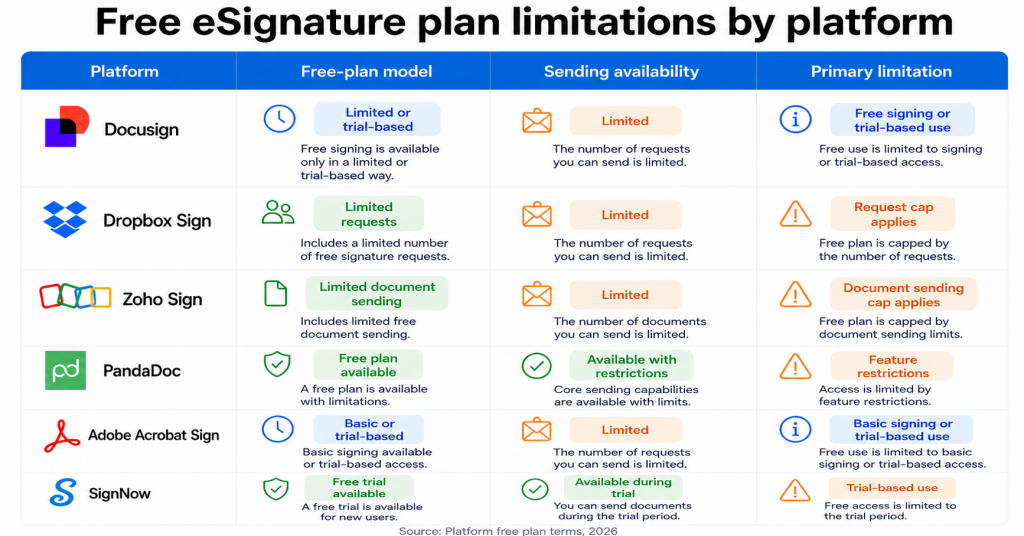
Popular paid platforms such as Docusign, Adobe Acrobat Sign, Dropbox Sign, PandaDoc, and Zoho Sign all support electronic signatures for business and personal use. Users often find them while searching for a free electronic signature tool because these providers may offer limited free functionality, such as a free plan, a free account, or a free trial.
These free options are useful when someone needs to test the signing process, create an online signature, upload a PDF file, add a signature image, or sign documents online before choosing a paid plan. They can also work for occasional personal tasks, such as electronically signing documents, downloading completed PDFs, or sending a small number of signature requests.
However, the free functionality inside paid eSignature solutions is usually limited. Common restrictions may apply to:
- The number of documents or signature requests you can send
- Access to reusable templates
- Signing order and advanced routing
- Team management
- Custom branding
- Bulk send
- Automated workflows
- Integrations with business systems
- Detailed audit trails
- Compliance support
- Advanced signer identity verification
This does not make these platforms “free tools.” They are paid solutions with limited free entry points. That distinction matters for businesses. A free plan or trial can help users evaluate the product, sign a few documents, or complete a simple agreement. But once a team needs to send agreements regularly, collect signatures from multiple users, track document status, manage many documents, or certify documents with stronger evidence, a paid plan is usually required.
Are free electronic signatures legally binding?
Yes, electronic signatures can be legally binding. Under the US ESIGN Act, a signature, contract, or record cannot be denied legal effect solely because it is electronic. In the EU, eIDAS defines several levels of electronic signatures, and a qualified electronic signature has the same legal effect as a handwritten signature.
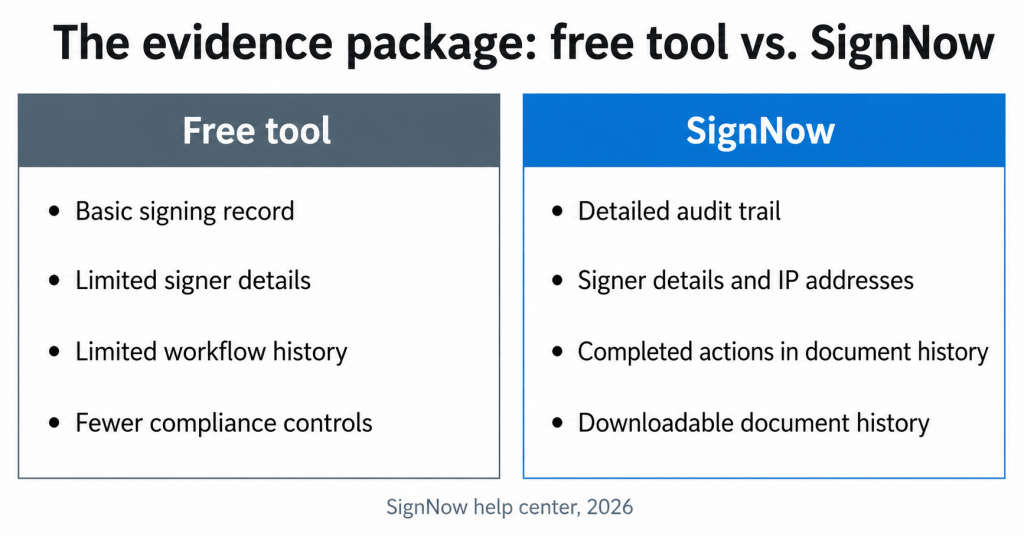
The important distinction is between legal validity and legal defensibility. A typed name, drawn signature, or uploaded signature image may show intent to sign. But if an agreement is challenged later, the stronger question becomes: can you prove who signed, when they signed, which device or IP address was used, and whether the digital documents were changed after signing?
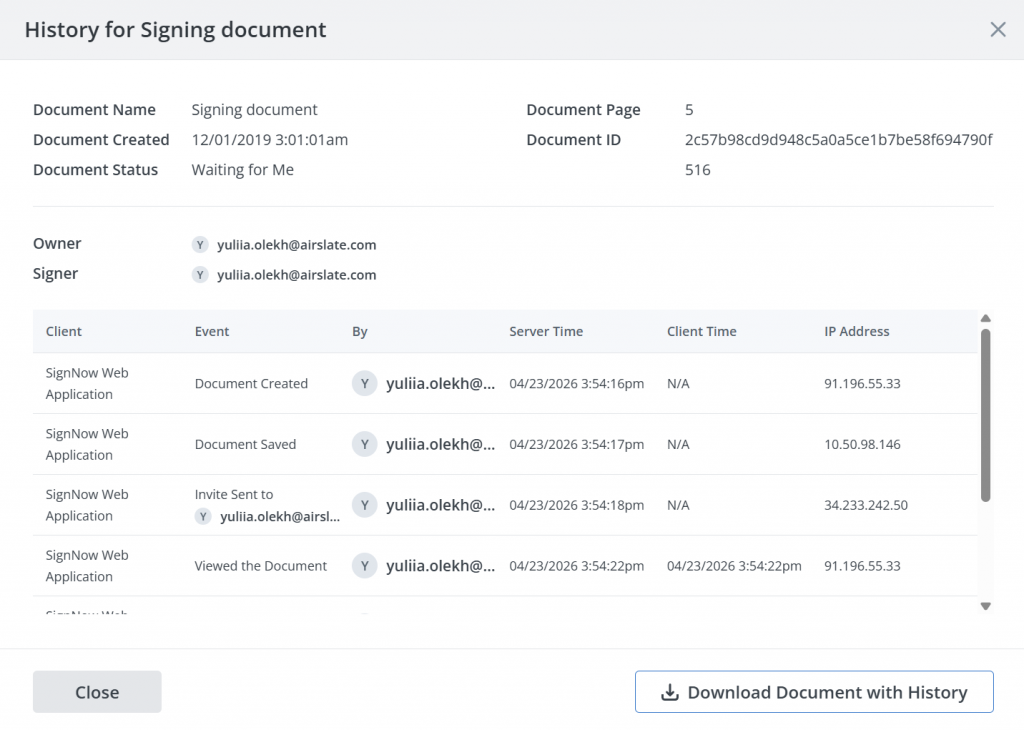
That is where audit trails matter. You can read more about their practical value in our blog: What is an audit trail in electronic signatures? SignNow’s Document History records timestamps, signer details, IP addresses, and completed actions in chronological order. Users can view the history inside SignNow or download a signed document with its full history attached.
For personal files, a basic free electronic signature may be enough. For contracts, sales agreements, HR forms, financial documents, healthcare forms, and other business records, a secure platform with detailed audit trails is safer.
Security and compliance gaps in free eSignature tools
Free eSignature tools are usually designed for convenience, not regulated document workflows. That matters for industries where document signing involves personal data, health data, financial records, contracts, or other sensitive files.
A business may need more than a way to eSign documents, for example:
- Encrypted storage and transmission
- Detailed audit trails
- Access controls
- Signer identity data
- Digital certificates or stronger authentication
- Retention controls
- Compliance documentation
- Administrative controls for users and teams
SignNow’s security and compliance support secure electronic signatures, GDPR-related controls, SOC 2 Type II reporting, HIPAA-related workflows, and 21 CFR Part 11 use cases.
Feature comparison: What businesses sacrifice for free
| Feature | Typical free electronic signature tool | SignNow for business workflows |
| Document signing | Usually supports basic signing for PDFs or uploaded files | Lets users sign documents, send documents for signature, and manage signing requests |
| Monthly document use | Often limited by document, sender, or feature caps | Built for teams that need recurring document sending and more structured signing workflows |
| Templates | May offer limited or no reusable templates | Supports reusable templates for frequently used documents |
| Signature fields | Usually includes basic signature and text fields | Supports signature fields and form fields for repeatable workflows |
| Audit trails | May include basic activity history | Provides document history and audit trail details, including timestamps, signer information, IP addresses, and completed actions |
| Branding | Free tools often include vendor branding or restrict customization | Branding options are available on select paid plans |
| Mobile use | Varies by provider and plan | Supports mobile signing through iOS and Android apps |
| Automated workflows | Usually limited or unavailable in free tools | Workflow automation is available through advanced features, integrations, and higher-tier options |
| Compliance support | Often limited to basic eSignature legality | Offers security and compliance options for business use, with advanced compliance documentation available on eligible plans |
| Free trial | May be available, depending on the provider | Offers a free trial with no credit card required |
SignNow offers a credit-card-free trial that includes core features like document uploads, signature field additions, and signer invitations. This makes it a practical choice for teams that have outgrown free e-signature apps but still want to avoid hidden fees, complicated setups, or the hassle of printing and scanning.
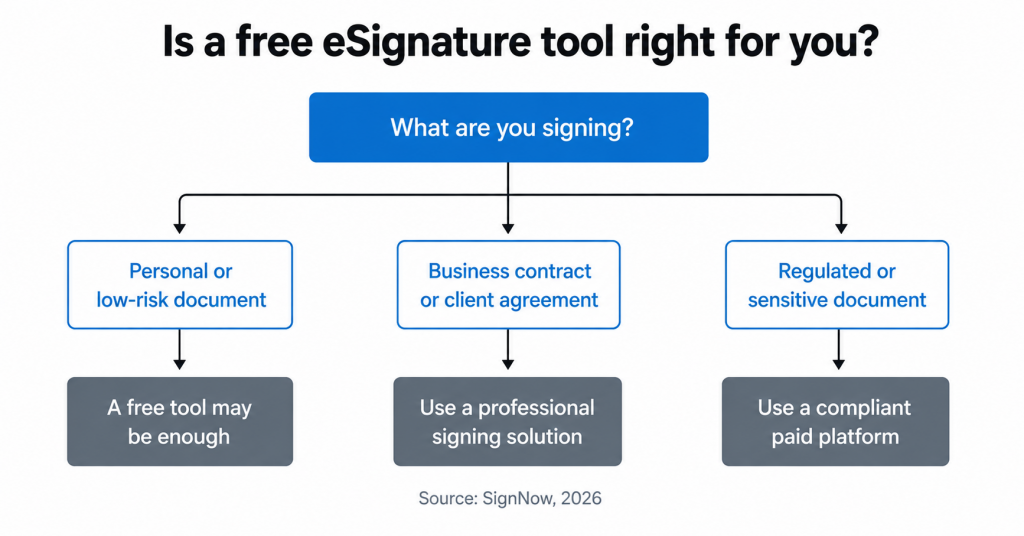
When to use a free tool vs. when to upgrade
A free electronic signature tool is usually enough when you need to sign one document, create your own signature for future use, or complete a personal PDF file without extra workflow needs.
When a free tool is enough
Use a free tool when you need to:
- Add an online signature to a personal form
- Sign documents online once in a while
- Upload, sign, and download simple PDFs
- Create a signature image for future use
- Test electronic signatures before choosing paid plans
- Avoid printing and scanning paper documents
When to upgrade
Upgrade when your business needs to:
- Send agreements regularly
- Collect signatures from multiple people
- Track signature requests and instant notifications
- Manage many documents across users or departments
- Reuse templates for contracts or onboarding forms
- Add signing order, role-based fields, or advanced eSignature controls
- Secure signing with stronger audit trails
- Support compliance requirements
- Close deals faster without manual follow-up
- Use advanced features like document notarization
Free tools can save time at the beginning. Paid plans become more valuable when document signing is part of a repeatable business workflow.
Why growing businesses choose SignNow
Free eSignature tools are great for one-off signing, but growing teams need more. You need to securely send and track documents, manage users, and keep agreements organized.
SignNow does all that and more. We offer robust tools to manage your entire signing workflow, from uploading files and creating templates to tracking document history. This means fewer manual steps, less paper, faster turnaround times, and more control over your contracts.
To move beyond a basic free tool to a secure, compliant, and scalable platform, start your free SignNow trial today.
Glossary
Audit trail: A record of actions taken on a document, such as viewing, signing, sending, or completing the agreement. Strong audit trails may include timestamps, signer details, IP addresses, and completed actions.
Digital certificate: A certificate used in digital signatures to help verify signer identity and protect document integrity.
Digital documents: Files that are created, uploaded, signed, sent, stored, or downloaded electronically instead of handled on paper.
Digital signature: A technical method that uses cryptography to help secure an electronic signature and verify whether a document has changed.
eSignature: A common shorthand for electronic signature.
eIDAS: The EU regulation that defines electronic identification and trust services, including simple, advanced, and qualified electronic signatures.
ESIGN Act: The US law that gives electronic signatures and electronic records legal effect for many transactions.
Legally binding: A term used when an agreement or signature can have legal effect, assuming the signing process meets applicable legal requirements.
Signature field: A field placed in a document where a signer adds their signature.
Signature request: A request sent to one or more recipients asking them to review and sign a document.
Frequently asked questions
Is a free electronic signature legally binding?
Yes. In the US, the ESIGN Act supports the legal validity of electronic signatures and electronic records. A free electronic signature can be legally binding when the signer clearly intends to sign, and the process meets applicable legal requirements.
What is the difference between electronic signatures and digital signatures?
Electronic signatures are a broad category. They can include a typed name, drawn signature, uploaded signature image, checkbox, or online signature added to a document. Digital signatures are a more technical method that uses encryption and digital certificates to help verify document integrity and signer identity.
What are the limits of free electronic signature software?
Common limits include document caps, fewer signature requests, limited templates, basic audit trails, limited team controls, no custom branding, fewer integrations, and limited compliance support. A free plan may work for occasional signing, but it is often too restrictive for businesses that send documents every week.
Can I type my name as my own signature?
Yes, a typed name can function as an electronic signature when it shows intent to sign. For higher-value contracts, it is safer to use an eSignature platform that records signer details, timestamps, IP addresses, and actions taken during signing.
What is the best electronic signature app mobile users can rely on?
The best electronic signature app mobile users choose depends on volume, security, and workflow needs. For occasional personal signing, a free electronic signature app may be enough. For small businesses and teams, SignNow is a stronger option because it supports mobile document signing, signature requests, templates, audit trails, and secure workflows.
Sources
- ESIGN Act — Federal Trade Commission
- Docusign official website
- Dropbox Sign official website
- Adobe Acrobat Sign release notes
- PandaDoc official website
- Zoho Sign official web page
- TL;DR: The trade-offs of free electronic signature software
- The most common eSignature platforms and their free functionality
- Are free electronic signatures legally binding?
- Security and compliance gaps in free eSignature tools
- Feature comparison: What businesses sacrifice for free
- When to use a free tool vs. when to upgrade
- Why growing businesses choose SignNow
- Glossary
- Frequently asked questions
- Sources
