United Airlines Claim Form


What is the United Airlines Claim Form
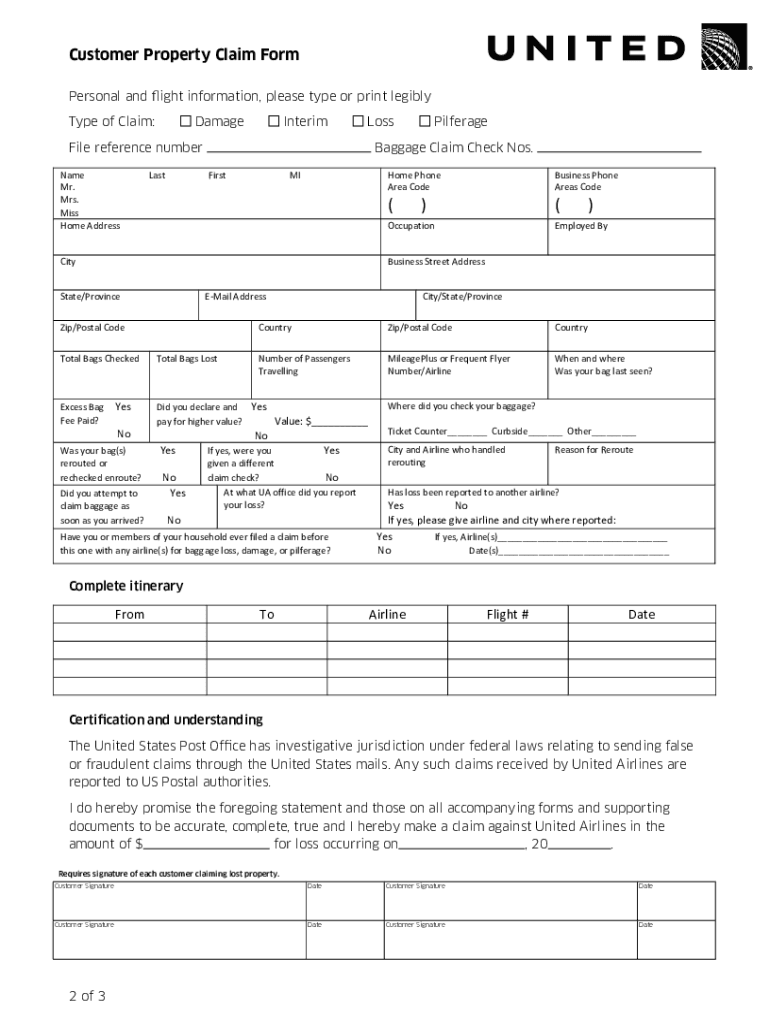
The United Airlines claim form is a specific document designed for passengers to report issues related to baggage, such as loss, damage, or delays. This form allows travelers to formally request compensation or reimbursement for their inconveniences. It is essential for ensuring that claims are processed efficiently and in accordance with airline policies. The form is typically available in both digital and physical formats, making it accessible for all passengers.
How to Use the United Airlines Claim Form
Using the United Airlines claim form involves several straightforward steps. First, gather all necessary information, including your flight details, baggage tag numbers, and any receipts for expenses incurred due to baggage issues. Next, fill out the form accurately, providing all required details to avoid delays in processing. Once completed, submit the form through the designated channels, either online or via mail, depending on your preference. It is advisable to keep copies of all submitted documents for your records.
Steps to Complete the United Airlines Claim Form
Completing the United Airlines claim form requires careful attention to detail. Start by entering your personal information, including your name, contact details, and flight information. Provide a clear description of the issue with your baggage, specifying whether it was lost, damaged, or delayed. Attach any supporting documents, such as receipts for necessary purchases or photographs of damaged items. Finally, review the form for accuracy before submitting it to ensure a smooth claims process.
Required Documents
To successfully file a claim using the United Airlines claim form, certain documents are necessary. These may include:
- Your flight itinerary or boarding pass
- Baggage claim ticket or tag
- Receipts for any expenses incurred due to baggage issues
- Photographic evidence of damaged baggage, if applicable
Having these documents ready will facilitate a quicker resolution of your claim.
Form Submission Methods
The United Airlines claim form can be submitted through various methods, catering to different passenger preferences. You can choose to submit the form online via the United Airlines website, which often provides a faster processing time. Alternatively, you may opt to mail the completed form to the appropriate claims department address. In some cases, in-person submissions may be possible at select airport locations. Always check the latest submission guidelines on the United Airlines website for the most accurate information.
Legal Use of the United Airlines Claim Form
The legal use of the United Airlines claim form is governed by specific airline policies and federal regulations. By submitting the form, passengers agree to the terms outlined by United Airlines regarding baggage claims. It is crucial to ensure that all information provided is truthful and accurate, as any discrepancies may lead to claim denial. Understanding your rights as a passenger and the airline's obligations can help navigate the claims process effectively.
Quick guide on how to complete united airline claim form
Uncover how to effortlessly navigate through the United Airlines Claim Form completion with this simple guide
eFiling and digitally completing documents is becoming increasingly favored and the preferred choice for a diverse range of users. It provides numerous advantages over traditional printed materials, such as convenience, time savings, enhanced precision, and security.
With tools like airSlate SignNow, you can find, modify, sign, and improve and transmit your United Airlines Claim Form without getting mired in endless printing and scanning. Follow this brief tutorial to begin and finalize your form.
Utilize these steps to obtain and complete United Airlines Claim Form
- Begin by clicking the Get Form button to launch your document in our editor.
- Pay attention to the green indicator on the left that highlights required fields so you don’t miss them.
- Employ our advanced features to annotate, modify, sign, secure, and enhance your document.
- Protect your file or convert it into a fillable format using the options on the right panel.
- Review the document and verify it for mistakes or inconsistencies.
- Press DONE to complete the editing process.
- Change the name of your form or leave it as it is.
- Select the storage service where you want to save your document, send it via USPS, or click the Download Now button to save your file.
If United Airlines Claim Form isn’t what you needed, you can explore our extensive array of pre-imported templates that you can complete with minimal effort. Check out our solution today!
Create this form in 5 minutes or less
FAQs
-
How does entering the USA as a tourist, with a visa waiver, work?
Entering the USA with the visa waiver letter is possible if you have a confirmation letter from the college or university. It is really important to deal with the information and to gather all the necessary facts about the visa documents and the application process. Getting a tourist visa to the USA is really complicated, you would have to try really hard and to have an impeccable reputation.Here are some recommendations which can help you to get a visa:prepare all the documents in advance, some of them may need translation and it takes a lot of timegather some information on that basis and get to know about the experience of other peopleget a confirmation letter and do not forget to book a hotel and your ticket backThese things can improve your visa application but they do not guarantee you the 100% result. So, get to know more
-
How can I claim the VAT amount for items purchased in the UK? Do I need to fill out any online forms or formalities to claim?
Easy to follow instructions can be found here Tax on shopping and servicesThe process works like this.Get a VAT 407 form from the retailer - they might ask for proof that you’re eligible, for example your passport.Show the goods, the completed form and your receipts to customs at the point when you leave the EU (this might not be in the UK).Customs will approve your form if everything is in order. You then take the approved form to get paid.The best place to get the form is from a retailer on the airport when leaving.
-
In what cases do you have to fill out an insurance claim form?
Ah well let's see. An insurance claim form is used to make a claim against your insurance for financial, repair or replacement of something depending on your insurance. Not everything will qualify so you actually have to read the small print.
-
How do I fill out the disability forms so well that my claim is approved?
Contact Barbara Case, the founder of USA: Providing Free Advocacy & Support She's incredible!
Create this form in 5 minutes!
How to create an eSignature for the united airline claim form
How to create an eSignature for the United Airline Claim Form in the online mode
How to make an electronic signature for the United Airline Claim Form in Google Chrome
How to make an electronic signature for putting it on the United Airline Claim Form in Gmail
How to generate an electronic signature for the United Airline Claim Form straight from your smartphone
How to generate an electronic signature for the United Airline Claim Form on iOS
How to generate an electronic signature for the United Airline Claim Form on Android
People also ask
-
What is the role of airSlate SignNow in managing united baggage claim documents?
airSlate SignNow streamlines the process of managing united baggage claim documents by providing an easy-to-use platform to create, send, and eSign essential documents. This ensures that all information regarding baggage claims is securely stored and accessible in real-time, making the process much more efficient for both travelers and airlines.
-
How does airSlate SignNow enhance the customer experience for united baggage claim?
With airSlate SignNow, customers can quickly fill out and sign united baggage claim forms online, eliminating the need for paperwork that can often be lost or delayed. This not only speeds up the claim process but also enhances customer satisfaction by providing instant access to claim updates and confirmations.
-
Are there any costs associated with using airSlate SignNow for united baggage claim?
airSlate SignNow offers a cost-effective solution with various pricing plans that cater to different business needs. By investing in this technology, companies can signNowly reduce operational costs associated with the traditional handling of united baggage claim forms, making it a worthwhile financial decision.
-
How does airSlate SignNow integrate with existing systems for united baggage claim?
airSlate SignNow easily integrates with various existing systems used in the airline industry to manage united baggage claim processes. Whether using CRM systems or other document management software, airSlate SignNow ensures a seamless flow of information, simplifying workflows for airlines and their customers.
-
What security features does airSlate SignNow offer for united baggage claim documents?
Security is paramount with airSlate SignNow, especially for sensitive united baggage claim documents. The platform uses advanced encryption and authentication measures to ensure that all data is protected, giving both customers and airlines peace of mind when handling claims.
-
Can airSlate SignNow be used for international united baggage claim issues?
Yes, airSlate SignNow is suitable for handling international united baggage claim issues, as it accommodates multiple languages and compliance with international regulations. This broadens the application of the platform, enabling airlines to manage claims more efficiently across different regions.
-
What benefits does airSlate SignNow provide for baggage handlers dealing with united baggage claims?
For baggage handlers, airSlate SignNow simplifies the collection and processing of united baggage claims. The intuitive interface allows them to quickly access, update, and track claims electronically, which reduces errors and improves turnaround time, ultimately benefiting the customer experience.
Get more for United Airlines Claim Form
- Treasury michigan income tax filing requirements of flow form
- Form 4582 2011 michigan business tax penalty and interest
- Form 1019 notice of assessment taxable state of michigan michigan
- Michigan withholding exemption certificate form oakland
- Michigan 4567 form 2016
- Mi 1040cr 2 2016 form
- Principal residence exemption pre audit questionnaire principal residence exemption pre audit questionnaire form
- D 1040nr 2015 form
Find out other United Airlines Claim Form
- How To Integrate Sign in Banking
- How To Use Sign in Banking
- Help Me With Use Sign in Banking
- Can I Use Sign in Banking
- How Do I Install Sign in Banking
- How To Add Sign in Banking
- How Do I Add Sign in Banking
- How Can I Add Sign in Banking
- Can I Add Sign in Banking
- Help Me With Set Up Sign in Government
- How To Integrate eSign in Banking
- How To Use eSign in Banking
- How To Install eSign in Banking
- How To Add eSign in Banking
- How To Set Up eSign in Banking
- How To Save eSign in Banking
- How To Implement eSign in Banking
- How To Set Up eSign in Construction
- How To Integrate eSign in Doctors
- How To Use eSign in Doctors