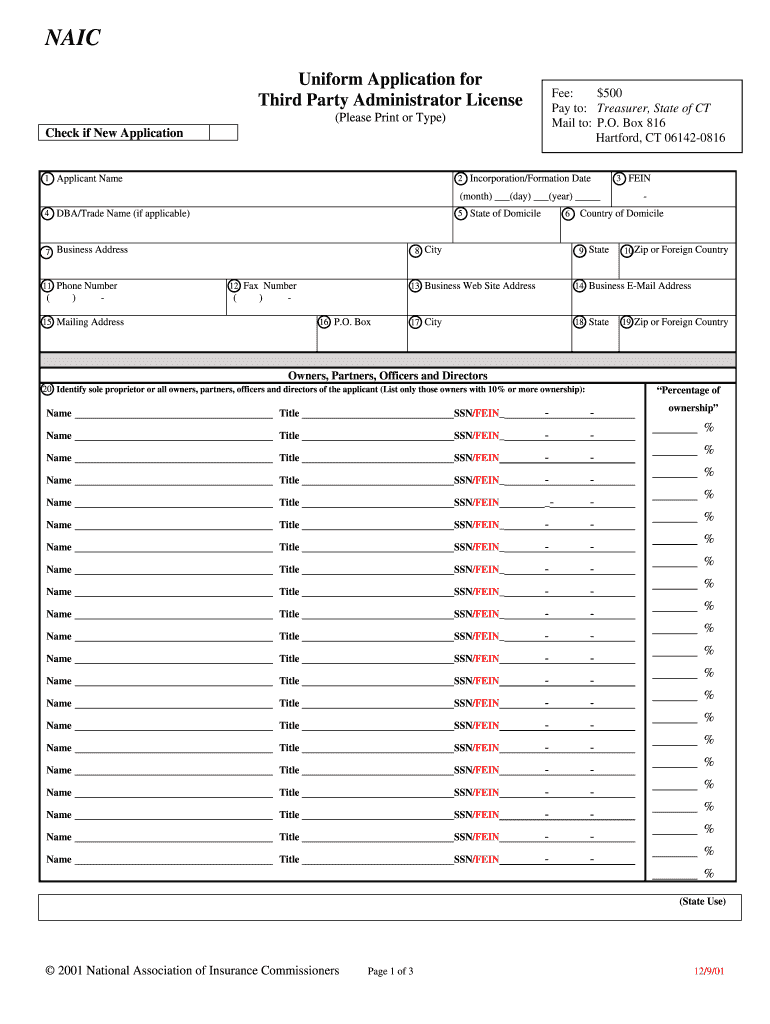
Naic Uniform Application for Third Party Administrator


What is the NAIC Uniform Application for Third Party Administrator
The NAIC Uniform Application for Third Party Administrator is a standardized form used by businesses and individuals seeking to operate as third-party administrators (TPAs) in the insurance industry. This application is essential for ensuring compliance with state regulations and is recognized across multiple jurisdictions. It collects vital information about the applicant's business operations, financial standing, and management structure, facilitating a streamlined review process by state regulators.
How to Use the NAIC Uniform Application for Third Party Administrator
Using the NAIC Uniform Application for Third Party Administrator involves several key steps. First, gather all necessary documentation and information required to complete the application. This includes details about your business structure, ownership, and any relevant financial records. Next, fill out the application accurately, ensuring that all sections are completed to avoid delays. Once completed, submit the application to the appropriate state regulatory authority, either electronically or via mail, depending on the state's submission guidelines.
Steps to Complete the NAIC Uniform Application for Third Party Administrator
Completing the NAIC Uniform Application for Third Party Administrator requires careful attention to detail. Follow these steps:
- Review the application form to understand the required information.
- Gather necessary documents, such as proof of financial stability and business licenses.
- Complete each section of the application, providing accurate and truthful information.
- Double-check for any errors or omissions before submission.
- Submit the application to the relevant state authority, adhering to their specific submission guidelines.
Legal Use of the NAIC Uniform Application for Third Party Administrator
The legal use of the NAIC Uniform Application for Third Party Administrator is governed by various state laws and regulations. It is crucial that applicants ensure compliance with these legal requirements to avoid potential penalties or rejection of their application. The application must be filled out truthfully, as any misrepresentation can lead to legal repercussions. Additionally, maintaining compliance with federal and state regulations related to insurance administration is essential for lawful operation as a TPA.
Eligibility Criteria
To be eligible for the NAIC Uniform Application for Third Party Administrator, applicants must meet specific criteria set by state regulators. Generally, applicants should have a solid financial foundation, relevant industry experience, and a clear understanding of the insurance landscape. It is important to review the specific requirements of each state, as they may vary, to ensure that all eligibility criteria are satisfied before submitting the application.
Required Documents
When completing the NAIC Uniform Application for Third Party Administrator, several documents are typically required. These may include:
- Proof of business registration and licenses
- Financial statements demonstrating the applicant's financial stability
- Information about key management personnel and their qualifications
- Details of any previous regulatory actions or disciplinary history
- Compliance documentation with relevant state and federal regulations
Form Submission Methods
The NAIC Uniform Application for Third Party Administrator can be submitted through various methods, depending on the state’s regulations. Common submission methods include:
- Online submission through the state’s regulatory portal
- Mailing a physical copy of the application to the appropriate regulatory office
- In-person submission at designated regulatory offices, if applicable
Quick guide on how to complete naic uniform application for third party administrator
Complete Naic Uniform Application For Third Party Administrator effortlessly on any device
Digital document management has gained traction among businesses and individuals alike. It serves as an excellent environmentally friendly alternative to conventional printed and signed documents, allowing you to locate the correct form and securely save it online. airSlate SignNow equips you with all the necessary tools to create, edit, and electronically sign your documents quickly and without any hold-ups. Handle Naic Uniform Application For Third Party Administrator on any device using the airSlate SignNow apps available for Android or iOS and streamline any document-related process today.
How to edit and electronically sign Naic Uniform Application For Third Party Administrator with ease
- Find Naic Uniform Application For Third Party Administrator and click Get Form to initiate the process.
- Utilize the tools we provide to complete your document.
- Emphasize pertinent sections of the documents or redact sensitive information with the tools that airSlate SignNow specifically offers for this purpose.
- Create your electronic signature using the Sign tool, which takes just seconds and carries the same legal validity as a conventional handwritten signature.
- Review all the details and click on the Done button to save your modifications.
- Select your preferred method of delivering your form, whether by email, SMS, or invitation link, or download it to your computer.
Eliminate concerns over lost or misplaced documents, tedious form searches, or mistakes that necessitate printing new document copies. airSlate SignNow caters to your document management needs in just a few clicks from any device you choose. Edit and electronically sign Naic Uniform Application For Third Party Administrator while ensuring excellent communication throughout the form preparation process with airSlate SignNow.
Create this form in 5 minutes or less
FAQs
-
How can you get financial aid if your parents won't fill out their part and you don't qualify for third party loans?
In that case, likely the only aid you can get is federal loans limited to 5,500 freshman year and increasing about 1k each year. If you speak to your financial aid office they may be able to arrange that, but they may require that your parents sign a form that they refuse to fill out your aid forms. You will not be able to get any federal Pell Grant or Grants from the college. However, in many cases you would be eligible for Merit Aid or Scholarships that do not depend on family income. If you have good enough test scores there are some colleges around the country that will give a lot of aid for that. They may not always be in the most desirable areas but the important thing is that you will get a college degree.
-
How long does it typically take to receive a response after applying to a job online? Does it vary by industry, or is it typically consistent?
Thanks for the A2A!As Stephen and Ingrid have already said, you won't get a reply unless they want to bring you in for an interview. Sometimes the process is fast, where applicants get notification in a few days for an interview, other times it can be a long time. I've heard of friends getting invited to interviews months after submitting applications. Some employers advertise positions, put those applications in a big database, then search them when there is an opening. A want ad doesn't always mean they have an open position right now. I know it sucks not getting any feedback. An automated email saying "nope, we don't want to interview you" would be nice so at least you know where you stand. Unfortunately that is one of the many faults in the hiring process. Best of luck!
-
How do I fill out the online application for a tourist visa to Canada for a family, one account and two applications or two accounts for two applications?
One account for all applicants is adequate assuming others are close family members. if they are not related in any way, ask them to create separate account and apply on their own. You can keep yourself as primary applicant and add family members as secondary. Just follow instructions on the website- very simpleApplication for Visitor Visa (Temporary Resident Visa - TRV)
Create this form in 5 minutes!
How to create an eSignature for the naic uniform application for third party administrator
How to make an eSignature for the Naic Uniform Application For Third Party Administrator online
How to generate an eSignature for your Naic Uniform Application For Third Party Administrator in Chrome
How to create an electronic signature for signing the Naic Uniform Application For Third Party Administrator in Gmail
How to make an eSignature for the Naic Uniform Application For Third Party Administrator right from your smartphone
How to generate an electronic signature for the Naic Uniform Application For Third Party Administrator on iOS
How to generate an eSignature for the Naic Uniform Application For Third Party Administrator on Android OS
People also ask
-
What is the Naic Uniform Application For Third Party Administrator?
The Naic Uniform Application For Third Party Administrator is a standardized form used across the insurance industry for licensing third-party administrators. It simplifies the application process by providing a uniform structure, ensuring compliance with regulatory requirements. Using this application helps streamline operations and enhances the efficiency of onboarding new partners.
-
How can airSlate SignNow help with the Naic Uniform Application For Third Party Administrator?
airSlate SignNow provides an efficient platform for electronically signing and sending the Naic Uniform Application For Third Party Administrator. Our solution allows you to complete, sign, and store documents securely, reducing turnaround times signNowly. This ensures that your licensing processes are not only compliant but also expedited.
-
What features does airSlate SignNow offer for managing the Naic Uniform Application For Third Party Administrator?
airSlate SignNow offers a variety of features for managing the Naic Uniform Application For Third Party Administrator, including customizable templates, secure eSignature capabilities, and automated workflows. These features allow you to easily track the status of applications and ensure that all necessary documentation is completed accurately. Additionally, our platform enables real-time collaboration among stakeholders.
-
Is there a cost associated with using airSlate SignNow for the Naic Uniform Application For Third Party Administrator?
Yes, airSlate SignNow offers flexible pricing plans that cater to different business needs when working with the Naic Uniform Application For Third Party Administrator. Our plans are designed to be cost-effective, ensuring that you can manage your document signing processes without overspending. You can choose a plan that best fits your organization’s size and document volume.
-
What are the benefits of using airSlate SignNow for the Naic Uniform Application For Third Party Administrator?
Using airSlate SignNow for the Naic Uniform Application For Third Party Administrator provides numerous benefits, including increased efficiency, reduced paperwork, and enhanced compliance. Our platform allows for quicker processing times, which can help your business stay ahead of regulatory deadlines. Additionally, the secure nature of our eSignature solution ensures that your applications are protected.
-
Does airSlate SignNow integrate with other software for the Naic Uniform Application For Third Party Administrator?
Absolutely! airSlate SignNow offers seamless integrations with various software applications to streamline the process of completing the Naic Uniform Application For Third Party Administrator. Whether you are using CRM systems, document management tools, or other business applications, our integrations help enhance your workflow and increase productivity.
-
Can I track the status of my Naic Uniform Application For Third Party Administrator with airSlate SignNow?
Yes, airSlate SignNow allows you to track the status of your Naic Uniform Application For Third Party Administrator in real-time. You can receive notifications when documents are viewed, signed, or require your attention, ensuring that you are always updated on the application's progress. This feature helps you manage your tasks efficiently and reduces any potential delays.
Get more for Naic Uniform Application For Third Party Administrator
Find out other Naic Uniform Application For Third Party Administrator
- eSignature Washington Government Arbitration Agreement Simple
- Can I eSignature Massachusetts Finance & Tax Accounting Business Plan Template
- Help Me With eSignature Massachusetts Finance & Tax Accounting Work Order
- eSignature Delaware Healthcare / Medical NDA Secure
- eSignature Florida Healthcare / Medical Rental Lease Agreement Safe
- eSignature Nebraska Finance & Tax Accounting Business Letter Template Online
- Help Me With eSignature Indiana Healthcare / Medical Notice To Quit
- eSignature New Jersey Healthcare / Medical Credit Memo Myself
- eSignature North Dakota Healthcare / Medical Medical History Simple
- Help Me With eSignature Arkansas High Tech Arbitration Agreement
- eSignature Ohio Healthcare / Medical Operating Agreement Simple
- eSignature Oregon Healthcare / Medical Limited Power Of Attorney Computer
- eSignature Pennsylvania Healthcare / Medical Warranty Deed Computer
- eSignature Texas Healthcare / Medical Bill Of Lading Simple
- eSignature Virginia Healthcare / Medical Living Will Computer
- eSignature West Virginia Healthcare / Medical Claim Free
- How To eSignature Kansas High Tech Business Plan Template
- eSignature Kansas High Tech Lease Agreement Template Online
- eSignature Alabama Insurance Forbearance Agreement Safe
- How Can I eSignature Arkansas Insurance LLC Operating Agreement