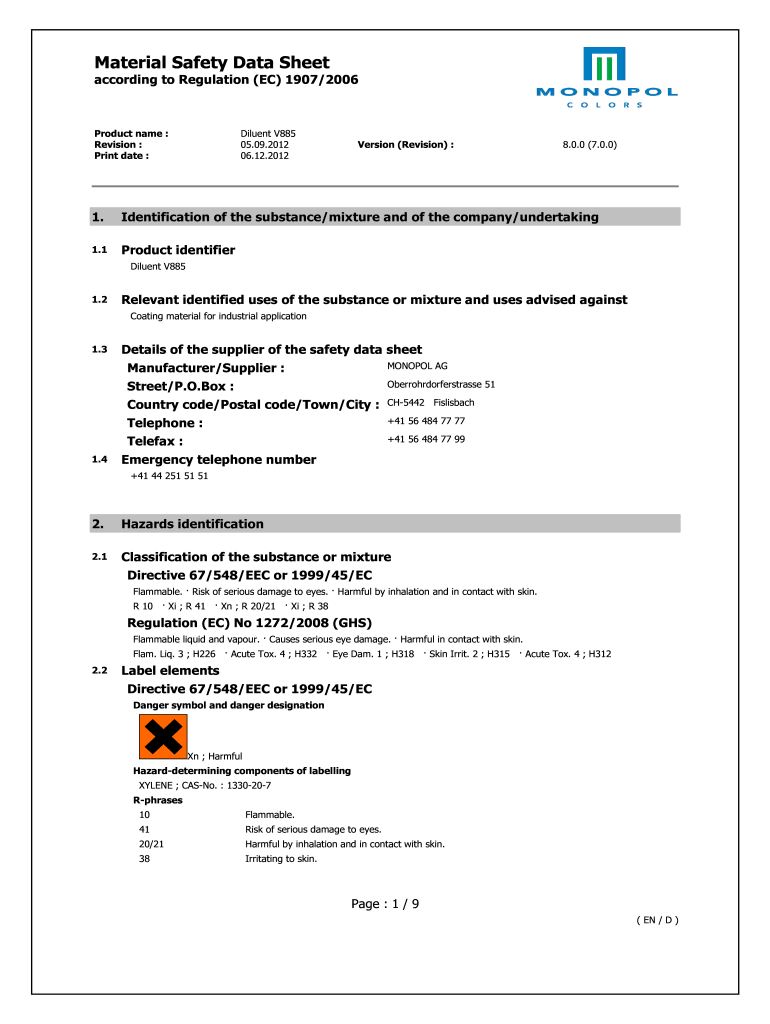
Material Safety Data Sheet Monopol Colors 2012


What is the Material Safety Data Sheet Monopol Colors
The Material Safety Data Sheet (MSDS) for Monopol Colors is a document that provides essential information regarding the properties, handling, and safety measures associated with the use of Monopol Colors products. This sheet is crucial for ensuring the safe use of chemical substances in various environments, including industrial and commercial settings. It typically includes details such as chemical composition, potential hazards, first aid measures, and guidelines for safe storage and disposal. Understanding the contents of the MSDS is vital for compliance with safety regulations and for protecting the health of workers and the environment.
How to use the Material Safety Data Sheet Monopol Colors
Using the Material Safety Data Sheet for Monopol Colors involves several key steps. First, familiarize yourself with the layout of the document, which is usually organized into sections covering various safety and handling information. When working with Monopol Colors, refer to the MSDS to identify any potential hazards associated with the product. This includes understanding the necessary personal protective equipment (PPE) required during use. Additionally, the MSDS provides guidance on emergency procedures, such as what to do in case of spills or exposure. Regularly consulting the MSDS ensures safe practices are maintained in the workplace.
Steps to complete the Material Safety Data Sheet Monopol Colors
Completing the Material Safety Data Sheet for Monopol Colors involves a systematic approach to ensure accuracy and compliance. Begin by gathering all relevant information about the product, including its chemical properties and any associated risks. Next, fill out each section of the MSDS, ensuring that all data is current and reflects the latest safety standards. It is important to include emergency contact information and any specific handling instructions. Once completed, review the document for completeness and accuracy before distributing it to all relevant personnel. Regular updates may be necessary as new information becomes available or as regulations change.
Key elements of the Material Safety Data Sheet Monopol Colors
The key elements of the Material Safety Data Sheet for Monopol Colors typically include the following sections:
- Identification: Product name, manufacturer details, and recommended uses.
- Hazard Identification: Potential health and environmental risks associated with the product.
- Composition: Chemical ingredients and their concentrations.
- First Aid Measures: Instructions for addressing exposure or accidents.
- Fire-Fighting Measures: Recommended extinguishing methods and hazards of combustion.
- Accidental Release Measures: Procedures for managing spills and leaks.
- Handling and Storage: Guidelines for safe use and storage conditions.
Legal use of the Material Safety Data Sheet Monopol Colors
The legal use of the Material Safety Data Sheet for Monopol Colors is governed by various regulations that require employers to provide this information to their employees. Under the Occupational Safety and Health Administration (OSHA) guidelines, employers must ensure that MSDSs are accessible to all workers who may be exposed to hazardous substances. Compliance with these regulations is essential to avoid penalties and ensure workplace safety. Additionally, the MSDS must be updated regularly to reflect any changes in safety data or regulations, maintaining its legal validity.
How to obtain the Material Safety Data Sheet Monopol Colors
Obtaining the Material Safety Data Sheet for Monopol Colors can be done through several methods. The most direct way is to contact the manufacturer or supplier of the product, who is required to provide the MSDS upon request. Many manufacturers also make MSDSs available on their websites, allowing users to download the document easily. Additionally, safety data can often be found through industry databases or safety organizations that compile MSDSs for various products. Ensuring access to the most current MSDS is crucial for maintaining safety standards in the workplace.
Quick guide on how to complete material safety data sheet monopol colors
Discover how to effortlessly navigate the Material Safety Data Sheet Monopol Colors completion with this simple guide
Filing and verifying forms online is becoming increasingly common and the preferred choice for a diverse array of clients. It offers numerous advantages over outdated paper documentation, such as convenience, time savings, enhanced precision, and security.
With tools like airSlate SignNow, you can find, adjust, signNow, enhance, and share your Material Safety Data Sheet Monopol Colors without getting stuck in endless printing and scanning. Follow this brief guide to begin and complete your form.
Follow these steps to obtain and complete Material Safety Data Sheet Monopol Colors
- Begin by clicking the Get Form button to access your form in our editor.
- Follow the green marker on the left that highlights required fields so you don’t miss them.
- Utilize our advanced features to annotate, edit, approve, secure, and enhance your form.
- Protect your document or transform it into a fillable form using the appropriate tab tools.
- Review the form and check it for errors or inconsistencies.
- Click on DONE to complete the editing process.
- Rename your document or leave it unchanged.
- Select the storage option you prefer to save your form, send it through USPS, or click the Download Now button to obtain your file.
If Material Safety Data Sheet Monopol Colors isn’t what you were looking for, you can explore our extensive library of pre-made templates that you can fill out with minimal effort. Check out our service today!
Create this form in 5 minutes or less
Find and fill out the correct material safety data sheet monopol colors
FAQs
-
My CA foundation exam is in November 2018 how will I get to know about the date sheet and how to fill the examination form and choose the examination centre? What materials are required to take in the examination centre?
all will be declared in clear and concise words in the institute website.Your foundation examination forms for nov 18 will be available after the results get out. They are on 20th July 2018.Registration for exams will be available after this date. Regarding the filling of exam form, the form will be online and self explanatory. You need not to think much of it. Choose the examination centre which is near to you, as it will lead to less travelling in the exam days. Materials to be taken to exam. Yourself, stationery calculator bottle of water and watch. Mobile phone Are not allowed inside roomAll instruction will be given in your hall ticket.
-
A Data Entry Operator has been asked to fill 1000 forms. He fills 50 forms by the end of half-an hour, when he is joined by another steno who fills forms at the rate of 90 an hour. The entire work will be carried out in how many hours?
Work done by 1st person = 100 forms per hourWork done by 2nd person = 90 forms per hourSo, total work in 1 hour would be = 190 forms per hourWork done in 5hours = 190* 5 = 950Now, remaining work is only 50 formsIn 1 hour or 60minutes, 190 forms are filled and 50 forms will be filled in = 60/190 * 50 = 15.7minutes or 16minutes (approximaty)Total time = 5hours 16minutes
-
What’s the title of a person who can take a complex Excel spreadsheet and turn it into a user friendly, intuitive form that’s easy to fill out? How can I hire someone with those skills? It contains , financial, quoting & engineering data.
Look for an SaaS developer, someone with JavaScript, PHP, and MySQL skills to create Cloud-hosted browser-based forms and reports who also has a modicum of financial analysis background.Dumping obsolete Excel client server architecture as soon as you can will be the best thing you can do to bring your operation into the 21st Century.
Create this form in 5 minutes!
How to create an eSignature for the material safety data sheet monopol colors
How to create an electronic signature for your Material Safety Data Sheet Monopol Colors online
How to create an electronic signature for your Material Safety Data Sheet Monopol Colors in Google Chrome
How to create an eSignature for signing the Material Safety Data Sheet Monopol Colors in Gmail
How to create an electronic signature for the Material Safety Data Sheet Monopol Colors straight from your smart phone
How to make an eSignature for the Material Safety Data Sheet Monopol Colors on iOS devices
How to make an electronic signature for the Material Safety Data Sheet Monopol Colors on Android devices
People also ask
-
What is a Material Safety Data Sheet for Monopol Colors?
A Material Safety Data Sheet (MSDS) for Monopol Colors provides detailed information about the safety and handling of these products. It outlines potential hazards, safe handling practices, and emergency procedures. Understanding the MSDS is crucial for ensuring the safe use of Monopol Colors in various applications.
-
How can I obtain the Material Safety Data Sheet for Monopol Colors?
You can easily obtain the Material Safety Data Sheet for Monopol Colors by visiting our website and navigating to the product section. We provide downloadable MSDS files for all our Monopol Colors products. If you need further assistance, feel free to contact our support team.
-
Why is it important to read the Material Safety Data Sheet for Monopol Colors?
Reading the Material Safety Data Sheet for Monopol Colors is essential for understanding the risks associated with the product. The MSDS contains critical information on handling, storage, and emergency measures, ensuring that users can operate safely and comply with regulations. It is a vital resource for both safety and compliance.
-
Are there any costs associated with accessing the Material Safety Data Sheet for Monopol Colors?
Accessing the Material Safety Data Sheet for Monopol Colors is completely free. We believe in providing our customers with essential safety information without any barriers. You can download the MSDS directly from our site at no cost.
-
How does airSlate SignNow facilitate the signing of MSDS documents?
airSlate SignNow empowers businesses to eSign documents, including Material Safety Data Sheets for Monopol Colors, with ease. Our platform allows users to securely send, sign, and store these documents, streamlining compliance and record-keeping. Enjoy a cost-effective solution that simplifies your document management.
-
Can I integrate airSlate SignNow with other applications for managing Material Safety Data Sheets?
Yes, airSlate SignNow offers seamless integrations with various applications to enhance your workflow. You can easily connect our platform with document management systems or compliance software to manage Material Safety Data Sheets for Monopol Colors efficiently. This integration helps maintain organization and accessibility.
-
What features does airSlate SignNow offer for handling Material Safety Data Sheets?
airSlate SignNow provides a range of features specifically designed for handling Material Safety Data Sheets, including customizable templates, secure eSigning, and automated workflows. These features ensure that the MSDS for Monopol Colors can be managed effectively, reducing the risk of errors and improving compliance.
Get more for Material Safety Data Sheet Monopol Colors
- Oregon landlord tenant 497324100 form
- Name change instructions and forms package for an adult oregon
- Oregon name change instructions and forms package for a minor oregon
- Petition for adult family name change oregon form
- Oregon family form
- Notice name change hearing form
- Name change adult 497324106 form
- General judgment for change of name and order to post for adult family oregon form
Find out other Material Safety Data Sheet Monopol Colors
- Electronic signature Texas Car Lease Agreement Template Easy
- Electronic signature New Mexico Articles of Incorporation Template Free
- Electronic signature New Mexico Articles of Incorporation Template Easy
- Electronic signature Oregon Articles of Incorporation Template Simple
- eSignature Montana Direct Deposit Enrollment Form Easy
- How To Electronic signature Nevada Acknowledgement Letter
- Electronic signature New Jersey Acknowledgement Letter Free
- Can I eSignature Oregon Direct Deposit Enrollment Form
- Electronic signature Colorado Attorney Approval Later
- How To Electronic signature Alabama Unlimited Power of Attorney
- Electronic signature Arizona Unlimited Power of Attorney Easy
- Can I Electronic signature California Retainer Agreement Template
- How Can I Electronic signature Missouri Unlimited Power of Attorney
- Electronic signature Montana Unlimited Power of Attorney Secure
- Electronic signature Missouri Unlimited Power of Attorney Fast
- Electronic signature Ohio Unlimited Power of Attorney Easy
- How Can I Electronic signature Oklahoma Unlimited Power of Attorney
- How Do I Electronic signature South Carolina Unlimited Power of Attorney
- How Can I Electronic signature Alaska Limited Power of Attorney
- How To Electronic signature Massachusetts Retainer Agreement Template