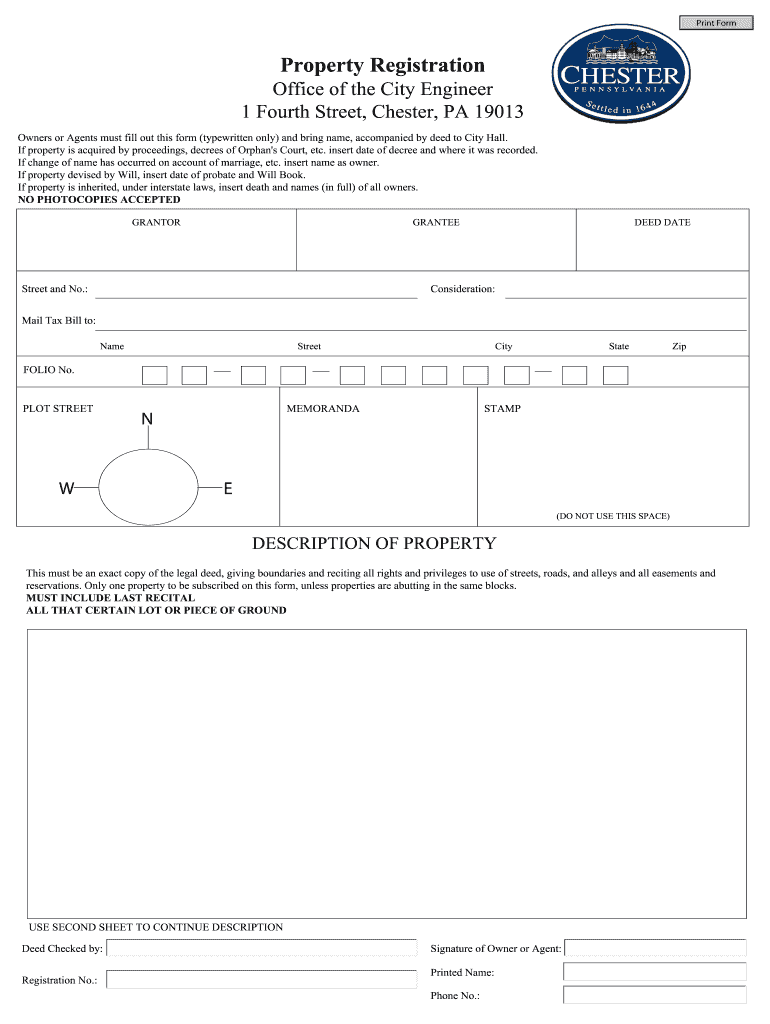
Property Registration Form


What is the Property Registration Form
The property registration form is a crucial document used to officially record ownership of real estate. This form typically includes essential details such as the names of the buyer and seller, the legal description of the property, its address, and the purchase price. It serves as a public record that establishes legal ownership and can be referenced in future transactions or disputes. Understanding the purpose of this form is vital for anyone involved in buying or selling property.
Key Elements of the Property Registration Form
When filling out the property registration form, several key elements must be included to ensure its validity. These elements typically consist of:
- Buyer and Seller Information: Full names and contact details of all parties involved.
- Property Description: A detailed legal description of the property, including its address and boundaries.
- Transaction Details: The purchase price, date of transaction, and any relevant terms or conditions.
- Signatures: Signatures of all parties involved, affirming their agreement to the terms outlined in the form.
Including these elements helps ensure that the form is legally binding and enforceable.
Steps to Complete the Property Registration Form
Completing the property registration form involves several important steps:
- Gather Information: Collect all necessary details about the property and the parties involved.
- Fill Out the Form: Accurately input all required information into the form.
- Review for Accuracy: Double-check all entries for correctness to avoid delays or issues.
- Obtain Signatures: Ensure that all parties sign the form, either in person or electronically.
- Submit the Form: File the completed form with the appropriate local government office.
Following these steps helps facilitate a smooth registration process and ensures compliance with local regulations.
Legal Use of the Property Registration Form
The legal use of the property registration form is essential for establishing ownership rights. This form must be completed accurately and submitted to the appropriate authority to be considered valid. In the United States, different states may have specific requirements regarding the form's contents and submission process. Understanding these legal nuances is crucial for ensuring that the registration is recognized and enforceable.
How to Obtain the Property Registration Form
Obtaining the property registration form can vary by state, but generally, it can be accessed through local government offices, such as the county clerk or recorder's office. Many jurisdictions also provide downloadable versions of the form on their official websites. It is important to ensure that you are using the most current version of the form to comply with local regulations.
Form Submission Methods
The property registration form can typically be submitted through various methods, including:
- Online Submission: Many jurisdictions allow for electronic filing of the form through their websites.
- Mail: The form can often be printed and mailed to the appropriate office.
- In-Person: Submitting the form in person at the local government office is also an option.
Choosing the right submission method can depend on local regulations and personal preference.
Quick guide on how to complete property registration form
Ensure Every Detail is Perfect on Property Registration Document
Handling agreements, managing listings, coordinating calls, and conducting showings—real estate agents and professionals manage a variety of tasks every day. Many of these tasks involve signNow documentation, such as Property Registration Form, that needs to be finalized punctually and as accurately as possible.
airSlate SignNow is a comprehensive tool that assists those in the real estate sector in alleviating the paperwork load, allowing them to focus more on their clients’ goals throughout the entire negotiation phase and enabling them to secure optimal terms in the transaction.
Steps to complete Property Registration Form using airSlate SignNow:
- Go to the Property Registration Form page or utilize our library’s search features to find what you require.
- Click on Get form—you will be promptly directed to the editor.
- Begin filling out the document by selecting fillable fields and entering your information into them.
- Add additional text and modify its formatting if needed.
- Select the Sign option in the upper toolbar to create your signature.
- Explore additional features for annotating and enhancing your document, such as drawing, highlighting, adding shapes, and more.
- Choose the note section to include comments regarding your document.
- Conclude by downloading, sharing, or emailing your document to your designated contacts or organizations.
Eliminate paper for good and optimize the homebuying process with our intuitive and powerful solution. Experience greater ease when signNowing Property Registration Form and other real estate paperwork online. Give our tool a try!
Create this form in 5 minutes or less
FAQs
-
If guns ever were made illegal in the US, how would they collect all of them from gun owners?
If guns ever were made illegal in the US, how would they collect all of them from gun owners?Let me run with this hypothetical.*Poof* tomorrow the Constitution is amended and the Second Amendment prohibiting the government from restricting this right is repealed. The day after tomorrow a law is passed making gun ownership illegal. (Or perhaps another Constitutional amendment)Everyone has three weeks to turn their guns into the police to be destroyed. As a nod to keep it from being a theft, you will be given an Amazon gift card for $20 and a coupon for a free Big Mac as payment for your stash of guns.There will be some gun owners who turn in their guns and wash their hands of it. I don't think it will be many, but some will. A quick google search told me that there are 393 million small arms in the hands (arms in hands?) of American civilians. I will assure you with absolute certainty that that many will not be turned in, not even close.So…How does the government go about getting the rest of the guns?Look up the registry to see who owns them?Well, we don't have a registry. You don't have to tell the government you are buying a gun. A gun shop has to check to see if you are legally able to buy one, but they don't then report that you did buy one, or which one you bought.Go door to door checking to see if you have a gun?This is a massive undertaking and it runs afoul of the Fourth Amendment protections against searches without probable cause.Make it a felony to own one with long prison time?Yeah, this could be done, but it wouldn't do anything. Guess what else is a felony with long prison time? (murder, armed robbery, rape, burglary, and many other violent crimes) If you're already ignoring the law, why will this law be any different. Worse yet, anyone who keeps their gun and then defends himself from one of the above listed violent crimes now suddenly becomes a felon himself and gets to spend time behind bars. (Well, perhaps prison is better than death, or sexual assault, or…)At the end of the day, there would still be millions and millions of guns in circulation by the new class of "felons” in America.
-
How do I copyright my works (design, codes, graphics, etc.) in the Philippines?
All requests for copyright are to be filed with the Intellectual Property Office (IPO), which is empowered to process copyright applications on behalf of the National Library of the Philippines (NLP), the national custodian of copyright.You will need to fill out and submit a Copyright Registration and Deposit Form to the IPO, which will then process your request. Don't forget to bring valid ID when filing the application. You must also enclose in your application two copies of the work being copyrighted, and pay a filing fee (this is ₱625 in Metro Manila and ₱750 everywhere else). Afterward, your application is processed, and after encoding and archival, you will receive a Certificate of Registration and Deposit, formalizing the copyright claim.What happens with those copies of the work being copyrighted? Well, all works submitted for copyright will eventually be sent to the National Library for copyright deposit, the local term for legal deposit.(EDIT: Note that in the Philippines, copyright is conferred automatically upon creation of the work. If you're copyrighting something like a website, you don't need to go through the IPO process; a simple copyright notice will suffice. However, registration ensures that the work is recorded as being copyrighted, and so you have a stronger legal defense in the event someone decides to steal your work and you want to sue.)
-
How do I legally purchase a shotgun in Texas?
Be 18 years old or more.Have no felony convictions, misdemeanor domestic violence convictions or restraining orders. Dont be a drug addict, dont have been involuntarily committed to a psych hospital, dont have a dishonorable discharge from the Military, walk into a gun shop, pick out the one you want, fill out the Federal Background Check Form #4473, wait 15 min or so, hand over the cash, walk out
-
How do I fill out the ICSI registration form?
Online Registration for CS Foundation | Executive | ProfessionalCheck this site
Create this form in 5 minutes!
How to create an eSignature for the property registration form
How to make an electronic signature for the Property Registration Form online
How to create an electronic signature for your Property Registration Form in Google Chrome
How to generate an eSignature for signing the Property Registration Form in Gmail
How to create an eSignature for the Property Registration Form from your smartphone
How to generate an eSignature for the Property Registration Form on iOS devices
How to create an electronic signature for the Property Registration Form on Android devices
People also ask
-
What is a Property Registration Form and how can airSlate SignNow help?
A Property Registration Form is a document used to formally register ownership of property. With airSlate SignNow, you can easily create, send, and eSign your Property Registration Form online, streamlining the process and ensuring that your documents are secure and legally binding.
-
What features does airSlate SignNow offer for managing Property Registration Forms?
airSlate SignNow offers features like customizable templates, secure eSigning, and automated workflows to simplify the management of Property Registration Forms. These tools help in reducing paperwork and enhancing efficiency, making the registration process faster and more reliable.
-
How much does it cost to use airSlate SignNow for Property Registration Forms?
airSlate SignNow offers a variety of pricing plans to fit different business needs when managing Property Registration Forms. You can choose from affordable monthly or annual subscriptions that provide access to all essential features, allowing you to find a plan that suits your budget.
-
Is airSlate SignNow compliant with legal standards for Property Registration Forms?
Yes, airSlate SignNow is compliant with legal standards, ensuring that your Property Registration Forms are handled in accordance with applicable laws. The platform uses advanced security measures, including encryption, to protect your sensitive data and maintain compliance.
-
Can I integrate airSlate SignNow with other software for Property Registration Forms?
Absolutely! airSlate SignNow supports various integrations with popular business applications, making it easy to manage Property Registration Forms alongside your existing systems. Whether you use CRM, project management tools, or cloud storage, you can streamline your workflows seamlessly.
-
What are the benefits of using airSlate SignNow for Property Registration Forms?
Using airSlate SignNow for your Property Registration Forms offers numerous benefits, including reduced turnaround times, enhanced security, and improved collaboration. The platform simplifies the signing process, allowing you to focus on your business while ensuring that your documents are processed efficiently.
-
How can I create a Property Registration Form using airSlate SignNow?
Creating a Property Registration Form with airSlate SignNow is simple. You can start by using one of our customizable templates or by uploading your own document. Once your form is ready, you can easily send it for eSignature, making the registration process quick and hassle-free.
Get more for Property Registration Form
- Feature article graphic organizer form
- English file upper intermediate third edition tests pdf form
- Itinerary of travel deped form
- Notarized statement of assets and liabilities form
- Nouns worksheets for grade 1 form
- Divorce papers 24469395 form
- Smart value id renewal online form
- Cub cadet warranty form
Find out other Property Registration Form
- How To Electronic signature Arizona Police PDF
- Help Me With Electronic signature New Hampshire Real Estate PDF
- Can I Electronic signature New Hampshire Real Estate Form
- Can I Electronic signature New Mexico Real Estate Form
- How Can I Electronic signature Ohio Real Estate Document
- How To Electronic signature Hawaii Sports Presentation
- How To Electronic signature Massachusetts Police Form
- Can I Electronic signature South Carolina Real Estate Document
- Help Me With Electronic signature Montana Police Word
- How To Electronic signature Tennessee Real Estate Document
- How Do I Electronic signature Utah Real Estate Form
- How To Electronic signature Utah Real Estate PPT
- How Can I Electronic signature Virginia Real Estate PPT
- How Can I Electronic signature Massachusetts Sports Presentation
- How To Electronic signature Colorado Courts PDF
- How To Electronic signature Nebraska Sports Form
- How To Electronic signature Colorado Courts Word
- How To Electronic signature Colorado Courts Form
- How To Electronic signature Colorado Courts Presentation
- Can I Electronic signature Connecticut Courts PPT