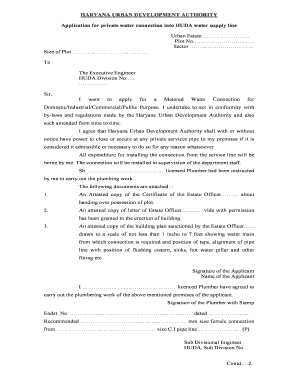
Huda Water Connection Apply Form


What is the Huda Water Connection Application?
The Huda Water Connection application is a formal request submitted by individuals or businesses seeking access to water supply services provided by the Haryana Urban Development Authority (HUDA). This application is essential for obtaining a legal connection to the municipal water supply system. It outlines the applicant's details, property information, and the purpose for which the water connection is required. The application must be filled out accurately to ensure a smooth processing experience.
Steps to Complete the Huda Water Connection Application
Completing the Huda Water Connection application involves several key steps:
- Gather Required Information: Collect necessary details such as personal identification, property address, and any relevant permits.
- Fill Out the Application Form: Accurately complete the application form, ensuring all fields are filled out as required.
- Attach Supporting Documents: Include any required documents, such as proof of identity and property ownership.
- Submit the Application: Submit the completed application form along with the supporting documents to the appropriate HUDA office.
- Follow Up: Keep track of your application status and respond to any requests for additional information from HUDA.
Required Documents for Huda Water Connection Application
When applying for a Huda Water Connection, certain documents are typically required to support your application. These may include:
- Proof of identity (e.g., driver's license, passport)
- Proof of property ownership (e.g., title deed, lease agreement)
- Recent utility bills (if applicable)
- Completed application form with all necessary details
Legal Use of the Huda Water Connection Application
The Huda Water Connection application serves as a legally binding document once submitted. It is important to ensure that all information provided is accurate and truthful to avoid any legal repercussions. Misrepresentation or failure to comply with HUDA regulations can lead to penalties or denial of service. Understanding the legal implications of your application helps in maintaining compliance with local regulations.
How to Obtain the Huda Water Connection Application
The Huda Water Connection application can be obtained through various channels:
- Visit the official HUDA website to download the application form.
- Obtain a physical copy at local HUDA offices.
- Request the form via email or phone from HUDA customer service.
Application Process & Approval Time
The application process for a Huda Water Connection typically involves the following stages:
- Submission of the application and supporting documents.
- Review by HUDA officials for completeness and accuracy.
- Site inspection, if necessary, to verify property details.
- Approval or rejection notification sent to the applicant.
Approval time may vary depending on the volume of applications and specific local regulations, but it generally takes several weeks to process.
Quick guide on how to complete huda water connection apply
Effortlessly prepare Huda Water Connection Apply on any device
Digital document management has gained popularity among businesses and individuals. It offers an excellent eco-friendly alternative to traditional printed and signed documents, allowing you to find the right form and securely store it online. airSlate SignNow provides all the tools necessary to create, edit, and eSign your documents swiftly without delays. Manage Huda Water Connection Apply on any platform using airSlate SignNow's Android or iOS applications and simplify any document-related workflow today.
The easiest way to alter and eSign Huda Water Connection Apply with ease
- Find Huda Water Connection Apply and click on Get Form to begin.
- Use the tools we provide to complete your document.
- Emphasize relevant sections of your documents or redact sensitive information with the tools that airSlate SignNow offers specifically for that purpose.
- Create your eSignature using the Sign tool, which takes mere seconds and holds the same legal significance as a conventional wet ink signature.
- Review all the details and click on the Done button to save your changes.
- Choose how you wish to send your form, whether by email, SMS, or invitation link, or download it to your computer.
Say goodbye to lost or misplaced files, tedious form searches, or mistakes that necessitate printing new document copies. airSlate SignNow fulfills all your document management needs in just a few clicks from any device you prefer. Modify and eSign Huda Water Connection Apply and ensure clear communication at every stage of your form preparation process with airSlate SignNow.
Create this form in 5 minutes or less
Create this form in 5 minutes!
How to create an eSignature for the huda water connection apply
How to create an electronic signature for a PDF online
How to create an electronic signature for a PDF in Google Chrome
How to create an e-signature for signing PDFs in Gmail
How to create an e-signature right from your smartphone
How to create an e-signature for a PDF on iOS
How to create an e-signature for a PDF on Android
People also ask
-
What is the process to apply for water connection using airSlate SignNow?
To apply for water connection using airSlate SignNow, you first need to create an account and access the provided templates. Fill out the necessary information and eSign the documents securely online. Once completed, submit your application directly through the platform to expedite the process.
-
How much does it cost to apply for water connection with airSlate SignNow?
The costs associated with applying for water connection through airSlate SignNow depend on the chosen plan. We offer various subscription tiers that are designed to fit different budgets and needs. Visit our pricing page to explore all options available for your business.
-
What features does airSlate SignNow offer for applying for water connection?
airSlate SignNow offers a robust suite of features to simplify the process of applying for water connection, including customizable templates, secure eSigning, and real-time status tracking. These tools ensure that you can manage paperwork efficiently without any delays. Our user-friendly interface makes it easy for anyone to navigate the application process.
-
Can I use airSlate SignNow to reapply for water connection if my application was denied?
Yes, you can use airSlate SignNow to easily reapply for water connection if your initial application was denied. Simply modify the original application using our system, ensuring to address any issues outlined in your denial notice. Once your new application is ready, eSign it and submit it again for consideration.
-
Does airSlate SignNow integrate with other platforms for applying for water connection?
Absolutely! airSlate SignNow integrates smoothly with various business applications, allowing for a seamless workflow. This means you can manage documents, client data, and more without having to switch between different systems when you apply for water connection.
-
What are the benefits of using airSlate SignNow for applying for water connection?
Using airSlate SignNow to apply for water connection streamlines the entire process, saving you time and reducing paperwork. With its secure eSigning feature, you can complete applications from anywhere, anytime. Moreover, the platform ensures that all your documents are safely stored and easily retrievable for future reference.
-
Is there customer support available when I apply for water connection through airSlate SignNow?
Yes, airSlate SignNow provides dedicated customer support to assist you when applying for water connection. Our team is available to answer questions and guide you through any challenges you may encounter. You can signNow out via chat, email, or phone for assistance.
Get more for Huda Water Connection Apply
- Dr 2904 cdl self certification form and attached medical if you are using a screen reader or other assistive technology please
- Instructions vendor registration and substitute w 9 form
- Dr 6596 040723 colorado department of revenue form
- Dr 5002 declaration of wholesale or entity sales tax exemption form
- Print blank tax forms georgia department of revenue
- Dr 2300b and temporarily legal residents identification checklist form
- 13105919999dr 1059 072023 colorado departmen form
- City of tybee fill out and sign printable pdf template form
Find out other Huda Water Connection Apply
- How Can I eSignature Colorado Insurance Presentation
- Help Me With eSignature Georgia Insurance Form
- How Do I eSignature Kansas Insurance Word
- How Do I eSignature Washington Insurance Form
- How Do I eSignature Alaska Life Sciences Presentation
- Help Me With eSignature Iowa Life Sciences Presentation
- How Can I eSignature Michigan Life Sciences Word
- Can I eSignature New Jersey Life Sciences Presentation
- How Can I eSignature Louisiana Non-Profit PDF
- Can I eSignature Alaska Orthodontists PDF
- How Do I eSignature New York Non-Profit Form
- How To eSignature Iowa Orthodontists Presentation
- Can I eSignature South Dakota Lawers Document
- Can I eSignature Oklahoma Orthodontists Document
- Can I eSignature Oklahoma Orthodontists Word
- How Can I eSignature Wisconsin Orthodontists Word
- How Do I eSignature Arizona Real Estate PDF
- How To eSignature Arkansas Real Estate Document
- How Do I eSignature Oregon Plumbing PPT
- How Do I eSignature Connecticut Real Estate Presentation