Mn Key Log 2007-2026


What is the Mn Key Log
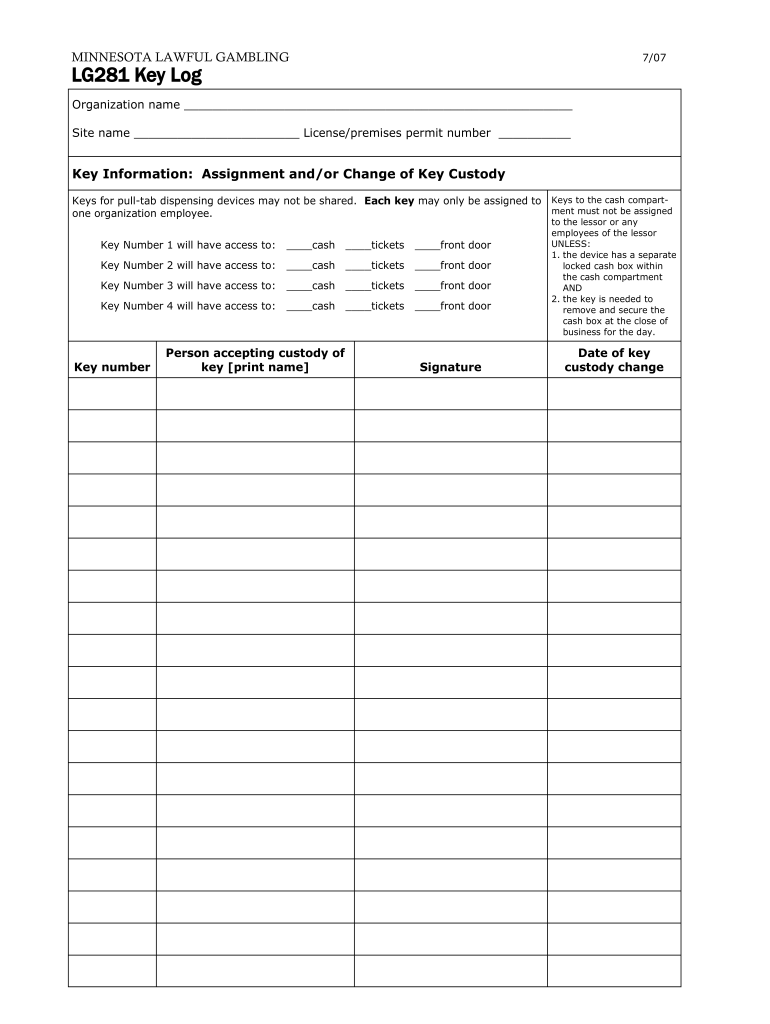
The Mn Key Log is a specific type of key log sheet used primarily in Minnesota for tracking the distribution and return of keys within organizations. This document serves as a record-keeping tool that helps businesses manage access to physical keys, ensuring accountability and security. The Mn Key Log typically includes fields for the key holder's name, the date of key issuance, the date of return, and any relevant notes regarding the key's usage.
How to Use the Mn Key Log
Using the Mn Key Log involves several straightforward steps. First, ensure that all necessary fields are included in the log, such as key identification numbers, names of individuals receiving keys, and the dates of issuance and return. When a key is issued, the responsible person should fill out the log with accurate details. Upon the return of the key, the log should be updated to reflect the return date. This practice aids in maintaining an organized record and helps prevent unauthorized access to keys.
Key Elements of the Mn Key Log
Essential components of the Mn Key Log include:
- Key Identification: A unique identifier for each key to avoid confusion.
- Key Holder Information: The name and contact details of the individual receiving the key.
- Date of Issuance: The date when the key is given to the key holder.
- Date of Return: The date when the key is returned to the organization.
- Signature: A space for the key holder's signature to confirm receipt and return of the key.
- Notes: Any additional information that may be relevant, such as reasons for key issuance or special conditions.
Steps to Complete the Mn Key Log
Completing the Mn Key Log requires attention to detail. Follow these steps:
- Gather all necessary information about the keys and key holders.
- Fill in the key identification number and the name of the key holder.
- Record the date the key is issued.
- Upon return, enter the return date and obtain the key holder's signature.
- Review the log for accuracy and completeness.
Legal Use of the Mn Key Log
The Mn Key Log must comply with local regulations regarding record-keeping and data privacy. Organizations should ensure that the log is maintained securely and that access is restricted to authorized personnel only. Proper use of the log can help protect against liability issues related to lost or misused keys, making it a crucial component of organizational security protocols.
Examples of Using the Mn Key Log
Organizations can implement the Mn Key Log in various scenarios, such as:
- Property management companies tracking keys for rental units.
- Schools managing keys for classrooms and facilities.
- Corporate offices controlling access to sensitive areas.
- Event venues keeping track of equipment keys.
Quick guide on how to complete lg281 key log minnesotagov mn
Handle Mn Key Log from anywhere, at any time
Your regular business procedures may require extra attention when managing state-specific business documents. Reclaim your work hours and minimize the expenses associated with paper-based processes with airSlate SignNow. airSlate SignNow provides you with a variety of pre-designed business documents, including Mn Key Log, which you can utilize and share with your business associates. Manage your Mn Key Log seamlessly with powerful editing and eSignature features and send it directly to your recipients.
Steps to obtain Mn Key Log in just a few clicks:
- Choose a form relevant to your state.
- Select Learn More to view the document and confirm its accuracy.
- Click Get Form to begin working with it.
- Mn Key Log will automatically launch in the editor. No additional actions are necessary.
- Utilize airSlate SignNow’s sophisticated editing tools to complete or modify the form.
- Select the Sign option to create your signature and eSign your document.
- Once everything is prepared, click Done, save your changes, and access your document.
- Distribute the form via email or SMS, or use a link-to-fill option with partners or allow them to download the document.
airSlate SignNow signNowly saves you time in managing Mn Key Log and allows you to find necessary documents in one location. A comprehensive library of forms is organized and designed to address essential business processes vital to your organization. The advanced editor minimizes the chances of mistakes, as you can easily rectify errors and review your documents on any device before sending them out. Start your free trial today to discover all the benefits of airSlate SignNow for your daily business workflows.
Create this form in 5 minutes or less
FAQs
-
How do I build an automatic script to visit a mailbox URL, fill out the form and log in, and get a link address in the email (any OS system)?
Here is a good place to start with checking email with VB since that is a topic you put it under.Retrieve Email and Parse Email in VB.NET - Tutorial
Create this form in 5 minutes!
How to create an eSignature for the lg281 key log minnesotagov mn
How to create an eSignature for the Lg281 Key Log Minnesotagov Mn in the online mode
How to generate an eSignature for the Lg281 Key Log Minnesotagov Mn in Google Chrome
How to generate an eSignature for putting it on the Lg281 Key Log Minnesotagov Mn in Gmail
How to make an eSignature for the Lg281 Key Log Minnesotagov Mn right from your smartphone
How to generate an electronic signature for the Lg281 Key Log Minnesotagov Mn on iOS devices
How to make an eSignature for the Lg281 Key Log Minnesotagov Mn on Android
People also ask
-
What is Mn Key Log in airSlate SignNow?
The Mn Key Log in airSlate SignNow is a comprehensive feature that tracks document signing activities. It provides insights into who signed, when, and where, ensuring accountability and transparency in your signing process. This feature is essential for businesses that require a clear audit trail for compliance and record-keeping.
-
How does airSlate SignNow's Mn Key Log enhance document security?
With the Mn Key Log, airSlate SignNow enhances document security by providing a detailed log of all activities related to your documents. This includes timestamps and IP addresses of signers, which helps identify any unauthorized access or modifications. Businesses can rest assured that their sensitive information is protected.
-
Is the Mn Key Log feature available in all pricing plans of airSlate SignNow?
Yes, the Mn Key Log feature is included in all pricing plans of airSlate SignNow, making it accessible for businesses of all sizes. Whether you choose a basic or premium plan, you can utilize this powerful tracking tool to monitor your document signing processes. This means you can ensure compliance without incurring additional costs.
-
Can I integrate Mn Key Log with other applications?
Absolutely! airSlate SignNow allows for seamless integrations with various applications, enhancing the functionality of the Mn Key Log feature. You can connect it with your CRM, project management tools, and more, streamlining your workflow and improving efficiency while keeping a detailed log of all document activities.
-
What are the benefits of using Mn Key Log for my business?
Using the Mn Key Log feature in airSlate SignNow provides numerous benefits, including improved accountability and enhanced security. It helps businesses track document interactions, ensuring that all signatures are verified and that records are maintained for audits. Overall, it simplifies the management of important documents.
-
How can I access the Mn Key Log in my airSlate SignNow account?
Accessing the Mn Key Log in your airSlate SignNow account is straightforward. Simply log in to your dashboard and navigate to the document management section, where you will find the log feature. It allows you to view all signing activities, providing you with the information you need at your fingertips.
-
Does the Mn Key Log support multiple user roles?
Yes, the Mn Key Log feature supports multiple user roles, which allows for better management of document access. You can assign different permissions to team members, ensuring that they can only view relevant logs based on their roles within the organization. This adds an additional layer of security and control.
Get more for Mn Key Log
- Employee new hire and payroll information form accplus
- Monthly inventory record fuel form
- Child 20attendance 20record 20by 20family 20unit form
- Travel expense form t17c the sea cadets
- Application for a refund of ontario retail sales tax for used vehicles purchased privately form
- Instructions graduate readmission applies to students who have attended the university of florida as a graduate student but form
- School of law students can use this form to request a letter that verifies enrollment
- Hkgeac master list form of documents number forms
Find out other Mn Key Log
- How To Integrate Sign in Banking
- How To Use Sign in Banking
- Help Me With Use Sign in Banking
- Can I Use Sign in Banking
- How Do I Install Sign in Banking
- How To Add Sign in Banking
- How Do I Add Sign in Banking
- How Can I Add Sign in Banking
- Can I Add Sign in Banking
- Help Me With Set Up Sign in Government
- How To Integrate eSign in Banking
- How To Use eSign in Banking
- How To Install eSign in Banking
- How To Add eSign in Banking
- How To Set Up eSign in Banking
- How To Save eSign in Banking
- How To Implement eSign in Banking
- How To Set Up eSign in Construction
- How To Integrate eSign in Doctors
- How To Use eSign in Doctors