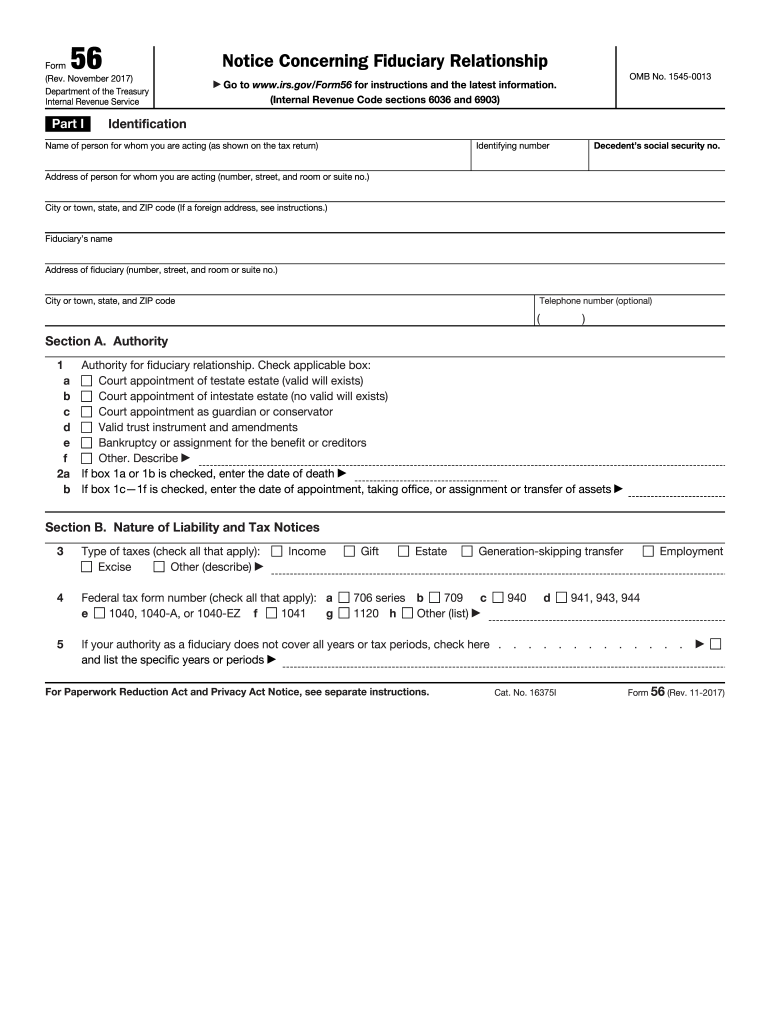
Downloadable Irs Form 56 2017


What is the downloadable IRS Form 56
The IRS Form 56 is a document used to notify the Internal Revenue Service of the creation of a fiduciary relationship. This form is essential for individuals or entities acting on behalf of another person or estate, such as executors, administrators, or trustees. By submitting this form, the fiduciary informs the IRS that they have the authority to act for the taxpayer in matters related to tax obligations. This includes the ability to receive tax information and make decisions regarding the taxpayer's tax filings.
How to obtain the downloadable IRS Form 56
To obtain the IRS Form 56, you can visit the official IRS website where the form is available for download in PDF format. It is important to ensure that you are accessing the most current version of the form to comply with IRS regulations. The form can be printed directly from the website, allowing you to fill it out manually. Additionally, you can also request a physical copy by contacting the IRS directly if you prefer not to download it online.
Steps to complete the downloadable IRS Form 56
Completing the IRS Form 56 involves several key steps:
- Download the form from the IRS website.
- Provide your name, address, and taxpayer identification number (TIN) in the appropriate fields.
- Indicate the type of fiduciary relationship you are establishing, such as executor or trustee.
- Include the name and TIN of the taxpayer for whom you are acting.
- Sign and date the form to certify the information provided is accurate.
- Submit the completed form to the IRS using the appropriate submission method.
Legal use of the downloadable IRS Form 56
The IRS Form 56 serves a legal purpose by formally establishing a fiduciary relationship recognized by the IRS. This legal recognition allows the fiduciary to handle tax matters on behalf of the taxpayer. It is crucial to ensure that the form is filled out accurately and submitted timely to avoid any complications with the IRS. Improper use of the form or failure to notify the IRS of a fiduciary relationship can lead to penalties or issues with tax compliance.
Key elements of the downloadable IRS Form 56
Several key elements are essential when completing the IRS Form 56:
- Fiduciary Information: This includes the name and TIN of the fiduciary.
- Taxpayer Information: The name and TIN of the taxpayer for whom the fiduciary is acting.
- Type of Fiduciary Relationship: Clearly indicate whether you are an executor, administrator, or trustee.
- Signature: The form must be signed by the fiduciary to validate the information.
Form submission methods (online / mail / in-person)
The completed IRS Form 56 can be submitted to the IRS through various methods. While electronic submission is not typically available for this form, it can be mailed to the appropriate IRS address based on the taxpayer's location. Ensure that you check the latest IRS guidelines for the correct mailing address. In some cases, you may also deliver the form in person to your local IRS office, but it is advisable to verify the office's hours and requirements before visiting.
Quick guide on how to complete 56 irs 2017 2019 form
Uncover the simplest method to complete and sign your Downloadable Irs Form 56
Are you still spending time preparing your official documents on paper instead of online? airSlate SignNow offers a superior way to complete and sign your Downloadable Irs Form 56 and associated forms for public services. Our intelligent electronic signature solution provides everything needed to handle paperwork swiftly and in compliance with official standards - comprehensive PDF editing, managing, securing, signing, and sharing tools available for you within a user-friendly interface.
Only a few steps are required to finish filling out and signing your Downloadable Irs Form 56:
- Insert the fillable template into the editor using the Get Form button.
- Review what details you need to input in your Downloadable Irs Form 56.
- Navigate through the fields with the Next button to ensure nothing is overlooked.
- Utilize Text, Check, and Cross tools to populate the fields with your information.
- Modify the content with Text boxes or Images from the upper toolbar.
- Emphasize what is truly signNow or Conceal areas that are no longer relevant.
- Click on Sign to generate a legally binding electronic signature using any method you prefer.
- Insert the Date beside your signature and conclude your work with the Done button.
Store your completed Downloadable Irs Form 56 in the Documents section within your profile, download it, or transfer it to your preferred cloud storage. Our service also provides adaptable form sharing. There’s no need to print your templates when sending them to the appropriate public office - you can do so via email, fax, or by requesting a USPS "snail mail" delivery from your account. Give it a shot today!
Create this form in 5 minutes or less
Find and fill out the correct 56 irs 2017 2019 form
FAQs
-
How can I fill out an IRS form 8379?
Form 8379, the Injured Spouse declaration, is used to ensure that a spouse’s share of a refund from a joint tax return is not used by the IRS as an offset to pay a tax obligation of the other spouse.Before you file this, make sure that you know the difference between this and the Innocent Spouse declaration, Form 8857. You use Form 8379 when your spouse owes money for a legally enforeceable tax debt (such as a student loan which is in default) for which you are not jointly liable. You use Form 8857 when you want to be released from tax liability for an understatement of tax that resulted from actions taken by your spouse of which you had no knowledge, and had no reason to know.As the other answers have specified, you follow the Instructions for Form 8379 (11/2016) on the IRS Web site to actually fill it out.
-
How do I fill out the CAT Application Form 2017?
CAT 2017 registration opened on August 9, 2017 will close on September 20 at 5PM. CAT online registration form and application form is a single document divided in 5 pages and is to be completed online. The 1st part of CAT online registration form requires your personal details. After completing your online registration, IIMs will send you CAT 2017 registration ID. With this unique ID, you will login to online registration form which will also contain application form and registration form.CAT Registration and application form will require you to fill up your academic details, uploading of photograph, signature and requires category certificates as per the IIMs prescribed format for CAT registration. CAT online application form 2017 consists of programme details on all the 20 IIMs. Candidates have to tick by clicking on the relevant programmes of the IIMs for which they wish to attend the personal Interview Process.
-
For taxes, does one have to fill out a federal IRS form and a state IRS form?
No, taxes are handled separately between state and federal governments in the United States.The IRS (Internal Revenue Service) is a federal, not state agency.You will be required to fill out the the necessary tax documentation for your federal income annually and submit them to the IRS by April 15th of that year. You can receive extensions for this; but you have to apply for those extensions.As far as state taxes go, 41 states require you to fill out an income tax return annually. They can either mail you those forms or they be downloaded from online. They are also available for free at various locations around the state.Nine states have no tax on personal income, so there is no need to fill out a state tax return unless you are a business owner.Reference:www.irs.gov
-
How do I fill out a CLAT 2019 application form?
Hi thereFirst of all, let me tell you some important points:CLAT 2019 has gone OFFLINE this yearBut the application forms for CLAT 2019 have to be filled ONLINEThe payment of the application fees also should be made onlineNow, kindly note the important dates:Note the details regarding the application fees:Here, if you want the Previous Year Question papers, Rs.500 would be added to the application fees.Apart from this, there would be bank transaction charges added to the application fees.The application fees is non-refundable.Note one important point here that before you fill the application form, check for your eligibility.To know the complete details of filling the application form along with other information like the eligibility - in terms of age, educational qualification, list of NLUs participating and the seats offered under each category, CLAT Reservation policies, CLAT exam pattern, marking scheme, syllabus, important documents required to be kept ready before filling the form, kindly go to the link below:How to fill CLAT 2019 Application form? Registration OPEN | All you need to knowTo know how to prepare for one of the very important section of CLAT exam, GK and Current Affairs, kindly go to the link below:How to prepare GK & Current Affairs for CLAT 2019To practice, daily MCQs on Current Affairs, kindly go to the link below:#CLAT2019 | #AILET2019 | #DULLB2019 | GK and Current Affairs Series: 5 in 10 Series: Day 12For any other queries, kindly write to us at mailateasyway@gmail.comThanks & Regards!
-
How do I fill out the NEET 2019 application form?
Expecting application form of NEET2019 will be same as that of NEET2018, follow the instructions-For Feb 2019 Exam:EventsDates (Announced)Release of application form-1st October 2018Application submission last date-31st October 2018Last date to pay the fee-Last week of October 2018Correction Window Open-1st week of November 2018Admit card available-1st week of January 2019Exam date-3rd February to 17th February 2019Answer key & OMR release-Within a week after examAnnouncement of result-1st week of March 2019Counselling begins-2nd week of June 2019For May 2019 Exam:EventsDates (Announced)Application form Release-2nd week of March 2019Application submission last date-2nd week of April 2019Last date to pay the fee-2nd week of April 2019Correction Window Open-3rd week of April 2019Admit card available-1st week of May 2019Exam date-12th May to 26th May 2019Answer key & OMR release-Within a week after examAnnouncement of result-1st week of June 2019Counselling begins-2nd week of June 2019NEET 2019 Application FormCandidates should fill the application form as per the instructions given in the information bulletin. Below we are providing NEET 2019 application form details:The application form will be issued through online mode only.No application will be entertained through offline mode.NEET UG registration 2019 will be commenced from the 1st October 2018 (Feb Exam) & second week of March 2018 (May Exam).Candidates should upload the scanned images of recent passport size photograph and signature.After filling the application form completely, a confirmation page will be generated. Download it.There will be no need to send the printed confirmation page to the board.Application Fee:General and OBC candidates will have to pay Rs. 1400/- as an application fee.The application fee for SC/ST and PH candidates will be Rs. 750/-.Fee payment can be done through credit/debit card, net banking, UPI and e-wallet.Service tax will also be applicable.CategoryApplication FeeGeneral/OBC-1400/-SC/ST/PH-750/-Step 1: Fill the Application FormGo the official portal of the conducting authority (Link will be given above).Click on “Apply Online” link.A candidate has to read all the instruction and then click on “Proceed to Apply Online NEET (UG) 2019”.Step 1.1: New RegistrationFill the registration form carefully.Candidates have to fill their name, Mother’s Name, Father’s Name, Category, Date of Birth, Gender, Nationality, State of Eligibility (for 15% All India Quota), Mobile Number, Email ID, Aadhaar card number, etc.After filling all the details, two links will be given “Preview &Next” and “Reset”.If candidate satisfied with the filled information, then they have to click on “Next”.After clicking on Next Button, the information submitted by the candidate will be displayed on the screen. If information correct, click on “Next” button, otherwise go for “Back” button.Candidates may note down the registration number for further procedure.Now choose the strong password and re enter the password.Choose security question and feed answer.Enter the OTP would be sent to your mobile number.Submit the button.Step 1.2: Login & Application Form FillingLogin with your Registration Number and password.Fill personal details.Enter place of birth.Choose the medium of question paper.Choose examination centres.Fill permanent address.Fill correspondence address.Fill Details (qualification, occupation, annual income) of parents and guardians.Choose the option for dress code.Enter security pin & click on save & draft.Now click on preview and submit.Now, review your entries.Then. click on Final Submit.Step 2: Upload Photo and SignatureStep 2 for images upload will be appeared on screen.Now, click on link for Upload photo & signature.Upload the scanned images.Candidate should have scanned images of his latest Photograph (size of 10 Kb to 100 Kb.Signature(size of 3 Kb to 20 Kb) in JPEG format only.Step 3: Fee PaymentAfter uploading the images, candidate will automatically go to the link for fee payment.A candidate has to follow the instruction & submit the application fee.Choose the Bank for making payment.Go for Payment.Candidate can pay the fee through Debit/Credit Card/Net Banking/e-wallet (CSC).Step 4: Take the Printout of Confirmation PageAfter the fee payment, a candidate may take the printout of the confirmation page.Candidates may keep at least three copies of the confirmation page.Note:Must retain copy of the system generated Self Declaration in respect of candidates from J&K who have opted for seats under 15% All India Quota.IF any queries, feel free to comment..best of luck
Create this form in 5 minutes!
How to create an eSignature for the 56 irs 2017 2019 form
How to make an electronic signature for your 56 Irs 2017 2019 Form online
How to make an eSignature for the 56 Irs 2017 2019 Form in Google Chrome
How to generate an eSignature for putting it on the 56 Irs 2017 2019 Form in Gmail
How to generate an eSignature for the 56 Irs 2017 2019 Form straight from your smartphone
How to generate an electronic signature for the 56 Irs 2017 2019 Form on iOS devices
How to make an eSignature for the 56 Irs 2017 2019 Form on Android OS
People also ask
-
What is a Downloadable IRS Form 56?
A Downloadable IRS Form 56 is a legal document that notifies the IRS of a taxpayer's appointment of a representative. This form is crucial for individuals or businesses looking to grant authority to someone else to manage their tax matters. Using airSlate SignNow, you can easily download, fill out, and eSign Form 56 to streamline your tax representation process.
-
How can I download the IRS Form 56 using airSlate SignNow?
To download the IRS Form 56 with airSlate SignNow, simply visit our platform and search for the form in the templates section. Once you find the Downloadable IRS Form 56, you can easily modify it as needed and complete the eSigning process. This makes managing your tax documents quick and efficient.
-
Is there a cost associated with downloading the IRS Form 56?
airSlate SignNow offers a range of pricing plans, including a free trial, which allows you to download the IRS Form 56 at no initial cost. After the trial, choose a plan that best fits your needs, ensuring you have access to all features necessary for efficient document management and eSigning.
-
What are the benefits of using airSlate SignNow for IRS Form 56?
Using airSlate SignNow for your Downloadable IRS Form 56 provides several benefits, including ease of use, quick eSigning, and secure document storage. Our platform simplifies the process of managing tax documents, ensuring you can focus on what matters most—your business. Plus, you can access your forms from anywhere, anytime.
-
Can I integrate airSlate SignNow with other software for IRS Form 56?
Yes, airSlate SignNow offers integrations with various software tools, enhancing your workflow when dealing with Downloadable IRS Form 56. Whether you use CRM systems, cloud storage, or accounting software, our platform can seamlessly connect, allowing you to manage your documents efficiently and effectively.
-
Is airSlate SignNow compliant with IRS regulations for Form 56?
Absolutely! airSlate SignNow ensures that all Downloadable IRS Form 56 documents meet IRS compliance standards. Our secure platform adheres to the latest regulations, providing peace of mind that your tax documents are handled appropriately and legally.
-
Can I track the status of my Downloadable IRS Form 56 once sent for eSignature?
Yes, airSlate SignNow allows you to track the status of your Downloadable IRS Form 56 after sending it for eSignature. You will receive notifications once the document is viewed and signed, giving you complete visibility over your document transactions.
Get more for Downloadable Irs Form 56
Find out other Downloadable Irs Form 56
- How To Electronic signature Indiana Healthcare / Medical PDF
- How Do I Electronic signature Maryland Healthcare / Medical Presentation
- How To Electronic signature Tennessee Healthcare / Medical Word
- Can I Electronic signature Hawaii Insurance PDF
- Help Me With Electronic signature Colorado High Tech Form
- How To Electronic signature Indiana Insurance Document
- Can I Electronic signature Virginia Education Word
- How To Electronic signature Louisiana Insurance Document
- Can I Electronic signature Florida High Tech Document
- Can I Electronic signature Minnesota Insurance PDF
- How Do I Electronic signature Minnesota Insurance Document
- How To Electronic signature Missouri Insurance Form
- How Can I Electronic signature New Jersey Insurance Document
- How To Electronic signature Indiana High Tech Document
- How Do I Electronic signature Indiana High Tech Document
- How Can I Electronic signature Ohio Insurance Document
- Can I Electronic signature South Dakota Insurance PPT
- How Can I Electronic signature Maine Lawers PPT
- How To Electronic signature Maine Lawers PPT
- Help Me With Electronic signature Minnesota Lawers PDF