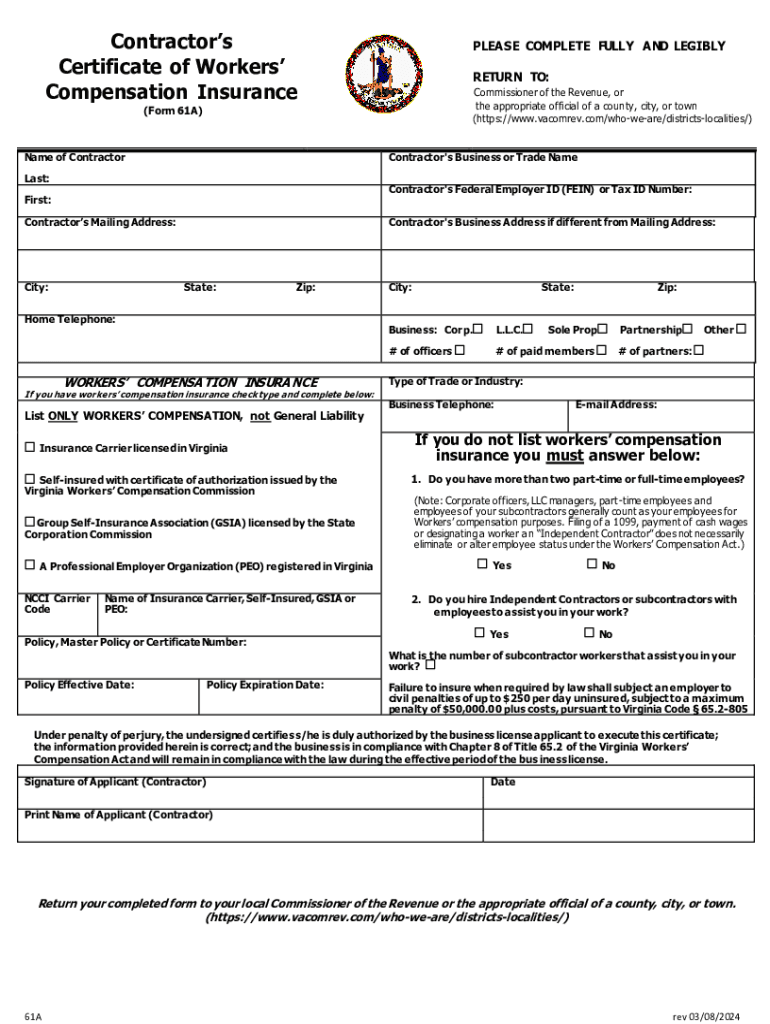
Workers Comp Form 61 a 2013


What is the Workers Comp Form 61 A
The Workers Comp Form 61 A is a crucial document used in the Virginia workers compensation system. This form is primarily utilized to report an employee's injury or illness that occurred in the workplace. It serves as a formal notification to the Virginia Workers Compensation Commission, initiating the claims process for benefits. Understanding the purpose of this form is essential for both employers and employees to ensure that all necessary information is accurately conveyed and processed.
How to use the Workers Comp Form 61 A
Using the Workers Comp Form 61 A involves several steps. First, the injured employee or their representative must complete the form, providing detailed information about the incident, including the date, time, and nature of the injury. Employers are responsible for reviewing the completed form and submitting it to the Virginia Workers Compensation Commission. It is important to ensure that all sections are filled out correctly to avoid delays in processing the claim.
Steps to complete the Workers Comp Form 61 A
Completing the Workers Comp Form 61 A requires careful attention to detail. Follow these steps:
- Begin by entering the employee's personal information, including name, address, and contact details.
- Provide specifics about the injury, including how it occurred and any immediate medical treatment received.
- Include information about the employer, such as the name of the business and the insurance provider.
- Review the form for accuracy and completeness before submission.
Once completed, the form should be submitted to the appropriate office, either online or via mail, depending on the employer's preference.
Legal use of the Workers Comp Form 61 A
The legal use of the Workers Comp Form 61 A is governed by Virginia state laws regarding workers compensation. This form must be filled out accurately to comply with legal requirements and to ensure that employees receive the benefits they are entitled to after a workplace injury. Failure to properly complete and submit this form can result in delays or denial of benefits, highlighting the importance of understanding its legal implications.
Required Documents
When submitting the Workers Comp Form 61 A, certain documents may be required to support the claim. These documents can include:
- Medical records related to the injury or illness.
- Witness statements, if applicable.
- Any previous correspondence regarding the injury.
Ensuring that all required documentation is included can facilitate a smoother claims process.
Form Submission Methods
The Workers Comp Form 61 A can be submitted through various methods, providing flexibility for employers and employees. The options include:
- Online submission through the Virginia Workers Compensation Commission's official portal.
- Mailing the completed form to the appropriate office.
- In-person delivery at designated locations.
Choosing the right submission method can help expedite the claims process and ensure timely handling of the form.
Quick guide on how to complete workers comp form 61 a
Accomplish Workers Comp Form 61 A seamlessly on any device
Digital document management has gained traction among businesses and individuals alike. It serves as an ideal sustainable alternative to conventional printed and signed documents, allowing you to acquire the proper form and securely store it online. airSlate SignNow equips you with all the necessary tools to create, modify, and electronically sign your documents swiftly without any hold-ups. Manage Workers Comp Form 61 A on any platform with airSlate SignNow Android or iOS applications and simplify any document-related task today.
The easiest way to modify and electronically sign Workers Comp Form 61 A with ease
- Locate Workers Comp Form 61 A and then click Get Form to commence.
- Utilize the features we offer to submit your document.
- Emphasize pertinent sections of your documents or obscure sensitive information with tools specifically provided by airSlate SignNow for that purpose.
- Create your electronic signature with the Sign tool, which takes mere seconds and holds the same legal validity as a conventional wet ink signature.
- Verify the details and then click on the Done button to save your modifications.
- Choose your preferred method to send your form, whether by email, SMS, invitation link, or download it to your computer.
No more dealing with lost or misplaced documents, tedious form searching, or mistakes that require printing new copies. airSlate SignNow fulfills your document management needs in a few clicks from any device you prefer. Modify and electronically sign Workers Comp Form 61 A and ensure excellent communication throughout the form preparation process with airSlate SignNow.
Create this form in 5 minutes or less
Find and fill out the correct workers comp form 61 a
Create this form in 5 minutes!
How to create an eSignature for the workers comp form 61 a
How to create an electronic signature for a PDF online
How to create an electronic signature for a PDF in Google Chrome
How to create an e-signature for signing PDFs in Gmail
How to create an e-signature right from your smartphone
How to create an e-signature for a PDF on iOS
How to create an e-signature for a PDF on Android
People also ask
-
What is the Virginia Workers Compensation Commission?
The Virginia Workers Compensation Commission is a state agency that oversees the workers' compensation system in Virginia. It ensures that injured workers receive the benefits they are entitled to and that employers comply with the law. Understanding its role is crucial for businesses navigating workers' compensation claims.
-
How can airSlate SignNow help with Virginia Workers Compensation Commission documentation?
airSlate SignNow streamlines the process of sending and eSigning documents required by the Virginia Workers Compensation Commission. Our platform allows businesses to create, manage, and store essential documents securely, ensuring compliance and efficiency in handling claims. This can signNowly reduce the time spent on paperwork.
-
What are the pricing options for airSlate SignNow?
airSlate SignNow offers flexible pricing plans tailored to meet the needs of businesses of all sizes. Our cost-effective solution ensures that you can manage your documentation related to the Virginia Workers Compensation Commission without breaking the bank. You can choose from monthly or annual subscriptions based on your usage.
-
What features does airSlate SignNow offer for managing workers' compensation claims?
Our platform includes features such as customizable templates, automated workflows, and secure cloud storage, all designed to facilitate the management of workers' compensation claims. These features help ensure that all documents required by the Virginia Workers Compensation Commission are completed accurately and efficiently.
-
Can airSlate SignNow integrate with other tools for managing workers' compensation?
Yes, airSlate SignNow integrates seamlessly with various tools and software that businesses use for managing workers' compensation claims. This includes HR systems, payroll software, and case management tools, allowing for a cohesive workflow that aligns with the requirements of the Virginia Workers Compensation Commission.
-
What are the benefits of using airSlate SignNow for Virginia Workers Compensation Commission processes?
Using airSlate SignNow for your Virginia Workers Compensation Commission processes offers numerous benefits, including increased efficiency, reduced paperwork, and enhanced compliance. Our easy-to-use platform ensures that all necessary documents are signed and stored securely, helping you focus on your business operations.
-
Is airSlate SignNow secure for handling sensitive workers' compensation documents?
Absolutely! airSlate SignNow prioritizes security and compliance, ensuring that all documents related to the Virginia Workers Compensation Commission are protected. We utilize advanced encryption and security protocols to safeguard sensitive information, giving you peace of mind while managing your claims.
Get more for Workers Comp Form 61 A
- Illinois postnuptial form
- Postnuptial property agreement form
- Illinois property agreement form
- Agreement between parties living together but remaining unmarried with regard to sale of residence illinois form
- Illinois owner llc form
- Illinois claim form 497306039
- Quitclaim deed from husband and wife to an individual illinois form
- Illinois deed to form
Find out other Workers Comp Form 61 A
- Electronic signature Washington Car Dealer Letter Of Intent Computer
- Electronic signature Virginia Car Dealer IOU Fast
- How To Electronic signature Virginia Car Dealer Medical History
- Electronic signature Virginia Car Dealer Separation Agreement Simple
- Electronic signature Wisconsin Car Dealer Contract Simple
- Electronic signature Wyoming Car Dealer Lease Agreement Template Computer
- How Do I Electronic signature Mississippi Business Operations Rental Application
- Electronic signature Missouri Business Operations Business Plan Template Easy
- Electronic signature Missouri Business Operations Stock Certificate Now
- Electronic signature Alabama Charity Promissory Note Template Computer
- Electronic signature Colorado Charity Promissory Note Template Simple
- Electronic signature Alabama Construction Quitclaim Deed Free
- Electronic signature Alaska Construction Lease Agreement Template Simple
- Electronic signature Construction Form Arizona Safe
- Electronic signature Kentucky Charity Living Will Safe
- Electronic signature Construction Form California Fast
- Help Me With Electronic signature Colorado Construction Rental Application
- Electronic signature Connecticut Construction Business Plan Template Fast
- Electronic signature Delaware Construction Business Letter Template Safe
- Electronic signature Oklahoma Business Operations Stock Certificate Mobile