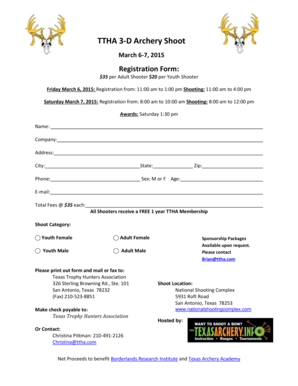
TTHA 3 D Archery Shoot Form


What is the TTHA 3 D Archery Shoot
The TTHA 3 D Archery Shoot is a competitive event designed for archery enthusiasts of all skill levels. Participants engage in shooting at life-sized three-dimensional targets that simulate real-life hunting scenarios. This format allows archers to practice their skills in a realistic environment while competing for prizes and recognition. The event typically includes various categories based on age and skill level, ensuring inclusivity and a fair competition for everyone involved.
How to use the TTHA 3 D Archery Shoot
To participate in the TTHA 3 D Archery Shoot, individuals must first register using the archery registration form template. This form collects essential information such as the participant's name, contact details, and skill level. Once registered, participants receive instructions on the event schedule, target locations, and safety guidelines. It is important to familiarize oneself with the rules and scoring system before the event to enhance the overall experience.
Steps to complete the TTHA 3 D Archery Shoot
Completing the TTHA 3 D Archery Shoot involves several key steps:
- Register using the archery registration form template.
- Review the event rules and safety guidelines.
- Arrive at the event location on the scheduled date.
- Check in with event organizers to confirm participation.
- Participate in the shooting rounds as per the event format.
- Submit scores for each round as instructed.
- Await the announcement of winners and prizes.
Key elements of the TTHA 3 D Archery Shoot
The TTHA 3 D Archery Shoot incorporates several key elements that contribute to its success:
- Target Variety: The event features a range of targets that mimic different types of game animals, providing a realistic shooting experience.
- Scoring System: Participants earn points based on accuracy, with specific scoring zones on each target.
- Categories: Divisions are available for different age groups and skill levels, promoting fair competition.
- Safety Protocols: Strict safety measures are enforced to ensure a secure environment for all participants.
State-specific rules for the TTHA 3 D Archery Shoot
Each state may have specific rules governing the TTHA 3 D Archery Shoot. These rules can include regulations on equipment, safety requirements, and scoring procedures. Participants should check with local archery associations or event organizers to ensure compliance with state-specific guidelines. Understanding these regulations is crucial for a successful and enjoyable experience during the event.
Eligibility Criteria
Eligibility to participate in the TTHA 3 D Archery Shoot typically includes the following criteria:
- Participants must be at least a certain age, often ranging from youth to adult categories.
- Archers should possess their own equipment that meets event specifications.
- Registration must be completed prior to the event date, using the archery registration form template.
- Participants may need to sign a waiver acknowledging the risks associated with archery.
Quick guide on how to complete ttha 3 d archery shoot
Complete TTHA 3 D Archery Shoot effortlessly on any device
Digital document handling has become increasingly popular among organizations and individuals. It offers a perfect eco-friendly substitute for traditional printed and signed documents, as you can access the appropriate form and securely store it online. airSlate SignNow equips you with all the tools necessary to create, adjust, and eSign your documents promptly without delays. Manage TTHA 3 D Archery Shoot on any platform using airSlate SignNow's Android or iOS applications and enhance any document-centric procedure today.
How to adjust and eSign TTHA 3 D Archery Shoot effortlessly
- Locate TTHA 3 D Archery Shoot and then click Get Form to begin.
- Utilize the tools we provide to fill out your form.
- Highlight important sections of your documents or obscure sensitive information using tools that airSlate SignNow offers specifically for that purpose.
- Create your signature with the Sign tool, which takes only a few seconds and holds the same legal validity as a conventional handwritten signature.
- Review the information and then click on the Done button to save your changes.
- Select how you wish to send your form, via email, text message (SMS), invitation link, or download it to your computer.
Eliminate concerns about lost or misplaced files, tedious form searches, or mistakes that necessitate printing new document copies. airSlate SignNow fulfills your needs in document management with just a few clicks from any device of your choice. Adjust and eSign TTHA 3 D Archery Shoot and ensure excellent communication at every step of the form preparation process with airSlate SignNow.
Create this form in 5 minutes or less
Create this form in 5 minutes!
How to create an eSignature for the ttha 3 d archery shoot
How to create an electronic signature for a PDF online
How to create an electronic signature for a PDF in Google Chrome
How to create an e-signature for signing PDFs in Gmail
How to create an e-signature right from your smartphone
How to create an e-signature for a PDF on iOS
How to create an e-signature for a PDF on Android
People also ask
-
What is the TTHA 3 D Archery Shoot?
The TTHA 3 D Archery Shoot is a competitive archery event that allows participants to shoot at life-sized 3D animal targets. This event is designed for archers of all skill levels, providing a fun and engaging way to improve your shooting skills while enjoying the outdoors.
-
How can I register for the TTHA 3 D Archery Shoot?
To register for the TTHA 3 D Archery Shoot, visit our official website and navigate to the registration section. You can complete the registration process online, ensuring a quick and easy sign-up experience for all participants.
-
What are the costs associated with the TTHA 3 D Archery Shoot?
The costs for participating in the TTHA 3 D Archery Shoot vary based on the category you choose. Typically, registration fees cover the event participation, access to targets, and any additional amenities provided during the shoot.
-
What equipment do I need for the TTHA 3 D Archery Shoot?
For the TTHA 3 D Archery Shoot, participants should bring their own bow and arrows, along with any personal gear such as quivers and arm guards. It's important to ensure your equipment is in good condition to enhance your shooting experience.
-
Are there any age restrictions for the TTHA 3 D Archery Shoot?
The TTHA 3 D Archery Shoot welcomes participants of all ages. However, younger archers may need to be accompanied by an adult, and specific categories may have age divisions to ensure fair competition.
-
What are the benefits of participating in the TTHA 3 D Archery Shoot?
Participating in the TTHA 3 D Archery Shoot offers numerous benefits, including improving your archery skills, meeting fellow archers, and enjoying a day outdoors. Additionally, it provides a great opportunity to compete and win prizes in a supportive environment.
-
Can I bring my own food and drinks to the TTHA 3 D Archery Shoot?
Yes, participants are encouraged to bring their own food and drinks to the TTHA 3 D Archery Shoot. However, there may also be food vendors available on-site for those who prefer to purchase refreshments during the event.
Get more for TTHA 3 D Archery Shoot
Find out other TTHA 3 D Archery Shoot
- How To Integrate Sign in Banking
- How To Use Sign in Banking
- Help Me With Use Sign in Banking
- Can I Use Sign in Banking
- How Do I Install Sign in Banking
- How To Add Sign in Banking
- How Do I Add Sign in Banking
- How Can I Add Sign in Banking
- Can I Add Sign in Banking
- Help Me With Set Up Sign in Government
- How To Integrate eSign in Banking
- How To Use eSign in Banking
- How To Install eSign in Banking
- How To Add eSign in Banking
- How To Set Up eSign in Banking
- How To Save eSign in Banking
- How To Implement eSign in Banking
- How To Set Up eSign in Construction
- How To Integrate eSign in Doctors
- How To Use eSign in Doctors