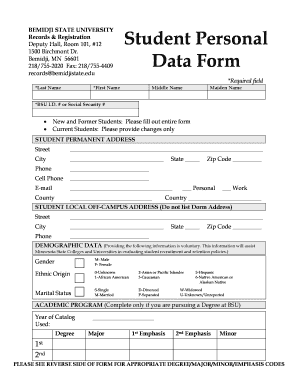
Personal Data Form for Students 2024-2026


What is the Personal Data Form for Students
The Personal Data Form for Students serves as a comprehensive document that collects essential information about students. This form typically includes personal details such as name, address, date of birth, and contact information. It may also request information regarding educational history, emergency contacts, and health-related data. The purpose of this form is to ensure that educational institutions have accurate and up-to-date information to support student needs and facilitate communication between students and staff.
How to Use the Personal Data Form for Students
Using the Personal Data Form for Students involves several straightforward steps. First, access the form, which may be available in digital format or as a printable PDF. Next, fill in the required fields with accurate information. It is important to review the completed form for any errors before submission. Once finalized, the form can be submitted electronically or printed and delivered to the appropriate administrative office. This process ensures that the institution can maintain current records for each student.
Steps to Complete the Personal Data Form for Students
Completing the Personal Data Form for Students requires careful attention to detail. Follow these steps for successful completion:
- Gather necessary documents, such as identification and previous academic records.
- Fill out personal information, including full name, address, and contact details.
- Provide educational background, including schools attended and grades achieved.
- Include emergency contact information and any relevant health details.
- Review the form for accuracy and completeness before submission.
Key Elements of the Personal Data Form for Students
Key elements of the Personal Data Form for Students include various sections designed to capture comprehensive information. Essential sections typically cover:
- Personal Information: Name, address, phone number, and email.
- Educational History: Previous schools, grades, and academic achievements.
- Emergency Contacts: Names and phone numbers of individuals to contact in case of emergencies.
- Health Information: Any medical conditions or allergies that the school should be aware of.
Legal Use of the Personal Data Form for Students
The legal use of the Personal Data Form for Students is governed by privacy laws and regulations, such as the Family Educational Rights and Privacy Act (FERPA). This act protects the privacy of student education records and ensures that personal data is handled appropriately. Educational institutions must obtain consent from students or their guardians before sharing personal data with third parties. Understanding these legal requirements is crucial for both students and institutions to ensure compliance and protect sensitive information.
Form Submission Methods
Submitting the Personal Data Form for Students can be done through various methods, depending on the institution's preferences. Common submission methods include:
- Online Submission: Many institutions offer digital platforms where students can submit forms electronically.
- Mail: Students may also choose to print the form and send it via postal service to the designated office.
- In-Person: Alternatively, students can deliver the completed form directly to the administrative office during business hours.
Quick guide on how to complete personal data form for students 47452978
Prepare Personal Data Form For Students effortlessly on any device
Online document administration has gained popularity among businesses and individuals alike. It offers an ideal eco-friendly alternative to traditional printed and signed documents, allowing you to access the needed form and securely store it online. airSlate SignNow equips you with all the necessary tools to create, edit, and eSign your documents promptly without delays. Manage Personal Data Form For Students on any platform with the airSlate SignNow applications for Android or iOS and enhance any document-related process today.
How to modify and eSign Personal Data Form For Students with ease
- Find Personal Data Form For Students and click Get Form to initiate the process.
- Use the available tools to fill out your document.
- Mark signNow sections of your documents or obscure sensitive information using the features that airSlate SignNow offers specifically for this purpose.
- Create your signature with the Sign tool, which takes only seconds and holds the same legal value as a conventional wet ink signature.
- Review the information and click on the Done button to save your changes.
- Choose how you wish to share your form, via email, text message (SMS), or link invitation, or download it to your computer.
Say goodbye to lost or misplaced documents, tedious form searches, or errors that necessitate printing new document copies. airSlate SignNow takes care of all your document management needs in just a few clicks from any device you choose. Modify and eSign Personal Data Form For Students and ensure excellent communication throughout the document preparation process with airSlate SignNow.
Create this form in 5 minutes or less
Find and fill out the correct personal data form for students 47452978
Create this form in 5 minutes!
How to create an eSignature for the personal data form for students 47452978
How to create an electronic signature for a PDF online
How to create an electronic signature for a PDF in Google Chrome
How to create an e-signature for signing PDFs in Gmail
How to create an e-signature right from your smartphone
How to create an e-signature for a PDF on iOS
How to create an e-signature for a PDF on Android
People also ask
-
What is a personal data sheet 2025?
A personal data sheet 2025 is a comprehensive document that outlines an individual's personal information, skills, and experiences. It serves as a valuable tool for job applications, educational purposes, and personal record-keeping. With airSlate SignNow, you can easily create, manage, and eSign your personal data sheet 2025.
-
How can airSlate SignNow help with my personal data sheet 2025?
airSlate SignNow provides an intuitive platform to create and eSign your personal data sheet 2025 efficiently. You can customize templates, add necessary fields, and ensure your document is legally binding. This streamlines the process of sharing your personal data sheet 2025 with potential employers or educational institutions.
-
What are the pricing options for using airSlate SignNow for my personal data sheet 2025?
airSlate SignNow offers flexible pricing plans to suit various needs, including options for individuals and businesses. You can choose a plan that fits your budget while gaining access to features that enhance your personal data sheet 2025. Check our website for the latest pricing details and promotions.
-
Are there any features specifically designed for personal data sheets 2025?
Yes, airSlate SignNow includes features tailored for creating personal data sheets 2025, such as customizable templates, drag-and-drop editing, and secure eSigning. These features ensure that your personal data sheet 2025 is professional and easy to share. Additionally, you can track document status and receive notifications.
-
Can I integrate airSlate SignNow with other tools for my personal data sheet 2025?
Absolutely! airSlate SignNow integrates seamlessly with various applications, including Google Drive, Dropbox, and CRM systems. This allows you to easily import and export your personal data sheet 2025, enhancing your workflow and ensuring that your information is always up-to-date.
-
What are the benefits of using airSlate SignNow for my personal data sheet 2025?
Using airSlate SignNow for your personal data sheet 2025 offers numerous benefits, including time savings, enhanced security, and ease of use. You can quickly create and eSign documents without the hassle of printing and scanning. This not only streamlines your process but also ensures your personal data sheet 2025 is securely stored.
-
Is airSlate SignNow secure for handling my personal data sheet 2025?
Yes, airSlate SignNow prioritizes security and compliance, ensuring that your personal data sheet 2025 is protected. We use advanced encryption and secure cloud storage to safeguard your information. You can trust that your personal data sheet 2025 will remain confidential and secure.
Get more for Personal Data Form For Students
Find out other Personal Data Form For Students
- How To Sign Alabama Home Repair Contract
- Sign Delaware Equipment Rental Agreement Template Fast
- Sign Nevada Home Repair Contract Easy
- Sign Oregon Construction Contract Template Online
- Sign Wisconsin Construction Contract Template Simple
- Sign Arkansas Business Insurance Quotation Form Now
- Sign Arkansas Car Insurance Quotation Form Online
- Can I Sign California Car Insurance Quotation Form
- Sign Illinois Car Insurance Quotation Form Fast
- Can I Sign Maryland Car Insurance Quotation Form
- Sign Missouri Business Insurance Quotation Form Mobile
- Sign Tennessee Car Insurance Quotation Form Online
- How Can I Sign Tennessee Car Insurance Quotation Form
- Sign North Dakota Business Insurance Quotation Form Online
- Sign West Virginia Car Insurance Quotation Form Online
- Sign Wisconsin Car Insurance Quotation Form Online
- Sign Alabama Life-Insurance Quote Form Free
- Sign California Apply for Lead Pastor Easy
- Sign Rhode Island Certeficate of Insurance Request Free
- Sign Hawaii Life-Insurance Quote Form Fast