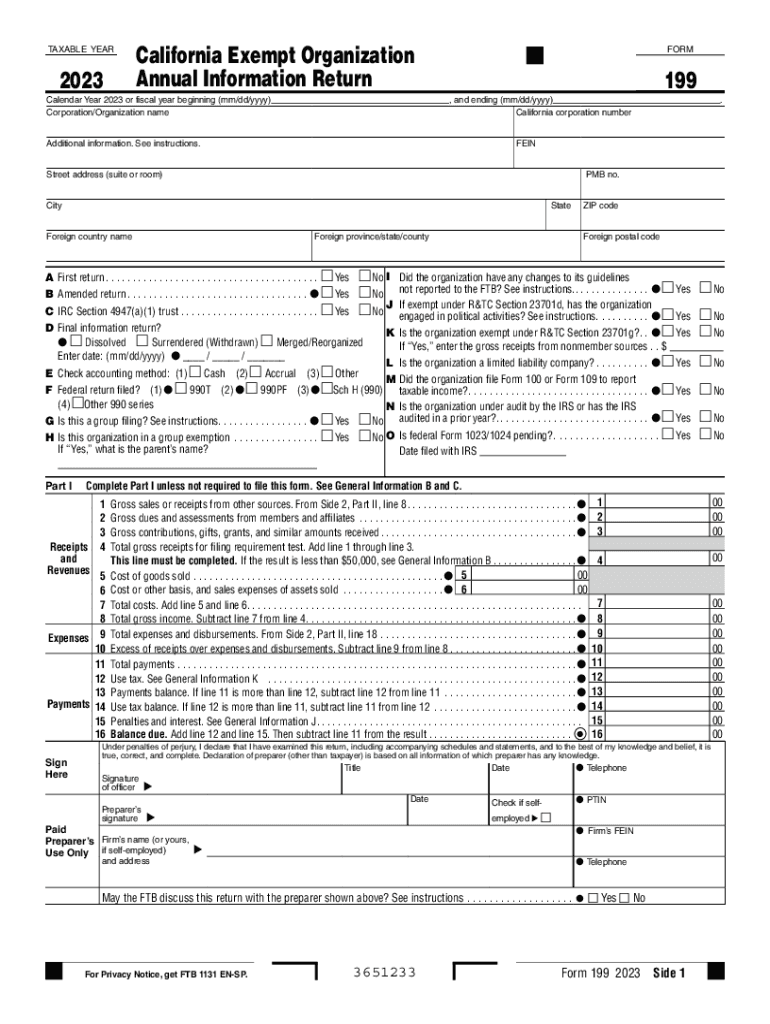
Form 199 California Exempt Organization Annual Information Return , Form 199, California Exempt Organization Annual Information


What is the California Exempt Organization Annual Information Return?
The California Exempt Organization Annual Information Return, commonly known as Form 199, is a crucial document for organizations operating as tax-exempt entities in California. This form is required by the California Franchise Tax Board (FTB) and serves to report the organization's financial activities, governance, and compliance with state regulations. Form 199 is specifically designed for organizations that are exempt from federal income tax under Internal Revenue Code section 501(c), including charities, religious organizations, and educational institutions.
How to Obtain Form 199
Organizations can obtain Form 199 through the California Franchise Tax Board's official website. The form is available for download in PDF format, allowing organizations to print and fill it out manually. Additionally, many tax preparation software programs include Form 199, making it easier for organizations to complete and file electronically. It is important for organizations to ensure they are using the correct version of the form for the current tax year, as updates may occur annually.
Steps to Complete Form 199
Completing Form 199 involves several key steps to ensure accurate reporting. Organizations should start by gathering necessary financial documents, including balance sheets and income statements. The form requires detailed information about the organization’s revenue, expenses, and assets. It is essential to provide accurate data, as discrepancies can lead to penalties. After filling out the form, organizations should review it for completeness and accuracy before submission.
Key Elements of Form 199
Form 199 includes several key elements that organizations must address. These elements typically consist of:
- Organization Information: Name, address, and federal employer identification number (EIN).
- Financial Information: Total revenue, expenses, and net assets.
- Governance Details: Information about the board of directors and any changes in governance.
- Compliance Statements: Confirmation of adherence to state and federal regulations.
Each section must be completed accurately to ensure compliance with California regulations.
Filing Deadlines for Form 199
Organizations must be aware of the filing deadlines associated with Form 199. Typically, the form is due on the 15th day of the fifth month after the end of the organization's fiscal year. For organizations operating on a calendar year, this means the form is generally due by May 15. It is crucial for organizations to file on time to avoid penalties and maintain their tax-exempt status.
Penalties for Non-Compliance
Failure to file Form 199 or filing it late can result in significant penalties. The California Franchise Tax Board may impose fines based on the duration of the delay and the size of the organization. Additionally, non-compliance can jeopardize an organization’s tax-exempt status, leading to potential tax liabilities. Organizations should prioritize timely and accurate submissions to avoid these consequences.
Create this form in 5 minutes or less
Create this form in 5 minutes!
How to create an eSignature for the form 199 california exempt organization annual information return form 199 california exempt organization annual information
How to create an electronic signature for a PDF online
How to create an electronic signature for a PDF in Google Chrome
How to create an e-signature for signing PDFs in Gmail
How to create an e-signature right from your smartphone
How to create an e-signature for a PDF on iOS
How to create an e-signature for a PDF on Android
People also ask
-
What is CA State Form 199?
CA State Form 199 is a tax form used by certain California businesses to report income and expenses. It is essential for compliance with state tax regulations. Using airSlate SignNow, you can easily eSign and submit CA State Form 199, streamlining your filing process.
-
How can airSlate SignNow help with CA State Form 199?
airSlate SignNow simplifies the process of completing and eSigning CA State Form 199. Our platform allows you to fill out the form digitally, ensuring accuracy and compliance. Additionally, you can securely send the form to relevant parties for signatures, saving time and reducing paperwork.
-
Is there a cost associated with using airSlate SignNow for CA State Form 199?
Yes, airSlate SignNow offers various pricing plans to accommodate different business needs. Our plans are cost-effective, providing access to features that facilitate the eSigning of CA State Form 199 and other documents. You can choose a plan that best fits your budget and requirements.
-
What features does airSlate SignNow offer for CA State Form 199?
airSlate SignNow provides features such as customizable templates, secure eSigning, and document tracking specifically for CA State Form 199. These tools enhance your workflow, making it easier to manage and submit your forms efficiently. Our user-friendly interface ensures a smooth experience.
-
Can I integrate airSlate SignNow with other applications for CA State Form 199?
Absolutely! airSlate SignNow offers integrations with various applications, allowing you to streamline your workflow when handling CA State Form 199. Whether you use CRM systems or cloud storage services, our platform can connect seamlessly to enhance your document management process.
-
What are the benefits of using airSlate SignNow for CA State Form 199?
Using airSlate SignNow for CA State Form 199 offers numerous benefits, including increased efficiency, reduced errors, and enhanced security. Our platform ensures that your documents are signed and submitted quickly, helping you meet deadlines and maintain compliance with state regulations.
-
Is airSlate SignNow secure for handling CA State Form 199?
Yes, airSlate SignNow prioritizes security when handling CA State Form 199. We utilize advanced encryption and secure storage to protect your sensitive information. You can trust that your documents are safe while using our platform for eSigning and submission.
Get more for Form 199 California Exempt Organization Annual Information Return , Form 199, California Exempt Organization Annual Information
Find out other Form 199 California Exempt Organization Annual Information Return , Form 199, California Exempt Organization Annual Information
- Can I Electronic signature New York Car Dealer Document
- How To Electronic signature North Carolina Car Dealer Word
- How Do I Electronic signature North Carolina Car Dealer Document
- Can I Electronic signature Ohio Car Dealer PPT
- How Can I Electronic signature Texas Banking Form
- How Do I Electronic signature Pennsylvania Car Dealer Document
- How To Electronic signature South Carolina Car Dealer Document
- Can I Electronic signature South Carolina Car Dealer Document
- How Can I Electronic signature Texas Car Dealer Document
- How Do I Electronic signature West Virginia Banking Document
- How To Electronic signature Washington Car Dealer Document
- Can I Electronic signature West Virginia Car Dealer Document
- How Do I Electronic signature West Virginia Car Dealer Form
- How Can I Electronic signature Wisconsin Car Dealer PDF
- How Can I Electronic signature Wisconsin Car Dealer Form
- How Do I Electronic signature Montana Business Operations Presentation
- How To Electronic signature Alabama Charity Form
- How To Electronic signature Arkansas Construction Word
- How Do I Electronic signature Arkansas Construction Document
- Can I Electronic signature Delaware Construction PDF