Change of Status Students International Students 2024-2026


What is the Change of Status for International Students?
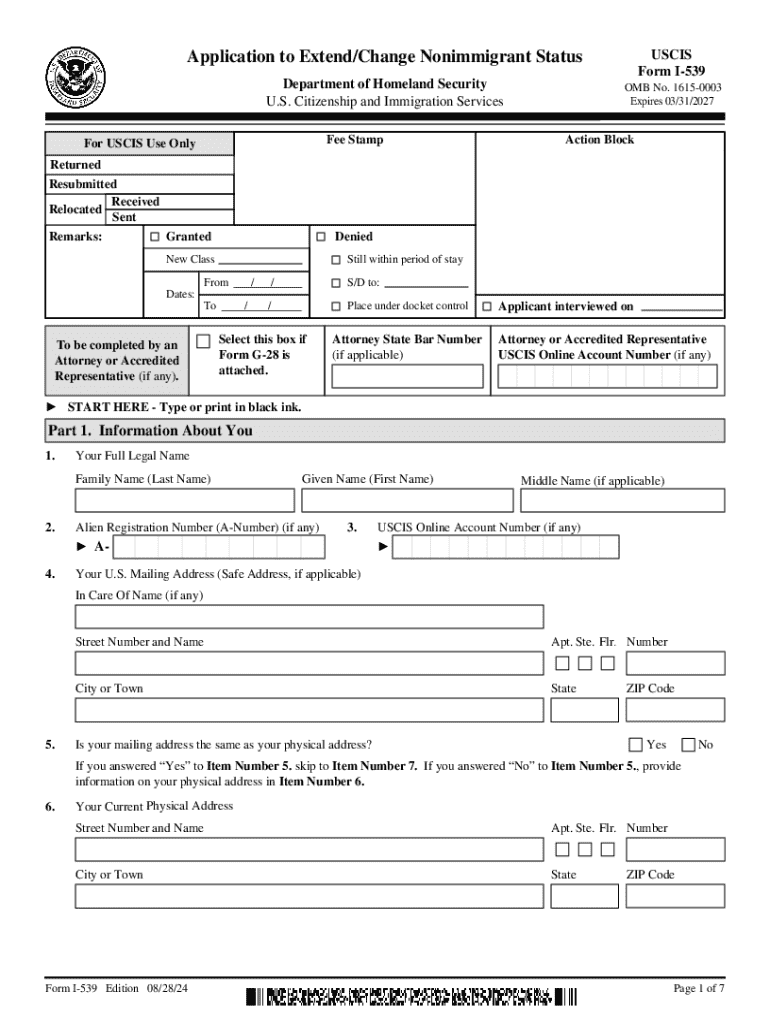
The Change of Status process for international students allows nonimmigrant individuals to adjust their visa status while remaining in the United States. This process is crucial for students who wish to extend their stay or change their current nonimmigrant status to another category, such as from an F-1 student visa to an H-1B work visa. Understanding the specific requirements and implications of this process is essential for maintaining legal status in the U.S.
Steps to Complete the Change of Status for International Students
Completing the Change of Status involves several key steps:
- Determine eligibility for the desired status change.
- Gather necessary documentation, including Form I-539 and supporting evidence.
- Complete the Form I-539 accurately, ensuring all information is correct.
- Submit the application to USCIS, either online or via mail, along with the required fees.
- Await a decision from USCIS and respond to any requests for additional information.
Required Documents for Change of Status
When applying for a Change of Status, it is important to include the following documents:
- Completed Form I-539, which is the application for change of nonimmigrant status.
- Proof of current nonimmigrant status, such as a copy of your visa or I-94 form.
- Evidence of financial support, such as bank statements or affidavits of support.
- Any additional documentation relevant to the new status being requested.
Eligibility Criteria for Change of Status
Eligibility for a Change of Status depends on several factors, including:
- Maintaining lawful status in the U.S. at the time of application.
- Meeting the specific requirements for the new visa category.
- Not having violated any terms of the current visa.
Form Submission Methods
International students can submit their Change of Status application through various methods:
- Online submission via the USCIS website, which may expedite processing times.
- Mailing the completed Form I-539 to the appropriate USCIS address based on the applicant's location.
- In-person submission at designated USCIS offices, if applicable.
Legal Use of the Change of Status
The Change of Status process must be used in accordance with U.S. immigration laws. Students should ensure they are not engaging in unauthorized employment or activities while their application is pending. Adhering to all legal requirements is essential to avoid penalties or denial of the application.
Handy tips for filling out Change Of Status Students International Students online
Quick steps to complete and e-sign Change Of Status Students International Students online:
- Use Get Form or simply click on the template preview to open it in the editor.
- Start completing the fillable fields and carefully type in required information.
- Use the Cross or Check marks in the top toolbar to select your answers in the list boxes.
- Utilize the Circle icon for other Yes/No questions.
- Look through the document several times and make sure that all fields are completed with the correct information.
- Insert the current Date with the corresponding icon.
- Add a legally-binding e-signature. Go to Sign -> Add New Signature and select the option you prefer: type, draw, or upload an image of your handwritten signature and place it where you need it.
- Finish filling out the form with the Done button.
- Download your copy, save it to the cloud, print it, or share it right from the editor.
- Check the Help section and contact our Support team if you run into any troubles when using the editor.
We know how stressing filling out documents could be. Obtain access to a GDPR and HIPAA compliant solution for optimum efficiency. Use signNow to electronically sign and send Change Of Status Students International Students for collecting e-signatures.
Create this form in 5 minutes or less
Find and fill out the correct change of status students international students
Create this form in 5 minutes!
How to create an eSignature for the change of status students international students
How to create an electronic signature for a PDF online
How to create an electronic signature for a PDF in Google Chrome
How to create an e-signature for signing PDFs in Gmail
How to create an e-signature right from your smartphone
How to create an e-signature for a PDF on iOS
How to create an e-signature for a PDF on Android
People also ask
-
What is the i539 2019 blank form used for?
The i539 2019 blank form is used by individuals seeking to extend or change their nonimmigrant status in the United States. Completing this form accurately is crucial for a successful application process. airSlate SignNow can help you fill out and eSign the i539 2019 blank form efficiently.
-
How can airSlate SignNow assist with the i539 2019 blank form?
airSlate SignNow provides an intuitive platform to fill out the i539 2019 blank form electronically. You can easily add your information, eSign the document, and share it securely. This streamlines the process, ensuring you meet all necessary requirements.
-
Is there a cost associated with using airSlate SignNow for the i539 2019 blank form?
Yes, airSlate SignNow offers various pricing plans to suit different needs. You can choose a plan that fits your budget while gaining access to features that simplify the completion of the i539 2019 blank form. Check our website for detailed pricing information.
-
What features does airSlate SignNow offer for document management?
airSlate SignNow offers features such as eSigning, document templates, and secure cloud storage. These tools make it easy to manage your documents, including the i539 2019 blank form, from anywhere. Our platform enhances productivity and ensures compliance.
-
Can I integrate airSlate SignNow with other applications?
Yes, airSlate SignNow supports integrations with various applications, enhancing your workflow. You can connect it with tools like Google Drive, Dropbox, and more to streamline the process of managing the i539 2019 blank form and other documents.
-
What are the benefits of using airSlate SignNow for the i539 2019 blank form?
Using airSlate SignNow for the i539 2019 blank form offers numerous benefits, including time savings and increased accuracy. The platform's user-friendly interface allows for quick completion and eSigning, reducing the chances of errors. This ensures a smoother application process.
-
Is airSlate SignNow secure for handling sensitive documents like the i539 2019 blank form?
Absolutely! airSlate SignNow prioritizes security and compliance, ensuring that your documents, including the i539 2019 blank form, are protected. We use advanced encryption and secure storage to keep your information safe throughout the signing process.
Get more for Change Of Status Students International Students
Find out other Change Of Status Students International Students
- How To eSign Hawaii Time Off Policy
- How Do I eSign Hawaii Time Off Policy
- Help Me With eSign Hawaii Time Off Policy
- How To eSign Hawaii Addressing Harassement
- How To eSign Arkansas Company Bonus Letter
- eSign Hawaii Promotion Announcement Secure
- eSign Alaska Worksheet Strengths and Weaknesses Myself
- How To eSign Rhode Island Overtime Authorization Form
- eSign Florida Payroll Deduction Authorization Safe
- eSign Delaware Termination of Employment Worksheet Safe
- Can I eSign New Jersey Job Description Form
- Can I eSign Hawaii Reference Checking Form
- Help Me With eSign Hawaii Acknowledgement Letter
- eSign Rhode Island Deed of Indemnity Template Secure
- eSign Illinois Car Lease Agreement Template Fast
- eSign Delaware Retainer Agreement Template Later
- eSign Arkansas Attorney Approval Simple
- eSign Maine Car Lease Agreement Template Later
- eSign Oregon Limited Power of Attorney Secure
- How Can I eSign Arizona Assignment of Shares