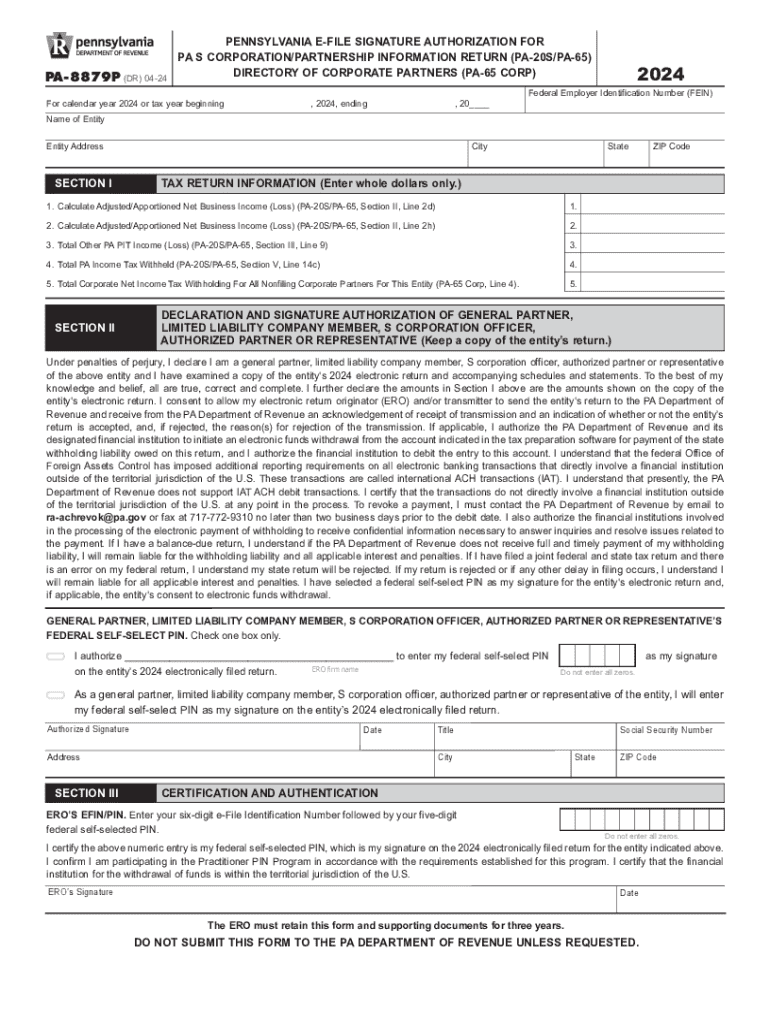
Pennsylvania E File Signature Authorization for PA S CorporationPartnership Information Return PA 20SPA 65 Directory of Corpoate 2024-2026


What is the Pennsylvania E File Signature Authorization For PA S Corporation Partnership Information Return PA 20SPA 65 Directory Of Corporate Partners PA 65 Corp PA 8879P Forms Publications
The Pennsylvania E File Signature Authorization is a crucial document for S Corporations and Partnerships in Pennsylvania. It allows these entities to authorize electronic filing of their tax returns, specifically the PA-20S/PA-65 forms. This authorization streamlines the process of submitting tax returns to the Pennsylvania Department of Revenue, ensuring compliance with state regulations while enhancing efficiency. The document is essential for businesses that wish to file their Partnership Information Return electronically, thereby reducing paper usage and expediting processing times.
How to use the Pennsylvania E File Signature Authorization For PA S Corporation Partnership Information Return PA 20SPA 65 Directory Of Corporate Partners PA 65 Corp PA 8879P Forms Publications
Using the Pennsylvania E File Signature Authorization involves several straightforward steps. First, the authorized representative of the S Corporation or Partnership must complete the form accurately, ensuring all necessary information is provided. Once completed, the form must be signed by the appropriate parties, typically the business owner or a designated officer. After signing, the form can be submitted electronically alongside the PA-20S/PA-65 tax returns. This process allows for a seamless filing experience, reducing the time spent on paperwork and improving overall accuracy.
Steps to complete the Pennsylvania E File Signature Authorization For PA S Corporation Partnership Information Return PA 20SPA 65 Directory Of Corporate Partners PA 65 Corp PA 8879P Forms Publications
Completing the Pennsylvania E File Signature Authorization requires careful attention to detail. Follow these steps:
- Obtain the latest version of the E File Signature Authorization form from the Pennsylvania Department of Revenue website.
- Fill in the required information, including the entity's name, address, and tax identification number.
- Designate the authorized representative who will sign the form on behalf of the entity.
- Ensure that the form is signed by the authorized representative and any other required signatories.
- Submit the completed form electronically with the PA-20S/PA-65 tax returns to the Pennsylvania Department of Revenue.
Key elements of the Pennsylvania E File Signature Authorization For PA S Corporation Partnership Information Return PA 20SPA 65 Directory Of Corporate Partners PA 65 Corp PA 8879P Forms Publications
Several key elements are essential for the Pennsylvania E File Signature Authorization to be valid:
- Entity Information: Accurate details about the S Corporation or Partnership, including name and address.
- Authorized Representative: Identification of the individual authorized to sign the form.
- Signatures: Required signatures from the authorized representative and any additional signatories.
- Submission Method: Clear indication of the electronic submission process for the associated tax returns.
Legal use of the Pennsylvania E File Signature Authorization For PA S Corporation Partnership Information Return PA 20SPA 65 Directory Of Corporate Partners PA 65 Corp PA 8879P Forms Publications
The Pennsylvania E File Signature Authorization is legally binding and must be used in compliance with state tax regulations. It serves as a formal agreement between the entity and the Pennsylvania Department of Revenue, allowing for the electronic submission of tax returns. Misuse or failure to comply with the guidelines set forth by the state can result in penalties or delays in processing tax returns. It is important for businesses to understand their legal obligations when utilizing this form.
Filing Deadlines / Important Dates
Filing deadlines for the Pennsylvania E File Signature Authorization and related tax returns are critical for compliance. Typically, S Corporations and Partnerships must file their PA-20S/PA-65 returns by the 15th day of the fourth month following the close of their fiscal year. For entities operating on a calendar year, this means the due date is April 15. It is advisable to check for any updates or extensions that may be provided by the Pennsylvania Department of Revenue to ensure timely submissions.
Create this form in 5 minutes or less
Find and fill out the correct pennsylvania e file signature authorization for pa s corporationpartnership information return pa 20spa 65 directory of 771656748
Create this form in 5 minutes!
How to create an eSignature for the pennsylvania e file signature authorization for pa s corporationpartnership information return pa 20spa 65 directory of 771656748
How to create an electronic signature for a PDF online
How to create an electronic signature for a PDF in Google Chrome
How to create an e-signature for signing PDFs in Gmail
How to create an e-signature right from your smartphone
How to create an e-signature for a PDF on iOS
How to create an e-signature for a PDF on Android
People also ask
-
What is the Pennsylvania E File Signature Authorization for PA S Corporation Partnership Information Return?
The Pennsylvania E File Signature Authorization for PA S Corporation Partnership Information Return is a crucial document that allows businesses to electronically file their PA 20S/PA 65 forms. This authorization simplifies the filing process and ensures compliance with state regulations, making it easier for businesses to manage their tax obligations.
-
How does airSlate SignNow facilitate the signing of the PA 20SPA 65 forms?
airSlate SignNow provides a user-friendly platform that allows businesses to easily send and eSign the PA 20SPA 65 forms. With its intuitive interface, users can quickly gather signatures, ensuring that the Pennsylvania E File Signature Authorization for PA S Corporation Partnership Information Return is completed efficiently and securely.
-
What are the pricing options for using airSlate SignNow for Pennsylvania E File Signature Authorization?
airSlate SignNow offers flexible pricing plans tailored to meet the needs of various businesses. Whether you are a small business or a large corporation, you can choose a plan that fits your budget while ensuring access to essential features for managing the Pennsylvania E File Signature Authorization for PA S Corporation Partnership Information Return.
-
What features does airSlate SignNow offer for managing corporate partner documents?
airSlate SignNow includes features such as document templates, real-time tracking, and secure storage, which are essential for managing corporate partner documents. These features streamline the process of completing the Pennsylvania E File Signature Authorization for PA S Corporation Partnership Information Return, making it easier for users to stay organized and compliant.
-
Can airSlate SignNow integrate with other software for tax filing?
Yes, airSlate SignNow can seamlessly integrate with various accounting and tax software, enhancing your workflow. This integration allows users to efficiently manage the Pennsylvania E File Signature Authorization for PA S Corporation Partnership Information Return alongside their existing tools, ensuring a smooth filing process.
-
What benefits does airSlate SignNow provide for businesses in Pennsylvania?
By using airSlate SignNow, businesses in Pennsylvania can enjoy a streamlined eSigning process, reduced paperwork, and improved compliance with state regulations. This is particularly beneficial for managing the Pennsylvania E File Signature Authorization for PA S Corporation Partnership Information Return, as it saves time and reduces the risk of errors.
-
Is airSlate SignNow secure for handling sensitive tax documents?
Absolutely, airSlate SignNow prioritizes security and compliance, utilizing advanced encryption and authentication measures. This ensures that all sensitive tax documents, including the Pennsylvania E File Signature Authorization for PA S Corporation Partnership Information Return, are protected throughout the signing process.
Get more for Pennsylvania E File Signature Authorization For PA S CorporationPartnership Information Return PA 20SPA 65 Directory Of Corpoate
- Ecotraveller roaming application form
- Properties of matter crossword puzzle pdf form
- Class b volunteer form special olympics florida l b5z
- Sunnyvale youth basketball league form
- Fw 003 form
- Prometheus test requisition form
- Digestive system haspi answer key form
- Medical aesthetics intake form calgary
Find out other Pennsylvania E File Signature Authorization For PA S CorporationPartnership Information Return PA 20SPA 65 Directory Of Corpoate
- Can I eSignature Tennessee Car Dealer Limited Power Of Attorney
- eSignature Utah Car Dealer Cease And Desist Letter Secure
- eSignature Virginia Car Dealer Cease And Desist Letter Online
- eSignature Virginia Car Dealer Lease Termination Letter Easy
- eSignature Alabama Construction NDA Easy
- How To eSignature Wisconsin Car Dealer Quitclaim Deed
- eSignature California Construction Contract Secure
- eSignature Tennessee Business Operations Moving Checklist Easy
- eSignature Georgia Construction Residential Lease Agreement Easy
- eSignature Kentucky Construction Letter Of Intent Free
- eSignature Kentucky Construction Cease And Desist Letter Easy
- eSignature Business Operations Document Washington Now
- How To eSignature Maine Construction Confidentiality Agreement
- eSignature Maine Construction Quitclaim Deed Secure
- eSignature Louisiana Construction Affidavit Of Heirship Simple
- eSignature Minnesota Construction Last Will And Testament Online
- eSignature Minnesota Construction Last Will And Testament Easy
- How Do I eSignature Montana Construction Claim
- eSignature Construction PPT New Jersey Later
- How Do I eSignature North Carolina Construction LLC Operating Agreement