Worker's Continuity Report Form REO6 2009-2026


Understanding the WSIB General Worker Expense Form
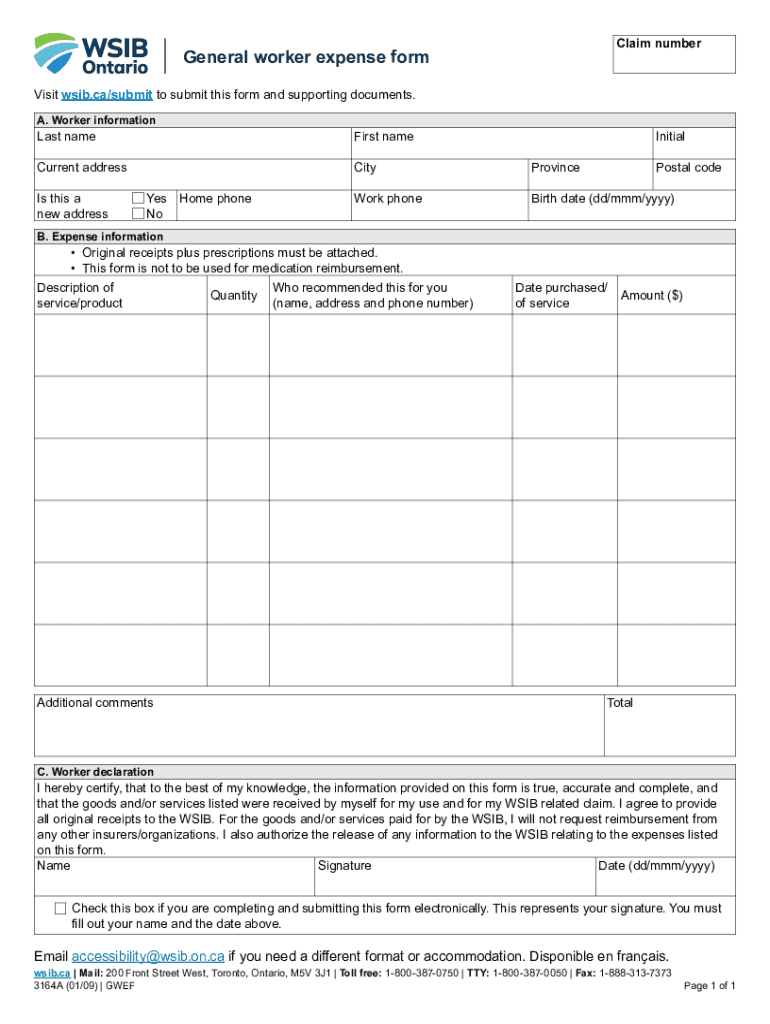
The WSIB General Worker Expense Form is essential for workers in Ontario seeking reimbursement for expenses related to work injuries or illnesses. This form is designed to document and submit claims for various costs incurred while recovering from workplace incidents. It includes sections for detailing medical expenses, travel costs, and other related expenditures. Understanding its purpose helps ensure that workers can effectively communicate their needs to the Workplace Safety and Insurance Board (WSIB).
Steps to Complete the WSIB General Worker Expense Form
Filling out the WSIB General Worker Expense Form involves several key steps to ensure accuracy and completeness:
- Begin by providing your personal information, including your name, contact details, and WSIB claim number.
- Detail the expenses you are claiming, including dates, descriptions, and amounts for each item.
- Attach any supporting documentation, such as receipts or invoices, to validate your claims.
- Review the completed form for accuracy before submission to avoid delays in processing.
Obtaining the WSIB General Worker Expense Form
The WSIB General Worker Expense Form can be obtained through various channels. It is available for download from the official WSIB website, where you can find a fillable PDF version. Additionally, workers can request a physical copy by contacting their local WSIB office. Ensuring you have the correct version of the form is crucial for timely processing of your claims.
Legal Use of the WSIB General Worker Expense Form
This form must be used in accordance with WSIB regulations to ensure compliance with legal requirements. Submitting inaccurate or incomplete information can lead to delays or denials of claims. It is important to familiarize yourself with the legal obligations surrounding the submission of this form, including deadlines and required documentation, to protect your rights as a worker.
Key Elements of the WSIB General Worker Expense Form
Several key elements should be included in the WSIB General Worker Expense Form:
- Personal Information: Full name, address, and WSIB claim number.
- Expense Details: A clear breakdown of each expense, including type, date, and amount.
- Supporting Documents: Receipts or other proof of payment for claimed expenses.
- Signature: Your signature certifying the accuracy of the information provided.
Form Submission Methods
The WSIB General Worker Expense Form can be submitted through multiple methods to accommodate different preferences:
- Online: Submit the form electronically via the WSIB online portal, ensuring a quick and efficient process.
- Mail: Send the completed form and supporting documents to the designated WSIB address.
- In-Person: Visit your local WSIB office to submit the form directly, allowing for immediate confirmation of receipt.
Create this form in 5 minutes or less
Find and fill out the correct workers continuity report form reo6
Create this form in 5 minutes!
How to create an eSignature for the workers continuity report form reo6
How to create an electronic signature for a PDF online
How to create an electronic signature for a PDF in Google Chrome
How to create an e-signature for signing PDFs in Gmail
How to create an e-signature right from your smartphone
How to create an e-signature for a PDF on iOS
How to create an e-signature for a PDF on Android
People also ask
-
What is the WSIB general worker expense form?
The WSIB general worker expense form is a document used by workers in Ontario to claim expenses related to workplace injuries. This form helps streamline the process of reimbursement for eligible expenses incurred during recovery. Understanding how to properly fill out this form is crucial for ensuring timely compensation.
-
How can airSlate SignNow help with the WSIB general worker expense form?
airSlate SignNow simplifies the process of completing and submitting the WSIB general worker expense form. With our platform, users can easily fill out, sign, and send the form electronically, reducing paperwork and enhancing efficiency. This ensures that your claims are processed quickly and accurately.
-
Is there a cost associated with using airSlate SignNow for the WSIB general worker expense form?
Yes, airSlate SignNow offers various pricing plans tailored to meet different business needs. Our cost-effective solutions provide access to features that facilitate the completion of the WSIB general worker expense form and other documents. You can choose a plan that best fits your budget and requirements.
-
What features does airSlate SignNow offer for managing the WSIB general worker expense form?
airSlate SignNow provides features such as customizable templates, electronic signatures, and document tracking to enhance the management of the WSIB general worker expense form. These tools help ensure that all necessary information is captured accurately and that the form is submitted without delays. Additionally, our platform is user-friendly, making it accessible for all users.
-
Can I integrate airSlate SignNow with other applications for the WSIB general worker expense form?
Absolutely! airSlate SignNow offers integrations with various applications, allowing you to streamline your workflow when handling the WSIB general worker expense form. Whether you use project management tools or accounting software, our integrations help you manage documents more efficiently and keep all your data in sync.
-
What are the benefits of using airSlate SignNow for the WSIB general worker expense form?
Using airSlate SignNow for the WSIB general worker expense form provides numerous benefits, including faster processing times and reduced paperwork. Our platform enhances collaboration among team members and ensures that all forms are securely stored and easily accessible. This leads to a more organized approach to managing worker expenses.
-
How secure is airSlate SignNow when handling the WSIB general worker expense form?
Security is a top priority at airSlate SignNow. We implement advanced encryption and security protocols to protect your data when handling the WSIB general worker expense form. Our platform complies with industry standards, ensuring that your sensitive information remains confidential and secure.
Get more for Worker's Continuity Report Form REO6
Find out other Worker's Continuity Report Form REO6
- Can I eSign Oklahoma Online Donation Form
- How Can I Electronic signature North Dakota Claim
- How Do I eSignature Virginia Notice to Stop Credit Charge
- How Do I eSignature Michigan Expense Statement
- How Can I Electronic signature North Dakota Profit Sharing Agreement Template
- Electronic signature Ohio Profit Sharing Agreement Template Fast
- Electronic signature Florida Amendment to an LLC Operating Agreement Secure
- Electronic signature Florida Amendment to an LLC Operating Agreement Fast
- Electronic signature Florida Amendment to an LLC Operating Agreement Simple
- Electronic signature Florida Amendment to an LLC Operating Agreement Safe
- How Can I eSignature South Carolina Exchange of Shares Agreement
- Electronic signature Michigan Amendment to an LLC Operating Agreement Computer
- Can I Electronic signature North Carolina Amendment to an LLC Operating Agreement
- Electronic signature South Carolina Amendment to an LLC Operating Agreement Safe
- Can I Electronic signature Delaware Stock Certificate
- Electronic signature Massachusetts Stock Certificate Simple
- eSignature West Virginia Sale of Shares Agreement Later
- Electronic signature Kentucky Affidavit of Service Mobile
- How To Electronic signature Connecticut Affidavit of Identity
- Can I Electronic signature Florida Affidavit of Title