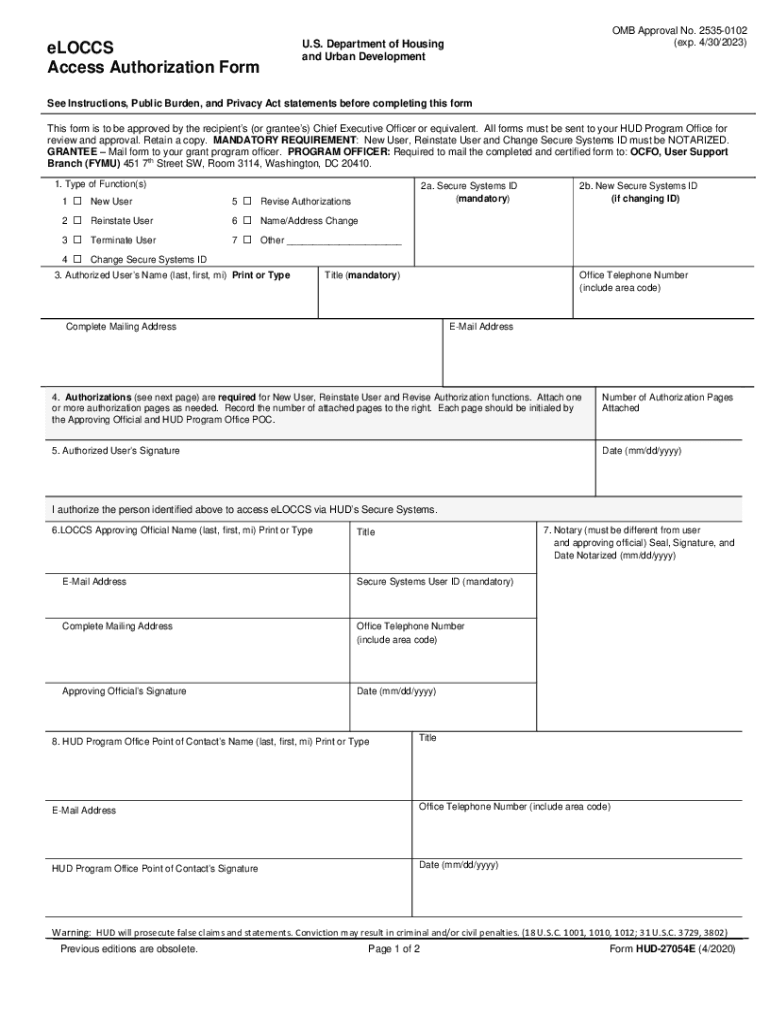
HUD 27054E ELOCCS Access Authorization Form 2020


What is the HUD 27054E ELOCCS Access Authorization Form
The HUD 27054E ELOCCS Access Authorization Form is a crucial document used by entities seeking access to the Electronic Line of Credit Control System (ELOCCS) managed by the U.S. Department of Housing and Urban Development (HUD). This form is primarily utilized by public housing authorities, nonprofit organizations, and other eligible entities to request authorization for electronic transactions related to federal funds. By completing this form, users can streamline their access to HUD's financial management system, ensuring efficient handling of grants and funds.
How to use the HUD 27054E ELOCCS Access Authorization Form
Using the HUD 27054E ELOCCS Access Authorization Form involves several key steps. First, ensure you have the correct version of the form, which can typically be downloaded from HUD's official website. Next, fill out the required fields, including your organization’s name, address, and the specific individuals authorized to access ELOCCS. After completing the form, review it for accuracy before submitting it to HUD. This submission can often be done electronically, which simplifies the process and speeds up approval.
Steps to complete the HUD 27054E ELOCCS Access Authorization Form
Completing the HUD 27054E ELOCCS Access Authorization Form requires attention to detail. Follow these steps:
- Download the form from the HUD website.
- Fill in the organization’s details, including the legal name and address.
- List the names and titles of individuals who will be granted access.
- Provide contact information for each authorized individual.
- Sign and date the form, ensuring that the person signing is authorized to do so.
- Submit the completed form as directed, typically via electronic submission.
Key elements of the HUD 27054E ELOCCS Access Authorization Form
The HUD 27054E ELOCCS Access Authorization Form includes several key elements that are essential for proper completion. These elements consist of:
- Organization Information: Legal name, address, and contact details.
- Authorized Users: Names and titles of individuals who will access ELOCCS.
- Signature: The form must be signed by an authorized representative of the organization.
- Date: The date of submission, which is important for processing timelines.
Legal use of the HUD 27054E ELOCCS Access Authorization Form
The legal use of the HUD 27054E ELOCCS Access Authorization Form is governed by federal regulations pertaining to the management of federal funds. Organizations must ensure that they are compliant with HUD’s guidelines when using this form. Proper completion and submission of the form are necessary to avoid any legal issues related to unauthorized access to federal funds. It is important for organizations to maintain accurate records of their submissions and any communications with HUD regarding the form.
Form Submission Methods
The HUD 27054E ELOCCS Access Authorization Form can be submitted through various methods. The most common submission method is electronic filing, which is encouraged for its efficiency and speed. Organizations may also have the option to submit the form via mail or in person at designated HUD offices. Each method has specific guidelines, so it is advisable to check with HUD for the most current submission procedures and any required documentation that may accompany the form.
Create this form in 5 minutes or less
Find and fill out the correct hud 27054e eloccs access authorization form
Create this form in 5 minutes!
How to create an eSignature for the hud 27054e eloccs access authorization form
How to create an electronic signature for a PDF online
How to create an electronic signature for a PDF in Google Chrome
How to create an e-signature for signing PDFs in Gmail
How to create an e-signature right from your smartphone
How to create an e-signature for a PDF on iOS
How to create an e-signature for a PDF on Android
People also ask
-
What is the HUD 27054E ELOCCS Access Authorization Form?
The HUD 27054E ELOCCS Access Authorization Form is a document used to grant access to the Electronic Line of Credit Control System (ELOCCS) for HUD programs. This form is essential for organizations seeking to manage their HUD funding effectively. By completing this form, users can ensure they have the necessary permissions to access and utilize ELOCCS.
-
How can airSlate SignNow help with the HUD 27054E ELOCCS Access Authorization Form?
airSlate SignNow provides a streamlined platform for completing and signing the HUD 27054E ELOCCS Access Authorization Form electronically. Our solution simplifies the process, allowing users to fill out, eSign, and send the form quickly and securely. This efficiency helps organizations save time and reduce paperwork.
-
Is there a cost associated with using airSlate SignNow for the HUD 27054E ELOCCS Access Authorization Form?
Yes, airSlate SignNow offers various pricing plans tailored to meet the needs of different organizations. Our plans are designed to be cost-effective, ensuring that users can access the features necessary for managing documents like the HUD 27054E ELOCCS Access Authorization Form without breaking the bank. You can choose a plan that fits your budget and requirements.
-
What features does airSlate SignNow offer for the HUD 27054E ELOCCS Access Authorization Form?
airSlate SignNow includes features such as customizable templates, secure eSigning, and document tracking specifically for forms like the HUD 27054E ELOCCS Access Authorization Form. These features enhance the user experience by making it easy to manage and monitor the signing process. Additionally, our platform ensures compliance with legal standards.
-
Can I integrate airSlate SignNow with other software for the HUD 27054E ELOCCS Access Authorization Form?
Absolutely! airSlate SignNow offers integrations with various software applications, allowing you to streamline your workflow when handling the HUD 27054E ELOCCS Access Authorization Form. Whether you use CRM systems, cloud storage, or project management tools, our integrations help you maintain efficiency and organization.
-
What are the benefits of using airSlate SignNow for the HUD 27054E ELOCCS Access Authorization Form?
Using airSlate SignNow for the HUD 27054E ELOCCS Access Authorization Form provides numerous benefits, including increased efficiency, reduced turnaround time, and enhanced security. Our platform allows for quick access and easy management of documents, ensuring that your organization can focus on its core activities without delays caused by paperwork.
-
Is airSlate SignNow secure for handling the HUD 27054E ELOCCS Access Authorization Form?
Yes, airSlate SignNow prioritizes security and compliance, making it a safe choice for handling sensitive documents like the HUD 27054E ELOCCS Access Authorization Form. We utilize advanced encryption and security protocols to protect your data, ensuring that your information remains confidential and secure throughout the signing process.
Get more for HUD 27054E ELOCCS Access Authorization Form
Find out other HUD 27054E ELOCCS Access Authorization Form
- How Can I Electronic signature New Jersey Courts Document
- How Can I Electronic signature New Jersey Courts Document
- Can I Electronic signature Oregon Sports Form
- How To Electronic signature New York Courts Document
- How Can I Electronic signature Oklahoma Courts PDF
- How Do I Electronic signature South Dakota Courts Document
- Can I Electronic signature South Dakota Sports Presentation
- How To Electronic signature Utah Courts Document
- Can I Electronic signature West Virginia Courts PPT
- Send Sign PDF Free
- How To Send Sign PDF
- Send Sign Word Online
- Send Sign Word Now
- Send Sign Word Free
- Send Sign Word Android
- Send Sign Word iOS
- Send Sign Word iPad
- How To Send Sign Word
- Can I Send Sign Word
- How Can I Send Sign Word