eSignature vendor agreement best practices for faster procurement workflows

Procurement teams juggle countless documents: vendor agreements, NDAs, purchase orders, you name it. When you’re stuck printing, scanning, and chasing wet signatures, the entire process grinds to a halt. It’s slow, inefficient, and a nightmare to audit. Deloitte Global CPO Survey reveals procurement’s continued push toward digital transformation.
There’s a better way: electronic signatures for vendor agreements.
eSignatures let you manage the entire agreement process digitally. You can:
- Sign contracts from anywhere
- Verify signer identity
- Store documents securely online
The global digital signature market size is predicted to increase from USD 17.25 billion in 2026. Electronic signature laws such as the ESIGN Act and the Uniform Electronic Transactions Act (UETA) recognize electronic signatures as legally valid for many business contracts.
This guide will show you how to use eSignatures for your vendor agreements to create a faster, more secure, and fully auditable workflow.
1. Standardize vendor contracts with reusable templates
The easiest place to improve an eSignature vendor agreement workflow is the document template. Instead of preparing each written contract from scratch, procurement teams can turn frequently used documents into reusable templates with preassigned fields, signer roles, and signing order.
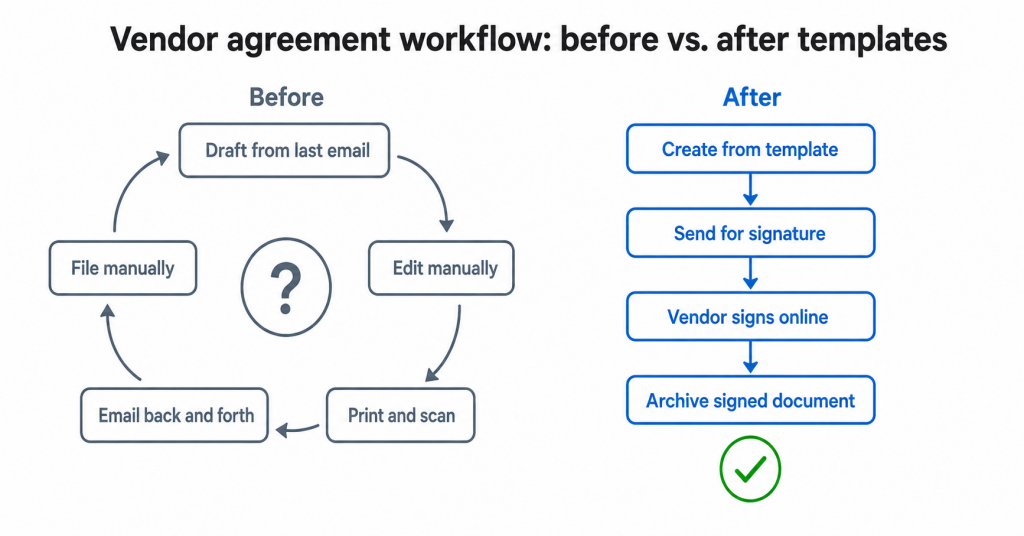
Templates are especially useful for vendor agreements, master service agreements, sales contracts, statements of work, and purchase orders. They reduce repeated setup work, help prevent missing fields, and keep the signing process consistent across teams.
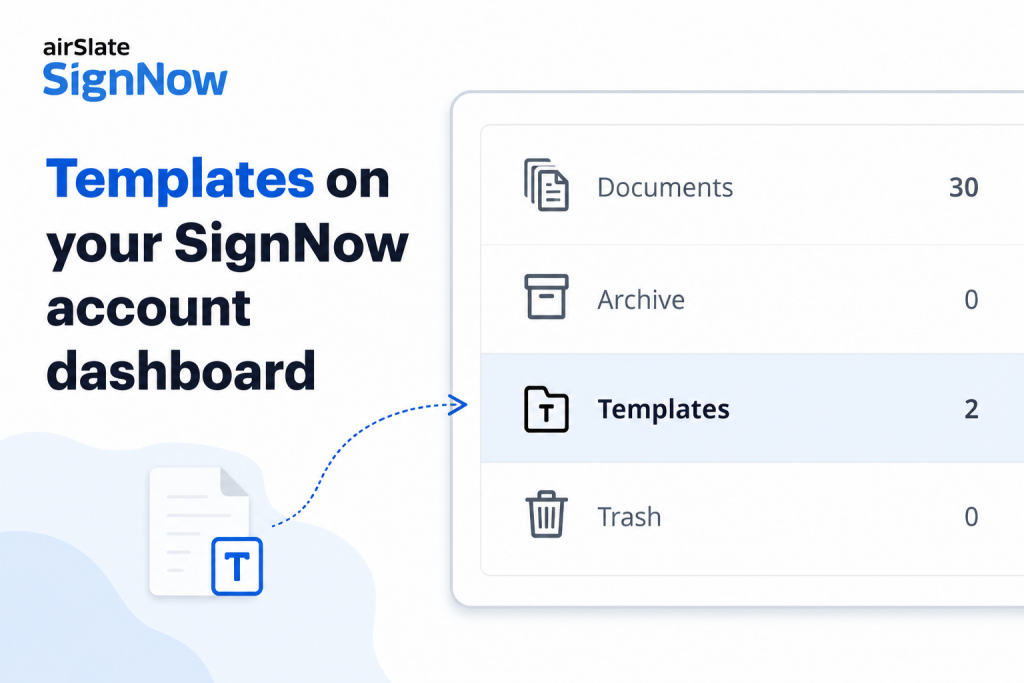
In SignNow, templates act as reusable files for repeated use with variable fields, while documents are one-time instances that carry completed data, certificate, and history. SignNow also supports creating, storing, and reusing templates with fields, roles, logic, and notifications.
How to implement templates in your workflow
- Identify the five most common vendor documents your team sends.
- Separate fixed language from variable fields such as vendor name, effective date, payment terms, and signer identity.
- Add required fields for signature, date, initials, title, and company name.
- Assign signing roles such as “Procurement manager,” “Legal approver,” and “Vendor authorized signer.”
- Share approved templates with the team so every document signed electronically starts from the same source.
SignNow supports unlimited templates of frequently used documents and allows teams to share and manage template access. Shared-template collaborators need an active paid SignNow subscription to view, send, or edit shared templates.
2. Connect electronic signatures to procurement systems
A standalone electronic signature app can still create manual work. Procurement teams may still need to download a document, upload it into a signing tool, wait for completion, and manually move the signed agreement into another system.
The stronger approach is to connect electronic signature capabilities to existing systems such as CRM, ERP, cloud storage, document management, and contract management tools. This keeps business agreements in an electronic form from approval through signature and storage.
SignNow offers integrations with tools such as Salesforce, NetSuite, Google Drive, Dropbox, SharePoint, Microsoft Office 365, Microsoft Word, OneDrive for Business, Dynamics CRM, Power Automate, and Microsoft Teams. It also supports workflow automation through Zapier and Power Automate.
How to implement this
- Map where vendor agreements leave the procurement workflow.
- Identify manual handoffs between procurement, legal, finance, and storage systems.
- Connect SignNow to the systems where teams already manage business contracts.
- Use automated processes to route documents for signature after approval.
- Store signed documents with the related vendor record for proper record retention.
For custom workflows, SignNow API uses OAuth 2.0 for authorization.
3. Require audit trails and authentication methods
For a signed agreement to be easier to defend, procurement teams need more than a visible signature mark. They need detailed audit trails, signer identity details, timestamps, document history, and a clear record of the signing process.
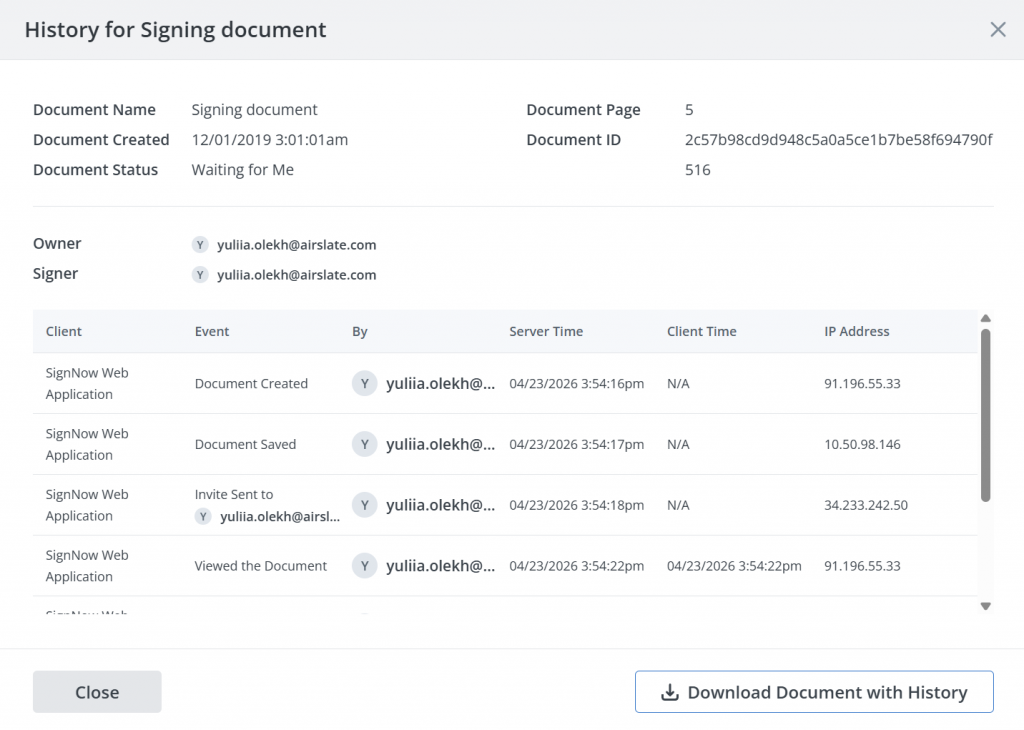
An electronic signature can be an electronic sound, symbol, or process attached to or logically associated with an electronic record and executed or adopted with the intent to sign. Under UETA, electronic records and signatures are not denied legal effect solely because they are electronic, and an electronic record satisfies a writing requirement when the law allows it.
SignNow approaches security thoroughly. The security and compliance standards include SOC 2 Type II reporting, GDPR compliance, and broader data protection controls. The users’ data is stored in access-controlled data centers that meet SOC 2 Type II, GDPR, and ISO 27001 standards.
How audit trails work for your contract process
- Enable authentication methods appropriate to contract risk.
- Use stronger identity verification for high-value vendor agreements.
- Confirm the platform stores detailed audit trails with each document signed.
- Keep the electronic record with the final signed agreement.
- Define retention rules that support proper record retention and future audits.
4. Confirm legal validity across jurisdictions
Electronic signature laws vary by country, region, and document type. Most business contracts can be signed electronically, but not all contracts should be processed the same way. Some documents may require additional identity verification, a wet signature, a qualified electronic signature, or local legal review.
Disclaimer: This article contains general information only, not legal advice. It is important to consult with your company’s legal team when implementing electronic signature methods.
In the United States, the ESIGN Act gives electronic records and signatures legal effect for transactions in or affecting interstate or foreign commerce when the legal requirements are met. The law also includes retention requirements: an electronic record must be capable of being retained and accurately reproduced for later reference.
UETA supports legal recognition of electronic records and electronic signatures at the state level by establishing legal equivalence with paper writings and manually signed signatures.
In the European Union, eIDAS provides the regulatory framework for electronic identification and trust services. Under eIDAS, a qualified electronic signature has the equivalent legal effect of a handwritten signature, while simple electronic signatures and advanced electronic signatures may still be admissible depending on context and local laws.
How to implement this
- Identify the jurisdictions involved in your vendor agreements.
- Confirm whether the document type can be signed electronically.
- Decide whether simple electronic signatures, advanced electronic signatures, digital signatures, or qualified electronic signatures are appropriate.
- Check whether a certificate authority, digital certificates, or public key infrastructure are required for the agreement type.
- Review local laws for exceptions before using eSignatures for higher-risk or regulated documents.
SignNow states that it supports legally binding signing workflows and offers security and compliance standards for U.S., European, and global use cases. Procurement teams should still verify requirements for specific industries, countries, and contract types before relying on one signature method for every agreement.
5. Optimize the vendor signing experience
The best electronic signature app mobile experience is simple for the signer. Vendors should be able to open, review, and sign contracts online in just a few clicks, even when they are away from a desktop.
SignNow supports signing documents and collecting signatures from Android and iOS mobile devices. Its mobile signing page says users can download, print, export a signed document, or send it to other parties for eSignature, and it offers a 7-day trial.
How to implement this
- Test the full signing process from a vendor’s phone.
- Confirm the document is readable on mobile before sending.
- Avoid unnecessary signer steps.
- Use reminders when a document signed electronically is still pending.
- Provide clear instructions in the email invite.
For high-volume vendor onboarding, teams can use templates and bulk sending, where available in their plan. SignNow pricing and plan details can change, so procurement teams should confirm current plan limits before rollout. In terms of pricing, SignNow offers a 7-day trial and a usage-based model, with the Business plan listed at $8 per user/month when billed annually.
Common mistakes to avoid when signing vendor contracts online
When signing a vendor contract online, it’s easy to make mistakes that could cost your business time and money. Here are a few common pitfalls to avoid:
Treating an electronic signature as just a scanned image
A scanned image of a handwritten signature does not provide the same process evidence as a complete electronic signature workflow. A reliable electronic process ties the signature to the electronic record, records intent to sign, and stores audit trails.
Assuming every contract can use the same signature method
Most business contracts can be signed electronically, but not all contracts are the same. A low-risk vendor agreement may use simple electronic signatures, while a regulated or cross-border digital contract may require stronger authentication methods, digital signatures, digital certificates, or a qualified electronic signature.
Skipping identity verification
To verify signer identity, choose authentication methods that match the risk of the agreement. For routine vendor agreements, email-based signing may be enough. For sensitive business agreements, use stronger identity verification.
Ignoring record retention
Legal recognition depends not only on the signature but also on the ability to keep and reproduce electronic records. The ESIGN Act specifically addresses retention and accurate reproduction of electronic records.
Using a tool that does not fit existing systems
If the signing workflow does not connect to contract management, storage, or procurement systems, the team may still depend on manual downloads, uploads, and status tracking.
Vendor agreement checklist: Best practices for a seamless experience
- Convert common vendor agreements into reusable templates.
- Add required fields for signer identity, date, title, and company name.
- Confirm the signer’s intent to sign is clear.
- Use authentication methods that match contract risk.
- Keep detailed audit trails for each signed agreement.
- Store signed documents with the related vendor record.
- Confirm compliance with the ESIGN Act, UETA, eIDAS, and relevant laws.
- Review local laws before using eSignatures across jurisdictions.
- Use digital signatures, digital certificates, or public key infrastructure when required.
- Test the mobile signing process before vendor rollout.
- Confirm SignNow plan features and pricing before implementation.
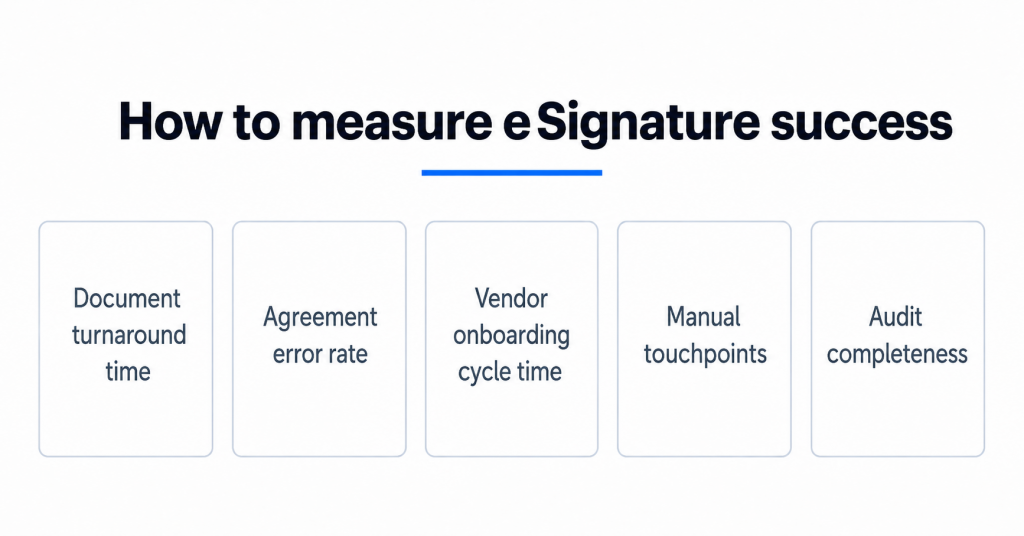
How to measure eSignature implementation success
Track practical procurement metrics before and after implementation. Avoid relying on generic ROI claims unless your team can validate them internally.
| KPI | What it measures | Why it matters |
| Document turnaround time | Time from sending to completed signature | Shows whether the signing process is faster |
| Agreement error rate | Missing fields, wrong versions, incomplete signatures | Shows whether templates reduce rework |
| Vendor onboarding cycle time | Time from vendor selection to signed agreement | Shows procurement workflow impact |
| Manual touchpoints | Downloads, uploads, reminders, status checks | Shows whether integrations reduce manual work |
| Audit completeness | Availability of signer identity, timestamp, and document history | Shows whether signed documents are defensible |
Final thoughts
A strong eSignature vendor agreement workflow is not just about replacing paper. It should help procurement teams standardize documents, verify signer identity, maintain electronic records, keep detailed audit trails, and store signed documents in the right systems.
Start with reusable templates, then connect electronic signatures to existing systems, choose authentication methods based on risk, and confirm the legal validity of each signature method across jurisdictions. With the right setup, procurement teams can conduct business electronically while keeping vendor agreements easier to track, review, and enforce.
Try SignNow today to streamline your vendor agreement process and enjoy the benefits of a secure, efficient, and paperless workflow.
Glossary
Advanced electronic signature: An electronic signature level used in the EU eIDAS framework. It provides stronger signer linkage and control requirements than a simple electronic signature.
Audit trail: A record of document activity, such as who viewed, signed, or completed a document and when those actions occurred.
Digital certificate: A certificate used in digital signature workflows to help associate a signer or organization with a cryptographic key.
Digital signature: A signature method that uses cryptographic technology to help verify signer identity and protect document integrity.
Electronic record: A record created, generated, sent, communicated, received, or stored by electronic means.
Electronic signature: An electronic sound, symbol, or process attached to or logically associated with a record and executed or adopted with the intent to sign.
ESIGN Act: The U.S. Electronic Signatures in Global and National Commerce Act, which supports the legal effect of electronic signatures and records in covered transactions.
Qualified electronic signature: The highest eIDAS signature level. Under eIDAS, a qualified electronic signature has the equivalent legal effect of a handwritten signature.
UETA: The Uniform Electronic Transactions Act, a U.S. model law that supports legal equivalence between electronic records and signatures and paper writings and manually signed signatures.
Wet signature: A traditional handwritten signature on a physical document.
FAQ
Are electronic signatures legally binding for vendor agreements?
In many cases, yes. In the United States, the ESIGN Act and UETA support legal recognition of electronic signatures and electronic records when applicable requirements are met. This gives electronic signatures and electronic records the same legal weight as traditional signatures and paper records for many business contracts. However, not all contracts are covered the same way, and local laws or industry rules may require a specific signature method.
What makes an electronic signature secure?
A secure electronic signature process usually combines signer identity checks, authentication methods, a clear intent to sign, tamper-evident document handling, and comprehensive audit trails. For higher-risk digital agreements, teams may also use digital signatures backed by digital certificates and public key infrastructure.
What is the difference between electronic signatures and digital signatures?
Electronic signatures are a broad category that can include an electronic sound, symbol, or process used to show intent to sign. Digital signatures are a more technical type of signature that typically uses digital certificates, cryptographic controls, and public key infrastructure to help confirm signer identity and document integrity.
Do vendors need a SignNow account to sign?
Vendor-side requirements can vary by workflow configuration. Before rollout, test the signing process from the vendor’s perspective and confirm whether your selected SignNow setup requires account creation, app installation, authentication, or additional steps.
Can electronic signatures replace wet signatures?
Often, electronic signatures can replace wet signatures for common business agreements. However, some documents, jurisdictions, or regulated processes may still require traditional signatures, advanced electronic signatures, qualified electronic signatures, or other specific controls. Review local laws before applying one workflow to all agreement processes.
What is the most important best practice to start with?
Start with reusable templates. Templates improve consistency, reduce repeated setup work, and make it easier to implement electronic signatures across vendor agreements before moving into more complex integrations and automation.
Sources:
Deloitte CPO Survey, 2025
World Commerce & Contracting, 2024
Digital Signature Market Size, Share, and Trends 2026 to 2035, Precedence Research
ESIGN Act, Federal Trade Commission
UETA Uniform Law Comission
- 1. Standardize vendor contracts with reusable templates
- 2. Connect electronic signatures to procurement systems
- 3. Require audit trails and authentication methods
- 4. Confirm legal validity across jurisdictions
- 5. Optimize the vendor signing experience
- Common mistakes to avoid when signing vendor contracts online
- Vendor agreement checklist: Best practices for a seamless experience
- How to measure eSignature implementation success
- Final thoughts
- Glossary
- FAQ
- Are electronic signatures legally binding for vendor agreements?
- What makes an electronic signature secure?
- What is the difference between electronic signatures and digital signatures?
- Do vendors need a SignNow account to sign?
- Can electronic signatures replace wet signatures?
- What is the most important best practice to start with?
- Sources:
