

The global electronic signature market is projected to reach $52.4 billion by 2032. Choosing a mobile eSignature app is not just about adding a handwritten signature to a PDF document. The right document signing app should help users sign documents, send documents, collect signatures, manage contracts, and complete the signing process from a mobile device.
This guide compares six of the best electronic signature apps for iPhone and Android across pricing, mobile app functionality, offline access, integrations, legal compliance, and ease of use.
Disclaimer: The article provides general information and is not legal advice.
TL;DR
- SignNow is a strong option for small business and mid-sized businesses that need mobile signing, offline access, audit trails, reusable templates, and predictable business workflows.
- Docusign is a strong fit for larger teams and real estate workflows, especially when teams need broad agreement workflows and a familiar signing experience.
- Adobe Acrobat Sign is a good fit for teams that already use Adobe Acrobat and want to edit, prepare, and sign PDF documents in one ecosystem.
- PandaDoc works well for sales teams that need proposal creation, CRM integrations, document analytics, and contract workflows.
- Dropbox Sign is a straightforward option for Dropbox users who need simple online document signing.
- Zoho Sign works best for companies already using Zoho CRM, Zoho Books, Zoho People, or Zoho One.
Best electronic signature apps for mobile in 2026
SignNow: A strong option for overall value and mobile functionality
SignNow is eSignature software built for businesses that need to prepare, send, sign, and manage documents from desktop and mobile devices. Its mobile app supports iOS and Android, making it useful for teams that need to sign documents directly from an iPhone, iPad, or Android phone.
SignNow is a strong choice for small and mid-sized businesses because it combines essential features with mobile workflows. Users can create reusable templates, add a signature field, send documents for signature, track document status, and complete the signature process from a mobile device.
Key features include:
- Mobile signing on iOS and Android
- Offline access for teams that need to sign documents offline
- Reusable templates
- Audit trails for completed documents
- Kiosk Mode for in-person signing
- Integrations with tools such as Google Drive, Microsoft 365, Salesforce, NetSuite, Oracle, and Box
- Support for legally recognized electronic signatures
- Security and compliance-related features for professional documents and sensitive documents
SignNow is especially useful for teams that need to quickly sign documents, collect signatures in the field, or manage contracts without relying only on a web version. Teams should review current plan details before purchase because some advanced features may depend on the selected paid plan.
Docusign: Best for larger teams and real estate workflows
Docusign is one of the most widely recognized electronic signature software providers. It is commonly used by enterprise teams, real estate professionals, legal departments, and companies with structured approval workflows.
The Docusign mobile app lets users prepare documents, add fields, send documents, and collect signatures from iOS and Android devices. Docusign also supports offline signing in certain mobile workflows.
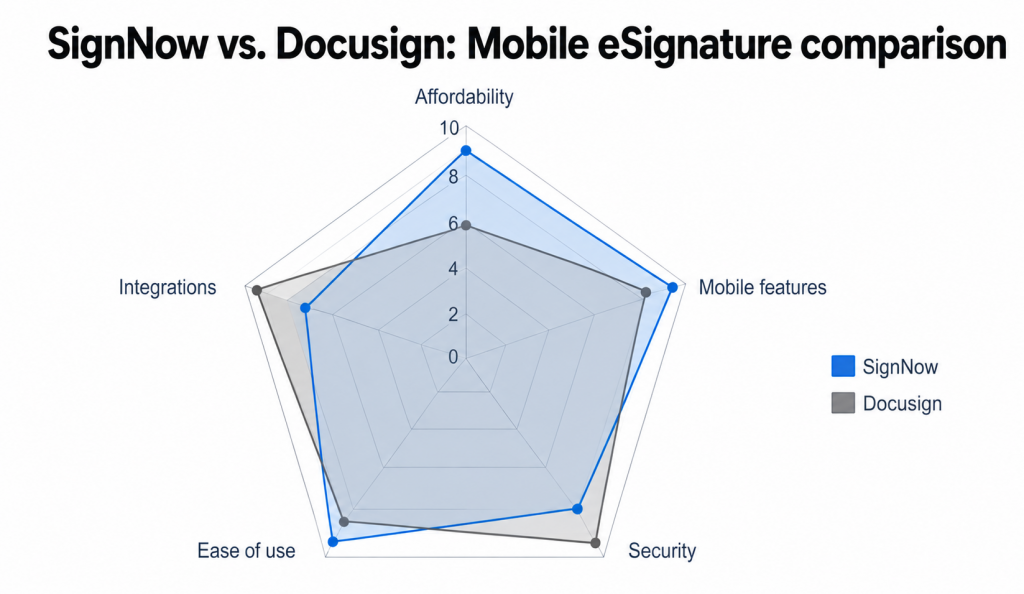
Docusign is a good fit when brand recognition, established workflows, and agreement management features are important. Teams with high document volume should review envelope limits, document volume, add-ons, and total cost before choosing a plan.
Adobe Acrobat Sign: Best for Adobe users
Adobe Acrobat Sign is a natural choice for teams that already use Adobe Acrobat or Adobe Document Cloud. It combines PDF editing, document preparation, and electronic signature functionality in the Adobe ecosystem.
The mobile app supports PDF workflows, allowing users to review, send, track, and sign documents from a mobile device. Adobe Acrobat Sign works well for teams that frequently handle PDF documents and want fewer tool changes between editing and signing.
For users who only need a simple signature app, Adobe Acrobat Sign may include more functionality than necessary. For teams already invested in Adobe, it can help connect PDF work and eSignature workflows in one environment.
PandaDoc: Best for sales teams and proposals
PandaDoc combines electronic signature software with proposal creation, contract generation, CRM integrations, and document analytics. It is designed for sales teams that need more than a basic document signing app.
PandaDoc helps teams create sales documents, send contracts, track recipient activity, and manage the signing process from proposal to close. Its CRM integrations can be useful when teams need visibility into document engagement.
Dropbox Sign: Best for Dropbox users
Dropbox Sign, formerly HelloSign, is a straightforward document signing app for individuals and small teams that already use Dropbox for cloud storage. It offers a clean signing interface and workflows for sending documents and collecting signatures.
Dropbox Sign is useful for online document signing, especially when files are already stored in Dropbox. It helps users send documents for signature without a steep learning curve.
Zoho Sign: Best for Zoho ecosystem users
Zoho Sign is an electronic signature app that integrates with Zoho CRM, Zoho Books, Zoho People, and other Zoho products. It is a strong option for teams already using Zoho to manage sales, finance, HR, and operations.
Zoho Sign lets users send documents, collect signatures, and trigger signing workflows from within the Zoho ecosystem. For Zoho One customers, it may be practical because it connects with existing Zoho workflows.
Why a mobile electronic signature app matters
Gartner’s 2025 Magic Quadrant for CLM identifies mobile-first design and robust app functionality as critical evaluation criteria for enterprise buyers. A mobile electronic signature app helps teams sign documents, collect signatures, and move agreements forward without waiting for desktop access. For remote workers, field teams, sales representatives, healthcare providers, real estate agents, and executives, mobile signing can reduce delays in the signing process.
A dedicated mobile app is useful when teams need to:
- Sign contracts from a phone or tablet
- Send documents while traveling
- Digitally sign PDF documents
- Collect signatures in person
- Handle sensitive documents securely
- Access documents without a reliable internet connection, when supported
- Keep audit trails for legal compliance review
- Manage contracts across devices
Electronic signatures can be legally recognized in many jurisdictions when the signer shows intent to sign and the platform records the signature process. In the United States, electronic signatures are generally recognized under the ESIGN Act and UETA. In the European Union, eSignature legality is governed by eIDAS.
For businesses, the best electronic signature software should do more than let users physically sign on a screen. It should support legally recognized electronic signatures, secure document storage, identity verification options where needed, audit trails, automatic reminders, and a reliable experience across mobile and web version workflows.
Mobile eSignature apps comparison
| App | Best for | Starting price | Best-fit user |
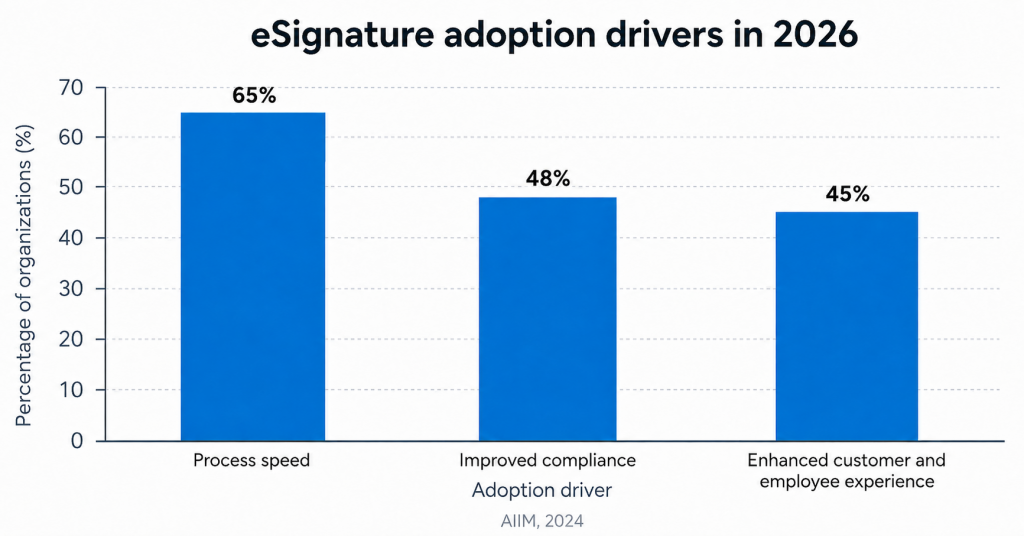
| SignNow | Overall value and SMB workflows | $8/user/month | Small and mid-sized businesses |
| Docusign | Larger teams and real estate workflows | $10/user/month | Larger teams and real estate workflows |
| Adobe Acrobat Sign | Adobe PDF workflows | $12.99/user/month | Adobe Acrobat users |
| PandaDoc | Sales proposals and contracts | There’s a free plan with sign-only options | Sales teams |
| Dropbox Sign | Simple Dropbox-connected signing | $15/user/month | Dropbox users |
| Zoho Sign | Zoho-connected workflows | $10/user/month | Zoho users |
Please be aware that pricing, plan limits, feature availability, and credit card requirements are subject to change. We recommend verifying the current plan details before you make a purchase. Note that while most apps are free to download, the pricing shown applies to the overall solution account.
Feature breakdown: How the best mobile eSignature apps compare
Most electronic signature apps let users upload a PDF, add a signature field, and send documents for signature. Stronger apps may also support templates, audit trails, mobile signing, cloud storage integrations, automatic reminders, custom branding, and compliance-related controls.
Key features to compare
| Feature | SignNow | Docusign | Adobe Acrobat Sign | PandaDoc | Dropbox Sign | Zoho Sign |
| Mobile app | Yes | Yes | Yes | Yes | Yes | Yes |
| Web version | Yes | Yes | Yes | Yes | Yes | Yes |
| Reusable templates | Yes | Yes | Yes | Yes | Yes | Yes |
| Audit trails | Yes | Yes | Yes | Yes | Yes | Yes |
| Bulk sending | Plan-dependent | Plan-dependent | Plan-dependent | Plan-dependent | Plan-dependent | Plan-dependent |
| Custom branding | Plan-dependent | Plan-dependent | Plan-dependent | Plan-dependent | Plan-dependent | Plan-dependent |
| Google Drive integration | Yes | Yes | Yes | Yes | Yes | Yes |
| Best use case | Mobile business workflows | Larger-scale signing | PDF signing | Mobile signing of sales documents | Simple signing | Zoho workflows |
Some free plans may limit documents, users, templates, reminders, or advanced features. If a plan mentions limits such as up to three documents, confirm whether that applies per month, per trial, or per user.
SignNow mobile app: Pros and cons
Pros
- Mobile app for iOS and Android
- Offline access for signing documents without an internet connection
- Ability to sign documents directly from a mobile device
- Reusable templates for repeat workflows
- Audit trails for completed documents
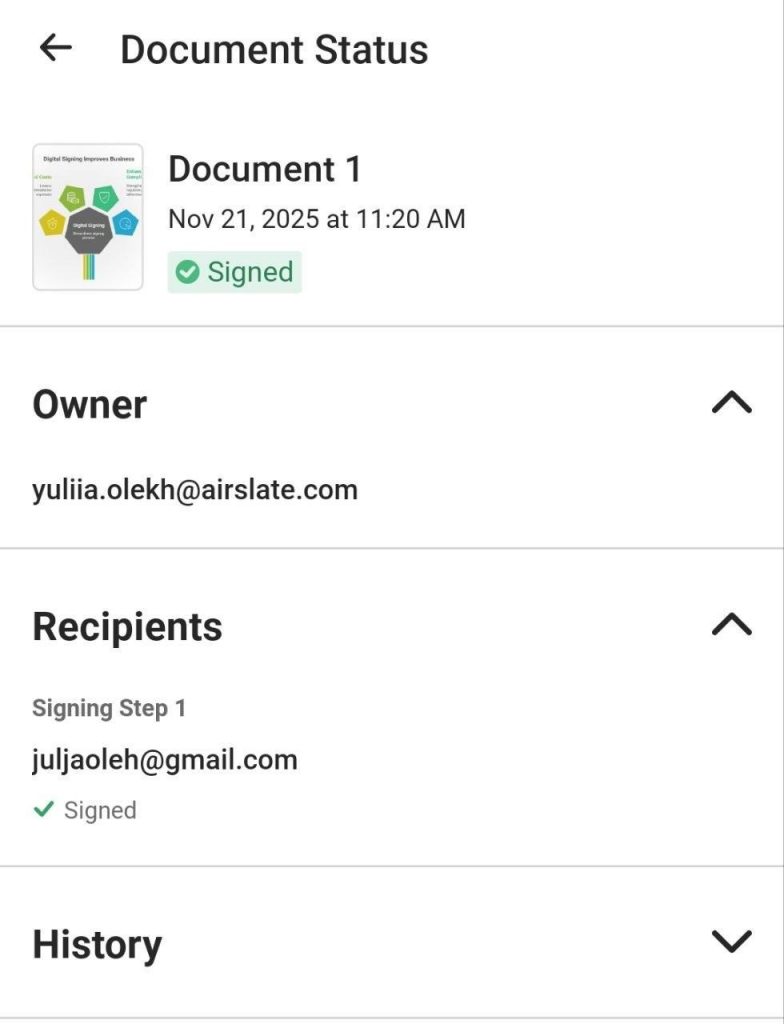
- Kiosk Mode for in-person signing
- Integrations with cloud storage and business apps
- Support for legally recognized electronic signatures
- Useful for small and mid-sized businesses
Cons
- Some advanced features may require higher-tier plans
- HIPAA-related workflows may require specific plan settings and a Business Associate Agreement
- Kiosk Mode may not be included in the base plan
- Some integrations may require higher-tier plans
- Teams should verify current plan details before purchase
Which mobile eSignature app should you choose?
Here are some conclusions based on each app’s functionality.
Choose SignNow if you need value, mobile signing, and flexibility
SignNow is a strong choice for businesses that need to sign documents, send contracts, collect signatures, and manage documents from desktop and mobile devices. It works well for teams that want a document signing app with core eSignature features, offline access, audit trails, and reusable templates.
It is especially useful for small business and mid-sized business teams that handle contracts, forms, HR documents, legal agreements, intake forms, sales documents, and other professional documents.
Choose DocuSign if you need larger-scale agreement workflows
DocuSign is a good fit for organizations that need broad integrations, structured agreement workflows, and a widely recognized electronic signature platform. It may also be useful for real estate workflows where counterparties already know the platform.
Before choosing DocuSign, review envelope limits, document volume, add-ons, and total cost for your expected signing process.
Choose Adobe Acrobat Sign if you work heavily with PDFs
Adobe Acrobat Sign is a good fit for teams that already use Adobe Acrobat and want electronic signature functionality built into PDF workflows. It is especially useful when users need to edit, prepare, and sign PDF documents in one environment.
Choose PandaDoc if sales documents are your priority
PandaDoc is best for sales teams that need proposals, quotes, contracts, CRM integrations, and document analytics. It is more than a basic signature app, making it useful for teams that want to manage sales documents and track buyer engagement.
Choose Dropbox Sign if you want simple signing
Dropbox Sign is best for users who want a straightforward way to sign documents and send documents from Dropbox. It is useful for basic online document signing and simple signature requests.
Choose Zoho Sign if your team already uses Zoho
Zoho Sign is a strong fit for teams already using Zoho CRM, Zoho Books, Zoho People, or Zoho One. It can help connect eSignature workflows with existing Zoho business processes.
How to choose the best electronic signature app
Before choosing electronic signature software for your team, compare each app across these criteria.
Legal compliance
Look for electronic signatures supported by clear audit trails. For U.S. workflows, review ESIGN Act and UETA requirements. For EU workflows, review eIDAS requirements.
Mobile experience
The best electronic signature apps should make it easy to sign documents directly from a mobile device. Test the app on both iOS and Android if your team uses multiple devices. For example, here are direct links to download SignNow from App Store and Google Play Store.
Offline access
Offline access matters for field teams, real estate professionals, construction teams, healthcare providers, and anyone working in areas with unreliable internet access. Not all signing apps offer offline signing, and availability can depend on plan, workflow, mobile app version, and operating system.
Pricing and document limits
Review whether the app offers a free account, free tier, free version, personal plan, paid plan, or business plan. Some free plans are useful for personal use but may limit documents, users, templates, or compliance-related features.
For business use, confirm whether there are caps on documents, envelopes, or users. If a vendor mentions unlimited users or unlimited sending, verify whether restrictions apply to your plan or workflow.
Security and audit trails
For sensitive documents, look for encryption, access controls, audit trails, signer authentication, and compliance-related controls. Audit trails are especially important when signed documents may need to be reviewed later.
Integrations
The best apps connect with cloud storage and business systems, such as Google Drive, Dropbox, Microsoft 365, Salesforce, HubSpot, Zoho, and other tools. Integrations can reduce manual work and make document signing easier to manage.
Advanced features
Advanced features may include custom branding, automatic reminders, bulk sending, templates, conditional fields, signer roles, payment collection, and API access. These features are often only available on specific paid plans.
Final thoughts
For many small and mid-sized businesses looking for the best electronic signature app for mobile teams, SignNow app offers a practical balance of mobile signing, offline access, reusable templates, audit trails, and business-focused workflows. It is especially useful for teams that need to sign documents directly from a mobile device, collect signatures in the field, and manage contracts without relying only on desktop workflows.
Try SignNow to test mobile signing, reusable templates, offline access, and audit trails with your own document workflows.
Glossary
Electronic signature and workflow terms
Electronic signature: A digital indication of a person’s intent to agree to a document. It can include a typed name, drawn signature, uploaded handwritten signature, or selected checkbox.
Digital signature: A cryptographic method used to verify document integrity and signer identity. It is more technical than a general electronic signature.
Audit trail: A record of actions taken on a document, including when it was viewed, signed, completed, or declined. Audit trails help verify the signature process and support compliance review.
Template: A reusable document setup with predefined fields, recipients, and signing steps. Templates help teams send documents faster.
Kiosk Mode: Allows multiple people to sign documents in person on one shared device, such as a tablet.
Legal, security, and compliance terms
ESIGN Act: A U.S. law that gives electronic signatures and electronic records legal recognition in many business and consumer transactions.
UETA: The Uniform Electronic Transactions Act is a U.S. law that helps recognize electronic records and signatures at the state level.
eIDAS: The European Union regulation that governs electronic identification and trust services, including electronic signatures.
HIPAA: A U.S. healthcare privacy and security law. Healthcare organizations should confirm whether an eSignature software provider supports HIPAA-related workflows and offers a Business Associate Agreement when required.
SOC 2: An independent audit framework used to evaluate service providers’ controls related to security, availability, confidentiality, processing integrity, or privacy.
FAQ
What should I test before choosing a mobile eSignature app?
Test the full signing workflow from upload to completion, not just the signature screen. Check how easy it is to add fields, assign recipients, send reminders, track status, and download the completed document. If your team works in the field, test the mobile app on the actual devices and networks your employees use.
When does offline signing matter most?
Offline signing matters when users collect signatures in places with weak or unreliable internet access. This can include job sites, client offices, open houses, events, clinics, warehouses, or travel settings. If offline access is important, confirm whether the app supports offline signing for your specific plan and mobile workflow.
What should small businesses watch for in eSignature pricing?
Small businesses should look beyond the starting price and check document limits, envelope limits, user limits, template access, reminders, branding, and support options. A low starting price may not include every feature needed for repeat business workflows. Review the current pricing page before purchase because limits, plan names, and credit card details can change.
How can teams reduce signing delays on mobile?
Use templates for repeat documents, label fields clearly, set recipient roles, and enable automatic reminders when available. Make sure the digital document is easy to read on a phone and that signature, date, and text fields are placed correctly. For multi-signer workflows, test the signing order before sending the document to customers or employees.
What security questions should I ask before using a signing app?
Ask how the platform protects stored documents, whether it offers audit trails, what authentication options are available, and how access permissions are managed. For regulated documents, confirm whether your plan supports the controls your organization needs, such as HIPAA-related workflows, SOC 2 reports, or admin settings. Do not assume every plan includes the same compliance-related features.
Sources
- Digital Signature Market Size, Share, Growth Report 2032 — Allied Market Research, 2024
- Cost Savings Per E-Signature Transaction — PwC Global Digital Procurement Survey, 2024
 Open
Open - Magic Quadrant for Contract Lifecycle Management — Gartner, 2025
- ESIGN Act — Federal Trade Commission
- eIDAS Regulation – eIDAS 2.0 Final text
- TL;DR
- Best electronic signature apps for mobile in 2026
- Why a mobile electronic signature app matters
- Mobile eSignature apps comparison
- Feature breakdown: How the best mobile eSignature apps compare
- SignNow mobile app: Pros and cons
- Which mobile eSignature app should you choose?
- Choose SignNow if you need value, mobile signing, and flexibility
- Choose DocuSign if you need larger-scale agreement workflows
- Choose Adobe Acrobat Sign if you work heavily with PDFs
- Choose PandaDoc if sales documents are your priority
- Choose Dropbox Sign if you want simple signing
- Choose Zoho Sign if your team already uses Zoho
- How to choose the best electronic signature app
- Final thoughts
- Glossary
- FAQ
- Sources
