

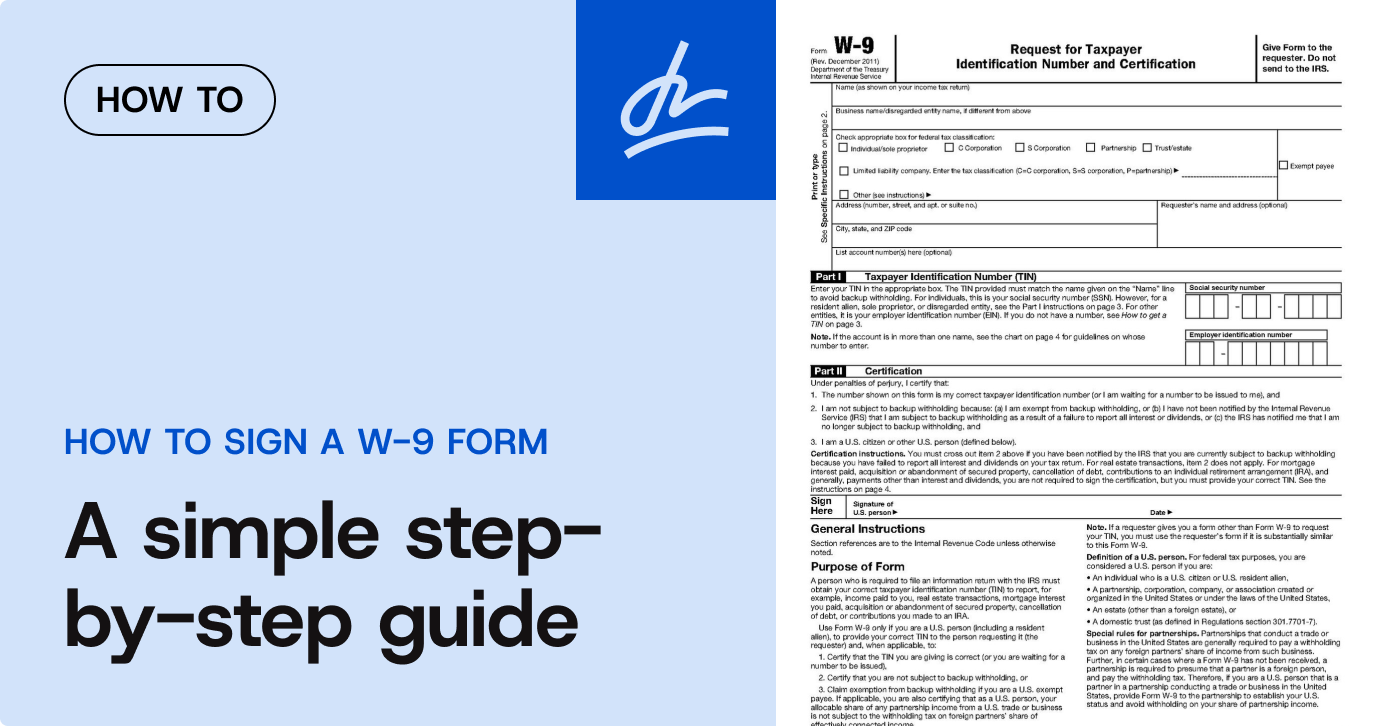
- Yes—you can use an electronic signature to complete a fillable W-9 as long as the eSignature solution meets IRS requirements (identity assurance, same info as paper, perjury jurat, and a final eSignature step).
- The IRS has expressly allowed electronic submission of Form W-9 since April 13, 1998 and still details the rules in its current Instructions for the Requester of Form W-9 (03/2024).
- For tax payers, properly signed W-9s help prevent backup withholding and must be retained; regulations specify a 3-year retention period in many cases.
- U.S. federal law (the ESIGN Act) gives electronic signatures the same legal effect as wet-ink signatures for interstate commerce.
If you’re an independent contractor, freelancer, vendor, or a business onboarding one, you’ll use Form W-9 (Request for Taxpayer Identification Number and Certification) to collect a payee’s legal name, TIN/SSN or EIN, and required certifications. Unlike tax returns, a W-9 isn’t filed with the IRS; it’s provided to the requester and used to prepare year-end information returns (e.g., Forms 1099). Today, you can complete a fillable W-9 with electronic signature end-to-end—fast and compliant—provided your eSignature process matches IRS rules.
Step-by-step: fill and eSign a W-9 correctly
1) Get the current W-9 and read the certification language
- Use the official IRS W-9 (or a substitute W-9 that is “substantially similar” and includes the same certifications and perjury statement).
2) Enter your legal name and TIN exactly
- Line 1 must be your legal name (as on your tax return).
- Provide the correct SSN or EIN. Incorrect name/TIN pairings can trigger backup withholding and B-Notices to the payer.
3) Choose the proper federal tax classification
- Check only one (individual/sole proprietor, C-corp, S-corp, partnership, trust/estate, LLC classification, etc.). Follow IRS instructions for disregarded entities and special cases.
4) If applicable, add exemption codes
- Only certain entities qualify for backup-withholding or FATCA exemptions. If you omit the FATCA field on a substitute form, the requester must clarify that item 4 doesn’t apply.
5) Sign electronically—but only in a compliant system
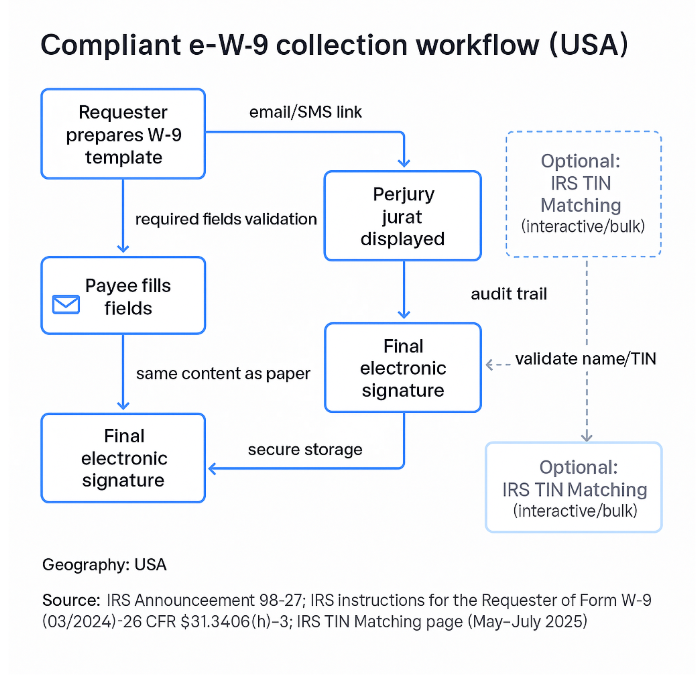
Per IRS Electronic Submission of Forms W-9 guidance, an eSignature is valid when the system:
- Ensures the information received is exactly what you sent and logs access that resulted in submission;
- Makes it reasonably certain the person signing is the person identified on the W-9;
- Presents the same information as the paper form;
- Can produce a hard copy if the IRS requests it;
- Requires, as the final entry, an electronic signature under penalties of perjury using the exact jurat language from the paper W-9.
6) Return the W-9 to the requester securely
- Provide the completed W-9 to the business that requested it (not to the IRS). Requesters should store it securely and be prepared to provide a copy to the IRS on request.
What makes an electronic W-9 legally valid?
Federal signature law
The Electronic Signatures in Global and National Commerce Act (ESIGN, 2000) provides that a contract or signature cannot be denied legal effect solely because it’s electronic, subject to certain exceptions. For W-9 workflows, ESIGN underpins the legal validity of the eSignature action in interstate commerce.
- Announcement 98-27 (effective April 13, 1998) expressly permits payers to receive Forms W-9 electronically and sets system and eSignature requirements (identity, audit trail, same content, final eSignature with perjury jurat).
- The IRS Instructions for the Requester of Form W-9 (03/2024) reiterate those requirements and clarify that the perjury statement must use the paper W-9’s language and the eSignature must be the final entry.
Retention and reliance
Regulations under §31.3406 (backup withholding) state a payer must retain a W-9 (or substitute) for 3 years from the date the account is opened or the instrument purchased, and explain when a payer can reasonably rely on a certification (e.g., signed and dated, contains the required statements).
Electronic W-9 compliance checklist (requester systems)
| Requirement (IRS) | Exact details to implement | Where it’s stated | What your eSignature tool must ensure |
| Identity assurance & access logs | The system must “make it reasonably certain” the signer is the identified one and “document all occasions of user access that result in the submission.” | Announcement 98-27, Requirements (1) | Audit log export on request |
| Perjury jurat language | Perjury statement “must contain the language that appears on the paper Form W-9.” | Announcement 98-27, (3)(8) and Instructions (03/2024) | PDF/CSV fields match the IRS layout |
| Final eSignature | “The electronic signature must be the final entry in the submission.” | Announcement 98-27, (3)(4) & Instructions (03/2024) | Signing must be the last action in the workflow |
| Provide a hard copy for the IRS | Must supply “a hard copy” of the electronic W-9 on request. | Announcement 98-27, (4) | On-demand PDF export |
| Retention | Retain W-9 for 3 years from account opening/instrument purchase (as applicable). | 26 CFR 631.3405 (h)-3(g)(1) | Document storage for at least 3 years |
Practical guide for businesses (requesters) using SignNow
- Find a fillable W-9 in the online library
- Use the current IRS W-9 or a compliant substitute W-9 with the exact certifications. Include clear instructions for tax classification, exemptions, and TIN entry.
- Add required signer fields
- Required text fields for name, TIN, entity type, and address.
- A signature field positioned immediately after the “Under penalties of perjury…” jurat (final action).
- Enable identity and access controls
- Configure email authentication and, for higher-risk use cases, add 2FA or knowledge-based authentication to make it “reasonably certain” the signer is the identified payee. Maintain audit trails capturing access and submission timestamps.
- Route and collect
- Send to the payee; the signer completes all required fields, reviews the jurat, and applies the eSignature as the final step. The system prevents submission until all required fields are complete.
- Store and retain
- Archive the executed W-9 in SignNow’s cloud storage for at least 3 years (or your organization’s longer record policy). Ensure you can generate a hard copy on IRS request.
- Validate TINs proactively (recommended)
- Use the IRS TIN Matching e-Service (interactive or bulk) to confirm name/TIN combinations before filing 1099s. This helps avoid B-Notices and backup withholding errors.
Common mistakes to avoid
- Skipping the jurat or altering its wording. The perjury statement must match the paper W-9 language.
- Signing before the jurat or allowing any step after signature. The eSignature must be the final entry.
- Collecting unrelated consents on the same signature line without highlighting the W-9 certifications and adding the required disclosure sentence for substitute forms.
- Not retaining records or lacking an auditable access log. Retain for 3 years and log access/submission events.
Case studies
1) Freelance designer onboarding (LLC taxed as S-corp)
A marketing firm sent a fillable W-9 to a new design vendor. The signer authenticated via email + SMS, selected LLC (S-corp), entered the EIN, reviewed the jurat, and e-signed as the final step. The firm stored the W-9 and ran a TIN Match before year-end. Result: no B-Notice, clean 1099 filing. (Process aligns with IRS W-9 e-submission guidance and TIN Matching program.)
2) Marketplace paying hundreds of U.S. creators
A platform embedded a compliant substitute W-9 into its onboarding flow. The system enforced required fields, captured audit logs for each submission, and generated on-demand PDFs for compliance. With nightly bulk TIN Matching, the error rate on 1099-NEC filings dropped materially. (Methods tied to IRS Announcement 98-27 requirements and TIN Matching guidance.)
3) Community bank account opening
During account opening, the bank collected a W-9 with identity checks and stored the certificate with account records for 3 years from account opening, satisfying retention rules in §31.3406(h).
Impact on stakeholders
- Payees (contractors/vendors): Faster onboarding; fewer paper mistakes; clear perjury jurat review before signing. (Authority to eSign comes from ESIGN, while IRS rules define how to eSign a W-9 properly.)
- Payers (businesses): Lower risk of backup withholding errors via TIN Matching; auditable workflows that satisfy IRS requests for copies; simplified retention.
Expert outlook (next 6–24 months)
- IRS eSignature acceptance has expanded across many interactions (e.g., permanent extensions for certain forms in the Internal Revenue Manual). Expect sustained support for digital workflows while identity controls remain critical. Source: PwC
- For W-9s specifically, the core requirements (identity assurance, same content, final eSignature, jurat language, logs, copy on request) are well-established and referenced in the current 2024 requester instructions—so plan your processes around those stable essentials. Source: IRS
Conclusion
A fillable W-9 with electronic signature is fully workable in the U.S. when you follow IRS rules: preserve the exact paper content, authenticate the signer, capture access and submission logs, present the jurat verbatim, and require the signature last. Store the certificate and be able to produce a hard copy if asked. Pair this with IRS TIN Matching to reduce filing errors and avoid unnecessary backup withholding. For operations at scale, standardize templates, enforce identity controls based on risk, and implement a 3-year retention policy. These steps deliver faster onboarding, cleaner year-end reporting, and a robust compliance posture.
FAQ
- Can I sign a W-9 on my phone or laptop?
Yes. The IRS allows electronic submission of W-9s. Ensure the platform enforces identity assurance, audit logging, same content as paper, and a final e-signature under the exact jurat. - Do I send my W-9 to the IRS?
No. You give it to the requester (payer). They must retain it and provide a hard copy to the IRS if asked. - What happens if my name and TIN don’t match?
The payer may receive a B-Notice and could have to apply backup withholding until corrected. TIN Matching can mitigate this. - How long must a business keep W-9s?
Generally, 3 years from the date the account is opened or the instrument purchased (see §31.3406(h) retention). - Is an electronic signature really “legal”?
Yes. The ESIGN Act makes eSignatures legally effective for interstate commerce, and IRS guidance allows electronic W-9s with specific controls.
Glossary
- Form W-9 (Request for Taxpayer Identification Number and Certification)
An official IRS form used by a person or business (the requester) to collect the legal name, address, and Taxpayer Identification Number (TIN) from a U.S. person (the payee), such as an independent contractor or vendor. It is not filed with the IRS, but is used by the requester to prepare year-end information returns, like Form 1099. - TIN (Taxpayer Identification Number)
A unique number used by the IRS to identify taxpayers. For individuals, this is typically a Social Security Number (SSN). For businesses, it is an Employer Identification Number (EIN). - Backup Withholding
A requirement for a payer (requester) to withhold a certain percentage of income from payments to a payee. This is often triggered if the payee fails to provide a correct TIN on their Form W-9. A properly completed W-9 prevents this. - Perjury Jurat
The legal certification statement on Form W-9 that begins, “Under penalties of perjury, I certify that…” The signer affirms that the information provided (like their TIN and name) is true and correct. The article emphasizes that for an electronic signature to be compliant, this exact language must be displayed and agreed to as the final step of the process. - ESIGN Act
The Electronic Signatures in Global and National Commerce Act, a U.S. federal law passed in 2000. It establishes that electronic signatures and records have the same legal validity and effect as traditional handwritten (ink) signatures and paper documents.
- Step-by-step: fill and eSign a W-9 correctly
- What makes an electronic W-9 legally valid?
- Electronic W-9 compliance checklist (requester systems)
- Practical guide for businesses (requesters) using SignNow
- Common mistakes to avoid
- Case studies
- Impact on stakeholders
- Expert outlook (next 6–24 months)
- Conclusion
- FAQ
- Glossary
