Executive summary template: How to write one, examples and a free template

An executive summary, similar to a movie preview or book synopsis, gives an overview of your project or business plan, making it easier for stakeholders to grasp the key information without reading through the entire document.
Whether you’re a project manager trying to pitch your next big idea or an entrepreneur seeking to gain potential investors’ buy-in, an impactful executive summary template helps you start on the right foot.
Key takeaways:
- An executive summary is a standalone overview of a larger document. It usually runs 300 to 600 words, or about 5 to 10% of the source document’s length.
- It differs from an abstract. An abstract serves academic peers and covers methodology. An executive summary serves decision-makers and covers conclusions and next steps.
- A business-plan executive summary needs five elements: the concept, the market, the team, the financials, and the ask.
- Two copy-ready templates are included below: one general-purpose, one built for a business plan.
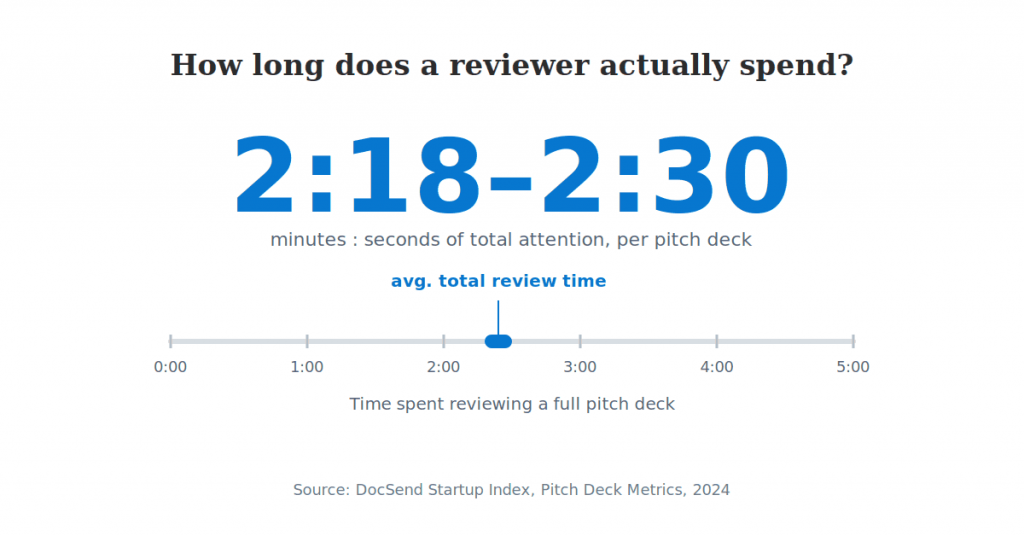
- Investors give an entire pitch deck an average of 2 minutes 18 seconds to 2 minutes 30 seconds of attention. That figure comes from DocSend’s 2024 data. Every line has to earn its place.
- The final section covers how to save the finished summary as a template and route it for review and signature.
What is an executive summary?
An executive summary is a concise and comprehensive outline of a larger report or proposal. It is typically no more than one or two pages long and provides busy executives, investors, and stakeholders with a snapshot of your document’s key points.
Think of the summary as a distilled version of your project or business plan that only covers the essentials:
- Purpose: Why was the project created? What problem does it solve?
- Objectives: What do you aim to achieve with it?
- Proposed solution: How are you going to address the problem?
- Resources needed: What do you require to achieve your goals?
- Timeline: What are the major phases and deadlines for your project?
- Expected benefits: What outcomes do you anticipate?
Purpose and typical length
Two contexts account for most searches for this term. A business-plan executive summary is written for investors or lenders. It focuses on the opportunity, the market, and the funding request. A project or report executive summary is written for internal stakeholders instead. It focuses on the problem, the recommendation, and the expected outcome. Both share the same job. They give a busy reader what’s needed to decide: keep reading, approve the request, or ask a follow-up question.
No single fixed length works for every document. A common range across business-writing and reporting practice is 300 to 600 words. That is roughly 5 to 10% of the source document’s length. For a one-page summary attached to a 20-page business plan, that puts the target close to 400 words; a longer report may justify up to two pages. Treat the range as a starting point, not a hard rule. The real test is whether a first-time reader can follow this brief document without the rest of the document.
Specific numbers make a summary more engaging than a list of adjectives. A concise summary that opens with the problem, not with company history, holds a reader’s attention through the last line.
Executive summary vs. abstract vs. introduction
An executive summary is written for decision-makers. It covers conclusions and recommendations. An abstract is written for peers and covers methodology instead. An introduction only opens a document. It cannot stand apart from the rest of the text.
How the formats differ
| Document | Primary audience | Typical length | Main purpose | Stands alone? |
| Executive summary | Executives, investors, stakeholders | 300 to 600 words | Conclusions, recommendations, requested action | Yes |
| Abstract | Peers, researchers | 150 to 300 words | Methodology and findings | Yes |
| Introduction | Any reader of the full document | Varies | Sets context for what follows | No |
The executive summary is the only one of the three built for zero context. An abstract assumes the reader already cares about the methodology. An introduction assumes the reader is about to continue into the next section. It never has to justify itself on its own.
Mixing up the three is a common source of feedback in the first draft review. A reviewer who asks “where’s the recommendation?” is usually reading an introduction that was mislabeled as a summary.
What to include in an executive summary
A business-plan executive summary needs the business concept, the market opportunity, financial highlights, and the ask. A general or project executive summary needs less: the problem, the proposed solution, and the expected outcome. The two lists overlap, but a business-plan summary carries a few extra fields.
Important elements by document type
For a business plan:
- Business concept and mission, in one sentence
- Product or service description
- Target market and competitive advantage
- Financial highlights or funding ask
- Management team, one line per person
For a project or report:
- Problem statement
- Proposed solution or recommendation
- Expected impact or return on investment
- Next steps or the decision requested
Use these bullet points to surface critical information, key metrics, and key findings from the entire document. Together, they give the target audience a high level overview of the main points while preserving the key insights and key takeaways that support a decision.
How to write an executive summary in 7 steps
Write the executive summary last. Draft the full document first. That way, every claim in the summary is already backed by detail the reader can find if they keep reading.
Draft and verify the summary
- Write it last. Draft the full business plan or report first. Writing the summary before the rest of the document exists means summarizing content that does not exist yet.
- State the problem or opportunity first. Open with the situation, not with background about the company. A reader should know why this document exists within one sentence.
- Summarize the solution in plain language. State the proposal concisely and avoid internal shorthand or jargon. A first-time reader outside the team will not recognize it.
- Back it with one or two concrete numbers. A market size, a revenue projection, or a timeline does more work than an adjective. Investors give an entire pitch deck an average of 2 minutes 18 to 2 minutes 30 seconds of attention. A vague claim competes poorly against a specific one.
- Name the requested action. State exactly what the reader should do next. That might mean approving a budget, committing funding, or scheduling a follow-up meeting.
- Cut anything that needs prior context. Then reread the result as a stranger would. If a sentence only makes sense because the writer already knows the backstory, it does not belong in the summary.
- Check every number against the source document. A number can change during drafting. If the summary is not updated to match, readers lose trust fast.
The full document rarely stays still while it is being written. Revisit the summary once more after the last edit to the source document. Confirm every figure and all essential information in it still match.
Recent review-time data shows how little time a summary actually gets:
Free executive summary template (copy and fill in)
Copy the structure below directly into a document. Replace each bracketed prompt with your own content.
General-purpose summary template
Executive summary
Problem or opportunity: [One or two sentences on the situation and why it matters now.]
Proposed solution: [What you are recommending or building, in plain language.]
Key data point: [One number that supports the case: market size, cost, time saved, or projected outcome.]
Expected outcome: [What changes if this is approved or funded.]
Requested action: [Exactly what the reader should do next.]
Fill in each line in order. Then read the result as one paragraph, not five separate fields. A reader should follow the logic from problem to action without seeing the labels.
If the key data point does not exist yet, say so directly. That happens often with an early-stage recommendation. Do not leave the line vague instead. Store the filled-in version in a shared document library if it needs reuse across a team. Keep this general version under roughly 150 words. Anything longer usually belongs in the full report instead.
Free business plan executive summary template (copy and fill in)
A business-plan executive summary template needs a few extra fields. A general template skips market size, competitive position, and the specific funding ask.
Business plan fields
Business plan executive summary
Company overview: [One sentence: what the company does and why it exists.]
Product or service: [What you sell and the problem it solves for the customer.]
Target market and competitive position: [Market size and how you differ from existing options.]
Financial highlights: [Revenue to date or projected, and key margins if relevant.]
Funding ask: [Amount requested and how it will be used.]
Management team: [One line per founder or key hire: name, role, relevant background.]
This is the version investors and lenders expect to see first. It usually appears on the page right after the title page. Each field maps to a question a lender or investor asks anyway. Answering it up front avoids a follow-up email.
Keep the funding ask specific. A summary that asks for investment without a number reads as unprepared. One that states an exact amount, and its purpose, reads as ready to discuss. The management team line does not need a full biography. State the role and one credential: has this person done something like this before? Investors who see a vague ask often stop reading before the financial section. The summary already signals that the plan is not finished.
This structure works well saved as one of several reusable templates a team keeps on file. That makes it easy to reuse for the next funding round.
Executive summary example: a business plan for a small manufacturer
Here is the business-plan template above, filled in for a fictional small manufacturer seeking expansion funding.
The example shows how to condense a full plan without losing the information that supports the request.
Northfield Woodworks example
Northfield Woodworks designs and builds custom furniture for residential and small commercial clients in the Pacific Northwest. Demand has outpaced the current one-line production shop for eighteen consecutive months. The backlog stands at eleven weeks as of this plan.
Northfield sells made-to-order furniture directly to consumers and interior designers. This avoids the markup of retail distribution. The regional custom-furniture market is estimated at $40 million annually. Northfield currently holds an estimated 2% share, competing on lead time rather than price.
Revenue reached $680,000 last year, with a 34% gross margin. Northfield is requesting $250,000 to add a second production line. That investment is projected to cut the backlog from eleven weeks to four. It should also support a 60% increase in annual capacity.
The founding team includes a master furniture maker with fifteen years in commercial shops. The operations lead brings a background in small-manufacturing logistics. Both the financial statements and the funding request were drafted in Word, then finalized as a PDF. Both are supported document formats for the final plan.
Northfield expects the new production line installed and running within four months of funding. The founders plan to repay the amount over three years from the added capacity. Investors typically ask about repayment terms in the first follow-up call. This plan states the timeline up front instead of waiting to be asked.
Common mistakes that make an executive summary hard to read
The most common mistake is treating the summary as a condensed introduction. It is not one; it needs to stand on its own.
These errors can hide key information or lose the reader before the requested action appears.
Treating it as a shortened introduction
An introduction can rely on the rest of the document for context. An executive summary cannot. A reader who stops after the summary should still understand the full picture.
Using jargon or internal shorthand
Terms that make sense inside the team mean nothing to a first-time outside reader. A project codename or an internal metric is a common example.
Leaving out a specific number
A summary that calls the market “large” or the impact “significant” gives the reader nothing to evaluate. A market size, a percentage, or a dollar figure makes the same point in fewer words.
Opening with company history instead of the problem
A paragraph on when the company was founded delays the one sentence a reader actually needs. Save the history, if it matters at all, for later in the summary or for the full document.
Skipping the stranger read-through
A final pass, reading the summary as someone with zero context would, catches unclear references. The original writer often can no longer see them after several drafts. A colleague invited through shared documents and folders can play that role. This works without waiting for a full review cycle.
Finalize your executive summary and route it for sign-off
Once the summary is drafted, save it as a reusable template. Add the fields a co-founder or reviewer needs to fill in or approve. Then send it for signature instead of emailing a static file back and forth. An emailed draft usually comes back with comments buried in three reply threads. There is no single record of who approved the final version.
This SignNow workflow turns a completed summary into a template that can be filled, sent, and tracked again. Follow the steps below after the full proposal or project report has been finalized.
Create a reusable template in SignNow
Upload and create the template. From the SignNow Documents dashboard, upload the finished executive summary file as a template by selecting + Create > Template and uploading it from a storage of your choice.
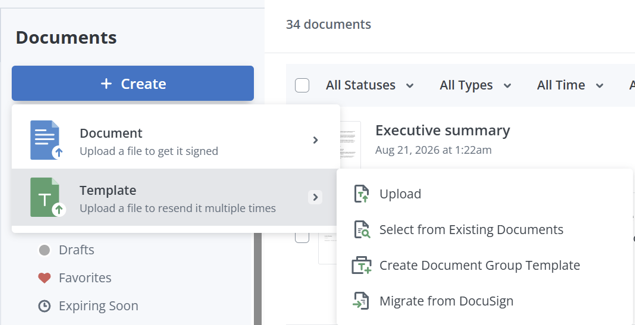
Create a reusable template in SignNow by opening the Create menu and choosing to upload a file or select an existing document.
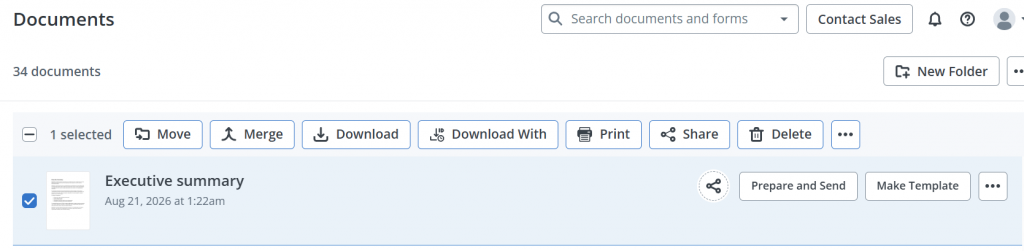
You can also select Make Template for the uploaded executive summary and name the template so the team can find it. The same structure is then available the next time a plan or report needs one.
Add fields and recipients
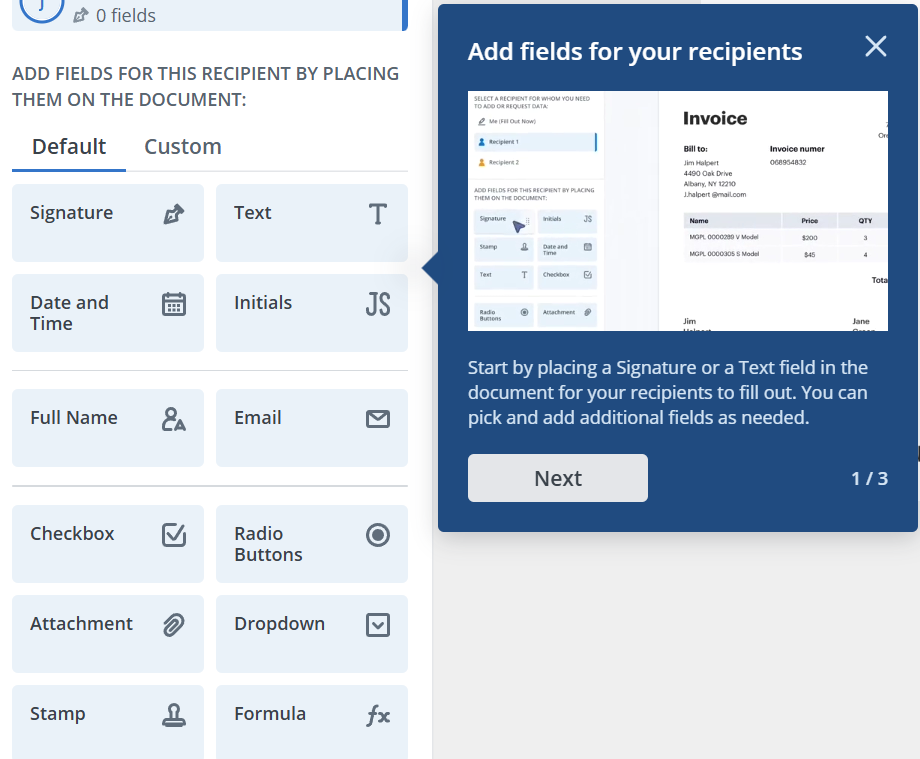
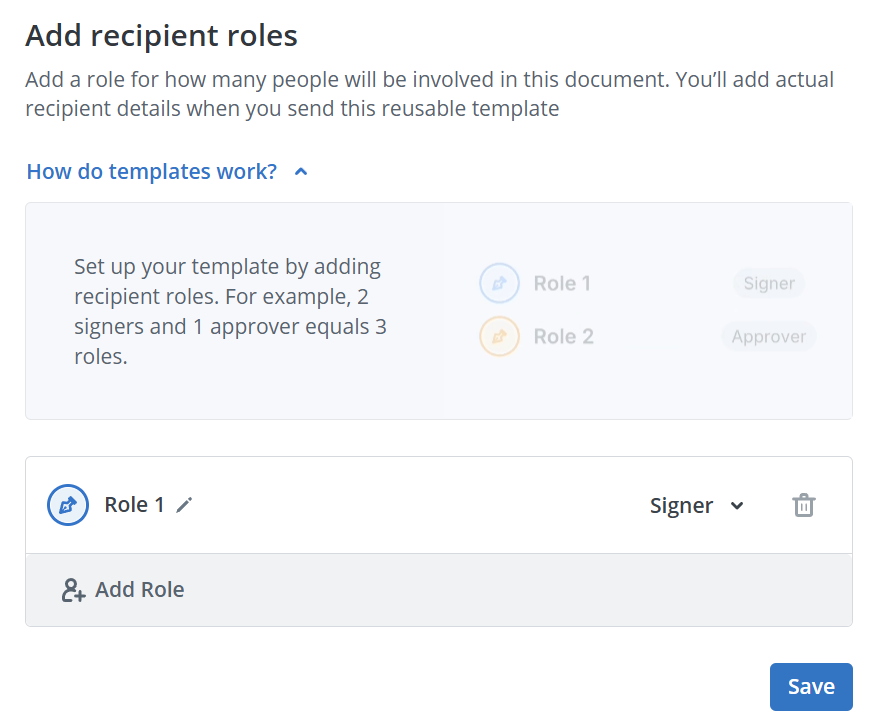
Add fields for reviewer input and set a signing order. Open the template editor, add recipient roles, and drag the needed text, date, checkbox, or signature fields onto the document. Assign each field to the correct role, then set the order in which reviewers and other stakeholders receive it.
Use and track the template
Create and send a document from the template. Select the saved template, choose the option to generate or send a new document, enter the recipients, and review the assigned fields before sending. This preserves the template for future use while creating a separate copy for the current full proposal.
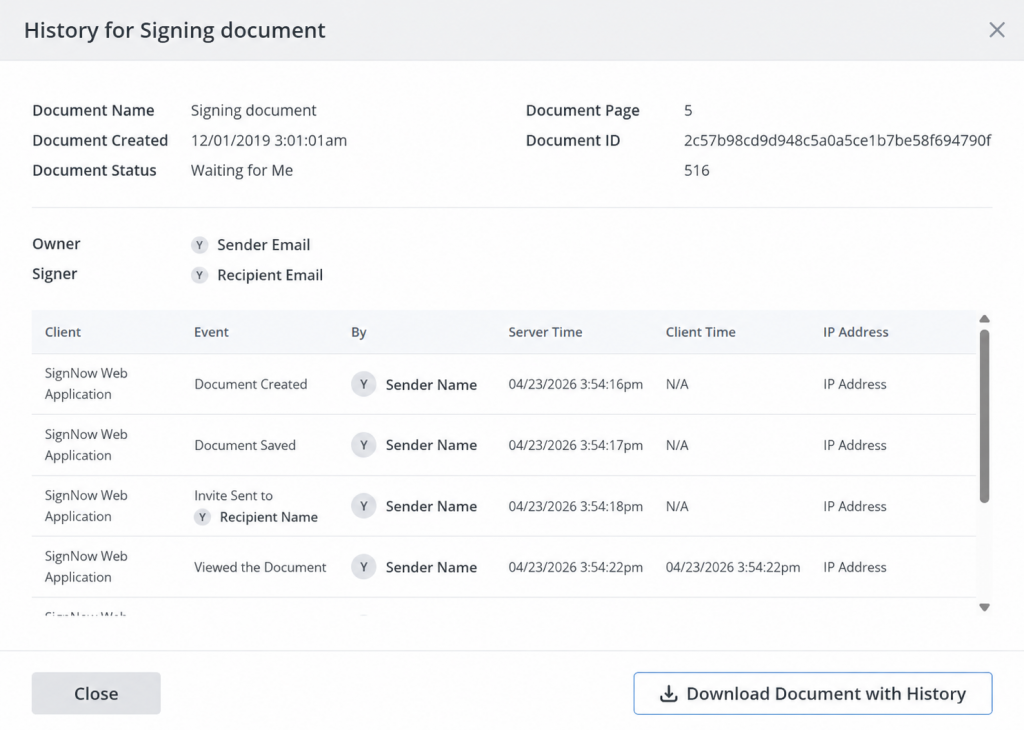
Track completion. Routing the finished summary for signature keeps a timestamped record instead of an email thread. Monitor its status from the Documents dashboard and use the court-admissible audit trails to see who reviewed and approved the final version.
Routing a business document for an electronic signature this way is legally binding in the US. This falls under ESIGN Act and UETA compliance.
SignNow’s cloud storage integrations pull the draft directly into a template. Small teams often draft a plan on a laptop, then review it from a phone. That whole step can happen without printing anything, since SignNow’s mobile applications cover both review and signing. Reusable templates and fillable fields are included on SignNow’s Business plan. That plan is priced at $8 per user per month when billed annually.
“We felt most comfortable investing with SignNow given their SOC 2 certification and strict focus on ESIGN and UETA act compliance.” — Dan Rotelli, CEO, BIS
Final thoughts
An effective executive summary presents the most important information from a business plan, project proposal, or report in a clear, decision-ready format. A reusable summary template helps teams maintain a consistent structure, focus on key findings, and make each document easier for stakeholders to review.
With SignNow, you can upload your completed executive summary, convert it into a reusable template, add fillable or signature fields, and assign roles to reviewers.
Start the free trial to create your template and simplify future document preparation, route summaries for approval, and track each step from one workspace.
Glossary
Audit trail: A timestamped record of who viewed, reviewed, and signed a document. It includes the order in which those actions happened.
Business plan: A document describing a company’s concept, market, operations, and financial projections. Companies typically use it to guide strategy or request funding.
ESIGN Act: A US federal law, the Electronic Signatures in Global and National Commerce Act. It makes electronic signatures legally valid for interstate and foreign commerce. See SignNow’s electronic signature legality page for country-by-country detail.
Executive summary: A short, standalone overview of a larger document. It gives a reader the purpose, key facts, and requested action without requiring the full document.
Signing order: The sequence in which reviewers or signers see and act on a document. Setting one for an executive summary ensures a co-founder or CFO reviews it before it reaches investors.
FAQ
How long should an executive summary be?
Most guidance puts it at 300 to 600 words. That is about 5 to 10% of the source document’s length. A one-page summary attached to a longer business plan usually lands near the shorter end of that range.
What is the difference between an executive summary and an abstract?
An executive summary is written for decision-makers. It leads with conclusions and a requested action. An abstract is written for peers instead, and leads with methodology and findings. Only the executive summary is meant to prompt a decision.
What should a business-plan executive summary include?
It needs six fields: the company concept, the product or service, and the target market and competitive position. It also needs financial highlights, the funding ask, and a short line on the management team. Teams that already store financial projections in a CRM or ERP can skip re-typing the numbers. SignNow’s document generation pulls them directly into the plan instead.
Where does the executive summary go in a document?
Immediately after the title page, and before the table of contents. A reader should encounter it before anything else. It should never appear at the end of a document.
Can AI write an executive summary?
An AI tool can draft a first pass once the full document exists. The summary depends entirely on content that has already been written. A person should still verify every number and the funding ask before it goes out. A final stranger read-through catches issues a drafting tool cannot.
Who actually reads an executive summary?
Investors, lenders, executives, and any stakeholder deciding whether to approve, fund, or act on the full document. Different industries emphasize different fields. A real estate business plan leans on market comparisons. A healthcare plan leans more on compliance instead.
What makes an executive summary engaging?
Specific, sourced numbers do more than adjectives ever will. A concise summary opens with the problem, states one clear ask, and skips filler. That combination holds a reader’s attention through the final line, more than any turn of phrase can.
Sources
- Key takeaways:
- What is an executive summary?
- Executive summary vs. abstract vs. introduction
- What to include in an executive summary
- How to write an executive summary in 7 steps
- Free executive summary template (copy and fill in)
- Free business plan executive summary template (copy and fill in)
- Executive summary example: a business plan for a small manufacturer
- Common mistakes that make an executive summary hard to read
- Finalize your executive summary and route it for sign-off
- Final thoughts
- Glossary
- FAQ
- How long should an executive summary be?
- What is the difference between an executive summary and an abstract?
- What should a business-plan executive summary include?
- Where does the executive summary go in a document?
- Can AI write an executive summary?
- Who actually reads an executive summary?
- What makes an executive summary engaging?
- Sources
