
AI digest: An invoice template is a reusable document layout that captures the fields a bill needs (business details, line items, tax, due date) so a business doesn’t rebuild an invoice from scratch every time. Most invoicing tools stop there: they hand over a template and leave the signing and payment collection as separate errands. For invoices that need a client’s approval before they’re payable, such as a purchase order or a contractor work order, that gap is where payment gets stuck.
TL;DR
- An invoice template only needs to standardize the required fields once: business and client details, invoice number, line items, tax, due date, and payment terms.
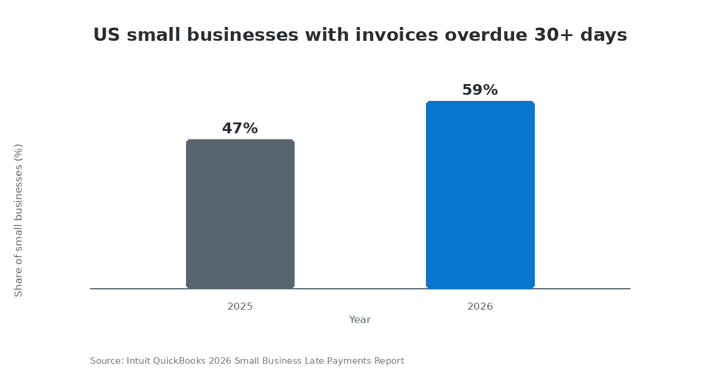
- 59% of US small businesses reported invoices overdue by 30+ days in 2026, up from 47% in 2025.
- A template built with fillable fields can be reused and edited per client without redesigning the layout.
- In the US, an electronically signed invoice or purchase order is enforceable under the ESIGN Act and UETA when the signer consents to sign electronically, and the record can be retained and reproduced.
- Combining the template, the signature request, and the payment request into a single link removes one full back-and-forth step between billing and getting paid.
- SignNow’s reusable templates and fillable fields are available on every paid plan; payment collection is a Business Premium-plan feature (or higher).
What is an invoice template?
An invoice template is a fixed layout with labeled fields for the information every invoice needs, so a business fills in new values per client instead of formatting a new document each time. Think of it the way a tax form works: the structure never changes, only the numbers inside it do. Static templates, built in Word or Excel, only automate the layout. A digital, fillable template goes further: it stores the field structure once and lets a business or their client fill it in, request a signature on it, and request payment against it, all from the same file.
What information does a valid invoice need?
A valid invoice needs a fixed set of fields regardless of format, and missing one is the most common reason a client’s accounts-payable team kicks a bill back for correction.
At a minimum, an invoice needs: the issuing business’s name, address, and tax ID; the client’s name and billing address; a unique invoice number; an itemized list of goods or services with quantity and unit price; applicable tax; a total amount due; a due date; and accepted payment methods. Who fills it in, when, and why matters for recordkeeping: the IRS generally recommends keeping business records, including invoices, for three years, and four years for employment tax records, to support a tax filing if it’s ever reviewed.
Why it matters: an invoice missing a tax ID or a clear due date is one of the most common reasons a client’s accounts-payable team delays payment.
How to build a fillable invoice template in SignNow
A fillable invoice template lets a business enter client-specific details once and reuse the same layout indefinitely, instead of recreating the file for every new client.
- Upload an existing invoice (PDF, Word, or Excel) or start from a blank document in the SignNow editor.
- Open the fields panel and add fillable fields for each variable value: client name, invoice number, line-item description, quantity, and unit price.
- Add a calculated field for the line-item total and the tax amount, so the total updates automatically as quantities change. Calculated fields are available on SignNow’s Enterprise plan.
- Save the document as a reusable template, so it can be sent to a new client without rebuilding the field layout.
- Set default values (business name, standard payment terms) so recurring fields don’t need to be re-entered each time.
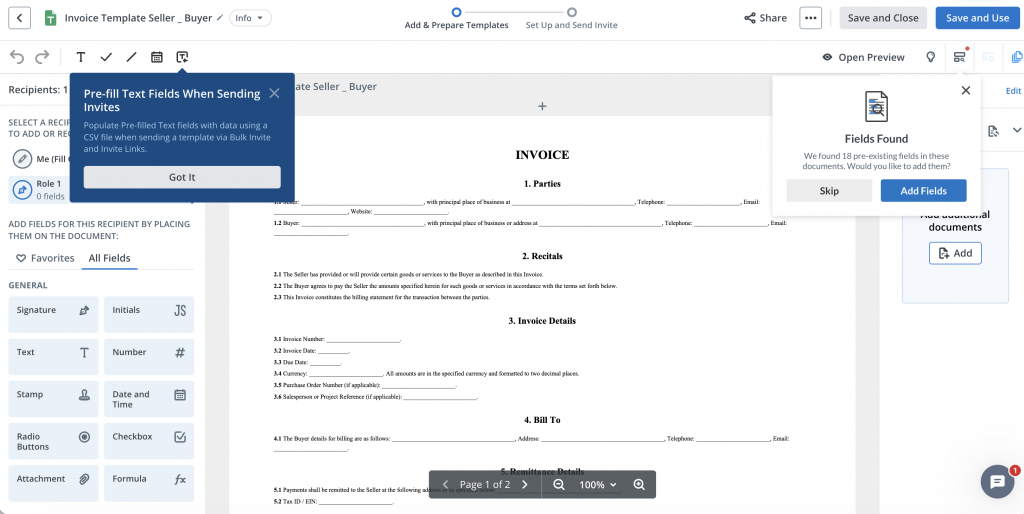
Fillable fields and reusable templates are included on SignNow’s Business plan; calculated fields require Enterprise.
How to customize an invoice template for your industry
An invoice template customized for a specific industry adds the fields and approval step that industry’s clients expect before they’ll pay.
A construction subcontractor billing against a draw schedule, for example, typically needs the client or general contractor to approve a work-order invoice before releasing payment. Building the invoice with a signing order that routes it to the approver first, then to accounts payable, keeps that approval on record without a separate email thread. A solo attorney or consultant sending a retainer invoice has a related but different need: they may want custom branding (logo, color scheme, letterhead) applied consistently across every invoice a client sees, since it’s often the first document a new client signs.
Both scenarios use the same base template. Only the fields, the signing order, and the branding change.
How to send an invoice for eSignature and payment in one step
Sending an invoice for signature and requesting payment on it can happen in a single send, instead of two separate follow-ups after the client has already reviewed the bill.
Once a template is built, a business can attach a payment request to the same document a client signs, using SignNow’s built-in Stripe integration. The client reviews the invoice, signs to approve it, and pays in the same session; the completed document, including the signature timestamp and IP address, is stored in the audit trail. Payment collection is available starting on SignNow’s Business Premium plan.
“We felt most comfortable investing with SignNow given their SOC 2 certification and strict focus on ESIGN and UETA act compliance. Deploying SignNow across all functions of our growing organization… has simplified our entire workflow.”
— Dan Rotelli, CEO, BIS
Is an electronically signed invoice legally binding?
Yes, in the US, an electronically signed invoice or purchase order is legally binding when it meets the ESIGN Act
 Open
OpenBusinesses invoicing clients in the EU should also account for eIDAS, the EU framework that recognizes electronic signatures across member states. SignNow documents are backed by an audit trail (signer name, timestamp, IP address) that supports this recordkeeping requirement, and the platform holds SOC 2 Type II certification alongside its ESIGN and UETA compliance.
Common mistakes to avoid with invoice templates
The most frequent invoice-template mistakes involve inconsistent formatting between invoices, not treating approval and payment as a single step.
Reusing invoice numbers, or generating them manually, creates duplicate or skipped numbers that complicate reconciliation. Leaving out a tax ID or an itemized breakdown gives a client’s accounts-payable team a reason to hold the bill. Treating signature and payment as two separate tasks (a signed PDF, then a separate payment link sent afterward) adds a full round-trip to a process that a single, signed and payable document can complete in one exchange. And skipping an audit trail means there is no record of who approved an invoice or when, which matters if a payment is disputed later.
Disclaimer: The information contained in this blog post is provided for general informational purposes only and does not constitute formal legal advice.
Final thoughts
A reusable invoice template can do more than save formatting time. By combining fillable fields, eSignature requests, approval routing, and payment collection in one workflow, businesses can reduce manual back-and-forth and keep a clearer record of each invoice from approval through payment. SignNow supports reusable templates and fillable fields, while payment requests can be added to signed documents on eligible plans.
Whether you send occasional invoices or manage recurring billing workflows, SignNow gives you one place to prepare documents, collect signatures, and track completed transactions.
Ready to streamline your invoicing workflow? Start using SignNow to create reusable documents, collect eSignatures, and manage your invoice approval process online.
Glossary
- Invoice template: a reusable document layout with fixed fields for the information every invoice needs.
- Fillable field: a field added to a document that lets a signer or sender enter a value (text, date, number) directly in the document.
- Calculated field: a field that automatically computes a value, such as a line-item total, from other fields in the document.
- ESIGN Act: US federal law that gives electronic signatures the same legal standing as handwritten ones, given signer consent and proper recordkeeping.
- UETA: the state-level counterpart to the ESIGN Act, adopted by nearly all US states.
- Audit trail: a record of every action taken on a document, including who signed it, when, and from what IP address.
- DSO (Days Sales Outstanding): the average number of days it takes a business to collect payment after issuing an invoice.
FAQ
1. What is an invoice template?
A reusable document layout with fields for the details every invoice needs (business and client information, line items, tax, due date), so a business fills in new values instead of formatting a new document each time.
2. How do I make a fillable invoice template?
Start from an existing invoice or a blank document, add fillable fields for each variable value, add a calculated field for totals, and save the result as a reusable template.
3. Is an electronically signed invoice legally binding?
Yes. In the US, the ESIGN Act and UETA make an electronically signed invoice or purchase order enforceable when the signer consents and the signed record is retained.
4. What are the basic components of an invoice?
Business and client details, a unique invoice number, itemized line items, applicable tax, a total due, a due date, and accepted payment methods.
5. What’s the difference between an invoice and a receipt?
An invoice is a request for payment issued before money changes hands; a receipt confirms that a payment has already been received.
6. How long should I keep signed invoices?
The IRS generally recommends three years for most business records, and four years for employment tax records.
7. Can I send an invoice for signature and payment at the same time?
Yes. Starting on SignNow’s Business Premium plan, a payment request can be attached to the same document a client signs, so approval and payment happen in one session.
Sources
- Intuit QuickBooks 2026 Small Business Late Payments Report
- IMARC Group e-invoicing market size report, 2025
- IRS recordkeeping guidance for small businesses
- ESIGN Act text — NTIA
- Uniform Electronic Transactions Act (UETA) — Uniform Law Commission
- eIDAS regulation — European Commission
- SignNow security and compliance
- What is an invoice template?
- What information does a valid invoice need?
- How to build a fillable invoice template in SignNow
- How to customize an invoice template for your industry
- How to send an invoice for eSignature and payment in one step
- Is an electronically signed invoice legally binding?
- Common mistakes to avoid with invoice templates
- Final thoughts
- Glossary
- FAQ
- Sources
