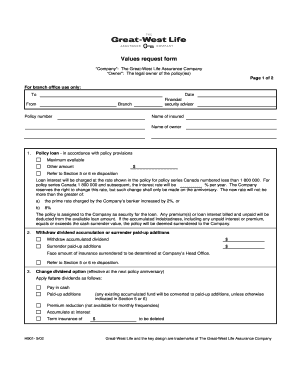
GWL Redemption Request Form Canadian Shield Financial


What is the GWL Redemption Request Form Canadian Shield Financial
The GWL Redemption Request Form Canadian Shield Financial is a document used by policyholders to request the redemption of funds from their insurance or investment products. This form is essential for initiating the process of withdrawing funds, ensuring that all necessary details are captured accurately for processing. The form typically includes sections for personal information, policy details, and the amount to be redeemed.
How to use the GWL Redemption Request Form Canadian Shield Financial
Using the GWL Redemption Request Form involves several straightforward steps. First, gather all relevant information, including your policy number and personal identification details. Next, fill out the form carefully, ensuring that all fields are completed. After completing the form, review it for accuracy before submitting it according to the specified submission methods. This ensures that your request is processed without delays.
Steps to complete the GWL Redemption Request Form Canadian Shield Financial
Completing the GWL Redemption Request Form requires attention to detail. Follow these steps for a smooth process:
- Begin by entering your personal information, including your name, address, and contact details.
- Provide your policy number and any other relevant identifiers.
- Specify the amount you wish to redeem and the method of payment you prefer.
- Sign and date the form to validate your request.
- Submit the completed form through the designated channels, either online or via mail.
Legal use of the GWL Redemption Request Form Canadian Shield Financial
The GWL Redemption Request Form is legally binding once it is properly completed and submitted. To ensure its validity, the form must adhere to applicable regulations regarding electronic signatures and documentation. Using a trusted eSignature platform can enhance the legal standing of your submission, as it provides a digital certificate and maintains compliance with relevant laws such as the ESIGN Act and UETA.
Key elements of the GWL Redemption Request Form Canadian Shield Financial
Several key elements are crucial for the GWL Redemption Request Form. These include:
- Personal Information: Accurate details about the policyholder.
- Policy Number: Essential for identifying the account from which funds are being redeemed.
- Redemption Amount: The specific amount the policyholder wishes to withdraw.
- Signature: A valid signature is necessary to authenticate the request.
Form Submission Methods
The GWL Redemption Request Form can be submitted through various methods, depending on the preferences of the policyholder. Common submission options include:
- Online Submission: Fill out and submit the form electronically through the Canadian Shield Financial website.
- Mail: Print the completed form and send it to the designated address.
- In-Person: Deliver the form directly to a local Canadian Shield Financial office for processing.
Quick guide on how to complete gwl redemption request form canadian shield financial
Complete GWL Redemption Request Form Canadian Shield Financial effortlessly on any device
Virtual document control has become increasingly popular among businesses and individuals. It serves as a suitable environmentally friendly substitute for conventional printed and signed documents, allowing you to access the appropriate form and securely store it online. airSlate SignNow provides you with all the resources necessary to create, edit, and eSign your documents promptly without delays. Handle GWL Redemption Request Form Canadian Shield Financial on any device using airSlate SignNow Android or iOS applications and enhance any document-driven procedure today.
How to modify and eSign GWL Redemption Request Form Canadian Shield Financial without any hassle
- Locate GWL Redemption Request Form Canadian Shield Financial and click on Get Form to begin.
- Utilize the tools we provide to fill out your form.
- Highlight pertinent sections of your documents or redact sensitive information with tools that airSlate SignNow specifically offers for that purpose.
- Create your eSignature using the Sign tool, which takes mere seconds and holds the same legal validity as a traditional handwritten signature.
- Review all the details and click on the Done button to save your changes.
- Choose your preferred method to send your form, by email, text message (SMS), invite link, or download it to your computer.
Eliminate concerns about lost or mislaid documents, tedious form searching, or mistakes that require printing new document copies. airSlate SignNow fulfills all your needs in document management in just a few clicks from any device you prefer. Modify and eSign GWL Redemption Request Form Canadian Shield Financial to ensure clear communication at every stage of your form preparation process with airSlate SignNow.
Create this form in 5 minutes or less
Create this form in 5 minutes!
How to create an eSignature for the gwl redemption request form canadian shield financial
How to create an electronic signature for a PDF online
How to create an electronic signature for a PDF in Google Chrome
How to create an e-signature for signing PDFs in Gmail
How to create an e-signature right from your smartphone
How to create an e-signature for a PDF on iOS
How to create an e-signature for a PDF on Android
People also ask
-
What is the GWL Redemption Request Form Canadian Shield Financial?
The GWL Redemption Request Form Canadian Shield Financial is a document that allows clients to request the redemption of their investments. This form ensures a smooth and efficient process for managing your investment withdrawals, making it a crucial tool for investors.
-
How can I access the GWL Redemption Request Form Canadian Shield Financial?
You can access the GWL Redemption Request Form Canadian Shield Financial through the Canadian Shield Financial website or by contacting their customer service. The form is typically available for download, which allows you to complete it at your convenience.
-
What are the benefits of using the GWL Redemption Request Form Canadian Shield Financial?
Using the GWL Redemption Request Form Canadian Shield Financial simplifies the process of redeeming your investments. It helps streamline your requests, minimizes errors, and ensures your transactions are processed efficiently, allowing you to focus on other important financial decisions.
-
Is there a fee associated with the GWL Redemption Request Form Canadian Shield Financial?
There may be fees associated with processing the GWL Redemption Request Form Canadian Shield Financial, which can vary based on your specific investment and the terms set by Canadian Shield Financial. It's advisable to review your investment agreement or consult their customer service for detailed information on any applicable fees.
-
Can I submit the GWL Redemption Request Form Canadian Shield Financial online?
Yes, the GWL Redemption Request Form Canadian Shield Financial can often be submitted online, depending on the specific procedures of Canadian Shield Financial. This electronic submission process makes it quicker and more convenient for clients to manage their investment requests.
-
What information is required on the GWL Redemption Request Form Canadian Shield Financial?
The GWL Redemption Request Form Canadian Shield Financial typically requires personal information such as your account number, identification details, and the amount you wish to redeem. Providing accurate information ensures a rapid and hassle-free processing of your request.
-
How long does it take to process the GWL Redemption Request Form Canadian Shield Financial?
Processing times for the GWL Redemption Request Form Canadian Shield Financial can vary but generally take between a few business days to a couple of weeks, depending on the complexity of your request. It's important to check with Canadian Shield Financial for specific timelines based on your unique situation.
Get more for GWL Redemption Request Form Canadian Shield Financial
- Tdp addendum 2011 form
- L 1040 instructions lansingmi form
- 2019 form mi 5076 fill online printable fillable blank pdffiller
- 5081 sales use and withholding taxes annual return 101881273 form
- Minnesota form ic 134 2012
- 2011 minnesota form
- S corporation form m8 instructions 2012 minnesota department of revenue state mn
- 2013 crp form
Find out other GWL Redemption Request Form Canadian Shield Financial
- How To Integrate Sign in Banking
- How To Use Sign in Banking
- Help Me With Use Sign in Banking
- Can I Use Sign in Banking
- How Do I Install Sign in Banking
- How To Add Sign in Banking
- How Do I Add Sign in Banking
- How Can I Add Sign in Banking
- Can I Add Sign in Banking
- Help Me With Set Up Sign in Government
- How To Integrate eSign in Banking
- How To Use eSign in Banking
- How To Install eSign in Banking
- How To Add eSign in Banking
- How To Set Up eSign in Banking
- How To Save eSign in Banking
- How To Implement eSign in Banking
- How To Set Up eSign in Construction
- How To Integrate eSign in Doctors
- How To Use eSign in Doctors