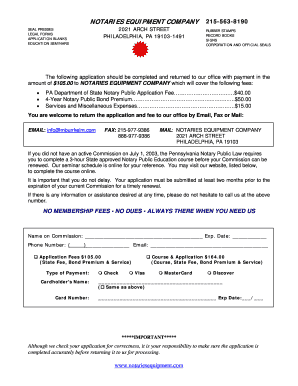
Pa Public Application 2014-2026


What is the Pennsylvania Public Application?
The Pennsylvania Public Application is a formal document used by individuals seeking to become notaries public in the state of Pennsylvania. This application is essential for those who wish to perform notarial acts, which include witnessing signatures, administering oaths, and certifying documents. The application ensures that candidates meet the necessary qualifications and comply with state regulations before being appointed as notaries. Understanding the requirements and processes involved in the application is crucial for prospective notaries.
Steps to Complete the Pennsylvania Public Application
Completing the Pennsylvania Public Application involves several key steps that ensure accuracy and compliance with state laws. Here is a general outline of the process:
- Gather Required Information: Collect personal information, including your name, address, and identification details.
- Complete the Application Form: Fill out the application form accurately, ensuring all sections are completed.
- Submit Required Documents: Include any necessary documentation, such as proof of residency and identification.
- Pay Application Fees: Submit the required fees associated with the application process.
- Await Approval: After submission, wait for the state to review and approve your application.
Legal Use of the Pennsylvania Public Application
The Pennsylvania Public Application serves as a legal document that initiates the process for becoming a notary public. It is governed by state laws and regulations that dictate the qualifications and responsibilities of notaries. Properly completing and submitting this application ensures that individuals are recognized by the state as authorized notaries, allowing them to perform legally binding acts. It is important to adhere to all legal requirements to avoid potential penalties or delays in the appointment process.
Required Documents for the Pennsylvania Public Application
When applying for the Pennsylvania Public Application, several documents are typically required to support your application. These may include:
- Proof of Residency: Documentation that verifies your residency in Pennsylvania.
- Identification: A valid government-issued ID, such as a driver's license or passport.
- Background Check: Some applicants may need to provide a background check to ensure eligibility.
- Application Fee Payment: Proof of payment for the application fee.
Eligibility Criteria for the Pennsylvania Public Application
To qualify for the Pennsylvania Public Application, applicants must meet specific eligibility criteria set forth by the state. These criteria typically include:
- Being at least eighteen years old.
- Being a resident of Pennsylvania or maintaining a business in the state.
- Having no felony convictions or disqualifying misdemeanors.
- Being able to read and write in English.
Form Submission Methods for the Pennsylvania Public Application
The Pennsylvania Public Application can be submitted through various methods, depending on the preferences of the applicant and the guidelines provided by the state. Common submission methods include:
- Online Submission: Many applicants choose to submit their applications online through the designated state portal.
- Mail Submission: Applications can also be printed and mailed to the appropriate state office.
- In-Person Submission: Applicants may have the option to submit their application in person at designated state offices.
Quick guide on how to complete pa public application 2014 2019 form
Complete Pa Public Application effortlessly on any device
Digital document management has gained popularity among businesses and individuals. It serves as an excellent eco-friendly alternative to conventional printed and signed documents, allowing you to access the correct form and securely store it online. airSlate SignNow offers you all the tools you need to create, modify, and electronically sign your files quickly without delays. Handle Pa Public Application on any device with airSlate SignNow Android or iOS applications and streamline any document-related task today.
How to alter and electronically sign Pa Public Application effortlessly
- Obtain Pa Public Application and click on Get Form to begin.
- Utilize the tools we provide to complete your form.
- Emphasize relevant sections of your documents or redact sensitive information with tools that airSlate SignNow provides specifically for that purpose.
- Generate your eSignature using the Sign feature, which takes seconds and holds the same legal significance as a traditional ink signature.
- Review all the details and click on the Done button to save your modifications.
- Select how you wish to share your form, whether by email, SMS, or invitation link, or download it to your computer.
Forget about lost or misplaced documents, tedious form searches, or mistakes that require printing new document versions. airSlate SignNow meets all your document management requirements in just a few clicks from any device you prefer. Modify and electronically sign Pa Public Application to ensure effective communication at any stage of the form preparation process with airSlate SignNow.
Create this form in 5 minutes or less
Find and fill out the correct pa public application 2014 2019 form
FAQs
-
How do I fill out the NEET 2019 application form?
Expecting application form of NEET2019 will be same as that of NEET2018, follow the instructions-For Feb 2019 Exam:EventsDates (Announced)Release of application form-1st October 2018Application submission last date-31st October 2018Last date to pay the fee-Last week of October 2018Correction Window Open-1st week of November 2018Admit card available-1st week of January 2019Exam date-3rd February to 17th February 2019Answer key & OMR release-Within a week after examAnnouncement of result-1st week of March 2019Counselling begins-2nd week of June 2019For May 2019 Exam:EventsDates (Announced)Application form Release-2nd week of March 2019Application submission last date-2nd week of April 2019Last date to pay the fee-2nd week of April 2019Correction Window Open-3rd week of April 2019Admit card available-1st week of May 2019Exam date-12th May to 26th May 2019Answer key & OMR release-Within a week after examAnnouncement of result-1st week of June 2019Counselling begins-2nd week of June 2019NEET 2019 Application FormCandidates should fill the application form as per the instructions given in the information bulletin. Below we are providing NEET 2019 application form details:The application form will be issued through online mode only.No application will be entertained through offline mode.NEET UG registration 2019 will be commenced from the 1st October 2018 (Feb Exam) & second week of March 2018 (May Exam).Candidates should upload the scanned images of recent passport size photograph and signature.After filling the application form completely, a confirmation page will be generated. Download it.There will be no need to send the printed confirmation page to the board.Application Fee:General and OBC candidates will have to pay Rs. 1400/- as an application fee.The application fee for SC/ST and PH candidates will be Rs. 750/-.Fee payment can be done through credit/debit card, net banking, UPI and e-wallet.Service tax will also be applicable.CategoryApplication FeeGeneral/OBC-1400/-SC/ST/PH-750/-Step 1: Fill the Application FormGo the official portal of the conducting authority (Link will be given above).Click on “Apply Online” link.A candidate has to read all the instruction and then click on “Proceed to Apply Online NEET (UG) 2019”.Step 1.1: New RegistrationFill the registration form carefully.Candidates have to fill their name, Mother’s Name, Father’s Name, Category, Date of Birth, Gender, Nationality, State of Eligibility (for 15% All India Quota), Mobile Number, Email ID, Aadhaar card number, etc.After filling all the details, two links will be given “Preview &Next” and “Reset”.If candidate satisfied with the filled information, then they have to click on “Next”.After clicking on Next Button, the information submitted by the candidate will be displayed on the screen. If information correct, click on “Next” button, otherwise go for “Back” button.Candidates may note down the registration number for further procedure.Now choose the strong password and re enter the password.Choose security question and feed answer.Enter the OTP would be sent to your mobile number.Submit the button.Step 1.2: Login & Application Form FillingLogin with your Registration Number and password.Fill personal details.Enter place of birth.Choose the medium of question paper.Choose examination centres.Fill permanent address.Fill correspondence address.Fill Details (qualification, occupation, annual income) of parents and guardians.Choose the option for dress code.Enter security pin & click on save & draft.Now click on preview and submit.Now, review your entries.Then. click on Final Submit.Step 2: Upload Photo and SignatureStep 2 for images upload will be appeared on screen.Now, click on link for Upload photo & signature.Upload the scanned images.Candidate should have scanned images of his latest Photograph (size of 10 Kb to 100 Kb.Signature(size of 3 Kb to 20 Kb) in JPEG format only.Step 3: Fee PaymentAfter uploading the images, candidate will automatically go to the link for fee payment.A candidate has to follow the instruction & submit the application fee.Choose the Bank for making payment.Go for Payment.Candidate can pay the fee through Debit/Credit Card/Net Banking/e-wallet (CSC).Step 4: Take the Printout of Confirmation PageAfter the fee payment, a candidate may take the printout of the confirmation page.Candidates may keep at least three copies of the confirmation page.Note:Must retain copy of the system generated Self Declaration in respect of candidates from J&K who have opted for seats under 15% All India Quota.IF any queries, feel free to comment..best of luck
-
How do I fill out a CLAT 2019 application form?
Hi thereFirst of all, let me tell you some important points:CLAT 2019 has gone OFFLINE this yearBut the application forms for CLAT 2019 have to be filled ONLINEThe payment of the application fees also should be made onlineNow, kindly note the important dates:Note the details regarding the application fees:Here, if you want the Previous Year Question papers, Rs.500 would be added to the application fees.Apart from this, there would be bank transaction charges added to the application fees.The application fees is non-refundable.Note one important point here that before you fill the application form, check for your eligibility.To know the complete details of filling the application form along with other information like the eligibility - in terms of age, educational qualification, list of NLUs participating and the seats offered under each category, CLAT Reservation policies, CLAT exam pattern, marking scheme, syllabus, important documents required to be kept ready before filling the form, kindly go to the link below:How to fill CLAT 2019 Application form? Registration OPEN | All you need to knowTo know how to prepare for one of the very important section of CLAT exam, GK and Current Affairs, kindly go to the link below:How to prepare GK & Current Affairs for CLAT 2019To practice, daily MCQs on Current Affairs, kindly go to the link below:#CLAT2019 | #AILET2019 | #DULLB2019 | GK and Current Affairs Series: 5 in 10 Series: Day 12For any other queries, kindly write to us at mailateasyway@gmail.comThanks & Regards!
-
How can I fill out the BITSAT Application Form 2019?
BITSAT 2019 Application Forms are available online. Students who are eligible for the admission test can apply online before 20 March 2018, 5 pm.Click here to apply for BITSAT 2019Step 1: Follow the link given aboveStep 2: Fill online application formPersonal Details12th Examination DetailsTest Centre PreferencesStep 3: Upload scanned photograph (4 kb to 50 kb) and signature ( 1 kb to 30 kb).Step 4: Pay application fee either through online payment mode or through e-challan (ICICI Bank)BITSAT-2019 Application FeeMale Candidates - Rs. 3150/-Female Candidates - Rs. 2650/-Thanks!
-
How can I fill out the COMEDK 2019 application form?
COMEDK 2019 application is fully online based and there is no need to send the application by post or by any other method. Check the below-mentioned guidelines to register for the COMEDK 2019 exam:Step 1 Visit the official website of the COMEDK UGET- comedk.orgStep 2 Click on “Engineering Application”.Step 3 After that click on “Login or Register” button.Step 4 You will be asked to enter the Application SEQ Number/User ID and Password. But since you have not registered. You need to click on the “Click here for Registration”.Step 5 Fill in the required details like “Full Name”, “DOB”, “Unique Photo ID Proof”, “Photo ID Proof Number”, “Email ID” and “Mobile Number”.Step 6 Then click on the “Generate OTP”Step 7 After that you need to enter the captcha code and then an OTP will be sent to the mobile number that you have provided.Step 8 A new window having your previously entered registration details will open where you need to enter the OTP.Step 9 Re-check all the details, enter the captcha code and click on the “Register” button.Step 10 After that a page will appear where you will be having the User ID and all the details that you entered. Also, you will be notified that you have successfully registered yourself and a User ID and Password will be sent to your mobile number and email ID.COMEDK 2019 Notification | Steps To Apply For COMEDK UGET ExamCheck the below-mentioned guidelines to fill COMEDK Application Form after COMEDK Login.Step 1 Using your User ID and Password. Log in using the User ID and passwordStep 2 You will be shown that your application form is incomplete. So you need to go to the topmost right corner and click on the “Go to application” tab.Step 3 Go to the COMEDK official website and login with these credentials.Step 4 After that click on “Go to application form”.Step 5 Select your preferred stream and course.Step 6 Click on “Save and Continue”.Step 7 Carefully enter your Personal, Category and Academic details.Step 8 Upload your Photograph and Signature, Parents Signature, your ID Proof, and Declaration.Step 9 Enter your “Payment Mode” and “Amount”.Step 10 Enter “Security code”.Step 11 Tick the “I Agree” checkbox.Step 12 Click on the “Submit” button.
-
How can I fill out the application form for the JMI (Jamia Millia Islamia) 2019?
Form for jamia school have been releaseYou can fill it from jamia siteJamia Millia Islamia And for collegeMost probably the form will out end of this month or next monthBut visit the jamia site regularly.Jamia Millia Islamiacheck whether the form is out or not for the course you want to apply.when notification is out then you have to create the account for entrance and for 2 entrance same account will be used you have to check in the account that the course you want to apply is there in listed or not ….if not then you have to create the different account for that course .If you have any doubts you can freely ask me .
-
How do I fill out the JEE Main 2019 exam application form?
Steps to fill out the JEE Mains 2019 application form?How to Fill JEE Main 2019 Application FormJEE Main 2019 Registration Process to be followed on the NTA Website:Step 1: Visit the website of NTA or CLick here.Step 2: Click on NTA exams or on Joint Entrance Examination under the Engineering Section given on the same page.Step 3: You will see the registration button as shown in the image below. Read all the eligibility criteria and click on “Registration”Step 4: Candidates will be redirected to the JEE Main 2019 official website where they have to click on “Fill Application Form”.Step 5: Now, Click on “Apply for JEE Main 2019”. Read all instructions carefully and proceed to apply online by clicking on the button given at the end of the page.Step 6: Fill in all the details as asked. Submit the authentication form with correct details.Step 7: Upload the scanned images in correct specification given on the instructions page.Step 8: Pay the Application fee and take a print out of the filled up application form.Aadhar Card Required for JEE Main 2019 RegistrationFor the last two years, Aadhar card was made mandatory for each candidate to possess for the application form filling of JEE Main. However, since JEE Main 2019 is now to be conducted by NTA, they have asked the candidates to enter their Aadhar card number. The Aadhar card number is necessary for JEE Main 2019 Application form and candidates must be ready with their Aadhar card number to enter it in the application form.JEE main 2019 Application Form will be available twice, once in the month of September for the January 2019 exam and again in the month of February for the April exam. Thus, first, the candidates have to fill out the application form of January 2019 examination in the month of September 2018.
-
How do I fill out the Rai Publication Scholarship Form 2019?
Rai Publication Scholarship Exam 2019- Rai Publication Scholarship Form 5th, 8th, 10th & 12th.Rai Publication Scholarship Examination 2019 is going to held in 2019 for various standards 5th, 8th, 10th & 12th in which interested candidates can apply for the following scholarship examination going to held in 2019. This scholarship exam is organized by the Rai Publication which will held only in Rajasthan in the year 2019. Students can apply for the following scholarship examination 2019 before the last date of application that is 15 January 2019. The exam will be conducted district wise in Rajasthan State by the Rai Publication before June 2019.Students of class 5th, 8th, 10th and 12th can fill online registration for Rai Publication scholarship exam 2019. Exam is held in February in all districts of Rajasthan. Open registration form using link given below.In the scholarship examination, the scholarship will be given to the 20 topper students from each standard of 5th, 8th, 10th & 12th on the basis of lottery which will be equally distributed among all 20 students. The declaration of the prize will be announced by July 2019.राय पब्लिकेशन छात्रव्रत्ति परीक्षा का आयोजन सत्र 2019 में किया जाएगा कक्षा 5वी , 8वी , 10वी एवं 12वी के लिए, इच्छुक अभ्यार्थी आवेदन कर सकते है इस छात्रव्रत्ति परीक्षा 2019 के लिए | यह छात्रव्रत्ति परीक्षा राजस्थान में राइ पब्लिकेशन के दवारा की जयगी सत्र 2019 में | इच्छुक अभ्यार्थी एक परीक्षा कर सकते है आखरी तारीख 15 जनवरी 2019 से पहले | यह परिखा राजस्थान छेत्र में जिला स्तर पर कराई जाएगी राइ पब्लिकेशन के दवारा जून 2019 से पहले |इस छात्रव्रत्ति परीक्षा में, छात्रव्रत्ति 20 विजेता छात्र छात्राओं दो दी जयेगी जिसमे हर कक्षा के 20 छात्र होंगे जिन्हे बराबरी में बाटा जयेगा। पुरस्कार की घोसणा जुलाई 2019 में की जयेगी |Rai Publication Scholarship Exam 2019 information :This scholarship examination is conducted for 5th, 8th, 10th & 12th standard for which interested candidates can apply which a great opportunity for the students. The exam syllabus will be based according to the standards of their exam which might help them in scoring in the Rai Publication Scholarship Examination 2019. The question in the exam will be multiple choice questions (MCQ’s) and there will be 100 multiple choice questions. To apply for the above scholarship students must have to fill the application form but the 15 January 2019.यह छात्रव्रत्ति परीक्षा कक्षा कक्षा 5वी , 8वी , 10वी एवं 12वी के लिए आयोजित है जिसमे इच्छुक अभ्यार्थी पंजीकरण करा सकते है जोकि छात्र छात्राओं के लिए एक बड़ा अवसर होगा | राय पब्लिकेशन छात्रव्रत्ति परीक्षा 2019 परीक्षा का पाठ्यक्रम कक्षा अनुसार ही होगा जोकि उन्हें प्राथम आने में सहयोग प्रदान करेगा | परीक्षा के प्रश्न-पत्र में सारे प्रश्न बहुविकल्पीय प्रश्न होंगे एवं प्रश्न-पत्र में कुल 100 प्रश्न दिए जायेंगे | इस छात्रव्रत्ति परीक्षा को देने क लिए अभयार्थियो को पहले पंजीकरण करना अनिवार्य होगा जोकि ऑनलाइन होगा जिसकी आखरी तारीख 15 जनवरी 2019 है |Distribution of Rai Publication Deskwork Scholarship Exam 2019:5th Class Topper Prize Money:- 4 Lakh Rupees8th Class Topper Prize Money:- 11 Lakh Rupees10th Class Topper Prize Money:- 51 Lakh Rupees12thClass Topper Prize Money:- 39 Lakh RupeesHow to fill Rai Publication Scholarship Form 2019 :Follow the above steps to register for the for Rai Publication Scholarship Examination 2019:Candidates can follow these below given instructions to apply for the scholarship exam of Rai Publication.The Rai Publication Scholarship application form is available in the news paper (Rajasthan Patrika.) You can also download it from this page. It also can be downloaded from the last page of your desk work.Application form is also given on the official website of Rai Publication: Rai Publication - Online Book Store for REET RPSC RAS SSC Constable Patwar 1st 2nd Grade TeacherNow fill the details correctly in the application form.Now send the application form to the head office of Rai Publication.Rai Publication Website Link Click HereHead Office Address of Rai PublicationShop No: -24 & 25, Bhagwan Das Market, Chaura Rasta, Jaipur, RajasthanPIN Code:- 302003Contact No.- 0141 232 1136Source : Rai Publication Scholarship Exam 2019
-
What are the steps to fill out the JEE Mains 2019 application form?
Steps to fill out the JEE Mains 2019 application form?How to Fill JEE Main 2019 Application FormJEE Main 2019 Registration Process to be followed on the NTA Website:Step 1: Visit the website of NTA or CLick here.Step 2: Click on NTA exams or on Joint Entrance Examination under the Engineering Section given on the same page.Step 3: You will see the registration button as shown in the image below. Read all the eligibility criteria and click on “Registration”Step 4: Candidates will be redirected to the JEE Main 2019 official website where they have to click on “Fill Application Form”.Step 5: Now, Click on “Apply for JEE Main 2019”. Read all instructions carefully and proceed to apply online by clicking on the button given at the end of the page.Step 6: Fill in all the details as asked. Submit the authentication form with correct details.Step 7: Upload the scanned images in correct specification given on the instructions page.Step 8: Pay the Application fee and take a print out of the filled up application form.Aadhar Card Required for JEE Main 2019 RegistrationFor the last two years, Aadhar card was made mandatory for each candidate to possess for the application form filling of JEE Main. However, since JEE Main 2019 is now to be conducted by NTA, they have asked the candidates to enter their Aadhar card number. The Aadhar card number is necessary for JEE Main 2019 Application form and candidates must be ready with their Aadhar card number to enter it in the application formJEE main 2019 Application Form will be available twice, once in the month of September for the January 2019 exam and again in the month of February for the April exam. Thus, first, the candidates have to fill out the application form of January 2019 examination in the month of September 2018.
Create this form in 5 minutes!
How to create an eSignature for the pa public application 2014 2019 form
How to make an electronic signature for the Pa Public Application 2014 2019 Form in the online mode
How to generate an electronic signature for the Pa Public Application 2014 2019 Form in Chrome
How to create an eSignature for putting it on the Pa Public Application 2014 2019 Form in Gmail
How to make an electronic signature for the Pa Public Application 2014 2019 Form from your smart phone
How to create an eSignature for the Pa Public Application 2014 2019 Form on iOS
How to create an electronic signature for the Pa Public Application 2014 2019 Form on Android OS
People also ask
-
What is the Pa Public Application and how does it work with airSlate SignNow?
The Pa Public Application is a digital platform that allows users to submit public records and documents electronically. With airSlate SignNow, you can easily eSign and send these documents, streamlining the process and ensuring compliance with government regulations. This integration makes it easier for users to manage their public applications efficiently.
-
How can airSlate SignNow enhance my experience with the Pa Public Application?
airSlate SignNow simplifies the eSigning process for the Pa Public Application by providing a user-friendly interface. You can quickly sign and send documents directly from your device, reducing the time and effort required for traditional paper-based submissions. This enhances your overall experience by making document management much more efficient.
-
What are the pricing options for using airSlate SignNow with the Pa Public Application?
airSlate SignNow offers flexible pricing plans that cater to different business needs, which can be particularly beneficial when dealing with the Pa Public Application. You can choose from various subscription tiers that provide access to essential features for eSigning documents. Each plan is designed to offer cost-effective solutions for managing your public applications.
-
Are there any features specifically tailored for the Pa Public Application in airSlate SignNow?
Yes, airSlate SignNow includes specific features that enhance the functionality of the Pa Public Application. These features include customizable templates for public documents, secure eSigning options, and automated workflows that help you track the status of your applications. This tailored approach ensures you can efficiently handle all aspects of your document submission.
-
Can I integrate airSlate SignNow with other tools for the Pa Public Application?
Absolutely! airSlate SignNow offers seamless integrations with various platforms that can assist with the Pa Public Application. Whether you're using CRM systems, cloud storage solutions, or project management tools, integrating airSlate SignNow ensures that your eSigning and document management processes are connected and streamlined.
-
Is airSlate SignNow secure for submitting the Pa Public Application?
Yes, airSlate SignNow prioritizes security, making it a safe choice for submitting the Pa Public Application. The platform utilizes advanced encryption protocols and complies with industry standards to protect your data. This ensures that your documents are securely signed and transmitted without the risk of unauthorized access.
-
What are the benefits of using airSlate SignNow for the Pa Public Application instead of traditional methods?
Using airSlate SignNow for the Pa Public Application offers numerous benefits over traditional methods. It reduces the time required to sign and submit documents, minimizes paper usage, and enhances the tracking capabilities of your applications. Additionally, the convenience of eSigning allows you to complete applications from anywhere at any time.
Get more for Pa Public Application
- Recipient agreement for donations to non aglc licensed groups form
- Bmj consent form
- Ikea malm 4 drawer dresser instructions pdf form
- Terex th644c service manual form
- Residential relative homestead application mower county form
- Montana employees withholding and exemption form
- Form or 243 claim to refund due a deceased person
- 3rdq2023 gasoline motor fuel ifta schedules form
Find out other Pa Public Application
- Electronic signature California Customer Complaint Form Online
- Electronic signature Alaska Refund Request Form Later
- How Can I Electronic signature Texas Customer Return Report
- How Do I Electronic signature Florida Reseller Agreement
- Electronic signature Indiana Sponsorship Agreement Free
- Can I Electronic signature Vermont Bulk Sale Agreement
- Electronic signature Alaska Medical Records Release Mobile
- Electronic signature California Medical Records Release Myself
- Can I Electronic signature Massachusetts Medical Records Release
- How Do I Electronic signature Michigan Medical Records Release
- Electronic signature Indiana Membership Agreement Easy
- How Can I Electronic signature New Jersey Medical Records Release
- Electronic signature New Mexico Medical Records Release Easy
- How Can I Electronic signature Alabama Advance Healthcare Directive
- How Do I Electronic signature South Carolina Advance Healthcare Directive
- eSignature Kentucky Applicant Appraisal Form Evaluation Later
- Electronic signature Colorado Client and Developer Agreement Later
- Electronic signature Nevada Affiliate Program Agreement Secure
- Can I Electronic signature Pennsylvania Co-Branding Agreement
- Can I Electronic signature South Dakota Engineering Proposal Template