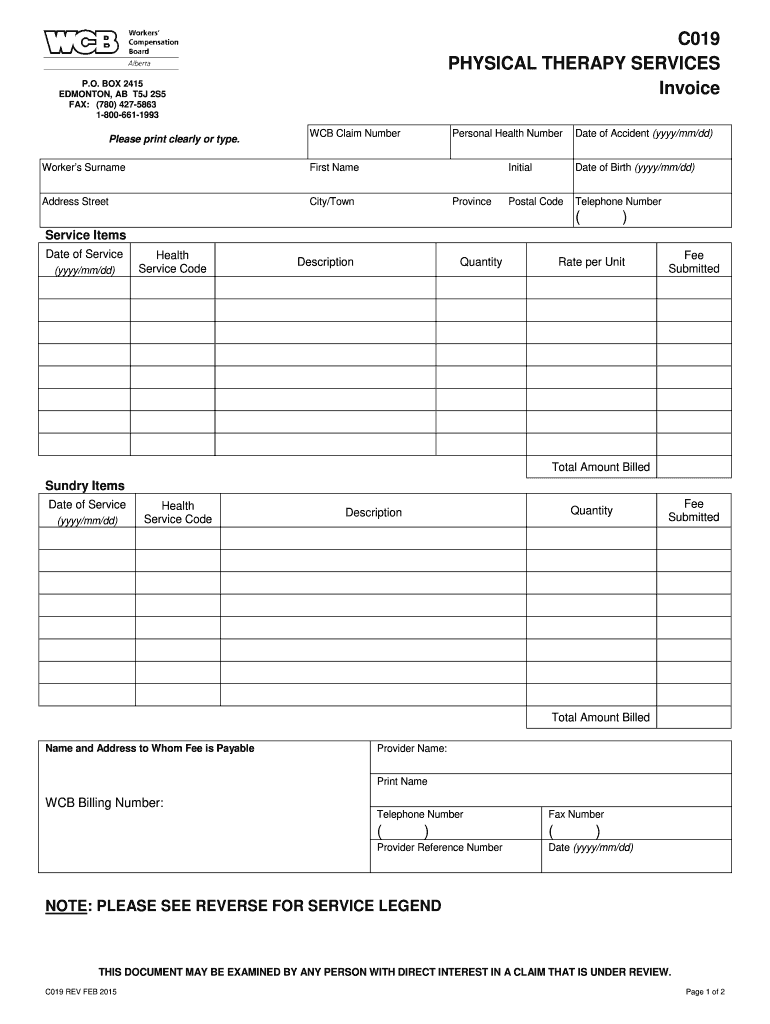
Physiotherapy Bill Format 2015


What is the Physiotherapy Bill Format
The physiotherapy bill format is a structured document used by physiotherapists to itemize and invoice services provided to patients. This format typically includes essential information such as the patient's details, the services rendered, the date of service, and the total amount due. It serves both as a receipt for the patient and as a record for the physiotherapist, ensuring that all billing practices are transparent and compliant with legal standards.
Key elements of the Physiotherapy Bill Format
When creating a physiotherapy bill, several key elements must be included to ensure its validity and clarity:
- Provider Information: Name, address, and contact details of the physiotherapy practice.
- Patient Information: Full name, address, and contact details of the patient receiving treatment.
- Date of Service: The specific date when the treatment was provided.
- Description of Services: A detailed list of services rendered, including any specific treatments or modalities used.
- Charges: The cost associated with each service, along with the total amount due.
- Payment Terms: Information regarding payment methods accepted and any applicable due dates.
Steps to complete the Physiotherapy Bill Format
Completing the physiotherapy bill format involves several straightforward steps:
- Gather Patient Information: Collect the necessary details about the patient, including their name and contact information.
- Document Services Provided: Clearly list all services rendered during the appointment, ensuring accuracy in descriptions.
- Calculate Charges: Determine the total cost for the services provided, including any applicable taxes or fees.
- Review for Accuracy: Double-check all information to ensure there are no errors or omissions.
- Provide a Copy to the Patient: Once completed, give a copy of the bill to the patient for their records.
Legal use of the Physiotherapy Bill Format
The physiotherapy bill format must comply with local regulations and standards to be considered legally valid. This includes ensuring that all necessary information is present, as well as adhering to any specific state or federal guidelines regarding medical billing. Accurate documentation helps protect both the provider and the patient, reducing the risk of disputes or misunderstandings regarding services rendered and payment obligations.
How to use the Physiotherapy Bill Format
To effectively use the physiotherapy bill format, practitioners should follow these guidelines:
- Choose a Template: Select a clear and professional template that meets legal requirements.
- Fill in Required Information: Complete all sections of the bill with accurate and up-to-date information.
- Maintain Records: Keep copies of all bills issued for accounting and auditing purposes.
- Provide Clear Instructions: Ensure that patients understand the payment terms and methods available.
Examples of using the Physiotherapy Bill Format
Examples of the physiotherapy bill format can vary based on the services provided and the specific practice. Common examples include:
- Initial Consultation Invoice: An invoice detailing the assessment and treatment plan discussed during the first visit.
- Follow-Up Treatment Invoice: A bill for subsequent sessions, including any modifications in treatment or additional services.
- Insurance Claim Submission: A formatted bill that can be submitted to insurance companies for reimbursement purposes.
Quick guide on how to complete physiotherapy bill format in word 2015 2019
A brief manual on how to ready your Physiotherapy Bill Format
Finding the correct template can be difficult when you need to submit official global documentation. Even if you possess the required form, it might be cumbersome to swiftly fill it out adhering to all the stipulations if you resort to physical copies instead of handling everything digitally. airSlate SignNow is the digital electronic signature platform that assists you in overcoming these challenges. It allows you to select your Physiotherapy Bill Format and efficiently complete and sign it on-site without reprinting papers if you make an error.
Here are the actions you must take to prepare your Physiotherapy Bill Format using airSlate SignNow:
- Click the Get Form button to upload your document to our editor right away.
- Begin with the first vacant field, enter information, and proceed with the Next tool.
- Complete the empty spaces using the Cross and Check features from the toolbar above.
- Utilize the Highlight or Line options to emphasize the most critical information.
- Click on Image and upload one if your Physiotherapy Bill Format requires it.
- Make use of the right-side panel to add additional spaces for you or others to complete if necessary.
- Review your responses and confirm the form by clicking Date, Initials, and Sign.
- Create, type, upload your eSignature, or capture it using a camera or QR code.
- Conclude editing the form by clicking the Done button and selecting your file-sharing preferences.
Once your Physiotherapy Bill Format is ready, you can share it as you wish - dispatch it to your recipients via email, SMS, fax, or even print it directly from the editor. You can also securely save all your completed documents in your account, organized into folders according to your liking. Don’t spend time on manual document completion; give airSlate SignNow a try!
Create this form in 5 minutes or less
Find and fill out the correct physiotherapy bill format in word 2015 2019
FAQs
-
How long will it take to get a green card for an Indian filled his/her EB2 category in 2015 if HR392 bill got passed?
Best clear answer to this question is that it’ll be much faster and quicker than without HR 392.There is no clear way to answer this as number of pending applications i.e. approved 485, approved 140 or approved and pending labors is not well known. 485 data is still well known as USCIS published that data in analyze-able format on quarterly basis…but 140 and labor is totally up in the air however there are some guess estimates available there.Best case scenario in my mind is 6–8 years for anyone with EB2 priority date of 2015. HR 392 will allow for clearing backlog but gradually over a 3 year period….so approx 20–25K (back of a napkin math) visas will be issued to EB2 India per year for first 3 years and more after that. Given historical estimate of about 25–30K EB2 based application per year, priority date would move forward by 1 year every year….but as I said in the beginning this would be much faster than without HR 392 so there is something to cheer if HR 392 goes through.
-
How many forms are filled out in the JEE Main 2019 to date?
You should wait till last date to get these type of statistics .NTA will release how much application is received by them.
-
How do you figure out how many pages there will be in an ebook (Word version) before you convert it to epublishing formats?
As Steven Hager (drag...) says, page count is irrelevant in ebook format. However, that's not to say that some of your customers might not appreciate knowing the number of printed pages; in fact, some of the retailers ask for printed page count when you upload. As a reader, I find there is some value in seeing that an ebook is 182 pages in its printed form; a lot of readers don't yet have a good sense of how long a book of 20,000 is words is relative to how long it "seems" to read or would seem in print. If I were you, I would simply make a note of how many pages long your book was in Word before you converted it (assuming that you format your Word pages to book trim sizes, e.g. 6 x 9, as I do).
-
When you don't want to write out entire swear words, how do you fill in with symbols like A#$ - Are there specific symbols to use?
Thanks for the A2AWhen you don't want to write out entire swear words, how do you fill in with symbols like A#$ - Are there specific symbols to use?If there are any specific sets of rules for this, I haven’t heard of them and suspect they would be “house rules”, meaning specific to a certain publisher.I have seen anything from a random list of characters that don’t even match a correct number of letters ( ^#&^&##* ) to all asterisks (******) to things that make it clear what the word was ( sh!t ) ( f***) or that make you figure it out ($#!+) .If you are not following someone else’s house rules, I suggest you pick what works best for you.If you don’t want the word to be obvious, then obfusicate it enough that it can’t be determined. If you want it to be silly and cartoonish, then make sure it doesn’t even look like something. If you want people to know, but don’t want to print the word, common practice in the media has been to do things like “ f-word” or “f***”.I don’t think there is any “standard”, so pick what works best for what you are doing.For more information on this, try looking into “Grawlixes”The Lexicon of Comicana - WikipediaYou can find some thoughts on their use here:What the @#$%&! Is a Grawlix?
Create this form in 5 minutes!
How to create an eSignature for the physiotherapy bill format in word 2015 2019
How to create an electronic signature for the Physiotherapy Bill Format In Word 2015 2019 online
How to make an eSignature for your Physiotherapy Bill Format In Word 2015 2019 in Chrome
How to make an eSignature for signing the Physiotherapy Bill Format In Word 2015 2019 in Gmail
How to generate an eSignature for the Physiotherapy Bill Format In Word 2015 2019 straight from your smart phone
How to create an electronic signature for the Physiotherapy Bill Format In Word 2015 2019 on iOS devices
How to create an eSignature for the Physiotherapy Bill Format In Word 2015 2019 on Android devices
People also ask
-
What is a Physiotherapy Bill Format and why is it important?
A Physiotherapy Bill Format is a structured template used by physiotherapy clinics to itemize and bill patients for services rendered. This format ensures transparency and clarity in billing, which is crucial for maintaining trust with patients. By using an appropriate Physiotherapy Bill Format, clinics can streamline their billing processes and improve their cash flow.
-
How can airSlate SignNow help with creating a Physiotherapy Bill Format?
airSlate SignNow provides customizable templates that can be tailored to create an effective Physiotherapy Bill Format. With its user-friendly interface, you can easily add the necessary fields for services, prices, and patient details. This not only saves time but also ensures that your billing aligns with industry standards.
-
What features does airSlate SignNow offer for managing Physiotherapy Bill Formats?
With airSlate SignNow, you can create, customize, and eSign your Physiotherapy Bill Formats seamlessly. The platform offers features such as digital signatures, document tracking, and secure storage, which enhance the efficiency of your billing process. These features help you manage your billing documents with greater ease and security.
-
Is airSlate SignNow cost-effective for small physiotherapy practices?
Yes, airSlate SignNow is designed to be a cost-effective solution for small physiotherapy practices. With flexible pricing plans, you can choose one that fits your budget while still gaining access to essential features for creating and managing your Physiotherapy Bill Format. This empowers small practices to maintain professionalism without overspending.
-
Can I integrate airSlate SignNow with my existing practice management software?
Absolutely! airSlate SignNow offers integrations with various practice management software, enhancing the functionality of your Physiotherapy Bill Format. This allows you to pull patient information directly into your billing documents, reducing errors and saving time in the billing cycle.
-
What are the benefits of using an electronic Physiotherapy Bill Format?
Using an electronic Physiotherapy Bill Format through airSlate SignNow streamlines your billing process, reduces paper waste, and enhances security. Additionally, electronic billing facilitates quicker payments and improves patient satisfaction by providing a clear and professional billing experience. It’s a modern solution that supports the efficiency of any physiotherapy practice.
-
How secure is the data when using airSlate SignNow for Physiotherapy Bill Formats?
Security is a top priority at airSlate SignNow. The platform employs advanced encryption and secure cloud storage to protect your Physiotherapy Bill Formats and patient data. This ensures that sensitive information remains confidential and accessible only to authorized personnel.
Get more for Physiotherapy Bill Format
Find out other Physiotherapy Bill Format
- eSign West Virginia Police Lease Agreement Online
- eSign Wyoming Sports Residential Lease Agreement Online
- How Do I eSign West Virginia Police Quitclaim Deed
- eSignature Arizona Banking Moving Checklist Secure
- eSignature California Banking Warranty Deed Later
- eSignature Alabama Business Operations Cease And Desist Letter Now
- How To eSignature Iowa Banking Quitclaim Deed
- How To eSignature Michigan Banking Job Description Template
- eSignature Missouri Banking IOU Simple
- eSignature Banking PDF New Hampshire Secure
- How Do I eSignature Alabama Car Dealer Quitclaim Deed
- eSignature Delaware Business Operations Forbearance Agreement Fast
- How To eSignature Ohio Banking Business Plan Template
- eSignature Georgia Business Operations Limited Power Of Attorney Online
- Help Me With eSignature South Carolina Banking Job Offer
- eSignature Tennessee Banking Affidavit Of Heirship Online
- eSignature Florida Car Dealer Business Plan Template Myself
- Can I eSignature Vermont Banking Rental Application
- eSignature West Virginia Banking Limited Power Of Attorney Fast
- eSignature West Virginia Banking Limited Power Of Attorney Easy