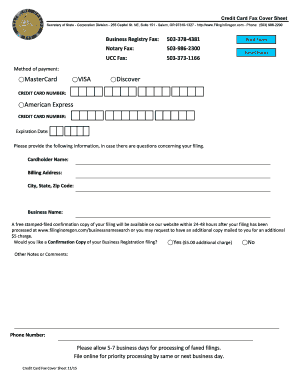
Card Cover Sheet 2015


What is the Card Cover Sheet
The card cover sheet is a specific document used to accompany fax transmissions, particularly for sensitive information such as credit card details. It serves as a protective layer, ensuring that the recipient understands the nature of the documents being sent. This cover sheet typically includes essential information like the sender's contact details, the recipient's information, and a brief description of the contents. It is especially useful in business environments where confidentiality and clarity are paramount.
How to use the Card Cover Sheet
Using the card cover sheet is straightforward. First, ensure that you have the correct template, which can often be found in a fillable format online. Fill in the required fields, including your name, company, and contact information, as well as the recipient's details. It is also important to include a brief note about the contents of the fax. Once completed, attach the cover sheet to the documents you intend to send. This practice not only enhances professionalism but also helps in organizing the information for the recipient.
Steps to complete the Card Cover Sheet
To effectively complete the card cover sheet, follow these steps:
- Download a fillable card fax cover form from a reliable source.
- Open the form in a PDF editor or compatible software.
- Fill in your name, title, and company information in the designated fields.
- Enter the recipient's name, title, and company details accurately.
- Add a brief description of the documents being sent.
- Include the date and any necessary confidentiality notices.
- Review the information for accuracy before sending.
Legal use of the Card Cover Sheet
The card cover sheet must comply with legal standards to ensure the confidentiality and integrity of the information being transmitted. It is crucial that the information included on the cover sheet accurately reflects the contents of the fax and adheres to any relevant regulations, such as those outlined in the ESIGN Act. This ensures that the documents maintain their legal validity and that sensitive information is protected during transmission.
Key elements of the Card Cover Sheet
When creating a card cover sheet, several key elements should be included to ensure its effectiveness:
- Sender Information: Name, title, company, and contact details.
- Recipient Information: Name, title, company, and fax number.
- Document Description: A brief overview of the contents being sent.
- Date: The date the fax is sent.
- Confidentiality Notice: A statement indicating the confidential nature of the documents.
Examples of using the Card Cover Sheet
Examples of using the card cover sheet include sending financial documents, contracts, or sensitive client information. For instance, a business may send a credit card application form along with a cover sheet to ensure the recipient understands the importance of the documents. Another example is sending tax-related documents to an accountant, where the cover sheet clarifies the purpose and urgency of the transmission. These examples highlight the versatility and necessity of the card cover sheet in various professional contexts.
Quick guide on how to complete com phone 503 986 2200
Manage Card Cover Sheet anywhere, anytime
Your everyday business tasks might need extra focus when handling state-specific business documents. Reclaim your office hours and reduce paper costs associated with document-driven processes using airSlate SignNow. airSlate SignNow provides you with a wide range of pre-uploaded business documents, including Card Cover Sheet, which you can utilize and share with your business associates. Manage your Card Cover Sheet seamlessly with powerful editing and eSignature tools and send it straight to your recipients.
How to obtain Card Cover Sheet in just a few clicks:
- Select a form pertinent to your state.
- Simply click Learn More to open the document and verify its accuracy.
- Click Get Form to start working on it.
- Card Cover Sheet will instantly appear in the editor. No further actions are required.
- Utilize airSlate SignNow’s advanced editing features to complete or modify the form.
- Click on the Sign tool to create your signature and eSign your document.
- Once ready, click Done, save your changes, and access your document.
- Share the form via email or SMS, or use a link-to-fill option with your partners or allow them to download the document.
airSlate SignNow signNowly reduces your time managing Card Cover Sheet and allows you to find necessary documents in one location. A comprehensive library of forms is organized and designed to support crucial business functions vital for your operation. The advanced editor decreases the likelihood of errors, as you can swiftly correct mistakes and review your documents on any device before sending them out. Start your free trial today to explore all the advantages of airSlate SignNow for your daily business processes.
Create this form in 5 minutes or less
Find and fill out the correct com phone 503 986 2200
FAQs
-
How do you fill out a customs form when visiting a country with no permanent address or phone?
No country will let a visitor in if they believe that person intends to be homeless. The ability to look after yourself and not be a burden on the state is one of the reasons visitors are screened in the first place.No, you can't leave it blank when you are trying to enter a country as a visitor. If you are returning home however, you're not a visitor and in my experience no country seeks address information for citizens returning home.
-
How can I fill out Google's intern host matching form to optimize my chances of receiving a match?
I was selected for a summer internship 2016.I tried to be very open while filling the preference form: I choose many products as my favorite products and I said I'm open about the team I want to join.I even was very open in the location and start date to get host matching interviews (I negotiated the start date in the interview until both me and my host were happy.) You could ask your recruiter to review your form (there are very cool and could help you a lot since they have a bigger experience).Do a search on the potential team.Before the interviews, try to find smart question that you are going to ask for the potential host (do a search on the team to find nice and deep questions to impress your host). Prepare well your resume.You are very likely not going to get algorithm/data structure questions like in the first round. It's going to be just some friendly chat if you are lucky. If your potential team is working on something like machine learning, expect that they are going to ask you questions about machine learning, courses related to machine learning you have and relevant experience (projects, internship). Of course you have to study that before the interview. Take as long time as you need if you feel rusty. It takes some time to get ready for the host matching (it's less than the technical interview) but it's worth it of course.
-
How do I fill out the form of DU CIC? I couldn't find the link to fill out the form.
Just register on the admission portal and during registration you will get an option for the entrance based course. Just register there. There is no separate form for DU CIC.
-
Is linking the Aadhaar to a mobile number necessary for filling out a form for competitive exams? What if a student doesn’t have a phone?
The SC order prohibits CBSE, IITs and the UGC from making Aadhaar number mandatory for examinations like JEE Main, NET and CAT held by IIMs.The case initially was heard by the Supreme Court in connection with linking of Aadhaar Card while filling application for NEET, 2018. As per the latest available information, the Supreme Court on March 7, 2018 said unique identification number Aadhaar cannot be made mandatory for any national entrance examination for now.Apart from sparing NEET candidates from mandatory furnishing Aadhaar, the interim order also prohibits CBSE, Indian Institutes of Technology (IITs) and the University Grants Commission (UGC) from making the unique number mandatory for examinations like Joint Entrance Exam (JEE-Main) and National Eligibility Test (NET) and the Common Admission Test held by Indian Institutes of Management (IIMs).However, as regards the Phone Number , the application forms in all formats, provides provisions for providing Phone Number in mailing address details of the candidates. You can argue on the lines of your question above. But, personally I feel, as on date a Mobile Phone is a mode of communication among many other things. A Mobile Phone in your pocket, you can get the most important message within the quickest possible time in relation to your Exams. which will facilitate you to take the earliest possible steps, in needed circumstances, if any.Link:Livemint: Business news, Budget News, financial news, current affairs and analysis of stock markets and Indian economy › Education › Education.Aadhaar not mandatory for NEET.Thanks.
-
How do you know if you need to fill out a 1099 form?
Assuming that you are talking about 1099-MISC. Note that there are other 1099s.check this post - Form 1099 MISC Rules & RegulationsQuick answer - A Form 1099 MISC must be filed for each person to whom payment is made of:$600 or more for services performed for a trade or business by people not treated as employees;Rent or prizes and awards that are not for service ($600 or more) and royalties ($10 or more);any fishing boat proceeds,gross proceeds of $600, or more paid to an attorney during the year, orWithheld any federal income tax under the backup withholding rules regardless of the amount of the payment, etc.
Create this form in 5 minutes!
How to create an eSignature for the com phone 503 986 2200
How to create an electronic signature for your Com Phone 503 986 2200 in the online mode
How to generate an eSignature for the Com Phone 503 986 2200 in Chrome
How to make an electronic signature for signing the Com Phone 503 986 2200 in Gmail
How to make an electronic signature for the Com Phone 503 986 2200 straight from your smartphone
How to create an electronic signature for the Com Phone 503 986 2200 on iOS devices
How to create an electronic signature for the Com Phone 503 986 2200 on Android devices
People also ask
-
What is a Card Cover Sheet and how does it work?
A Card Cover Sheet is a customizable document that acts as a professional introduction to your main documents. It helps organize and present important information clearly, making it easier for recipients to understand the content at a glance. With airSlate SignNow, you can easily create and send a Card Cover Sheet alongside your documents for a polished presentation.
-
How much does it cost to use the Card Cover Sheet feature?
The Card Cover Sheet feature is included in airSlate SignNow's subscription plans, which are designed to be cost-effective for businesses of all sizes. Pricing varies based on the number of users and specific plan features. By choosing airSlate SignNow, you gain access to a range of tools, including the Card Cover Sheet, to streamline your document management.
-
Can I customize the Card Cover Sheet to fit my branding?
Yes, the Card Cover Sheet in airSlate SignNow is fully customizable. You can add your company logo, choose specific colors, and adjust the layout to reflect your brand identity. This customization ensures that your documents, including the Card Cover Sheet, maintain a professional appearance and reinforce your brand.
-
What are the benefits of using a Card Cover Sheet in my documents?
Using a Card Cover Sheet enhances the professionalism of your documents and provides a clear overview of the contents. It helps recipients quickly grasp the purpose of the documents, improving communication efficiency. Additionally, a well-designed Card Cover Sheet can make your agreements and contracts more appealing, fostering better client relationships.
-
Does airSlate SignNow offer integrations for the Card Cover Sheet?
Absolutely! airSlate SignNow integrates seamlessly with various applications and platforms, allowing you to utilize the Card Cover Sheet alongside your existing tools. Whether you're using CRM systems, cloud storage solutions, or project management tools, integrating the Card Cover Sheet can enhance your workflow and productivity.
-
Is there a limit to the number of Card Cover Sheets I can create?
No, there is no limit to the number of Card Cover Sheets you can create with airSlate SignNow. You can generate as many as needed to support your document management processes. This flexibility allows you to tailor your Card Cover Sheets for different clients or projects without any additional costs.
-
Can I track the status of documents sent with a Card Cover Sheet?
Yes, airSlate SignNow provides tracking capabilities for all documents sent, including those with a Card Cover Sheet. You can easily monitor when your recipients view, sign, or complete the documents, ensuring you stay informed throughout the process. This feature enhances your ability to manage documents effectively.
Get more for Card Cover Sheet
Find out other Card Cover Sheet
- How Can I Sign Kansas Lawers Promissory Note Template
- Sign Kentucky Lawers Living Will Free
- Sign Kentucky Lawers LLC Operating Agreement Mobile
- Sign Louisiana Lawers Quitclaim Deed Now
- Sign Massachusetts Lawers Quitclaim Deed Later
- Sign Michigan Lawers Rental Application Easy
- Sign Maine Insurance Quitclaim Deed Free
- Sign Montana Lawers LLC Operating Agreement Free
- Sign Montana Lawers LLC Operating Agreement Fast
- Can I Sign Nevada Lawers Letter Of Intent
- Sign Minnesota Insurance Residential Lease Agreement Fast
- How Do I Sign Ohio Lawers LLC Operating Agreement
- Sign Oregon Lawers Limited Power Of Attorney Simple
- Sign Oregon Lawers POA Online
- Sign Mississippi Insurance POA Fast
- How Do I Sign South Carolina Lawers Limited Power Of Attorney
- Sign South Dakota Lawers Quitclaim Deed Fast
- Sign South Dakota Lawers Memorandum Of Understanding Free
- Sign South Dakota Lawers Limited Power Of Attorney Now
- Sign Texas Lawers Limited Power Of Attorney Safe