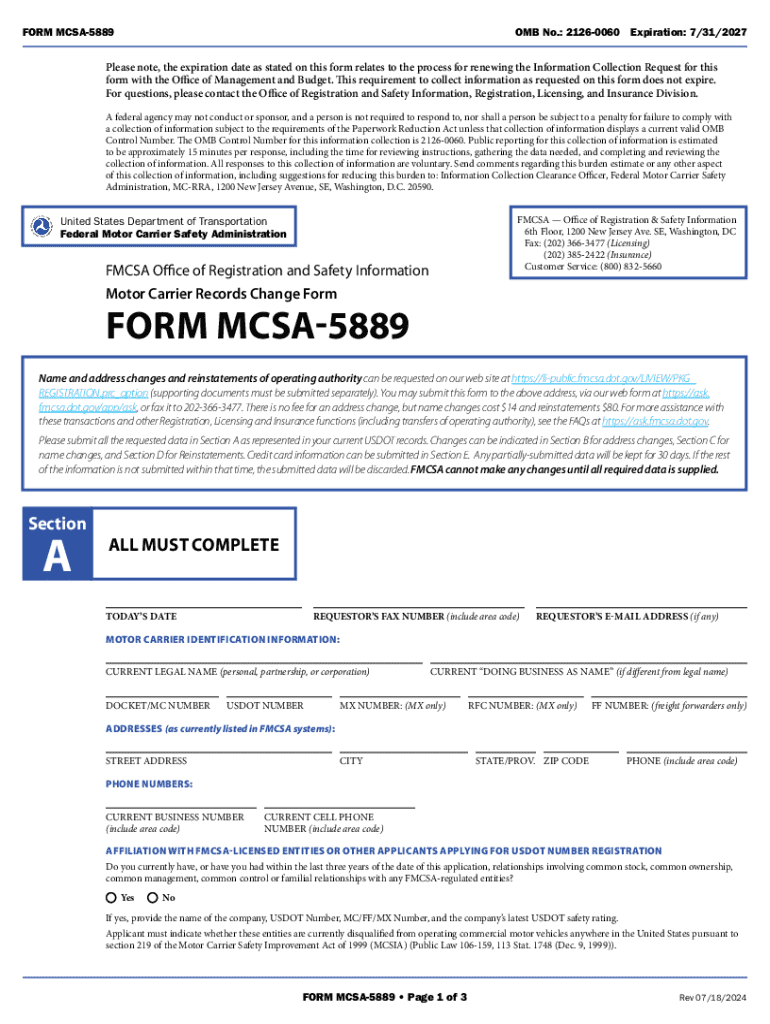
FORM MCSA 5889 OMB No 2126 0060 Revised 0813201 2024-2026


What is the FORM MCSA 5889 OMB No 2 Revised 0813201
The FORM MCSA 5889, officially designated as OMB No 2, is a critical document used in the commercial motor vehicle industry. This form is primarily utilized by individuals seeking to apply for a medical certification to operate commercial motor vehicles. The form collects essential information regarding the applicant's medical history and current health status, ensuring compliance with federal regulations set forth by the Federal Motor Carrier Safety Administration (FMCSA).
This form is vital for maintaining safety standards on U.S. roads and is part of the broader regulatory framework that governs commercial driving. It helps assess whether an individual meets the necessary health requirements to safely operate a commercial vehicle, thereby protecting both the driver and the public.
How to use the FORM MCSA 5889 OMB No 2 Revised 0813201
Using the FORM MCSA 5889 involves several straightforward steps. First, applicants should download the form from a reliable source or access it through an authorized provider. Once obtained, the applicant must fill out personal details, including name, address, and contact information.
Next, the form requires information about the applicant's medical history. This includes any existing medical conditions, medications taken, and previous medical evaluations. It is crucial to provide accurate and complete information, as this will be reviewed by a certified medical examiner. After completing the form, applicants should submit it to the designated medical professional for evaluation and signature.
Steps to complete the FORM MCSA 5889 OMB No 2 Revised 0813201
Completing the FORM MCSA 5889 involves a series of methodical steps to ensure accuracy and compliance:
- Download the form from an official source.
- Fill in personal identification details accurately.
- Provide comprehensive medical history, including any chronic conditions or medications.
- Review the completed form for any errors or omissions.
- Submit the form to a certified medical examiner for assessment.
- Receive the medical examiner's evaluation and signature on the form.
Following these steps carefully will facilitate a smooth application process for medical certification.
Legal use of the FORM MCSA 5889 OMB No 2 Revised 0813201
The legal use of the FORM MCSA 5889 is governed by federal regulations that mandate medical evaluations for commercial drivers. This form serves as a formal declaration of an individual's medical fitness to operate a commercial vehicle, which is a requirement under the FMCSA guidelines.
Failure to complete and submit this form can result in penalties for both the driver and the employer, as it is essential for maintaining compliance with safety regulations. The information provided on this form is also subject to confidentiality laws, ensuring that personal medical details are protected.
Required Documents
When completing the FORM MCSA 5889, applicants must gather and provide several supporting documents to ensure a comprehensive evaluation. These documents typically include:
- A valid driver's license or identification card.
- Medical records related to any existing health conditions.
- Documentation of any medications currently being taken.
- Previous medical examination reports, if applicable.
Having these documents ready will streamline the process and help the medical examiner make an informed decision regarding the applicant's fitness to drive.
Form Submission Methods (Online / Mail / In-Person)
The FORM MCSA 5889 can be submitted through various methods, depending on the preferences of the applicant and the requirements of the medical examiner. Common submission methods include:
- Online Submission: Some medical examiners may allow for electronic submission of the completed form.
- Mail: Applicants can send the completed form via postal service to the medical examiner’s office.
- In-Person: Submitting the form directly to the medical examiner during a scheduled appointment is also an option.
Choosing the appropriate submission method can enhance the efficiency of the application process and ensure timely evaluation.
Handy tips for filling out FORM MCSA 5889 OMB No 2126 0060 Revised 0813201 online
Quick steps to complete and e-sign FORM MCSA 5889 OMB No 2126 0060 Revised 0813201 online:
- Use Get Form or simply click on the template preview to open it in the editor.
- Start completing the fillable fields and carefully type in required information.
- Use the Cross or Check marks in the top toolbar to select your answers in the list boxes.
- Utilize the Circle icon for other Yes/No questions.
- Look through the document several times and make sure that all fields are completed with the correct information.
- Insert the current Date with the corresponding icon.
- Add a legally-binding e-signature. Go to Sign -> Add New Signature and select the option you prefer: type, draw, or upload an image of your handwritten signature and place it where you need it.
- Finish filling out the form with the Done button.
- Download your copy, save it to the cloud, print it, or share it right from the editor.
- Check the Help section and contact our Support team if you run into any troubles when using the editor.
We understand how straining completing documents can be. Obtain access to a HIPAA and GDPR compliant solution for maximum simpleness. Use signNow to e-sign and send out FORM MCSA 5889 OMB No 2126 0060 Revised 0813201 for collecting e-signatures.
Create this form in 5 minutes or less
Find and fill out the correct form mcsa 5889 omb no 2126 0060 revised 0813201
Create this form in 5 minutes!
How to create an eSignature for the form mcsa 5889 omb no 2126 0060 revised 0813201
How to create an electronic signature for a PDF online
How to create an electronic signature for a PDF in Google Chrome
How to create an e-signature for signing PDFs in Gmail
How to create an e-signature right from your smartphone
How to create an e-signature for a PDF on iOS
How to create an e-signature for a PDF on Android
People also ask
-
What is the form MCSA 5889 online and why do I need it?
The form MCSA 5889 online is a crucial document for commercial driver's license holders, allowing them to signNow their medical qualifications. Completing this form online streamlines the process, ensuring you meet regulatory requirements efficiently. Using airSlate SignNow, you can easily fill out and eSign the form, saving time and reducing paperwork.
-
How can I complete the form MCSA 5889 online using airSlate SignNow?
To complete the form MCSA 5889 online with airSlate SignNow, simply upload the document to our platform, fill in the required fields, and eSign it. Our user-friendly interface makes it easy to navigate through the form. Once completed, you can download or share the signed document directly from the platform.
-
Is there a cost associated with using airSlate SignNow for the form MCSA 5889 online?
Yes, airSlate SignNow offers various pricing plans to suit different business needs. You can choose a plan that allows you to complete the form MCSA 5889 online along with other document management features. We also provide a free trial, so you can explore our services before committing to a subscription.
-
What features does airSlate SignNow offer for the form MCSA 5889 online?
airSlate SignNow provides a range of features for the form MCSA 5889 online, including customizable templates, secure eSigning, and real-time tracking of document status. These features enhance your workflow and ensure that your documents are handled efficiently. Additionally, our platform is designed to be intuitive, making it accessible for all users.
-
Can I integrate airSlate SignNow with other applications for the form MCSA 5889 online?
Absolutely! airSlate SignNow offers seamless integrations with various applications, allowing you to manage the form MCSA 5889 online alongside your existing tools. Whether you use CRM systems, cloud storage, or project management software, our integrations enhance your productivity and streamline your document processes.
-
What are the benefits of using airSlate SignNow for the form MCSA 5889 online?
Using airSlate SignNow for the form MCSA 5889 online provides numerous benefits, including increased efficiency, reduced paperwork, and enhanced security. Our platform ensures that your documents are stored securely and are easily accessible. Additionally, the eSigning feature speeds up the approval process, allowing you to focus on your core business activities.
-
Is airSlate SignNow compliant with legal standards for the form MCSA 5889 online?
Yes, airSlate SignNow is fully compliant with legal standards for electronic signatures, ensuring that your form MCSA 5889 online is legally binding. We adhere to regulations such as the ESIGN Act and UETA, providing peace of mind that your documents are valid and enforceable. This compliance is crucial for businesses that require secure and reliable document management.
Get more for FORM MCSA 5889 OMB No 2126 0060 Revised 0813201
Find out other FORM MCSA 5889 OMB No 2126 0060 Revised 0813201
- eSign Oklahoma Insurance Business Associate Agreement Mobile
- eSign Louisiana Life Sciences Month To Month Lease Online
- eSign Legal Form Hawaii Secure
- eSign Hawaii Legal RFP Mobile
- How To eSign Hawaii Legal Agreement
- How Can I eSign Hawaii Legal Moving Checklist
- eSign Hawaii Legal Profit And Loss Statement Online
- eSign Hawaii Legal Profit And Loss Statement Computer
- eSign Hawaii Legal Profit And Loss Statement Now
- How Can I eSign Hawaii Legal Profit And Loss Statement
- Can I eSign Hawaii Legal Profit And Loss Statement
- How To eSign Idaho Legal Rental Application
- How To eSign Michigan Life Sciences LLC Operating Agreement
- eSign Minnesota Life Sciences Lease Template Later
- eSign South Carolina Insurance Job Description Template Now
- eSign Indiana Legal Rental Application Free
- How To eSign Indiana Legal Residential Lease Agreement
- eSign Iowa Legal Separation Agreement Easy
- How To eSign New Jersey Life Sciences LLC Operating Agreement
- eSign Tennessee Insurance Rental Lease Agreement Later