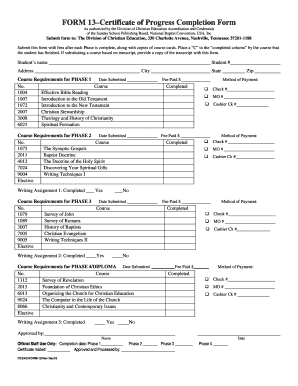
Certificate of Progress 2010


What is the Certificate Of Progress
The Certificate Of Progress is an official document that serves to acknowledge a student's achievements and progress in their educational journey. It is often used in schools to provide a formal record of a student's performance, including grades, attendance, and participation in various activities. This certificate can be an important tool for students, parents, and educators, as it highlights areas of strength and identifies opportunities for improvement.
How to use the Certificate Of Progress
The Certificate Of Progress can be utilized in several ways. Educators may issue it to students at the end of a grading period to summarize their academic performance. Parents can use it to track their child's development and discuss progress with teachers. Additionally, students may present this certificate as part of their applications for scholarships, advanced programs, or extracurricular activities, showcasing their commitment to their education.
Steps to complete the Certificate Of Progress
Completing the Certificate Of Progress involves several key steps:
- Gather necessary information: Collect data on the student’s grades, attendance, and participation in school activities.
- Fill out the certificate: Input the gathered information into the designated sections of the certificate template.
- Review for accuracy: Ensure all information is correct and reflects the student's performance accurately.
- Obtain signatures: Have the certificate signed by relevant authorities, such as teachers or school administrators.
- Distribute the certificate: Provide copies to the student and their parents, and retain a copy for school records.
Legal use of the Certificate Of Progress
The Certificate Of Progress holds legal significance in educational contexts. It can serve as a formal record of a student's academic standing and may be required for certain applications, such as transfers to other schools or enrollment in advanced programs. Schools must ensure that the information presented in the certificate is accurate and complies with educational regulations to avoid any legal complications.
Key elements of the Certificate Of Progress
Several key elements should be included in a Certificate Of Progress to ensure it is comprehensive and useful:
- Student's name: Clearly state the full name of the student.
- School information: Include the name and address of the school issuing the certificate.
- Academic performance: Detail the student's grades for each subject or course.
- Attendance record: Provide information on the student's attendance, highlighting any significant absences.
- Comments section: Allow space for teachers to add personalized remarks about the student's progress and areas for improvement.
Examples of using the Certificate Of Progress
The Certificate Of Progress can be effectively used in various scenarios:
- Scholarship applications: Students can submit the certificate to demonstrate their academic achievements when applying for financial aid.
- Parent-teacher conferences: Educators may present the certificate during meetings with parents to discuss the student’s progress and set future goals.
- College applications: High school students may include the certificate as part of their application materials to showcase their dedication to their studies.
Create this form in 5 minutes or less
Find and fill out the correct certificate of progress 14931705
Create this form in 5 minutes!
How to create an eSignature for the certificate of progress 14931705
How to create an electronic signature for a PDF online
How to create an electronic signature for a PDF in Google Chrome
How to create an e-signature for signing PDFs in Gmail
How to create an e-signature right from your smartphone
How to create an e-signature for a PDF on iOS
How to create an e-signature for a PDF on Android
People also ask
-
What is a Certificate Of Progress?
A Certificate Of Progress is a document that verifies the completion of specific milestones or achievements in a project or educational program. It serves as a formal acknowledgment of progress made, helping individuals and organizations track their development over time.
-
How can airSlate SignNow help with creating a Certificate Of Progress?
airSlate SignNow provides an intuitive platform for creating and signing a Certificate Of Progress. With customizable templates and easy eSignature options, you can quickly generate professional-looking certificates that meet your specific needs.
-
What are the pricing options for using airSlate SignNow for Certificate Of Progress?
airSlate SignNow offers flexible pricing plans that cater to different business sizes and needs. You can choose from monthly or annual subscriptions, ensuring that you find a cost-effective solution for generating and managing your Certificate Of Progress.
-
What features does airSlate SignNow offer for managing Certificate Of Progress?
airSlate SignNow includes features such as customizable templates, bulk sending, and real-time tracking for your Certificate Of Progress. These tools streamline the process, making it easier to manage multiple certificates efficiently.
-
Can I integrate airSlate SignNow with other applications for my Certificate Of Progress?
Yes, airSlate SignNow offers seamless integrations with various applications, including CRM and project management tools. This allows you to automate the process of sending and managing your Certificate Of Progress alongside your existing workflows.
-
What are the benefits of using airSlate SignNow for Certificate Of Progress?
Using airSlate SignNow for your Certificate Of Progress provides numerous benefits, including enhanced efficiency, reduced paperwork, and improved tracking of document status. This ensures that you can focus on your core activities while maintaining a professional approach to documentation.
-
Is it easy to customize a Certificate Of Progress in airSlate SignNow?
Absolutely! airSlate SignNow allows you to easily customize your Certificate Of Progress with your branding, logos, and specific content. This flexibility ensures that your certificates reflect your organization's identity and meet your unique requirements.
Get more for Certificate Of Progress
- Handling advice for unaccompanied minor erkl ring norwegian norwegian form
- Form 9783t 1659511
- Printable denver developmental screening test pdf form
- Respect paragraph form
- Absence request form
- Assessment the political development of imperial china form
- Taxpayer advocate servicesftb ca gov franchise tax board form
- Profit sharing trading agreement template form
Find out other Certificate Of Progress
- eSign Utah Outsourcing Services Contract Computer
- How Do I eSign Maryland Interview Non-Disclosure (NDA)
- Help Me With eSign North Dakota Leave of Absence Agreement
- How To eSign Hawaii Acknowledgement of Resignation
- How Can I eSign New Jersey Resignation Letter
- How Do I eSign Ohio Resignation Letter
- eSign Arkansas Military Leave Policy Myself
- How To eSign Hawaii Time Off Policy
- How Do I eSign Hawaii Time Off Policy
- Help Me With eSign Hawaii Time Off Policy
- How To eSign Hawaii Addressing Harassement
- How To eSign Arkansas Company Bonus Letter
- eSign Hawaii Promotion Announcement Secure
- eSign Alaska Worksheet Strengths and Weaknesses Myself
- How To eSign Rhode Island Overtime Authorization Form
- eSign Florida Payroll Deduction Authorization Safe
- eSign Delaware Termination of Employment Worksheet Safe
- Can I eSign New Jersey Job Description Form
- Can I eSign Hawaii Reference Checking Form
- Help Me With eSign Hawaii Acknowledgement Letter