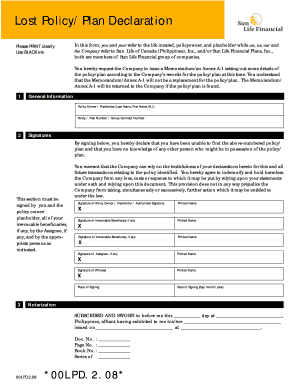
Sun Life Lost Policy Declaration Form


What is the Sun Life Lost Policy Declaration Form
The Sun Life Lost Policy Declaration Form is a crucial document for individuals who have misplaced their life insurance policy issued by Sun Life. This form serves as an official declaration to notify the insurance company about the loss of the policy. By completing this form, policyholders can initiate the process of obtaining a replacement policy or accessing benefits associated with the original policy. It is important to ensure that all information provided is accurate to avoid delays in processing the request.
How to use the Sun Life Lost Policy Declaration Form
Using the Sun Life Lost Policy Declaration Form involves several straightforward steps. First, download the form from the Sun Life website or request a physical copy from their customer service. Next, fill out the required fields, including personal information such as your name, address, and policy number, if available. After completing the form, you may need to sign it to affirm the accuracy of the information provided. Finally, submit the form to Sun Life through the designated submission method, which can include online submission, mail, or in-person delivery.
Steps to complete the Sun Life Lost Policy Declaration Form
Completing the Sun Life Lost Policy Declaration Form requires careful attention to detail. Follow these steps for successful completion:
- Download or obtain the form from Sun Life.
- Enter your personal information, including full name, address, and contact details.
- Provide any known details about the lost policy, such as the policy number and type of coverage.
- Sign and date the form to confirm the information is accurate.
- Submit the completed form as per the instructions provided by Sun Life.
Legal use of the Sun Life Lost Policy Declaration Form
The legal use of the Sun Life Lost Policy Declaration Form is essential for ensuring that the declaration is recognized by the insurance company. This form acts as a formal notice of the lost policy and is necessary for initiating any claims or replacement processes. It is important to comply with any state-specific regulations regarding lost policy declarations to ensure that the form is legally binding. Additionally, retaining a copy of the submitted form can provide evidence of the declaration in case of future disputes.
Key elements of the Sun Life Lost Policy Declaration Form
Several key elements are essential in the Sun Life Lost Policy Declaration Form. These include:
- Personal Information: Full name, address, and contact information of the policyholder.
- Policy Details: Information about the lost policy, including policy number and type of insurance.
- Declaration Statement: A statement affirming the loss of the policy and the intent to replace it.
- Signature: The policyholder's signature to validate the declaration.
Form Submission Methods
The Sun Life Lost Policy Declaration Form can be submitted through various methods, ensuring convenience for policyholders. Options typically include:
- Online Submission: Upload the completed form directly through the Sun Life website.
- Mail: Send the printed form to the designated mailing address provided by Sun Life.
- In-Person: Deliver the form to a local Sun Life office for immediate processing.
Quick guide on how to complete sun life lost policy declaration form
Complete Sun Life Lost Policy Declaration Form effortlessly on any device
Digital document management has become increasingly favored by businesses and individuals alike. It offers an ideal eco-friendly solution to traditional printed and signed documents, allowing you to access the desired form and securely save it online. airSlate SignNow equips you with all the necessary tools to create, modify, and electronically sign your documents promptly without interruptions. Manage Sun Life Lost Policy Declaration Form across any platform with airSlate SignNow's Android or iOS applications and simplify your document-related processes today.
The simplest way to modify and electronically sign Sun Life Lost Policy Declaration Form effortlessly
- Find Sun Life Lost Policy Declaration Form and click on Get Form to begin.
- Utilize the tools we provide to complete your document.
- Emphasize important sections of your documents or redact sensitive information with tools that airSlate SignNow provides specifically for that purpose.
- Create your electronic signature using the Sign tool, which takes only seconds and holds the same legal validity as a conventional wet ink signature.
- Review the details and click on the Done button to save your changes.
- Choose how you would prefer to send your form, via email, text message (SMS), or an invitation link, or download it to your computer.
Say goodbye to lost or misplaced documents, tedious form searches, or mistakes that require reprinting new copies. airSlate SignNow takes care of all your document management needs in just a few clicks from your preferred device. Modify and electronically sign Sun Life Lost Policy Declaration Form and ensure excellent communication throughout your form preparation process with airSlate SignNow.
Create this form in 5 minutes or less
Create this form in 5 minutes!
People also ask
-
What is a sun policy form?
A sun policy form is a document that outlines the terms and conditions under which a business operates under a sun policy. This form is critical for ensuring compliance with relevant regulations and can be easily created and managed using tools like airSlate SignNow.
-
How can I create a sun policy form using airSlate SignNow?
Creating a sun policy form with airSlate SignNow is straightforward. You can start by selecting a template that fits your needs, customize it with your specific terms, and then send it out for signatures. The platform’s intuitive interface makes the process seamless.
-
What are the pricing options for using the sun policy form feature?
airSlate SignNow offers various pricing plans tailored to fit different business needs. You can choose from a free trial to evaluate the sun policy form feature, or select a subscription plan that provides added functionalities at a competitive rate.
-
What features should I look for in a sun policy form?
When assessing a sun policy form, look for features such as customizable templates, real-time tracking of document status, and secure eSignature capabilities. airSlate SignNow offers all these features, making it an ideal solution for creating and managing sun policy forms.
-
Is the sun policy form legally binding?
Yes, a sun policy form can be legally binding when executed properly. By using airSlate SignNow, you ensure that all signatures are compliant with legal standards, providing your business with peace of mind in document validity.
-
Can I integrate the sun policy form with other software applications?
airSlate SignNow can be easily integrated with other software applications, such as CRM and project management tools. This allows you to automate workflows involving the sun policy form, improving efficiency and reducing manual errors.
-
What are the benefits of using airSlate SignNow for sun policy forms?
Using airSlate SignNow for your sun policy forms offers numerous benefits, including enhanced document security, faster turnaround times, and improved user experience. The platform simplifies the process of obtaining signatures, helping you focus more on your core business activities.
Get more for Sun Life Lost Policy Declaration Form
- Reconciliation of income tax form
- Resale certificate kentucky form pdf studyeducationorg
- Learn about homestead exemption south carolinasenior property tax homestead exemptionhomestead exemption frequently asked form
- Form w 1louisvillekygov
- Fillable online revenue ky form 720s kentucky department
- Department of revenue important please see instructions form
- 0900020270 kentucky department of revenue form
- Wwwirsgovpubirs pdf2020 form 8404 internal revenue service
Find out other Sun Life Lost Policy Declaration Form
- How To Integrate Sign in Banking
- How To Use Sign in Banking
- Help Me With Use Sign in Banking
- Can I Use Sign in Banking
- How Do I Install Sign in Banking
- How To Add Sign in Banking
- How Do I Add Sign in Banking
- How Can I Add Sign in Banking
- Can I Add Sign in Banking
- Help Me With Set Up Sign in Government
- How To Integrate eSign in Banking
- How To Use eSign in Banking
- How To Install eSign in Banking
- How To Add eSign in Banking
- How To Set Up eSign in Banking
- How To Save eSign in Banking
- How To Implement eSign in Banking
- How To Set Up eSign in Construction
- How To Integrate eSign in Doctors
- How To Use eSign in Doctors