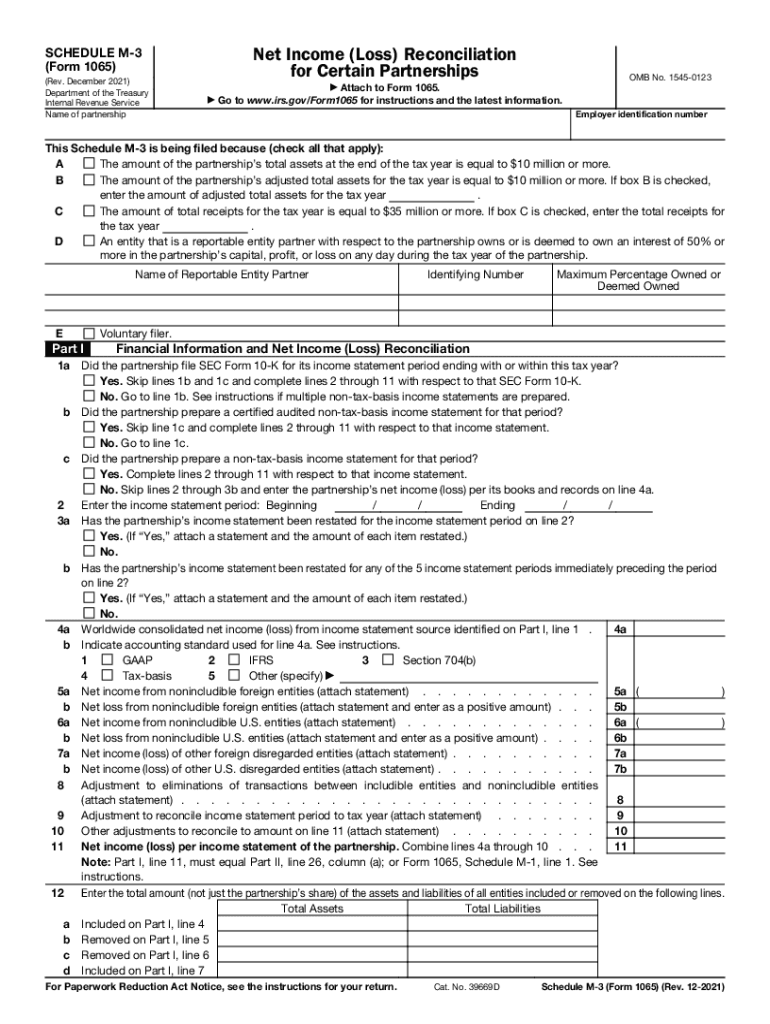
SCHEDULE M 3 Net Income Loss Reconciliation Form 1065 2021-2026


What is the Schedule M 3 Net Income Loss Reconciliation Form 1065
The Schedule M 3 is a critical form used in the United States for partnerships to reconcile their net income or loss as reported on their tax return, specifically Form 1065. This form is designed to provide detailed information regarding the differences between the financial accounting income and the taxable income. It is essential for partnerships that have total assets exceeding ten million dollars or that meet certain other criteria set by the IRS. Understanding the Schedule M 3 is vital for accurate tax reporting and compliance.
Steps to complete the Schedule M 3 Net Income Loss Reconciliation Form 1065
Completing the Schedule M 3 involves several steps to ensure accuracy and compliance. First, gather all necessary financial statements and tax documents. Next, begin filling out the form by entering the partnership's financial accounting income, followed by adjustments for any differences that affect taxable income. This includes items such as tax-exempt income and nondeductible expenses. Each section of the form must be carefully completed, ensuring that all calculations are accurate. Finally, review the form for completeness and accuracy before submission.
Legal use of the Schedule M 3 Net Income Loss Reconciliation Form 1065
The Schedule M 3 must be used in accordance with IRS regulations to ensure that the information provided is legally binding. The form serves as a declaration of the partnership's income and deductions, and incorrect information can lead to penalties or audits. It is important to comply with the legal frameworks surrounding eSignatures and electronic submissions to maintain the integrity of the document. Utilizing a reliable eSignature solution can enhance the legal validity of the submitted form.
IRS Guidelines
The IRS provides specific guidelines for completing and submitting the Schedule M 3. These include instructions on how to report various types of income and deductions, as well as the required documentation to support the entries made on the form. Adhering to these guidelines is crucial for ensuring compliance and avoiding potential issues with the IRS. The IRS also updates these guidelines periodically, so it is important to stay informed about any changes that may affect the filing process.
Filing Deadlines / Important Dates
Filing deadlines for the Schedule M 3 correspond with the due date for Form 1065, which is typically March 15 for partnerships operating on a calendar year. If additional time is needed, partnerships can file for an extension, but it is essential to ensure that the Schedule M 3 is submitted by the extended deadline. Missing these deadlines can result in penalties and interest on any unpaid taxes, making timely filing a priority for all partnerships.
Required Documents
To complete the Schedule M 3, certain documents are required. These include the partnership's financial statements, prior year tax returns, and any additional documentation that supports income and expense claims. Having these documents organized and readily available can streamline the process of filling out the form and help ensure accuracy. It is advisable to maintain thorough records to support all entries made on the Schedule M 3.
Quick guide on how to complete schedule m 3 net income loss reconciliation form 1065
Complete SCHEDULE M 3 Net Income Loss Reconciliation Form 1065 seamlessly on any device
Digital document management has gained traction among businesses and individuals alike. It offers an excellent environmentally friendly alternative to conventional printed and signed documents, allowing you to obtain the right form and securely archive it online. airSlate SignNow equips you with all the necessary tools to create, modify, and eSign your documents quickly and without interruptions. Manage SCHEDULE M 3 Net Income Loss Reconciliation Form 1065 on any device with the airSlate SignNow Android or iOS applications and streamline any document-related task today.
The easiest way to modify and eSign SCHEDULE M 3 Net Income Loss Reconciliation Form 1065 with minimal effort
- Obtain SCHEDULE M 3 Net Income Loss Reconciliation Form 1065 and click Get Form to begin.
- Utilize the tools we offer to finalize your document.
- Emphasize relevant sections of the documents or obscure sensitive information with tools that airSlate SignNow specifically provides for this purpose.
- Create your eSignature using the Sign tool, which takes only seconds and carries the same legal validity as a conventional wet ink signature.
- Review all the details and click on the Done button to save your changes.
- Select how you wish to share your form, by email, text message (SMS), or invitation link, or download it to your computer.
Eliminate concerns about lost or misplaced files, tedious document searching, or errors that necessitate printing new document copies. airSlate SignNow fulfills all your document management needs in just a few clicks from a device of your preference. Modify and eSign SCHEDULE M 3 Net Income Loss Reconciliation Form 1065 and ensure excellent communication at any stage of the document preparation process with airSlate SignNow.
Create this form in 5 minutes or less
Find and fill out the correct schedule m 3 net income loss reconciliation form 1065
Create this form in 5 minutes!
How to create an eSignature for the schedule m 3 net income loss reconciliation form 1065
How to create an e-signature for a PDF online
How to create an e-signature for a PDF in Google Chrome
The best way to create an e-signature for signing PDFs in Gmail
The way to create an electronic signature from your smartphone
How to generate an e-signature for a PDF on iOS
The way to create an electronic signature for a PDF file on Android
People also ask
-
What is the best way to schedule m 3 for my document signing?
To effectively schedule m 3 for document signing with airSlate SignNow, simply log in to your account and select the documents you need to send. Use the scheduling feature to set a specific date and time for the signing process. This ensures that all parties are notified and can sign at their convenience.
-
What pricing plans are available for scheduling m 3 with airSlate SignNow?
airSlate SignNow offers several pricing plans that cater to different business needs, including options for efficiently scheduling m 3. These plans vary in features and limits based on usage, making it easy to find one that fits your budget while still providing robust eSignature capabilities.
-
Can I integrate scheduling m 3 into my existing workflow?
Yes, airSlate SignNow allows for seamless integration of scheduling m 3 into your existing workflow. Whether you're using CRM software, Google Workspace, or other applications, our platform supports integrations that facilitate easy document signing while allowing you to maintain your standard processes.
-
What features help streamline the scheduling m 3 process?
airSlate SignNow provides several features designed to streamline the scheduling m 3 process, including reminders, notifications, and a user-friendly dashboard. These tools enable users to track the status of their documents and ensure that all parties are involved in the signing process on time.
-
Are there any mobile capabilities for scheduling m 3?
Absolutely! airSlate SignNow offers mobile capabilities that allow you to schedule m 3 on the go. With our mobile app, users can manage document signing, send reminders, and receive notifications directly from their smartphones, promoting flexibility and convenience.
-
How does airSlate SignNow ensure the security of scheduled m 3?
Security is a top priority for airSlate SignNow when scheduling m 3. We implement advanced encryption protocols and authentication methods to ensure that your documents are secure throughout the signing process, safeguarding sensitive information at all times.
-
What customer support is available for scheduling m 3?
airSlate SignNow offers robust customer support options for users scheduling m 3, including live chat, phone support, and a comprehensive knowledge base. Our dedicated team is ready to assist with any questions or issues that may arise, ensuring a smooth eSignature experience.
Get more for SCHEDULE M 3 Net Income Loss Reconciliation Form 1065
Find out other SCHEDULE M 3 Net Income Loss Reconciliation Form 1065
- How To Electronic signature Delaware Car Dealer Lease Template
- Electronic signature North Carolina Banking Claim Secure
- Electronic signature North Carolina Banking Separation Agreement Online
- How Can I Electronic signature Iowa Car Dealer Promissory Note Template
- Electronic signature Iowa Car Dealer Limited Power Of Attorney Myself
- Electronic signature Iowa Car Dealer Limited Power Of Attorney Fast
- How Do I Electronic signature Iowa Car Dealer Limited Power Of Attorney
- Electronic signature Kentucky Car Dealer LLC Operating Agreement Safe
- Electronic signature Louisiana Car Dealer Lease Template Now
- Electronic signature Maine Car Dealer Promissory Note Template Later
- Electronic signature Maryland Car Dealer POA Now
- Electronic signature Oklahoma Banking Affidavit Of Heirship Mobile
- Electronic signature Oklahoma Banking Separation Agreement Myself
- Electronic signature Hawaii Business Operations Permission Slip Free
- How Do I Electronic signature Hawaii Business Operations Forbearance Agreement
- Electronic signature Massachusetts Car Dealer Operating Agreement Free
- How To Electronic signature Minnesota Car Dealer Credit Memo
- Electronic signature Mississippi Car Dealer IOU Now
- Electronic signature New Hampshire Car Dealer NDA Now
- Help Me With Electronic signature New Hampshire Car Dealer Warranty Deed