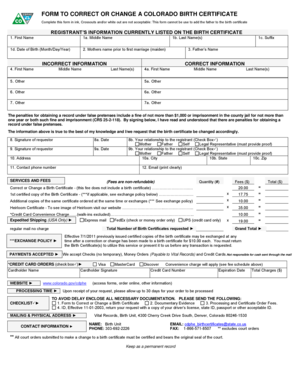
FORM to CORRECT or CHANGE a COLORADO BIRTH CERTIFICATE Reset Form Data Complete This Form in Ink, Crossouts Andor White Out Are


Understanding the Form to Correct or Change a Colorado Birth Certificate
The form to correct or change a Colorado birth certificate is a crucial document for individuals seeking to amend their birth records. This form is specifically designed for correcting errors or making changes to existing information on the birth certificate, such as the registrant's name or date of birth. It is important to note that this form cannot be used to add a father to the birth certificate. Completing this form accurately is essential to ensure that the changes are processed without delays.
Steps to Complete the Form
Filling out the form to correct or change a Colorado birth certificate requires careful attention to detail. Here are the steps to ensure proper completion:
- Use black or blue ink to fill out the form, as crossouts and white-out are not acceptable.
- Provide accurate information regarding the registrant, including full name, date of birth, and place of birth.
- Clearly specify the corrections or changes needed in the designated sections.
- Sign and date the form where indicated, ensuring that all signatures are original.
Required Documents for Submission
When submitting the form to correct or change a Colorado birth certificate, certain documents must accompany the application. These may include:
- A copy of a valid photo ID, such as a driver's license or passport.
- Any supporting documents that validate the requested changes, such as marriage certificates or court orders.
- Payment for any applicable fees associated with processing the request.
Submission Methods for the Form
The completed form to correct or change a Colorado birth certificate can be submitted through various methods:
- By mail, using the address provided on the form for the Colorado Department of Public Health and Environment.
- In-person at designated state offices where vital records are processed.
Legal Use of the Form
This form is legally binding and must be filled out in compliance with Colorado state laws. It is essential to ensure that all information provided is truthful and accurate, as any discrepancies may lead to legal complications. The form serves as an official request to amend public records, and proper procedure must be followed to maintain the integrity of vital statistics.
State-Specific Rules for Completing the Form
Each state has specific regulations regarding the correction of birth certificates. In Colorado, it is important to adhere to the guidelines set forth by the Colorado Department of Public Health and Environment. This includes understanding the types of changes that can be made, the necessary documentation required, and the fees associated with processing the request. Familiarizing oneself with these state-specific rules can help streamline the process.
Quick guide on how to complete form to correct or change a colorado birth certificate reset form data complete this form in ink crossouts andor white out are
Effortlessly Prepare FORM TO CORRECT OR CHANGE A COLORADO BIRTH CERTIFICATE Reset Form Data Complete This Form In Ink, Crossouts Andor White Out Are on Any Device
Digital document management has become increasingly favored by organizations and individuals. It serves as an excellent eco-friendly alternative to conventional printed and signed documents, allowing you to locate the appropriate form and securely store it online. airSlate SignNow equips you with all the tools necessary to create, edit, and electronically sign your documents quickly and without delays. Manage FORM TO CORRECT OR CHANGE A COLORADO BIRTH CERTIFICATE Reset Form Data Complete This Form In Ink, Crossouts Andor White Out Are on any platform using the airSlate SignNow Android or iOS applications and simplify any document-related tasks today.
How to Edit and Electronically Sign FORM TO CORRECT OR CHANGE A COLORADO BIRTH CERTIFICATE Reset Form Data Complete This Form In Ink, Crossouts Andor White Out Are with Ease
- Locate FORM TO CORRECT OR CHANGE A COLORADO BIRTH CERTIFICATE Reset Form Data Complete This Form In Ink, Crossouts Andor White Out Are and click Get Form to begin.
- Utilize the tools we provide to complete your form.
- Mark important sections of the documents or obscure sensitive information with tools that airSlate SignNow specifically offers for that purpose.
- Create your electronic signature using the Sign tool, which takes just seconds and carries the same legal validity as a traditional handwritten signature.
- Review all the information and click the Done button to save your changes.
- Select your preferred method for sending your form, whether by email, text message (SMS), invitation link, or download it to your computer.
Eliminate concerns about lost or misplaced documents, tedious form searching, or mistakes that require printing new copies. airSlate SignNow fulfills all your document management requirements in just a few clicks from any device you choose. Edit and electronically sign FORM TO CORRECT OR CHANGE A COLORADO BIRTH CERTIFICATE Reset Form Data Complete This Form In Ink, Crossouts Andor White Out Are to ensure exceptional communication at every phase of your form preparation with airSlate SignNow.
Create this form in 5 minutes or less
Create this form in 5 minutes!
People also ask
-
What is the purpose of the FORM TO CORRECT OR CHANGE A COLORADO BIRTH CERTIFICATE?
The FORM TO CORRECT OR CHANGE A COLORADO BIRTH CERTIFICATE is used to update or correct information on a birth certificate. This form is specifically for changes to names or details; note that it cannot be used to add a father to the birth certificate. Be sure to complete this form in ink, as crossouts and/or white out are not acceptable.
-
How do I complete the FORM TO CORRECT OR CHANGE A COLORADO BIRTH CERTIFICATE?
To complete the FORM TO CORRECT OR CHANGE A COLORADO BIRTH CERTIFICATE, you need to fill it out accurately, ensuring all information is clear and legible. Remember, this form requires completion in ink and cannot include crossouts or white out. It's important to follow the instructions carefully to avoid processing delays.
-
Can I use the FORM TO CORRECT OR CHANGE A COLORADO BIRTH CERTIFICATE to add a father’s information?
No, the FORM TO CORRECT OR CHANGE A COLORADO BIRTH CERTIFICATE cannot be used to add the father's information. This form is specifically designated for correcting existing information. If you need to add a father's information, you'll need to look into a different process.
-
What information do I need to provide on the FORM TO CORRECT OR CHANGE A COLORADO BIRTH CERTIFICATE?
When filling out the FORM TO CORRECT OR CHANGE A COLORADO BIRTH CERTIFICATE, you will need to include the registrant's identification details, errors to be corrected, and any supporting documents if required. Ensure all data is complete and written in ink, as no crossouts or white out will be accepted.
-
Is there a fee associated with submitting the FORM TO CORRECT OR CHANGE A COLORADO BIRTH CERTIFICATE?
Yes, there is typically a fee involved when submitting the FORM TO CORRECT OR CHANGE A COLORADO BIRTH CERTIFICATE. Check the Colorado Department of Public Health website for specific pricing details, as these may vary based on the nature of the correction or change.
-
How long does it take to process the FORM TO CORRECT OR CHANGE A COLORADO BIRTH CERTIFICATE?
The processing time for the FORM TO CORRECT OR CHANGE A COLORADO BIRTH CERTIFICATE can vary. Generally, it takes several weeks for the changes to be processed and the updated certificate to be issued. It’s advisable to check with local health department for any expedited options.
-
What happens if I make a mistake on the FORM TO CORRECT OR CHANGE A COLORADO BIRTH CERTIFICATE?
If you make a mistake on the FORM TO CORRECT OR CHANGE A COLORADO BIRTH CERTIFICATE, it is important to start over and fill out a new form. Remember that crossouts and/or white out are not acceptable, which means any errors made cannot be corrected on the original document.
Get more for FORM TO CORRECT OR CHANGE A COLORADO BIRTH CERTIFICATE Reset Form Data Complete This Form In Ink, Crossouts Andor White Out Are
Find out other FORM TO CORRECT OR CHANGE A COLORADO BIRTH CERTIFICATE Reset Form Data Complete This Form In Ink, Crossouts Andor White Out Are
- eSignature Michigan Real Estate LLC Operating Agreement Mobile
- eSignature Georgia Police Last Will And Testament Simple
- How To eSignature Hawaii Police RFP
- Can I eSignature Minnesota Real Estate Warranty Deed
- How Do I eSignature Indiana Police Lease Agreement Form
- eSignature Police PPT Kansas Free
- How Can I eSignature Mississippi Real Estate Rental Lease Agreement
- How Do I eSignature Kentucky Police LLC Operating Agreement
- eSignature Kentucky Police Lease Termination Letter Now
- eSignature Montana Real Estate Quitclaim Deed Mobile
- eSignature Montana Real Estate Quitclaim Deed Fast
- eSignature Montana Real Estate Cease And Desist Letter Easy
- How Do I eSignature Nebraska Real Estate Lease Agreement
- eSignature Nebraska Real Estate Living Will Now
- Can I eSignature Michigan Police Credit Memo
- eSignature Kentucky Sports Lease Agreement Template Easy
- eSignature Minnesota Police Purchase Order Template Free
- eSignature Louisiana Sports Rental Application Free
- Help Me With eSignature Nevada Real Estate Business Associate Agreement
- How To eSignature Montana Police Last Will And Testament