Form 9400 193 2016


What is the Form 9400 193
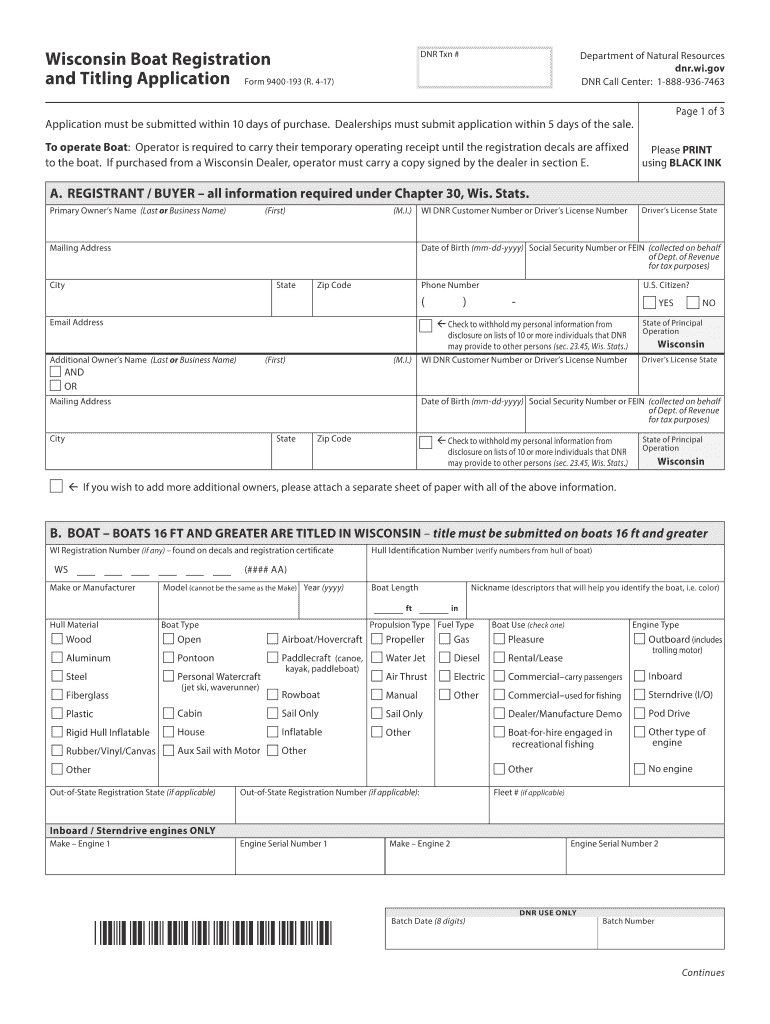
The Form 9400 193 is the official Wisconsin boating registration and titling application. This form is essential for individuals who wish to register their boats with the Wisconsin Department of Natural Resources (DNR). Completing this form accurately ensures that boat owners comply with state regulations and can legally operate their vessels on Wisconsin waters. The form collects vital information about the boat, including its make, model, year, and hull identification number, as well as details about the owner.
Steps to complete the Form 9400 193
Completing the Form 9400 193 involves several important steps:
- Gather necessary information about the boat, such as the hull identification number and the manufacturer's details.
- Provide personal information, including the owner's name, address, and contact details.
- Indicate whether the boat is new or used and provide the previous registration details if applicable.
- Review the form for accuracy and completeness before submission.
Ensuring that all sections are filled out correctly will help prevent delays in the registration process.
How to obtain the Form 9400 193
The Form 9400 193 can be obtained through the Wisconsin DNR website or by visiting a local DNR office. It is available in both digital and paper formats, allowing boat owners to choose the method that best suits their needs. For those who prefer to fill out the form online, the DNR website provides an easy-to-navigate interface for completing the application digitally.
Legal use of the Form 9400 193
The legal use of the Form 9400 193 is crucial for ensuring that boat ownership is properly documented and recognized by state authorities. This form must be submitted to the Wisconsin DNR to obtain a valid registration certificate and title for the boat. Failure to register a boat can result in penalties, including fines and restrictions on operating the vessel legally.
Required Documents
When submitting the Form 9400 193, certain documents are required to support the application. These may include:
- Proof of ownership, such as a bill of sale or previous registration.
- Identification documents of the owner, such as a driver's license or state ID.
- Payment for registration fees, which can vary based on the type and size of the boat.
Having these documents ready will streamline the registration process and help ensure compliance with state regulations.
Form Submission Methods
The Form 9400 193 can be submitted through various methods, including:
- Online submission via the Wisconsin DNR website, where users can fill out and submit the form digitally.
- Mailing the completed form to the appropriate DNR office, along with any required documents and payment.
- In-person submission at a local DNR office, which may provide immediate assistance and feedback.
Choosing the right submission method can enhance the efficiency of the registration process.
Quick guide on how to complete wisconsin boat application 2016 2019 form
Complete Form 9400 193 effortlessly on any device
Online document management has gained popularity among businesses and individuals. It serves as an ideal eco-friendly alternative to traditional printed and signed paperwork, allowing you to obtain the correct form and securely store it online. airSlate SignNow equips you with all the resources necessary to create, modify, and electronically sign your documents swiftly without interruptions. Manage Form 9400 193 on any device using the airSlate SignNow apps for Android or iOS and enhance any document-related process today.
How to modify and electronically sign Form 9400 193 with ease
- Acquire Form 9400 193 and click on Get Form to begin.
- Utilize the tools we provide to complete your document.
- Emphasize pertinent sections of the documents or conceal sensitive information with tools that airSlate SignNow specifically offers for that purpose.
- Generate your signature using the Sign tool, which takes mere seconds and carries the same legal validity as a conventional wet ink signature.
- Review all the information and click on the Done button to save your changes.
- Choose how you want to share your form, either via email, SMS, or invitation link, or download it to your computer.
Forget about lost or misplaced documents, tedious form searches, or errors that necessitate printing new copies. airSlate SignNow meets your document management needs with just a few clicks from any device you select. Edit and electronically sign Form 9400 193 to ensure excellent communication at every step of the form preparation process with airSlate SignNow.
Create this form in 5 minutes or less
Find and fill out the correct wisconsin boat application 2016 2019 form
FAQs
-
How do I fill out a CLAT 2019 application form?
Hi thereFirst of all, let me tell you some important points:CLAT 2019 has gone OFFLINE this yearBut the application forms for CLAT 2019 have to be filled ONLINEThe payment of the application fees also should be made onlineNow, kindly note the important dates:Note the details regarding the application fees:Here, if you want the Previous Year Question papers, Rs.500 would be added to the application fees.Apart from this, there would be bank transaction charges added to the application fees.The application fees is non-refundable.Note one important point here that before you fill the application form, check for your eligibility.To know the complete details of filling the application form along with other information like the eligibility - in terms of age, educational qualification, list of NLUs participating and the seats offered under each category, CLAT Reservation policies, CLAT exam pattern, marking scheme, syllabus, important documents required to be kept ready before filling the form, kindly go to the link below:How to fill CLAT 2019 Application form? Registration OPEN | All you need to knowTo know how to prepare for one of the very important section of CLAT exam, GK and Current Affairs, kindly go to the link below:How to prepare GK & Current Affairs for CLAT 2019To practice, daily MCQs on Current Affairs, kindly go to the link below:#CLAT2019 | #AILET2019 | #DULLB2019 | GK and Current Affairs Series: 5 in 10 Series: Day 12For any other queries, kindly write to us at mailateasyway@gmail.comThanks & Regards!
-
How do I fill out the NEET 2019 application form?
Expecting application form of NEET2019 will be same as that of NEET2018, follow the instructions-For Feb 2019 Exam:EventsDates (Announced)Release of application form-1st October 2018Application submission last date-31st October 2018Last date to pay the fee-Last week of October 2018Correction Window Open-1st week of November 2018Admit card available-1st week of January 2019Exam date-3rd February to 17th February 2019Answer key & OMR release-Within a week after examAnnouncement of result-1st week of March 2019Counselling begins-2nd week of June 2019For May 2019 Exam:EventsDates (Announced)Application form Release-2nd week of March 2019Application submission last date-2nd week of April 2019Last date to pay the fee-2nd week of April 2019Correction Window Open-3rd week of April 2019Admit card available-1st week of May 2019Exam date-12th May to 26th May 2019Answer key & OMR release-Within a week after examAnnouncement of result-1st week of June 2019Counselling begins-2nd week of June 2019NEET 2019 Application FormCandidates should fill the application form as per the instructions given in the information bulletin. Below we are providing NEET 2019 application form details:The application form will be issued through online mode only.No application will be entertained through offline mode.NEET UG registration 2019 will be commenced from the 1st October 2018 (Feb Exam) & second week of March 2018 (May Exam).Candidates should upload the scanned images of recent passport size photograph and signature.After filling the application form completely, a confirmation page will be generated. Download it.There will be no need to send the printed confirmation page to the board.Application Fee:General and OBC candidates will have to pay Rs. 1400/- as an application fee.The application fee for SC/ST and PH candidates will be Rs. 750/-.Fee payment can be done through credit/debit card, net banking, UPI and e-wallet.Service tax will also be applicable.CategoryApplication FeeGeneral/OBC-1400/-SC/ST/PH-750/-Step 1: Fill the Application FormGo the official portal of the conducting authority (Link will be given above).Click on “Apply Online” link.A candidate has to read all the instruction and then click on “Proceed to Apply Online NEET (UG) 2019”.Step 1.1: New RegistrationFill the registration form carefully.Candidates have to fill their name, Mother’s Name, Father’s Name, Category, Date of Birth, Gender, Nationality, State of Eligibility (for 15% All India Quota), Mobile Number, Email ID, Aadhaar card number, etc.After filling all the details, two links will be given “Preview &Next” and “Reset”.If candidate satisfied with the filled information, then they have to click on “Next”.After clicking on Next Button, the information submitted by the candidate will be displayed on the screen. If information correct, click on “Next” button, otherwise go for “Back” button.Candidates may note down the registration number for further procedure.Now choose the strong password and re enter the password.Choose security question and feed answer.Enter the OTP would be sent to your mobile number.Submit the button.Step 1.2: Login & Application Form FillingLogin with your Registration Number and password.Fill personal details.Enter place of birth.Choose the medium of question paper.Choose examination centres.Fill permanent address.Fill correspondence address.Fill Details (qualification, occupation, annual income) of parents and guardians.Choose the option for dress code.Enter security pin & click on save & draft.Now click on preview and submit.Now, review your entries.Then. click on Final Submit.Step 2: Upload Photo and SignatureStep 2 for images upload will be appeared on screen.Now, click on link for Upload photo & signature.Upload the scanned images.Candidate should have scanned images of his latest Photograph (size of 10 Kb to 100 Kb.Signature(size of 3 Kb to 20 Kb) in JPEG format only.Step 3: Fee PaymentAfter uploading the images, candidate will automatically go to the link for fee payment.A candidate has to follow the instruction & submit the application fee.Choose the Bank for making payment.Go for Payment.Candidate can pay the fee through Debit/Credit Card/Net Banking/e-wallet (CSC).Step 4: Take the Printout of Confirmation PageAfter the fee payment, a candidate may take the printout of the confirmation page.Candidates may keep at least three copies of the confirmation page.Note:Must retain copy of the system generated Self Declaration in respect of candidates from J&K who have opted for seats under 15% All India Quota.IF any queries, feel free to comment..best of luck
-
How can I fill out the BITSAT Application Form 2019?
BITSAT 2019 Application Forms are available online. Students who are eligible for the admission test can apply online before 20 March 2018, 5 pm.Click here to apply for BITSAT 2019Step 1: Follow the link given aboveStep 2: Fill online application formPersonal Details12th Examination DetailsTest Centre PreferencesStep 3: Upload scanned photograph (4 kb to 50 kb) and signature ( 1 kb to 30 kb).Step 4: Pay application fee either through online payment mode or through e-challan (ICICI Bank)BITSAT-2019 Application FeeMale Candidates - Rs. 3150/-Female Candidates - Rs. 2650/-Thanks!
-
How can I fill out the COMEDK 2019 application form?
COMEDK 2019 application is fully online based and there is no need to send the application by post or by any other method. Check the below-mentioned guidelines to register for the COMEDK 2019 exam:Step 1 Visit the official website of the COMEDK UGET- comedk.orgStep 2 Click on “Engineering Application”.Step 3 After that click on “Login or Register” button.Step 4 You will be asked to enter the Application SEQ Number/User ID and Password. But since you have not registered. You need to click on the “Click here for Registration”.Step 5 Fill in the required details like “Full Name”, “DOB”, “Unique Photo ID Proof”, “Photo ID Proof Number”, “Email ID” and “Mobile Number”.Step 6 Then click on the “Generate OTP”Step 7 After that you need to enter the captcha code and then an OTP will be sent to the mobile number that you have provided.Step 8 A new window having your previously entered registration details will open where you need to enter the OTP.Step 9 Re-check all the details, enter the captcha code and click on the “Register” button.Step 10 After that a page will appear where you will be having the User ID and all the details that you entered. Also, you will be notified that you have successfully registered yourself and a User ID and Password will be sent to your mobile number and email ID.COMEDK 2019 Notification | Steps To Apply For COMEDK UGET ExamCheck the below-mentioned guidelines to fill COMEDK Application Form after COMEDK Login.Step 1 Using your User ID and Password. Log in using the User ID and passwordStep 2 You will be shown that your application form is incomplete. So you need to go to the topmost right corner and click on the “Go to application” tab.Step 3 Go to the COMEDK official website and login with these credentials.Step 4 After that click on “Go to application form”.Step 5 Select your preferred stream and course.Step 6 Click on “Save and Continue”.Step 7 Carefully enter your Personal, Category and Academic details.Step 8 Upload your Photograph and Signature, Parents Signature, your ID Proof, and Declaration.Step 9 Enter your “Payment Mode” and “Amount”.Step 10 Enter “Security code”.Step 11 Tick the “I Agree” checkbox.Step 12 Click on the “Submit” button.
-
How can I fill out the application form for the JMI (Jamia Millia Islamia) 2019?
Form for jamia school have been releaseYou can fill it from jamia siteJamia Millia Islamia And for collegeMost probably the form will out end of this month or next monthBut visit the jamia site regularly.Jamia Millia Islamiacheck whether the form is out or not for the course you want to apply.when notification is out then you have to create the account for entrance and for 2 entrance same account will be used you have to check in the account that the course you want to apply is there in listed or not ….if not then you have to create the different account for that course .If you have any doubts you can freely ask me .
-
How do I fill out the JEE Main 2019 exam application form?
Steps to fill out the JEE Mains 2019 application form?How to Fill JEE Main 2019 Application FormJEE Main 2019 Registration Process to be followed on the NTA Website:Step 1: Visit the website of NTA or CLick here.Step 2: Click on NTA exams or on Joint Entrance Examination under the Engineering Section given on the same page.Step 3: You will see the registration button as shown in the image below. Read all the eligibility criteria and click on “Registration”Step 4: Candidates will be redirected to the JEE Main 2019 official website where they have to click on “Fill Application Form”.Step 5: Now, Click on “Apply for JEE Main 2019”. Read all instructions carefully and proceed to apply online by clicking on the button given at the end of the page.Step 6: Fill in all the details as asked. Submit the authentication form with correct details.Step 7: Upload the scanned images in correct specification given on the instructions page.Step 8: Pay the Application fee and take a print out of the filled up application form.Aadhar Card Required for JEE Main 2019 RegistrationFor the last two years, Aadhar card was made mandatory for each candidate to possess for the application form filling of JEE Main. However, since JEE Main 2019 is now to be conducted by NTA, they have asked the candidates to enter their Aadhar card number. The Aadhar card number is necessary for JEE Main 2019 Application form and candidates must be ready with their Aadhar card number to enter it in the application form.JEE main 2019 Application Form will be available twice, once in the month of September for the January 2019 exam and again in the month of February for the April exam. Thus, first, the candidates have to fill out the application form of January 2019 examination in the month of September 2018.
Create this form in 5 minutes!
How to create an eSignature for the wisconsin boat application 2016 2019 form
How to create an eSignature for your Wisconsin Boat Application 2016 2019 Form online
How to generate an eSignature for your Wisconsin Boat Application 2016 2019 Form in Google Chrome
How to make an electronic signature for signing the Wisconsin Boat Application 2016 2019 Form in Gmail
How to generate an electronic signature for the Wisconsin Boat Application 2016 2019 Form straight from your smart phone
How to generate an eSignature for the Wisconsin Boat Application 2016 2019 Form on iOS
How to generate an eSignature for the Wisconsin Boat Application 2016 2019 Form on Android devices
People also ask
-
What is Form 9400 193 and how does it work with airSlate SignNow?
Form 9400 193 is a document used for various official processes, and airSlate SignNow simplifies its management by allowing users to easily send and eSign this form electronically. With our user-friendly platform, you can fill out Form 9400 193, customize it, and ensure secure signatures without any hassle.
-
How can airSlate SignNow help me manage Form 9400 193 efficiently?
Using airSlate SignNow, you can streamline the signing process for Form 9400 193 by sending it directly to multiple signers and tracking its status in real-time. Our platform ensures that all documents, including Form 9400 193, are securely stored and easily accessible, enhancing your workflow and compliance.
-
What are the pricing options for using airSlate SignNow for Form 9400 193?
airSlate SignNow offers flexible pricing plans designed to meet various business needs, including those who frequently use Form 9400 193. Our cost-effective solutions ensure that you can manage your documents and eSignatures efficiently without breaking the bank.
-
Are there any features specific to Form 9400 193 within airSlate SignNow?
Yes, airSlate SignNow provides specific features for Form 9400 193, such as customizable templates, automated reminders for signers, and integration with various cloud storage solutions. These features help ensure that your Form 9400 193 is handled accurately and promptly.
-
Can I integrate airSlate SignNow with other applications for Form 9400 193 processing?
Absolutely! airSlate SignNow offers seamless integrations with popular applications such as Google Drive, Dropbox, and CRM systems, facilitating the efficient processing of Form 9400 193. This integration allows for a more cohesive workflow and easy access to your documents.
-
What benefits does airSlate SignNow provide for handling Form 9400 193?
By using airSlate SignNow for Form 9400 193, you benefit from a rapid turnaround time, enhanced security features, and the ability to track document progress. This ensures that your business remains compliant while also saving time and resources.
-
Is airSlate SignNow secure for signing Form 9400 193?
Yes, security is a top priority for airSlate SignNow. When signing Form 9400 193, our platform utilizes advanced encryption and secure data storage practices to ensure that your information remains confidential and protected from unauthorized access.
Get more for Form 9400 193
- Oklahoma limited liability forms oklahoma secretary of state
- Form of llc operating agreement derrick ampamp briggs llp
- Business licensing alaska department of commerce form
- State form 49459 r10 6 19
- Application for certificate of authority of a foreign limited form
- Arkansas notary american association of notariesarkansas llc articles of organization instructions llc arkansas llc articles of form
- Arkansas secretary of state mark martin american form
- Secretary of stateoffice articles of organization 500 e form
Find out other Form 9400 193
- How Do I Electronic signature Indiana Lawers Quitclaim Deed
- How To Electronic signature Maryland Lawers Month To Month Lease
- Electronic signature North Carolina High Tech IOU Fast
- How Do I Electronic signature Michigan Lawers Warranty Deed
- Help Me With Electronic signature Minnesota Lawers Moving Checklist
- Can I Electronic signature Michigan Lawers Last Will And Testament
- Electronic signature Minnesota Lawers Lease Termination Letter Free
- Electronic signature Michigan Lawers Stock Certificate Mobile
- How Can I Electronic signature Ohio High Tech Job Offer
- How To Electronic signature Missouri Lawers Job Description Template
- Electronic signature Lawers Word Nevada Computer
- Can I Electronic signature Alabama Legal LLC Operating Agreement
- How To Electronic signature North Dakota Lawers Job Description Template
- Electronic signature Alabama Legal Limited Power Of Attorney Safe
- How To Electronic signature Oklahoma Lawers Cease And Desist Letter
- How To Electronic signature Tennessee High Tech Job Offer
- Electronic signature South Carolina Lawers Rental Lease Agreement Online
- How Do I Electronic signature Arizona Legal Warranty Deed
- How To Electronic signature Arizona Legal Lease Termination Letter
- How To Electronic signature Virginia Lawers Promissory Note Template