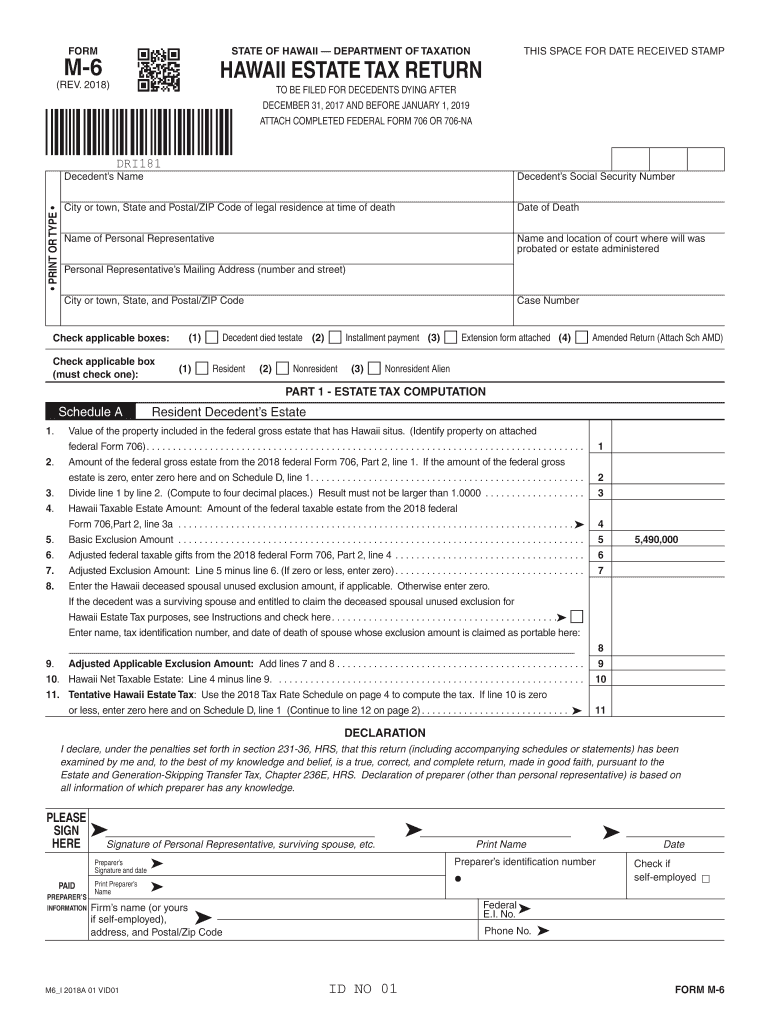
Hawaii Form M 6 2018


What is the Hawaii Form M 6
The Hawaii Form M 6 is a tax form used by residents of Hawaii to apply for an extension to file their individual income tax returns. This form allows taxpayers to request additional time to submit their tax documentation without incurring penalties for late filing. It is essential for individuals who need extra time to gather necessary information or complete their tax returns accurately. The form is specifically designed to comply with Hawaii state tax regulations and is part of the broader tax filing process for residents.
How to use the Hawaii Form M 6
Using the Hawaii Form M 6 involves a straightforward process. First, download the form from the official state tax website or obtain a physical copy. Next, fill in the required information, including your name, address, and Social Security number. Indicate the tax year for which you are requesting the extension. After completing the form, you can submit it electronically through an approved eSignature platform or mail it to the appropriate tax office. Ensure that you file the form before the original tax deadline to avoid penalties.
Steps to complete the Hawaii Form M 6
Completing the Hawaii Form M 6 requires careful attention to detail. Follow these steps:
- Download the latest version of the form from the Hawaii Department of Taxation website.
- Fill in your personal information accurately, including your full name, address, and Social Security number.
- Specify the tax year for which you are requesting an extension.
- Review the form for completeness and accuracy before submission.
- Submit the form electronically or by mail, ensuring it reaches the tax office by the deadline.
Legal use of the Hawaii Form M 6
The Hawaii Form M 6 is legally recognized as a valid request for an extension to file individual income tax returns. By submitting this form, taxpayers can avoid penalties associated with late filing, provided they adhere to the guidelines set by the Hawaii Department of Taxation. It is crucial to ensure that the form is completed accurately and submitted on time to maintain its legal validity.
Filing Deadlines / Important Dates
Filing deadlines for the Hawaii Form M 6 are critical to avoid penalties. Typically, the form must be submitted by the original due date of the tax return, which is usually April 20 for individual income tax returns. If the deadline falls on a weekend or holiday, it may be extended to the next business day. Taxpayers should keep track of these dates to ensure timely submission and compliance with state tax regulations.
Form Submission Methods (Online / Mail / In-Person)
The Hawaii Form M 6 can be submitted through various methods, offering flexibility to taxpayers. Options include:
- Online Submission: Use an approved eSignature platform to submit the form electronically, ensuring a quick and secure process.
- Mail: Print the completed form and send it to the designated address provided by the Hawaii Department of Taxation.
- In-Person: Visit a local tax office to submit the form directly, if preferred.
Quick guide on how to complete form m 6 2018 2019
Your assistance manual on how to prepare your Hawaii Form M 6
If you’re curious about how to finalize and submit your Hawaii Form M 6, here are a few brief tips on how to simplify tax declaring.
To start, you just need to create your airSlate SignNow account to revolutionize how you manage documents online. airSlate SignNow is an extremely user-friendly and robust document solution that allows you to alter, generate, and complete your tax forms effortlessly. Using its editor, you can toggle between text, checkboxes, and eSignatures and return to modify information when necessary. Enhance your tax organization with advanced PDF editing, eSigning, and easy sharing options.
Complete the following actions to achieve your Hawaii Form M 6 in just a few minutes:
- Establish your account and begin working on PDFs in no time.
- Utilize our directory to find any IRS tax form; browse through variations and schedules.
- Click Get form to access your Hawaii Form M 6 in our editor.
- Populate the necessary fillable fields with your information (text, numbers, checkmarks).
- Employ the Sign Tool to add your legally-recognized eSignature (if required).
- Review your document and correct any inaccuracies.
- Apply changes, print a copy for yourself, send it to your recipient, and download it to your device.
Utilize this guide to submit your taxes electronically with airSlate SignNow. Keep in mind that filing manually may increase return errors and prolong refunds. Certainly, before e-filing your taxes, verify the IRS website for submission guidelines in your state.
Create this form in 5 minutes or less
Find and fill out the correct form m 6 2018 2019
FAQs
-
Which ITR form should an NRI fill out for AY 2018–2019 to claim the TDS deducted by banks only?
ITR form required to be submitted depends upon nature of income. As a NRI shall generally have income from other sources like interest, rental income therefore s/he should file ITR 2.
-
Which ITR form should an NRI fill out for AY 2018–2019 for salary income?
File ITR 2 and for taking credit of foreign taxes fill form 67 before filling ITR.For specific clarifications / legal advice feel free to write to dsssvtax[at]gmail or call/WhatsApp: 9052535440.
-
Can I fill the form for the SSC CGL 2018 which will be held in June 2019 and when will the form for 2019 come out?
No, you can’t fill the form for SSC CGL 2018 as application process has been long over.SSC CGL 2019 : No concrete information at this time. Some update should come by August-September 2019.Like Exambay on facebook for all latest updates on SSC CGL 2018 , SSC CGL 2019 and other upcoming exams
Create this form in 5 minutes!
How to create an eSignature for the form m 6 2018 2019
How to create an eSignature for the Form M 6 2018 2019 online
How to make an electronic signature for your Form M 6 2018 2019 in Google Chrome
How to create an eSignature for signing the Form M 6 2018 2019 in Gmail
How to make an electronic signature for the Form M 6 2018 2019 from your mobile device
How to generate an eSignature for the Form M 6 2018 2019 on iOS
How to generate an electronic signature for the Form M 6 2018 2019 on Android devices
People also ask
-
What is Hawaii Form M 6 and how can airSlate SignNow help with it?
Hawaii Form M 6 is a state-specific document that requires accurate completion and submission for tax purposes. airSlate SignNow simplifies the process by allowing users to fill out, sign, and send Hawaii Form M 6 electronically, ensuring compliance and efficiency.
-
Are there any costs associated with using airSlate SignNow for Hawaii Form M 6?
Yes, airSlate SignNow offers various pricing plans to fit different business needs. Each plan includes features that streamline the signing process for documents like Hawaii Form M 6, making it a cost-effective solution for managing your paperwork.
-
What features does airSlate SignNow offer for managing Hawaii Form M 6?
airSlate SignNow provides features such as customizable templates, secure eSigning, and real-time tracking for documents like Hawaii Form M 6. These features enhance the efficiency and security of your document management process.
-
Can I integrate airSlate SignNow with other applications while using Hawaii Form M 6?
Absolutely! airSlate SignNow supports integrations with popular applications such as Google Drive, Salesforce, and more. This means you can easily manage Hawaii Form M 6 alongside your existing workflows and tools.
-
How does airSlate SignNow ensure compliance for Hawaii Form M 6?
airSlate SignNow is designed to comply with state and federal regulations, providing a secure platform for eSigning Hawaii Form M 6. This ensures that your documents are legally binding and meet all necessary compliance standards.
-
Is it easy to use airSlate SignNow for Hawaii Form M 6?
Yes, airSlate SignNow is user-friendly and intuitive, making it easy for anyone to complete and eSign Hawaii Form M 6 without requiring technical expertise. The platform guides you through each step of the process.
-
What are the benefits of using airSlate SignNow for Hawaii Form M 6?
Using airSlate SignNow for Hawaii Form M 6 offers numerous benefits, including faster turnaround times, reduced paperwork, and enhanced security. This not only saves time but also helps streamline your document management.
Get more for Hawaii Form M 6
- Axa credit card form
- The san diego quick assessment measures the recognition of words out of context form
- Financial disclosure affidavit of indigency butler county ohio butlercountyohio form
- Td ameritrade trust account form
- Online visa fillable application for india from pakistan form
- Ldss 5023 50096019 form
- Restaurant agreement template form
- Restaurant investment agreement template form
Find out other Hawaii Form M 6
- Can I eSign Alaska Equipment Rental Agreement Template
- eSign Michigan Equipment Rental Agreement Template Later
- Help Me With eSignature Washington IOU
- eSign Indiana Home Improvement Contract Myself
- eSign North Dakota Architectural Proposal Template Online
- How To eSignature Alabama Mechanic's Lien
- Can I eSign Alabama Car Insurance Quotation Form
- eSign Florida Car Insurance Quotation Form Mobile
- eSign Louisiana Car Insurance Quotation Form Online
- Can I eSign Massachusetts Car Insurance Quotation Form
- eSign Michigan Car Insurance Quotation Form Online
- eSign Michigan Car Insurance Quotation Form Mobile
- eSignature Massachusetts Mechanic's Lien Online
- eSignature Massachusetts Mechanic's Lien Free
- eSign Ohio Car Insurance Quotation Form Mobile
- eSign North Dakota Car Insurance Quotation Form Online
- eSign Pennsylvania Car Insurance Quotation Form Mobile
- eSignature Nevada Mechanic's Lien Myself
- eSign California Life-Insurance Quote Form Online
- How To eSignature Ohio Mechanic's Lien