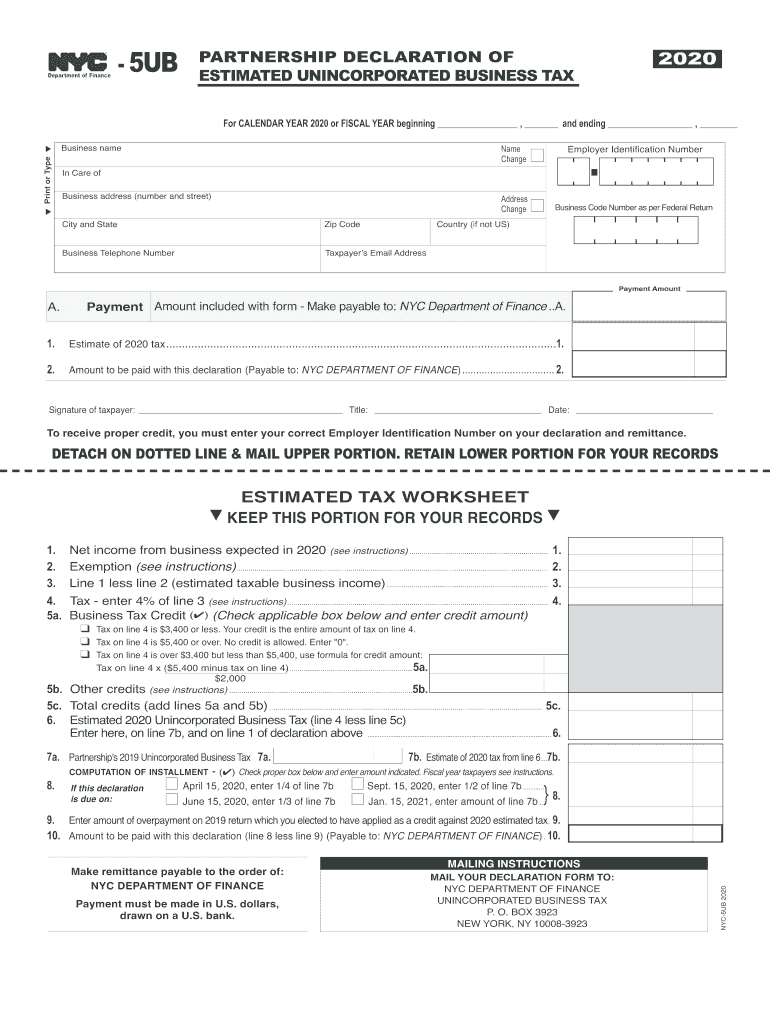
for CALENDAR YEAR or FISCAL YEAR Beginning , and Ending , 2020


What is the for calendar year or fiscal year beginning, and ending
The term "for calendar year or fiscal year beginning, and ending" refers to the specific time frame for which the tax payments are calculated. A calendar year runs from January first to December thirty-first, while a fiscal year can start and end on any dates designated by the taxpayer. Understanding this distinction is crucial for accurately reporting income and expenses, as well as determining the correct estimated tax payments.
Steps to complete the for calendar year or fiscal year beginning, and ending
Completing the section for the calendar year or fiscal year involves several key steps. First, determine whether you will use a calendar year or a fiscal year for your tax reporting. Next, accurately enter the starting and ending dates of your chosen period. This information is essential for ensuring that your estimated tax payments align with your income and expenses during that time frame. Finally, double-check your entries for accuracy before submitting your form.
Filing deadlines / important dates
Filing deadlines for estimated tax payments are critical to avoid penalties. For the calendar year, payments are typically due on April fifteenth, June fifteenth, September fifteenth, and January fifteenth of the following year. If you are using a fiscal year, the due dates will vary based on your specific year-end date. Mark these dates on your calendar to ensure timely submissions.
Required documents
To complete the estimated tax payments form, you will need several documents. These may include your previous year’s tax return, income statements, and any other relevant financial records. Having these documents on hand will help you accurately estimate your tax liability and ensure that you provide the necessary information on the form.
Penalties for non-compliance
Failing to submit your estimated tax payments on time can result in penalties. The IRS typically imposes a penalty for underpayment of estimated taxes if you do not pay enough throughout the year. This can lead to additional interest charges and fees, which can accumulate quickly. It is essential to stay compliant to avoid these financial repercussions.
IRS guidelines
The IRS provides specific guidelines for estimated tax payments, which are important to follow. These guidelines outline how to calculate your estimated taxes, when to pay them, and what to do if you overpay or underpay. Familiarizing yourself with these rules can help you navigate the tax process more effectively and avoid common pitfalls.
Quick guide on how to complete for calendar year 2020 or fiscal year beginning and ending
Effortlessly Prepare For CALENDAR YEAR Or FISCAL YEAR Beginning , And Ending , on Any Device
Digital document management has gained signNow traction among businesses and individuals alike. It offers an excellent eco-friendly alternative to traditional printed and signed documents, allowing you to locate the necessary form and securely store it online. airSlate SignNow provides all the tools you require to create, modify, and electronically sign your documents swiftly without delays. Manage For CALENDAR YEAR Or FISCAL YEAR Beginning , And Ending , on any device using airSlate SignNow apps for Android or iOS and streamline any document-related process today.
How to Modify and eSign For CALENDAR YEAR Or FISCAL YEAR Beginning , And Ending , with Ease
- Obtain For CALENDAR YEAR Or FISCAL YEAR Beginning , And Ending , and then click Get Form to begin.
- Utilize the tools we offer to fill out your document.
- Highlight important sections of your documents or obscure sensitive information with tools that airSlate SignNow provides specifically for that purpose.
- Create your signature using the Sign tool, which takes mere seconds and has the same legal validity as a conventional wet ink signature.
- Review all the details and then click the Done button to finalize your changes.
- Choose your preferred method to send your form, whether by email, text message (SMS), invitation link, or download it to your computer.
Eliminate concerns about lost or misfiled documents, tedious form searching, or errors that require printing new document copies. airSlate SignNow meets all your document management needs with just a few clicks from any device you prefer. Modify and eSign For CALENDAR YEAR Or FISCAL YEAR Beginning , And Ending , and ensure seamless communication at any stage of the form preparation process with airSlate SignNow.
Create this form in 5 minutes or less
Find and fill out the correct for calendar year 2020 or fiscal year beginning and ending
Create this form in 5 minutes!
How to create an eSignature for the for calendar year 2020 or fiscal year beginning and ending
How to create an electronic signature for your For Calendar Year 2020 Or Fiscal Year Beginning And Ending in the online mode
How to generate an electronic signature for the For Calendar Year 2020 Or Fiscal Year Beginning And Ending in Chrome
How to generate an electronic signature for putting it on the For Calendar Year 2020 Or Fiscal Year Beginning And Ending in Gmail
How to generate an electronic signature for the For Calendar Year 2020 Or Fiscal Year Beginning And Ending right from your smartphone
How to make an electronic signature for the For Calendar Year 2020 Or Fiscal Year Beginning And Ending on iOS devices
How to generate an eSignature for the For Calendar Year 2020 Or Fiscal Year Beginning And Ending on Android devices
People also ask
-
What is the difference between calendar year and fiscal year in airSlate SignNow?
In airSlate SignNow, 'For CALENDAR YEAR Or FISCAL YEAR Beginning , And Ending ,' refers to the timing of your documents' validity and reporting. A calendar year runs from January 1 to December 31, while a fiscal year can start and end on any date set by your organization. Understanding these differences helps you manage contract timelines effectively.
-
How does airSlate SignNow facilitate document management for different fiscal periods?
airSlate SignNow is designed to streamline document management, whether you're operating 'For CALENDAR YEAR Or FISCAL YEAR Beginning , And Ending ,.' You can set reminders, track signing statuses, and organize documents based on your fiscal calendar, ensuring that all important deadlines are met.
-
What are the pricing plans for airSlate SignNow based on calendar or fiscal years?
When considering airSlate SignNow, our pricing plans are flexible and can be adjusted 'For CALENDAR YEAR Or FISCAL YEAR Beginning , And Ending ,.' This means you can select a plan that aligns with your business cycles, ensuring you get the most value throughout your chosen time frame.
-
Can airSlate SignNow integrate with accounting software to track fiscal year expenses?
Yes, airSlate SignNow integrates seamlessly with various accounting software, allowing you to manage expenses 'For CALENDAR YEAR Or FISCAL YEAR Beginning , And Ending ,.' This integration ensures all your document workflows align with your financial reporting needs, simplifying budget management.
-
How can airSlate SignNow help with compliance during fiscal year audits?
Using airSlate SignNow 'For CALENDAR YEAR Or FISCAL YEAR Beginning , And Ending ,' helps maintain compliance during audits by providing a secure record of all signed documents. Our audit trail feature ensures that your documents are organized and easily accessible, simplifying the audit process.
-
Is there a way to customize templates for different fiscal timelines in airSlate SignNow?
Absolutely! airSlate SignNow allows you to customize templates to suit your specific needs 'For CALENDAR YEAR Or FISCAL YEAR Beginning , And Ending ,.' By tailoring templates, you can ensure that all necessary information aligns with your financial reporting periods, enhancing efficiency.
-
What features in airSlate SignNow support remote signing for fiscal year contracts?
airSlate SignNow provides robust remote signing features that are crucial 'For CALENDAR YEAR Or FISCAL YEAR Beginning , And Ending ,.' With electronic signatures, you can ensure that contracts are signed quickly and securely, regardless of location, facilitating timely execution of important agreements.
Get more for For CALENDAR YEAR Or FISCAL YEAR Beginning , And Ending ,
Find out other For CALENDAR YEAR Or FISCAL YEAR Beginning , And Ending ,
- eSignature Alaska Government Agreement Fast
- How Can I eSignature Arizona Government POA
- How Do I eSignature Nevada Doctors Lease Agreement Template
- Help Me With eSignature Nevada Doctors Lease Agreement Template
- How Can I eSignature Nevada Doctors Lease Agreement Template
- eSignature Finance & Tax Accounting Presentation Arkansas Secure
- eSignature Arkansas Government Affidavit Of Heirship Online
- eSignature New Jersey Doctors Permission Slip Mobile
- eSignature Colorado Government Residential Lease Agreement Free
- Help Me With eSignature Colorado Government Medical History
- eSignature New Mexico Doctors Lease Termination Letter Fast
- eSignature New Mexico Doctors Business Associate Agreement Later
- eSignature North Carolina Doctors Executive Summary Template Free
- eSignature North Dakota Doctors Bill Of Lading Online
- eSignature Delaware Finance & Tax Accounting Job Description Template Fast
- How To eSignature Kentucky Government Warranty Deed
- eSignature Mississippi Government Limited Power Of Attorney Myself
- Can I eSignature South Dakota Doctors Lease Agreement Form
- eSignature New Hampshire Government Bill Of Lading Fast
- eSignature Illinois Finance & Tax Accounting Purchase Order Template Myself