
Top 10 ways small businesses use eSignatures effectively

Summary (executive overview)
- An electronic signature for small businesses is legally valid in the U.S. and widely accepted across industries.
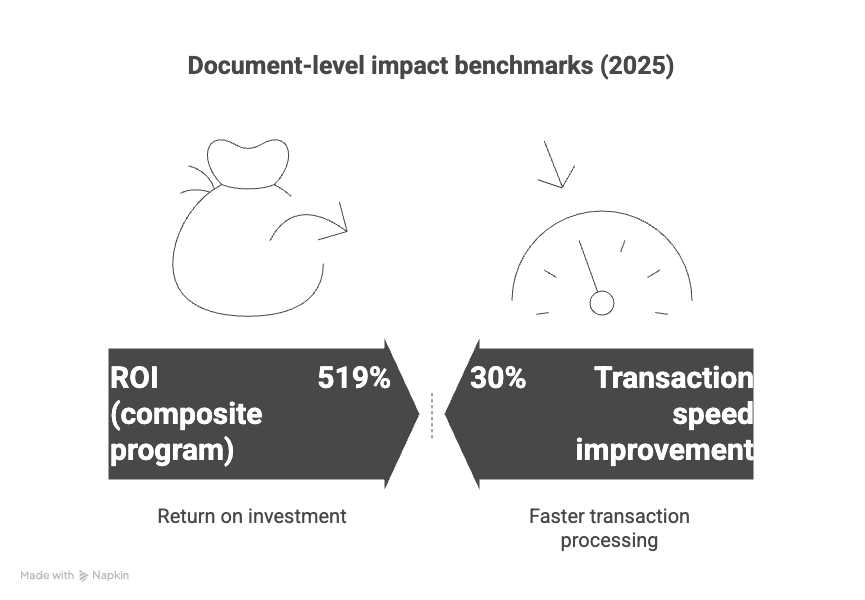
- Clear ROI evidence exists: Forrester studies report 30% faster transactions and approximately $21.50 savings per document; CLM and identity practices further amplify gains.
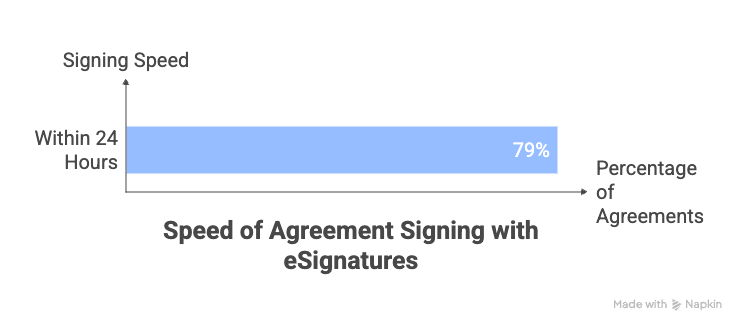
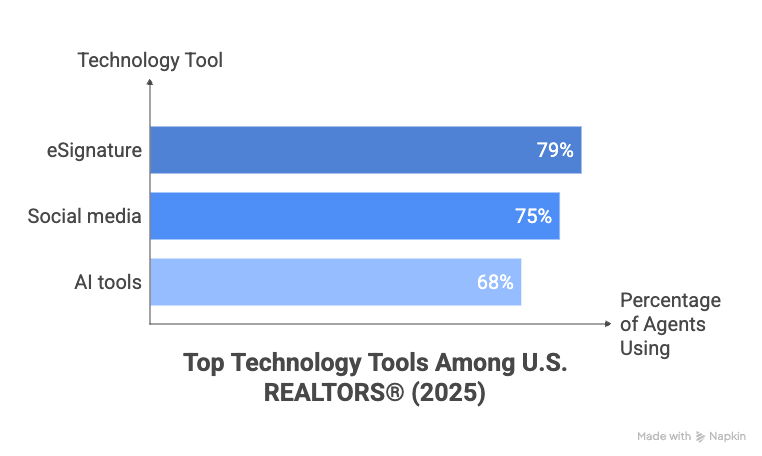
- Adoption is mainstream in high-velocity SMB categories (e.g., real estate—79% of REALTORS® use eSignature).
- Compliance guardrails (ESIGN/UETA guidance, IRS eSignature program) make eSign practical for regulated workflows when configured properly.
- SignNow is built for small business agility: it offers easy-to-use tools, unlimited templates, and robust integrations (with solutions like Google Workspace, Salesforce, and more). Transparent pricing, white-labeling, mobile signing, reusable templates, and 24/7 live support make it simple to deploy SignNow across teams and departments.
This guide focuses on U.S. SMBs and turns research into practical, high-ROI use cases you can deploy today.
Why eSignatures matter for small businesses
eSignatures are legally valid in the U.S. (thanks to the ESIGN Act and UETA) and widely accepted across industries. They eliminate the need for printing, scanning, and mailing documents, speeding up processes and reducing errors. For regulated industries, they also provide the compliance guardrails needed to handle sensitive transactions securely.
With SignNow, small businesses can standardize workflows, reduce manual entry and errors, and collect all needed signatures remotely—even on smartphones or tablets. Security features like two-factor authentication, customizable roles, document encryption, and detailed audit logs ensure each transaction is protected from start to finish.
The return on investment (ROI) is clear. Studies show that eSignatures can speed up transactions by 30% and save businesses an average of $21.50 per document. For small businesses, this means faster deals, fewer bottlenecks, and more time to focus on growth.
SignNow helps further maximize ROI by offering affordable subscription plans tailored for SMBs, empowering you to automate routine paperwork and grow with confidence—without worrying about adding seats or transaction fees.
10 high-impact use cases for eSignatures
Here are the top ways small businesses are using eSignatures to work smarter, not harder—with extra power and flexibility from SignNow:
1. Sales proposals and contracts
eSignatures help turn an excited “yes” into a firm agreement, minimizing the lag that can lose a deal. Instead of waiting days for physical paperwork, sales teams can send contracts instantly and get approvals within minutes, even if the client is halfway across the country. Digital workflows allow you to require initials on key sections, embed pricing and options, and set up automatic reminders—ensuring nothing falls through the cracks. By reducing the turnaround time from proposal to signed contract, small businesses can boost close rates, improve cash flow, and dedicate more time to nurturing new relationships.
SignNow benefit: With drag-and-drop fields and conditional logic, SignNow makes it easy to tailor proposals for each customer, automate reminders, and even integrate signed deals directly into your CRM.
- Why it works: Close deals faster by turning verbal agreements into signed contracts in minutes.
- Pro tip: Use templates with required fields and automatic reminders to keep things moving.
- Key metric: Track your quote-to-cash time to measure efficiency.
2. NDAs and vendor agreements
Onboarding new vendors or protecting confidential information with Non-Disclosure Agreements is often slowed by repeated email exchanges and manual signatures. With eSignatures, you can streamline the process by providing ready-to-use templates, enabling quick, self-serve completion for all parties. Automated routing ensures all necessary approvals are collected without bottlenecks. Enhanced audit trails give you secure, time-stamped records—crucial in case of later disputes or compliance reviews. This not only speeds up partner onboarding but also supports strong, consistent business relationships.
SignNow fact: The platform offers unlimited templates and reusable documents, so even complex, multi-signer approval chains can be automated with a single click—saving precious time for lean SMB teams.
- Why it works: Simplify onboarding by replacing email back-and-forth with a quick, self-serve process.
- Pro tip: Set up templates with standard language and automated routing for approvals.
- Compliance tip: Keep audit trails to ensure enforceability.
3. HR onboarding
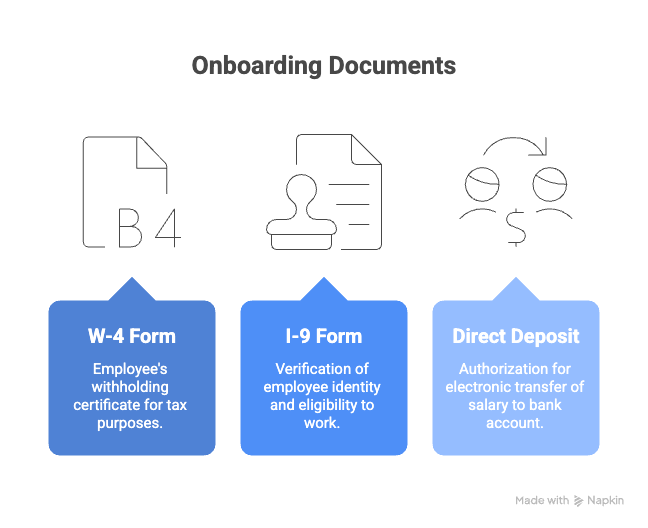
Hiring and onboarding new employees often requires multiple signed documents—offer letters, company policies, benefits forms, and more. eSignatures allow HR teams to send bulk updates or individualized welcome packets to candidates, reducing manual paperwork and the risk of missing acknowledgements. Features like read-receipts help ensure compliance, and role-based signing workflows let you capture sign-off from employees, HR, and managers, all in one go. This digital approach creates an easily searchable, legally valid record of policies and acknowledgments, supporting both growth and accountability as your team expands.
SignNow for HR: Advanced document routing, template libraries, and secure storage for employee files simplify onboarding—while integration with HR systems and role-based permissions ensure only authorized staff see sensitive data.
- Why it works: Streamline hiring with digital offer letters, policy acknowledgments, and more.
- Pro tip: Use bulk-send features for policy updates and track read-receipts for compliance.
- Compliance tip: Align identity practices with industry standards for sensitive documents.
Traditional approval processes for invoices and change orders can stall cash flow, especially when multiple sign-offs are needed or disputes arise over project scope. eSignatures turn payment authorizations into a streamlined, trackable process. Digital forms with line-item acknowledgments ensure everyone is clear on charges, and optional SMS authentication can add an extra layer of security. Small businesses benefit from reduced payment cycles, better visibility on outstanding receivables, and the ability to resolve disputes with clear documentation. This is especially valuable for ongoing service contracts, maintenance, or project-based billing.
SignNow feature: Use bulk-send and payment collection features to send multiple invoices for eSignature in one go—and even request payments right in the signing process by integrating with payment platforms.
- Why it works: Speed up approvals and reduce disputes for out-of-scope work.
- Pro tip: Add line-item acknowledgments and optional SMS authentication for extra security.
- Key metric: Monitor Days Sales Outstanding (DSO) to see the impact.
5. Real estate transactions
Speed is everything in real estate. Offers, listing agreements, and addenda can require fast action to secure a property or close a sale. eSignatures make it possible for agents and clients to sign documents from anywhere—on desktop or mobile—accelerating negotiations and minimizing delays. You can set up workflows to include all necessary parties, such as buyers, sellers, brokers, and counter-signers. Additionally, eSignatures help manage compliance for time-sensitive and notarized documents, with features like time boxing and digital audit trails that are increasingly required for regulatory oversight.
SignNow edge: SignNow offers mobile signing apps and reminders, making last-minute signatures (or counter-signatures) quick and reliable, whether you’re at the office or in the field. You can also add expiration dates to offers to prompt quicker responses from buyers.
- Why it works: Fast responses win deals, and eSignatures are a must-have for real estate professionals.
- Pro Tip: Create mobile-friendly templates and set time limits on offers to keep things moving.
- Compliance Tip: Check state rules for notarized documents if required.
6. Healthcare forms and consents
In healthcare settings—from private practices to wellness providers—collecting intakes, patient consents, and Business Associate Agreements (BAAs) can be time-consuming and error-prone. eSignatures simplify the process with digital forms that minimize missing fields and facilitate secure, role-based access. Encryption and audit logs help protect patient privacy while supporting HIPAA compliance. Patients appreciate the improved convenience, and administrators benefit from greater efficiency and peace of mind knowing records are complete and traceable. This improves not only operations but also the patient experience.
SignNow security: With its tamper-proof audit trails, HIPAA-ready functionality, document encryption, and support for complex routing between patients, clinicians, and administrators, SignNow delivers peace of mind for healthcare providers.
- Why it works: Improve patient experience and reduce errors with digital intake forms and consents.
- Pro tip: Use role-based access and encryption to protect sensitive information.
- Compliance tip: Stay updated on HIPAA requirements and ensure your vendor meets security standards.
7. Field service approvals
For businesses with field teams—such as construction, HVAC, or managed service providers—being able to complete work orders and capture approvals on-site is vital. eSignatures enable technicians to get signatures immediately after completing a job, even when offline. Features like geo-tagged checkboxes and required initials on safety clauses ensure accurate, detailed documentation, while attached photos offer proof of work. This speeds up billing cycles, reduces administrative overhead, and creates clear records to support any future customer inquiries or warranty claims.
SignNow in the field: The mobile app’s offline signing lets technicians get customer approvals on remote job sites. Photos and notes can be attached as supporting evidence, while GPS locations provide added verification for service records.
- Why it works: Capture approvals on-site for faster job completion and payment.
- Pro tip: Use geo-tagged checkboxes and offline capture for areas with spotty connectivity.
- Key metric: Measure the time from job completion to payment authorization.
8. Tax and accounting documents
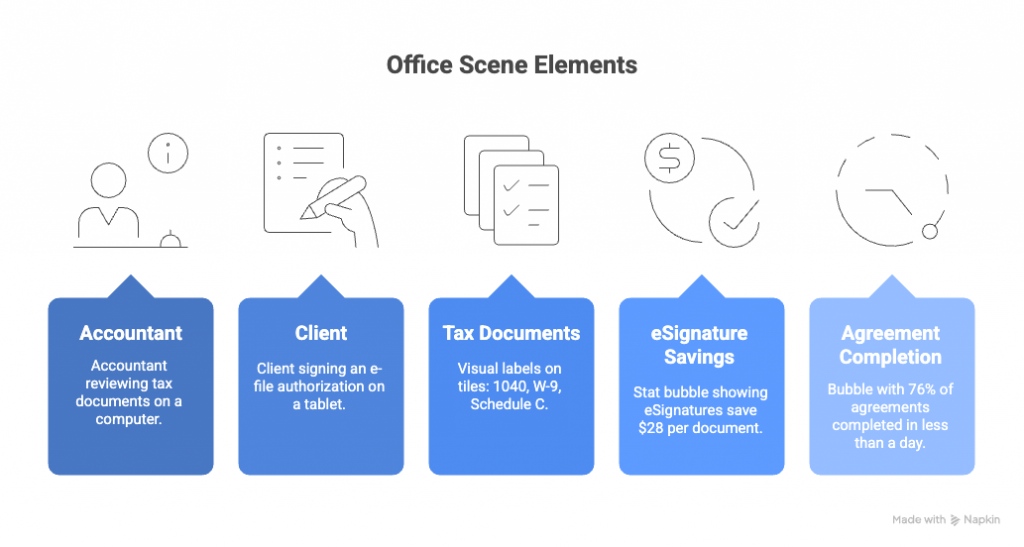
Tax season can be stressful for both clients and accountants. Engagement letters, e-file authorizations, and annual forms often require fast turnaround to meet deadlines. With eSignatures, you can standardize these processes using templates that automatically update for each tax year, reducing errors and delays. Built-in SMS or email authentication keeps the process secure, while instant notifications prompt clients to sign well before the deadline. This ensures compliance with regulatory requirements and boosts client satisfaction, as signatures are completed quickly and conveniently.
SignNow streamlines: Organize document templates by year, client, or filing type, and collect eSignatures in bulk. The built-in reminders mean less chasing signatures—and signed tax forms are securely archived for instant retrieval.
- Why it works: Avoid last-minute delays during tax season with standardized eSign workflows.
- Pro tip: Use year-specific templates and enable SMS/email authentication for clients.
- Compliance tip: Follow IRS guidelines for e-signature programs and document retention.
9. Financing and loan documents
Applying for loans or financing often involves complex documentation and multiple verification steps. eSignatures let lenders and borrowers move through standardized loan packets efficiently, with templates tailored to the latest program guidelines. Built-in identity verification ensures compliance with regulatory standards and provides a seamless experience for clients. Automated reminders and clear status updates help both parties avoid delays, ultimately supporting a smoother path to funding for small businesses seeking growth.
SignNow benefit: Leverage integrations with business platforms and advanced signer authentication (including Knowledge-Based Authentication) to meet industry KYC/AML requirements—reducing risk and customer friction at the same time.
- Why it works: Simplify borrower journeys with standardized forms and faster approvals.
- Pro tip: Align templates with the latest regulatory requirements for smooth processing.
- Compliance tip: Ensure identity verification steps meet program standards.
10. Compliance attestations and policy renewals
Small businesses often need employees or partners to complete compliance attestations, policy renewals, or training acknowledgments. Managing this manually can quickly become a burden as staff grow. eSignatures simplify the process by enabling bulk sends, automated reminders, and centralized reporting. With a comprehensive digital record, businesses can prepare for audits with confidence and respond to regulatory requests quickly. Exportable evidence reports facilitate ongoing compliance, while automated renewal reminders keep everyone up to date without manual tracking.
SignNow makes it easy: Instantly generate CSV reports of signed compliance documents, schedule renewal reminders, and automate retention—all backed by secure cloud storage and detailed audit history.
- Why it works: Reduce audit prep time with centralized logs and automated reminders.
- Pro tip: Use bulk-send features and exportable evidence reports for easy tracking.
- Compliance tip: Maintain retention policies to meet regulatory requirements.
Quick-start guide for using SignNow eSignature
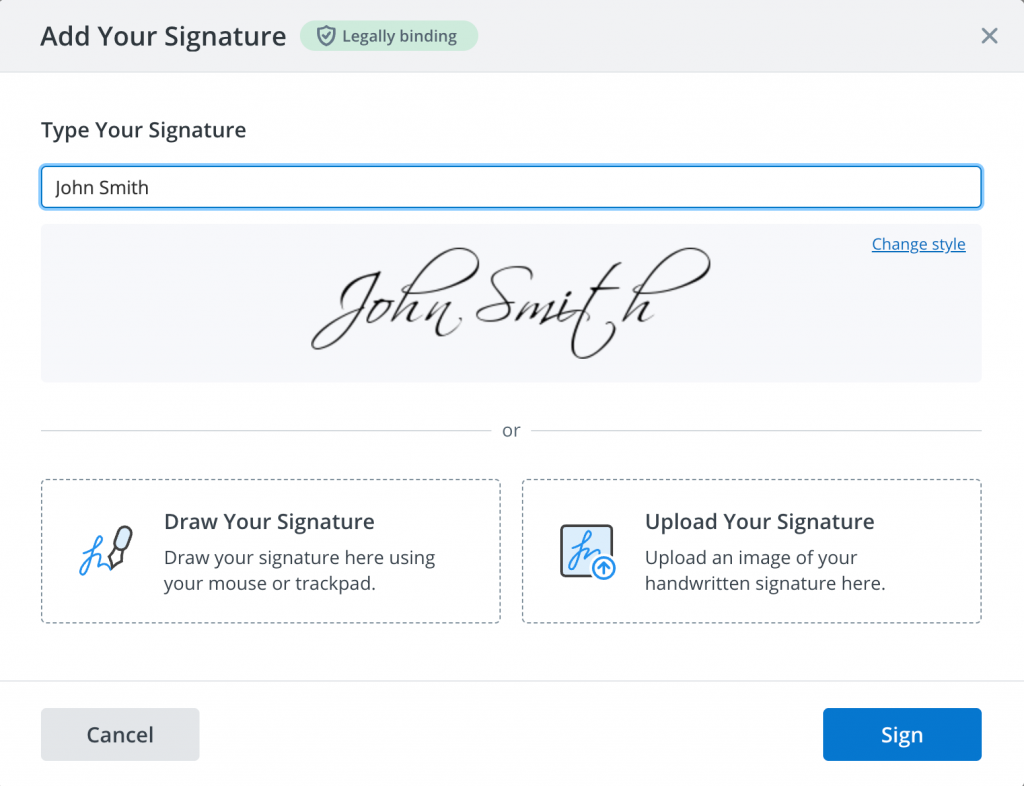
Ready to implement eSignatures with the confidence of a trusted solution built for small businesses? Here’s a quick-start guide, powered by SignNow:
- Start small: Choose 2–3 high-friction documents (like proposals or NDAs) to digitize first.
- Template everything: Set up templates with required fields, routing, and reminders.
- Add security: Use basic identity checks (email or SMS codes), or scale up to advanced signer authentication and user permissions with SignNow’s flexible options.
- Automate reminders: Avoid delays with automated follow-ups at 1, 2, and 5-day intervals—built-in for every SignNow subscription.
- Measure results: Track cycle times, completion rates, and cost savings to see the impact using SignNow’s built-in analytics.
Watch how to get started with SignNow in our short video.
Final thoughts
eSignatures have transformed from a “nice-to-have” to a must-have for small businesses, becoming a critical tool in the digital age. With robust legal frameworks, advanced identity verification, and widespread adoption, they streamline processes like closing deals, onboarding employees, and managing compliance.
SignNow leads the way with a user-friendly interface, affordability, unlimited users, and integrations designed for your favorite software. Get started in minutes, enjoy seamless onboarding and world-class security, and access 24/7 live chat support whenever you need help.By adopting eSignatures with SignNow, you’re not just keeping up—you’re staying ahead. Save time, reduce costs, secure every transaction, and focus on what matters most: growing your business.
Glossary
- ESIGN Act: A U.S. federal law that gives legal recognition to electronic signatures and records, ensuring that contracts cannot be denied validity simply because they are in digital form.
- UETA (Uniform Electronic Transactions Act): A state-level law adopted across most U.S. states that works alongside the ESIGN Act to provide a consistent legal framework for electronic transactions.
- Audit trail: An automatically generated record that logs each step in the signing process, including timestamps, signer identities, and document changes, making compliance and record-keeping straightforward.
- Signer authentication: Methods used to verify the identity of someone signing a document, which can include email, SMS codes, or more advanced verification options offered by SignNow.
- Role-based access: A feature that allows businesses to specify different permissions and access levels in the eSignature workflow, helping protect sensitive information and maintain compliance.
FAQ
1. Are eSignatures legally binding for small businesses in the U.S.?
Yes, eSignatures are legally recognized across all states under the ESIGN Act and UETA, making them fully enforceable for most business transactions. SignNow ensures compliance with these legal standards and offers robust audit trails for every signature.
2. How secure are eSignatures?
eSignatures use advanced encryption and audit trails to protect each document, ensuring the authenticity and integrity of your agreements. SignNow provides additional features like two-factor authentication, tamper-proof certificates, and secure cloud storage.
3. Will my clients or partners need to install software to sign documents?
No, recipients can review and sign documents from any device using a web browser—no downloads or special software required. SignNow’s intuitive interface makes it easy for everyone, even for those signing for the first time.
4. How quickly can a small business implement eSignatures?
Most small businesses can get started within minutes. Platforms like SignNow offer intuitive templates, easy setup, and customer support throughout the onboarding process. You can invite your whole team and customize workflows right away.5. What types of documents are best suited for eSignatures?
eSignatures can be used for sales contracts, NDAs, onboarding forms, invoices, compliance attestations, and more—almost any document requiring a legal signature. SignNow’s flexible platform makes it simple to adapt templates for any business process.
- Summary (executive overview)
- Why eSignatures matter for small businesses
- 10 high-impact use cases for eSignatures
- 1. Sales proposals and contracts
- 2. NDAs and vendor agreements
- 3. HR onboarding
- 4. Invoices and payment authorizations
- 5. Real estate transactions
- 6. Healthcare forms and consents
- 7. Field service approvals
- 8. Tax and accounting documents
- 9. Financing and loan documents
- 10. Compliance attestations and policy renewals
- Quick-start guide for using SignNow eSignature
- Final thoughts
- Glossary
- FAQ
