
Is SignNow a scam? No, SignNow is a legitimate eSignature platform. But confusion around the phrase “SignNow scam” arises when someone receives an unexpected signature request, when scammers imitate SignNow branding in phishing emails, or when a payment or cashback dispute involves a third-party service rather than SignNow directly. Fake messages may contain suspicious links, lookalike domains, or cloned login pages designed to steal login credentials or sensitive information.
To verify a request, check the sender’s full email address, confirm that the link belongs to the official signnow.com domain, and contact the document sender through a trusted channel.
This guide explains how phishing scams work, how to identify suspicious emails, and how to distinguish a genuine SignNow request from a phishing lookalike.
TL;DR
An unexpected SignNow email is not automatically fraudulent, but recipients should verify it before clicking any links or opening a document.
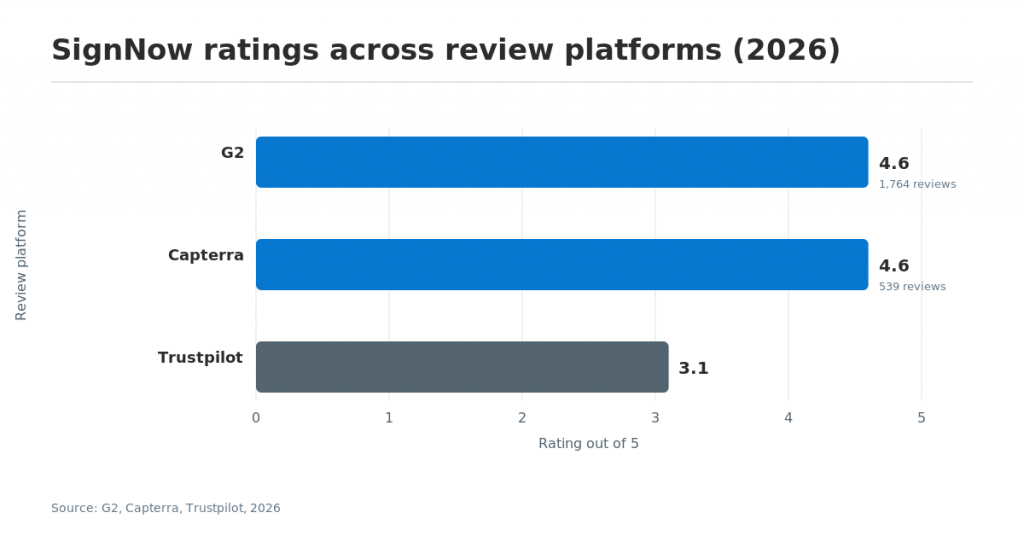
- SignNow is rated 4.6 out of 5 on both G2 SignNow reviews (1,764 reviews) and Capterra SignNow reviews (539 reviews).
- Most phishing emails, phishing messages, and phishing scams that use the SignNow name are impersonation attempts, not a flaw in the platform itself.
- Reddit and Facebook group posts show real people publicly asking whether a signnow.com email is safe to open.
- A genuine SignNow email message can be checked against a spoofed lookalike using the Email Preview panel and the Manage Recipients screen before signing.
- Phishing overall is still rising: APWG logged 892,494 phishing attacks in Q3 2025 alone, and the FBI named phishing/spoofing the top reported cyber attack type of 2025 at over $215 million in losses.
- Multi-factor authentication (MFA), phishing training, and a security team that can act on reported phishing emails are the fastest ways to prevent phishing across a team.
- SignNow’s security measures give account owners concrete ways to prevent phishing risk directly inside the product.
Is SignNow legit? Here’s what the evidence shows
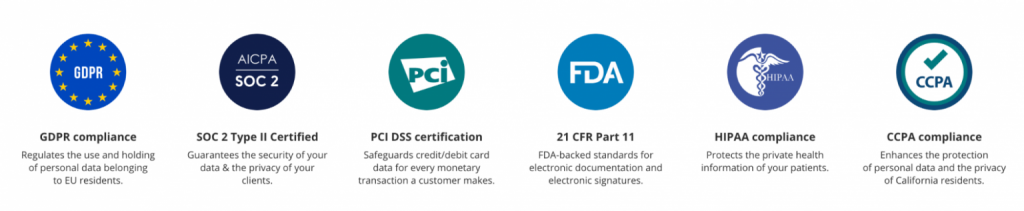
SignNow is a legitimate eSignature company, founded in 2011, that carries SOC 2 Type II certification and has run on the signnow.com domain since 2001. Why it matters: trust in an e-signature platform depends on independently verifiable evidence, not on how familiar an email message in your inbox looks.
ScamAdviser’s signnow.com trust check rates the domain “Very Likely Safe,” citing its 25-year registration history and valid SSL certificate. On the review-platform side, SignNow holds 4.6 out of 5 on G2 across 1,764 reviews and 4.6 out of 5 on Capterra across 539 reviews, with 93% of Capterra reviewers rating their experience positive. Trustpilot shows a lower, “Average” 3.1 out of 5, but a single lower-sample rating on one platform does not outweigh two much larger, independently collected scores pointing the other way; a fair read of SignNow’s legitimacy has to weigh all three together rather than isolating the lowest one.
SignNow customers echo this in their own words: “The most important thing for us is that we get valid and fully-legal electronic signatures on each enrollment form. We can recommend SignNow not only because of compliance, but also because it is easy in use for us and for all the applicants!” said Lucija Hrvat, Course Coordinator at Instituto Italiano di Fotografia, in a SignNow customer story.
What Capterra reviews indicate
Capterra reviews of SignNow do not indicate that SignNow is a scam. They generally describe a functioning eSignature product used for legitimate document workflows.
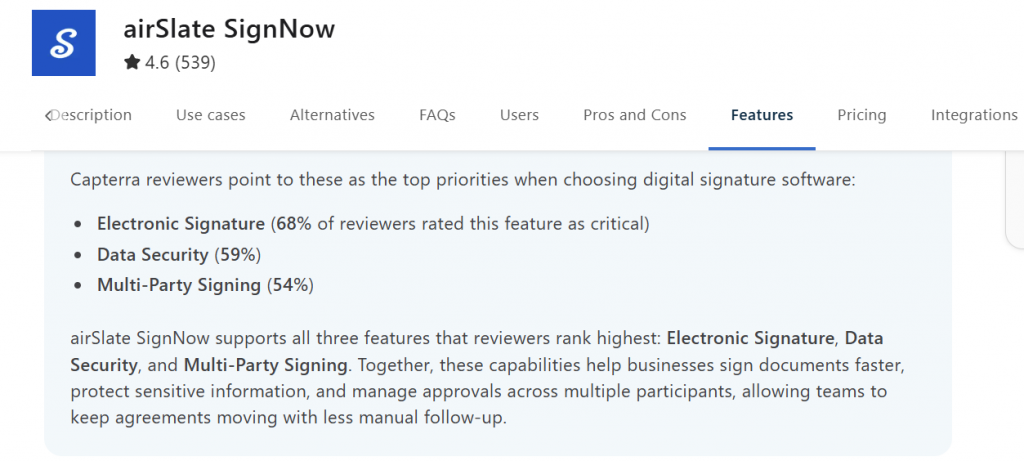
Data security is identified as an important capability by a substantial share of Capterra reviewers. This supports the view that customers evaluate SignNow as an established business product rather than a fraudulent service.
On the security and compliance page of SignNow’s website, you can find more information about the compliance certifications, regulations, and more.
How to interpret the Trustpilot rating
Trustpilot presents a less favorable overall score for SignNow, than Capterra and G2. That difference should be acknowledged, but it does not demonstrate that SignNow is fraudulent or unable to provide reliable services.
Review platforms differ in audience, sample size, and the experiences that motivate users to post. A balanced assessment should consider several sources instead of treating one rating as conclusive evidence.
Independent security rating plaforms
Independent security-rating platforms reach a similar conclusion through different methods. Panorays has a live SignNow report showing no relevant cyber news (no flagged incidents) available at this time, alongside verified SOC 2, GDPR, HIPAA, PCI, and CCPA compliance badges. UpGuard’s automated scan rates signnow.com in the B range (790 out of 950); it does flag a general “infostealer” data-leakage indicator, which is a common signal on large, high-traffic domains rather than evidence of an actual SignNow breach, so it’s worth reading alongside the certifications above rather than in isolation.
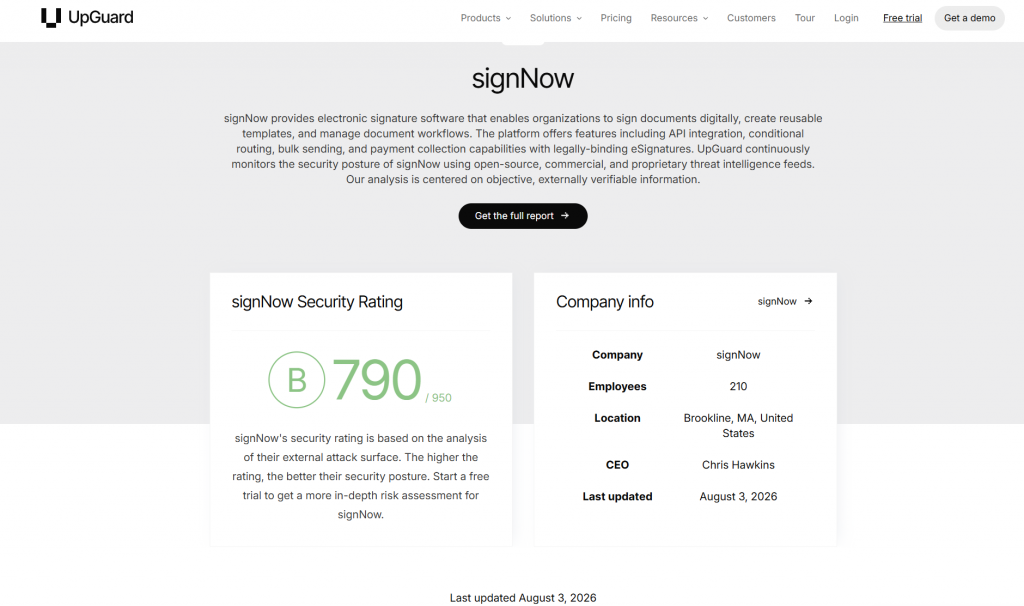
Taken together, the security scans tell the same story as the review platforms above: this is a large, actively monitored, certified platform with the ordinary trade-offs of scale, not evidence of a “SignNow scam” built to defraud its own users.
Why “is SignNow a scam?” searches keep trending
People commonly search this question after receiving a SignNow invitation or a link included to the SignNow website from someone they do not immediately recognize.
A legitimate signing request may come from an employer, landlord, vendor, insurer, customer, or other organization. The recipient may know the organization but not recognize the individual employee who sent the document.
Recognizable online platforms are also natural targets for impersonation. The update notes that SaaS and webmail represented a significant share of phishing activity in the APWG Q3 2025 report, making popular services attractive targets for lookalike emails and malicious domains.
The resulting pattern is predictable: someone receives an unexpected SignNow email, worries about falling victim to a cyber attack, and searches online for confirmation. That uncertainty does not mean the platform is fraudulent. It means the individual request should be verified.
Case study #1: A fraudulent message that mentions SignNow
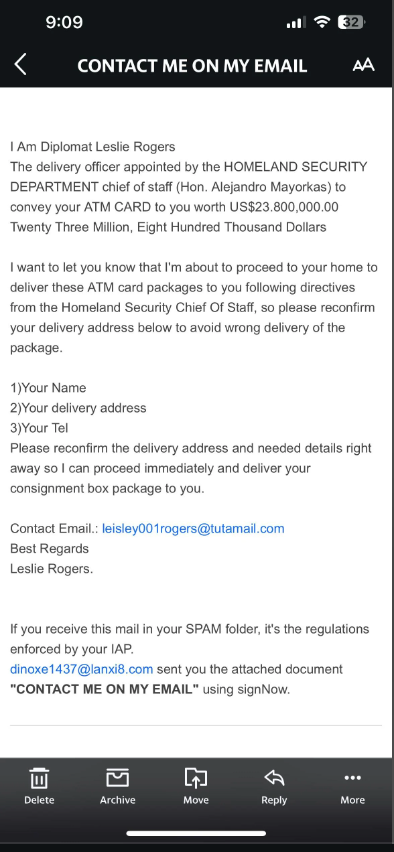
One recipient received an email from someone claiming to be a diplomat responsible for delivering an ATM card worth more than $23 million and described the situation on Reddit.
The message requested the recipient’s name, delivery address, and telephone number. It also contained poor grammar, unrelated sender addresses, an implausible financial claim, and instructions to respond quickly.
Although the email mentioned SignNow, its context indicated a scam. Placing a trusted product name inside a message does not establish that the product provider sent or endorsed it.
What to do if you receive a scam message
This example contains several common characteristics of phishing scams. A recipient facing a similar message should take these steps:
- Assess the claim. An unsolicited multimillion-dollar delivery offer is not credible.
- Inspect the language. Poor grammar and inconsistent wording may indicate impersonation.
- Check the addresses. Compare the displayed name with the complete email address and domain.
- Do not reply. Responding may confirm that the address is active.
- Report the message. Report phishing emails to your security team or email provider.
- Enable account protection. Multi factor authentication adds another verification step if a password is exposed.
After reporting the message, delete it according to your organization’s email security procedures.
Case study #2: An unfamiliar but genuine signing invitation
Another user reported on Reddit the following situation: they received an email claiming to be an invitation to sign a document related to their work schedule using SignNow.
The email looked broadly consistent with a signing request, but the recipient did not recognize the sender. The greeting was also more generic than the messages they normally received from colleagues.
Further investigation showed that the request had been sent by a new colleague. In this case, the email was unexpected but not fraudulent.
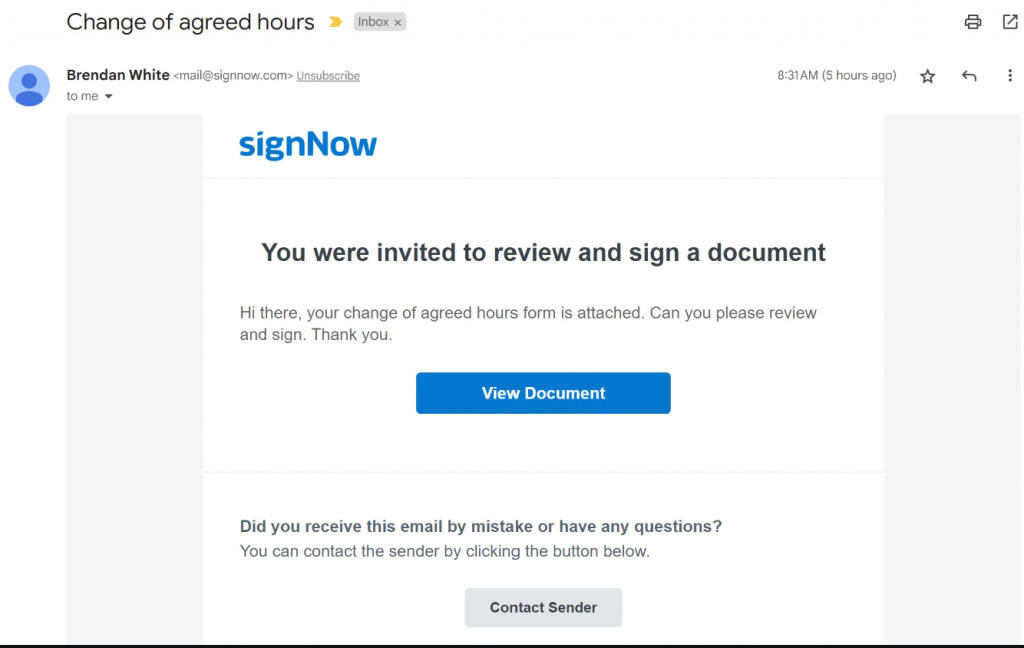
Upon closer examination, this email resembles a typical invite for signing. However, the signature request message deviates from SignNow’s default and appears poorly customized by the sender. Although the sender’s email indicates it’s from our platform (“@signnow.com”), the primary concern lies in the identity of the individual requesting the signature.
Best practices for reviewing sign requests
An unfamiliar sender does not automatically make a signing request unsafe. Apply the following checks:
- Avoid clicking immediately. First confirm why the document was sent.
- Inspect the address. Check the complete sender’s email address rather than the displayed name.
- Verify the request internally. Contact the employer, HR representative, or relevant organization.
- Open SignNow independently. Enter the legitimate domain name in your browser rather than following uncertain phishing links.
- Contact support when needed. Obtain contact details from the legitimate website, not from the questionable message.
In this case, independent verification resolved the concern without exposing the recipient to unnecessary risk.
Case study #3: A fake hotel-booking message using a SignNow link
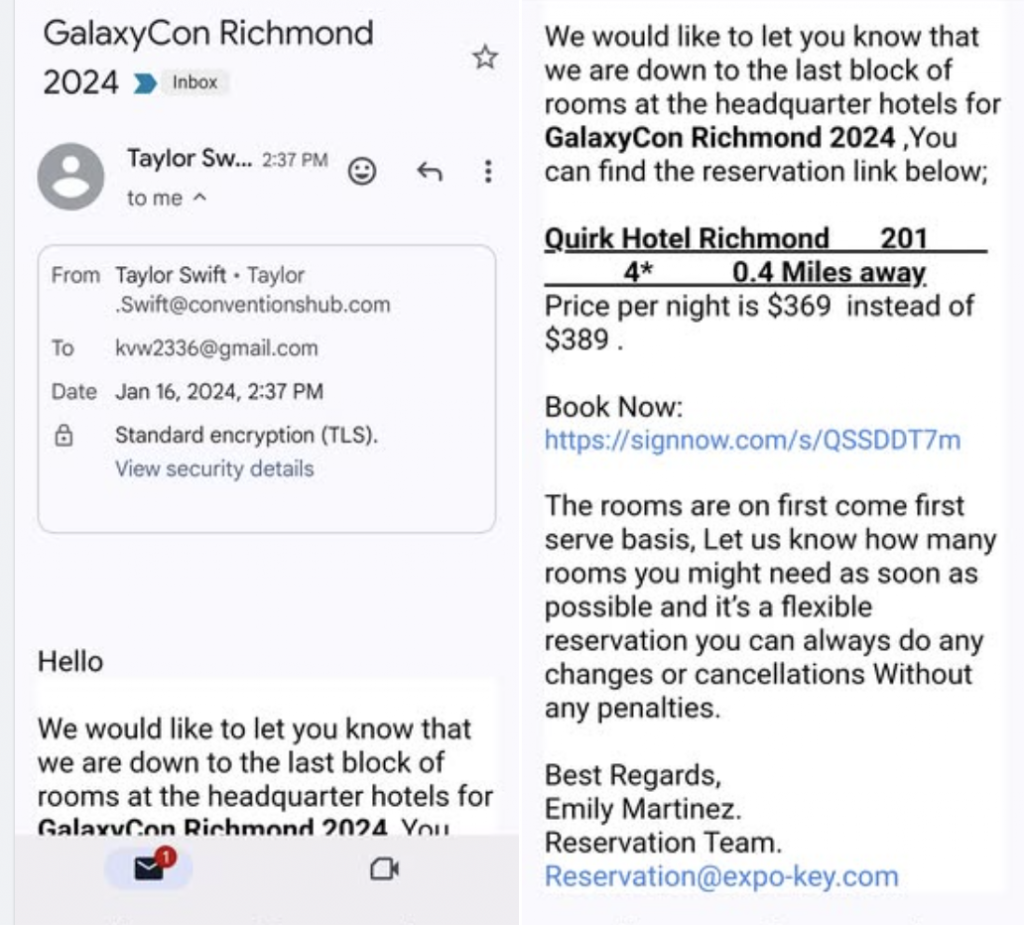
Another user shared their experience of Facebook: A phishing message promoted what appeared to be a discounted hotel block for a conference. It created a sense of urgency by claiming that only a few rooms remained.
The message included a shortened SignNow link as its “Book Now” call to action. However, the sender’s address did not match the organization named in the email, the greeting was generic, and the booking context did not resemble a normal electronic-signature workflow.
These inconsistencies indicated that the message was a fraudulent lookalike rather than a genuine SignNow signing request.
What to do if you receive one of these invitations
A familiar domain inside a shortened link is not sufficient proof of legitimacy. Before interacting with a similar message:
- Confirm the event and hotel independently.
- Compare the sender’s address with the named organization.
- Avoid using an unexpected eSignature link as a booking portal.
- Ask the organizer whether it sent the offer.
- Report the message if the sender cannot be verified.
A legitimate organizer should be able to confirm its reservation process through an official website or established contact channel.
Case study #4: A third-party cashback dispute mistaken for a SignNow scam
Some “SignNow scam” searches may relate to cashback or payment disputes involving third-party services rather than SignNow itself. In one reported case, a customer purchased a SignNow subscription through Rakuten but said the expected cashback was not credited. The discussion indicates that eligibility, tracking, plan requirements, browser settings, and retailer verification may affect such offers. To avoid confusion, purchase SignNow through official channels whenever possible. When using a third-party promotion, read all cashback conditions, and make sure the subscription remains affordable even if the reward is not approved.
Genuine SignNow email versus phishing lookalike: how to tell the difference
A genuine signing request should match the expected sender, document context, and SignNow domain. Branding alone is not enough to establish authenticity.
Check the complete sender address
Expand the sender information in your email application and inspect the complete address.
Attackers may use malicious domains that contain extra letters, misleading subdomains, or visually similar characters. A sender’s domain that only resembles signnow.com is not the same as the legitimate domain.
Inspect links before clicking
On a desktop, hover over a button to display its destination. On mobile devices, use the available link-preview function without opening the page.
Avoid clicking malicious links that resolve to unrelated phishing sites, file-sharing services, payment forms, or fake login pages. Suspicious links may redirect users several times before reaching fraudulent websites.
Evaluate the request context
Consider whether the document makes sense based on your relationship with the sender.
A lease from a landlord or an employment form from HR may be expected. A lottery payment, cryptocurrency offer, hotel reservation, or multimillion-dollar delivery is not a standard signing workflow.
Watch for manipulation tactics
Phishing techniques commonly rely on fear, financial temptation, or pressure.
Messages may claim that your account will be closed within minutes or that a payment requires immediate action. This false sense of urgency is intended to convince users to act before verifying the request.
Confirm through another channel
Contact the sender through a telephone number, established email thread, corporate directory, or internal messaging platform you already trust.
Do not rely exclusively on contact information contained in suspicious messages. Independent confirmation remains one of the most effective forms of phishing prevention.
Use SignNow’s email preview
A SignNow document owner can review the Email Preview area during setup and sending. The preview displays the message that recipients are expected to receive.
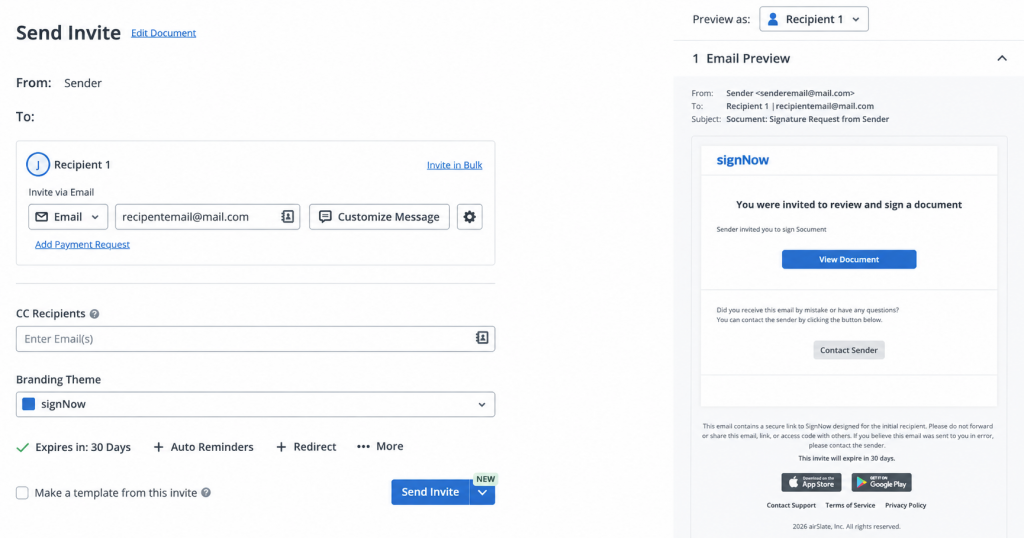
This helps a sender confirm the invitation wording and explain its appearance to a recipient who is concerned about authenticity.
On the technical side, DMARC, SPF and DKIM email authentication are the underlying standards that let mail servers verify a message actually originated from the legitimate domain it claims, and they back up the domain-check advice above rather than replacing it. Verification habits matter: Verizon’s 2025 Data Breach Investigations Report found that phishing accounted for 16% of confirmed breaches with a known initial access vector, behind vulnerability exploitation and credential abuse, which is why checking the sender before acting closes off one of the largest single entry points for a cyber attack.
Common phishing techniques that target SignNow users
Phishing threats keep evolving, but most phishing incidents targeting SignNow users fall into a handful of recognizable categories. Knowing the difference helps you tell a real signing request from a scam faster than reading through every red flag from scratch.
- Spear phishing sends a personalized phishing email to one person or team, often naming a real colleague or vendor, rather than a mass phishing scam blasted to thousands of addresses.
- Business email compromise (BEC) impersonates an executive or vendor to trick users into wiring money or approving a document under a false sense of urgency.
- Voice phishing (vishing) uses a phone call instead of a phishing email, with a caller claiming to be from SignNow support and asking you to confirm your user credentials.
- Smishing delivers phishing messages by text messages or direct messages on social platforms, often with a shortened link that hides the real destination.
Each of these phishing attempts is designed to bypass your instincts rather than your technology, which is why recognizing the pattern matters as much as any single red flag. Most still arrive as unsolicited emails you weren’t expecting in the first place, which is itself worth noticing.
How to prevent a phishing attack with SignNow
Effective phishing prevention combines SignNow controls with consistent verification habits. The following workflow helps senders prevent phishing confusion and reduce avoidable risk.
1. Preview the invitation email
Review the email subject, invitation text, sender details, and document description before sending.
A clear email message gives the recipient enough context to understand why the request arrived.
2. Verify recipient addresses
Check the recipient list for misspellings, outdated accounts, or unintended recipients.
A document sent to the wrong address can expose sensitive information and create uncertainty about whether the invitation is genuine.
3. Correct errors inside SignNow
Use the available SignNow controls to correct an address and resend the invitation.
Avoid manually forwarding an uncertain message because forwarding can obscure its original context.
4. Enable relevant notifications
Workspace notifications can help administrators see when recipients open or interact with documents.
Organizations can also monitor network traffic and account activity for behavior associated with compromised accounts.
5. Add authentication where appropriate
Use additional recipient authentication for higher-risk documents when the relevant option is available.
Authentication should be proportionate to the sensitivity of the document and the potential consequences of unauthorized access.
6. Tell recipients what to expect
Notify recipients through a trusted channel before sending a SignNow request.
Providing the document name and sender information can help prevent phishing concerns and make a fraudulent imitation easier to detect.
Together, these steps support a clearer and more secure signing experience.
Phishing prevention best practices for teams and IT security
SignNow’s in-product controls stop a lot of phishing attempts, but broader phishing prevention also depends on habits and tools outside any single platform. To prevent phishing attacks at scale, most IT and security teams combine a few standard defenses:
- Multi-factor authentication (MFA) — also written as multi factor authentication MFA — adds a second verification step beyond a password, so a stolen credential alone isn’t enough for unauthorized access attempts to succeed.
- Secure email gateways and other tools that implement email filtering are core email security controls that can catch a large share of phishing email and phishing links before they ever reach an inbox.
- Regular phishing training helps staff recognize phishing techniques — from generic greetings to a false sense of urgency — before they click.
- A dedicated security team should monitor network traffic for unusual patterns, watch for compromised accounts, and restrict privileged access so a single phished credential can’t reach sensitive systems.
- Employees should know how to report phishing emails immediately, rather than deleting them or replying, so the security team can act before a single cyber attack turns into a wider incident.
None of these steps are SignNow-specific, but they compound with the platform’s own protections — Email Preview, Manage Recipients, and Advanced recipient authentication — to close off most of the paths a phishing attempt could take. Together, they’re what genuine phishing prevention looks like in practice: not one control, but several working at once.
Final thoughts
Preventing phishing starts with verifying unexpected SignNow emails before you click, open attachments, or enter login details. Check the sender’s domain, inspect link destinations, confirm the request through a trusted channel, and use safeguards such as multi-factor authentication, recipient authentication, workspace notifications, and employee security training. SignNow is a legitimate eSignature platform, but scammers can imitate trusted brands, so consistent verification remains essential.
Try SignNow to send and manage documents with built-in controls that support a more secure signing process.
Clossary
Business Email Compromise (BEC): A phishing attack that impersonates a trusted contact or executive to trick a recipient into sending money or sensitive data.
DMARC/SPF/DKIM: Email authentication standards that let a receiving mail server verify a message genuinely originated from the domain it claims to be from.
ESIGN Act: The U.S. federal law establishing that electronic signatures carry the same legal weight as handwritten ones.
Multi-factor authentication (MFA): A login process requiring a second verification step, such as a one-time code, in addition to a password.
Phishing: A scam that impersonates a trusted sender to trick a recipient into clicking a malicious link, opening an infected attachment, or sharing sensitive information.
Smishing/vishing: Phishing conducted over SMS text message (smishing) or phone call (vishing) rather than email.
SOC 2 Type II: An independent audit standard confirming that a company’s security controls operate effectively over a period of time, not just at a single point.
Spear phishing: A targeted phishing email aimed at a specific person or team, often using real names or details to appear more convincing than a generic phishing scam.
Spoofing: Disguising an email’s sender address so it appears to come from a legitimate domain, such as signnow.com, when it does not.
FAQ
Is SignNow legit?
Yes. SignNow is a SOC 2 Type II-certified e-signature platform in operation since 2011, rated 4.6 out of 5 on both G2 and Capterra, with a signnow.com domain registered since 2001.
Why did I get an email from SignNow?
Someone used SignNow to send you a document to review or sign. The sender is typically a business, landlord, employer or vendor you have an existing relationship with, even if their name isn’t immediately familiar in your inbox.
Is signnow.com safe?
Yes. ScamAdviser’s automated check rates signnow.com “Very Likely Safe,” based on its long registration history, valid SSL certificate and popularity ranking.
How do I know if a SignNow email is fake?
Check that the sender’s email address resolves to signnow.com, look for urgent or threatening language and generic greetings, and confirm any signing link actually points to signnow.com before clicking it. The Email Preview and Manage Recipients screens inside SignNow can help a document owner confirm what was actually sent.
What is [email protected]?
It’s an address SignNow’s platform uses to send automated notifications and signing requests on behalf of document senders. Receiving mail from this address means someone sent you a document through SignNow, not that your account has been compromised.
Can SignNow emails be spoofed by scammers?
Yes, in the same way any well-known brand’s emails can be spoofed. That’s why checking the actual sender’s domain and link destinations matters more than checking whether the branding looks familiar.
Is airSlate SignNow a scam?
No, there is no evidence for these statements. Scammers may imitate SignNow branding or include SignNow links in fraudulent messages, but impersonation of a company is different from fraudulent conduct by that company.
How do I report a phishing email pretending to be from SignNow?
Do not click any links in the suspicious message, and don’t open any unexpected attachments. Verify the sender through your own SignNow account if you have one, and report phishing emails to your security team or to SignNow support rather than replying to the message directly.
Sources
- G2 SignNow reviews, 2026
- Capterra SignNow reviews, 2026
- Trustpilot signnow.com review
- ScamAdviser signnow.com trust check
- APWG Phishing Activity Trends Report, Q3 2025
- FBI IC3 2025 Internet Crime Report
- Verizon 2025 Data Breach Investigations Report
- FTC statement on the ESIGN Act
For more information about SignNow’s secure and world-class eSignature solution, visit SignNow’s corporate site.
- TL;DR
- Is SignNow legit? Here’s what the evidence shows
- Why “is SignNow a scam?” searches keep trending
- Case study #1: A fraudulent message that mentions SignNow
- What to do if you receive a scam message
- Case study #2: An unfamiliar but genuine signing invitation
- Best practices for reviewing sign requests
- Case study #3: A fake hotel-booking message using a SignNow link
- What to do if you receive one of these invitations
- Case study #4: A third-party cashback dispute mistaken for a SignNow scam
- Genuine SignNow email versus phishing lookalike: how to tell the difference
- Common phishing techniques that target SignNow users
- How to prevent a phishing attack with SignNow
- Phishing prevention best practices for teams and IT security
- Final thoughts
- Clossary
- FAQ
- Sources
