Electronic signature for remote work: Best practices

Without a clear electronic signature strategy, remote work doesn’t just slow down—it grinds to a halt. Unsigned documents languish in inboxes, approval processes become inconsistent, and workflows break when team members are traveling, working across different time zones, or away from their desks. In a remote environment, electronic signatures are essential. They eliminate the need for physical meetings, slash administrative tasks, and ensure that important documents keep moving forward without anyone needing to be physically present.
The need for electronic signatures and digital signatures is still growing:
- Grand View Research estimates the global digital signature market at $9.4 billion in 2026 and projects it to reach $121.0 billion by 2033, with a 43.9% CAGR from 2026 to 2033.
- Remote and hybrid work also remain part of everyday operations: BLS reported a 20.8% telework rate for U.S. private wage and salary workers in April 2025, compared with 20.4% one year earlier.
- Gallup’s hybrid work data supports the same point: among remote-capable U.S. employees, hybrid work decreased only from 55% to 51% over two quarters.
In this guide, we cover five best practices for electronic signature remote work requires: securing your platform, standardizing workflows, verifying signer identity, enabling mobile signing, and maintaining audit trails that help document each step of the signing process.
1. Choose a platform built on verifiable security and compliance
Selecting an electronic signature remote work platform with documented security and compliance information is one of the most important decisions a remote team makes. A distributed workforce naturally increases the number of devices, locations, networks, and access points involved in document workflows.
SOC 2 Type II as a security assurance
Think of SOC 2 Type II as a security assurance signal, rather than a marketing badge. SignNow’s customers can request its SOC 2 Type II report, which gives teams a practical way to review the vendor’s security controls before sending sensitive agreements through the platform.
Why it matters: The ESIGN Act provides a general rule of validity for electronic records and signatures in transactions affecting interstate or foreign commerce. Under that framework, an electronic signature can include an electronic sound, symbol, or process associated with a record and adopted with the intent to sign. However, the law does not replace the need for platform-level security, access controls, proper workflow configuration, and industry-specific compliance checks.
SignNow supports compliance standards for a variety of industries and regions. For healthcare teams, SignNow helps organizations meet HIPAA-related requirements by providing appropriate safeguards for Protected Health Information (PHI). For teams working with data from EU residents, SignNow also supports compliance with regulations like GDPR and eIDAS. This includes offering qualified electronic signatures, which use qualified trust services and certificates to meet specific legal requirements within the European Union.
How to evaluate a platform’s security posture
- Request the vendor’s SOC 2 Type II report if your team handles sensitive or regulated documents.
- Confirm which compliance standards the platform states it supports, such as SOC 2 Type II, GDPR, HIPAA, eIDAS, PCI DSS, or 21 CFR Part 11.
- Check whether HIPAA-related workflows require a separate Business Associate Agreement (BAA).
- Verify whether files are encrypted in transit and at rest.
- Ask how the vendor handles role-based access controls, security audits, vulnerability scanning, penetration testing, and multi-factor authentication.
- Confirm how the platform helps ensure data integrity for signed documents, electronic documents, and electronic records.
2. Standardize paperless workflows with templates and integrations
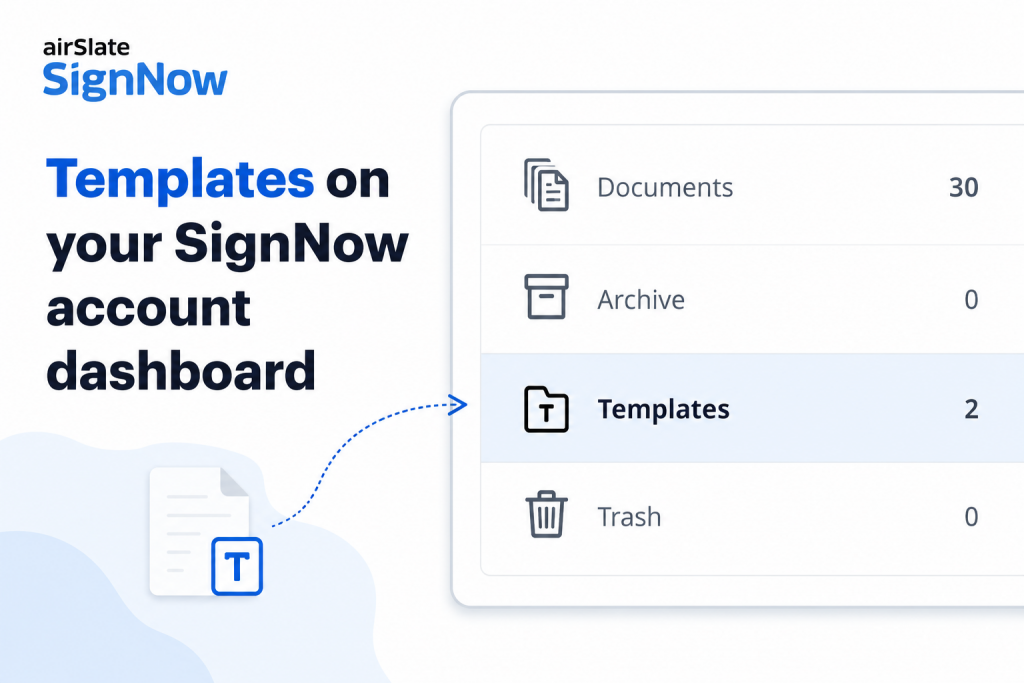
Reusable templates and software integrations turn one-off document tasks into repeatable workflows. This matters most when remote teams are distributed across time zones, different locations, and various locations and need to sign documents remotely.
Reusable templates usability
Remote document work becomes inefficient when employees recreate the same agreement, offer letter, purchase order, or intake form from scratch. Standardized templates reduce repetitive setup work, while integrations help signed documents move back into the systems where teams already manage customer, employee, or operational records. This can support cost savings, improve efficiency, and improve productivity, enabling real-time collaboration.
How to standardize your document workflows:
- Identify the five document types your team sends most often, such as NDAs, employment contracts, service agreements, vendor agreements, purchase orders, insurance claims, or intake forms.
- Build a reusable template for each recurring document.
- Add signing order rules so documents route to signers in the right sequence.
- Connect your eSignature platform to the systems your team already uses, such as CRM, HR, cloud storage, or productivity tools.
- Use automatic reminders to follow up with signers who have not completed a document within your expected window.
- Store each completed PDF file, electronic form, and related audit record according to your internal retention policy.
SignNow supports reusable templates and integrations with tools such as Salesforce, NetSuite, Microsoft Dynamics CRM, Google Workspace, Dropbox, and more. These integrations are useful for enabling businesses to move documents through an electronic process instead of relying on paper documents, scanned attachments, or time-consuming manual follow-ups.
3. Require identity verification proportional to document risk
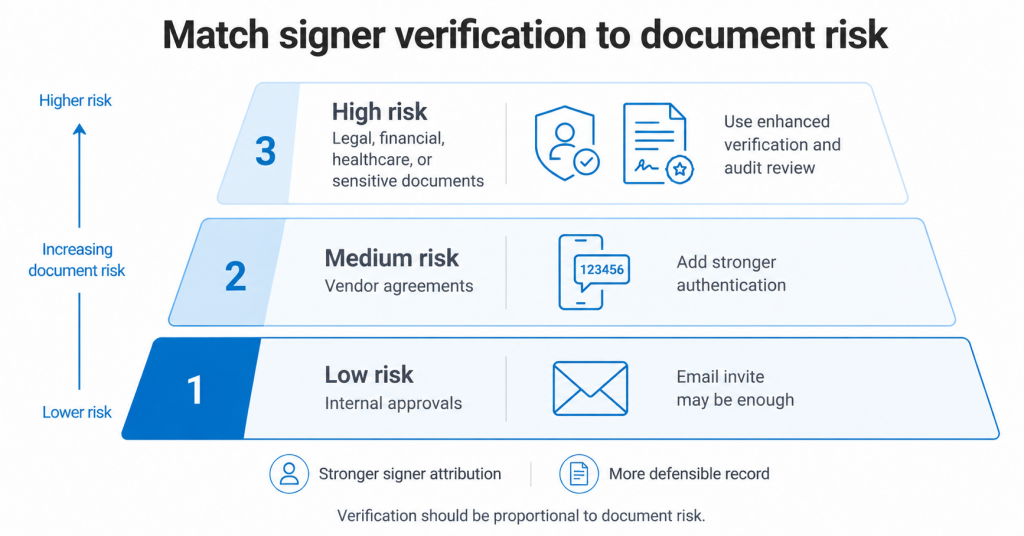
In a remote setting, signers may be in different cities, many countries, or time zones, and the sender may never meet them in person. Email delivery alone may be enough for some low-risk workflows, but higher-value or regulated documents often need stronger authentication.
eSignature attribution to the signer
The ESIGN Act supports the validity of electronic signatures and records, but teams still need to show that the signature can be attributed to the signer and that the record can be retained and reproduced when needed. For sensitive documents, identity verification settings and audit trail data help create a stronger record of who accessed and completed the agreement.
The need for stronger verification
- Who: external signers, vendors, clients, contractors, patients, or customers whose identity is not already verified through an internal system.
- What: high-value contracts, healthcare intake forms, financial agreements, legal documents, and forms involving sensitive data.
- Where: signing workflows where the signer accesses the document through an email invite, public link, or mobile device.
- When: before sending the document, not after a dispute or compliance review.
- Why: stronger authentication can help support signer attribution.
- How: apply authentication settings at the document or template level when the document risk justifies it.
Practical steps for document risk management
Here are five best practices for managing your document security and authentication settings:
- Categorize your document types by risk: low, medium, and high.
- Use stronger authentication for medium- and high-risk documents.
- Keep authentication settings consistent across recurring templates.
- Document your internal rules for when stronger verification is required.
- Review the audit trail after signing to confirm key events were recorded.
Signer verification should be based on document risk, signer relationship, and internal compliance requirements rather than a one-size-fits-all rule. Multi-factor authentication and similar controls are most valuable when the value or sensitivity of the document justifies the added step.
4. Build a mobile-ready electronic signature experience for every signer
Remote work does not always mean working from a home office. Signers may be traveling, visiting a job site, attending a meeting, or completing paperwork from a phone. A signing process that only works well on a desktop can delay approvals.
Cross-device signing as a trend
Remote and hybrid work remain common enough to make mobile signing and remote accessibility practical requirements. BLS reported that 20.8% of U.S. private wage and salary workers teleworked in April 2025, nearly unchanged from 20.4% one year earlier. Gallup also found that hybrid work among remote-capable U.S. employees shifted only from 55% to 51% over two quarters. These figures support the need for document workflows that work across locations, devices, and an internet connection.
How to ensure a mobile-ready workflow
- Test each template on both iOS and Android before using it with external signers.
- Confirm that fields are easy to tap and complete on smaller screens.
- Use mobile apps when team members need to send, sign, or manage documents away from a desktop.
- Use in-person signing or Kiosk Mode when signers need to complete the same form on a shared device.
- Confirm that completed documents and audit records are stored according to your internal process.
- Make sure the signing method works for remote employees who need to sign papers or review documents without returning to the office.
SignNow’s mobile app supports sending, signing, and managing documents from iOS and Android devices. The Kiosk Mode for SignNow API users allows multiple people to sign the same form sequentially on a single device, such as an iPad or Android tablet.
5. Maintain audit trails that document every step of the signing process
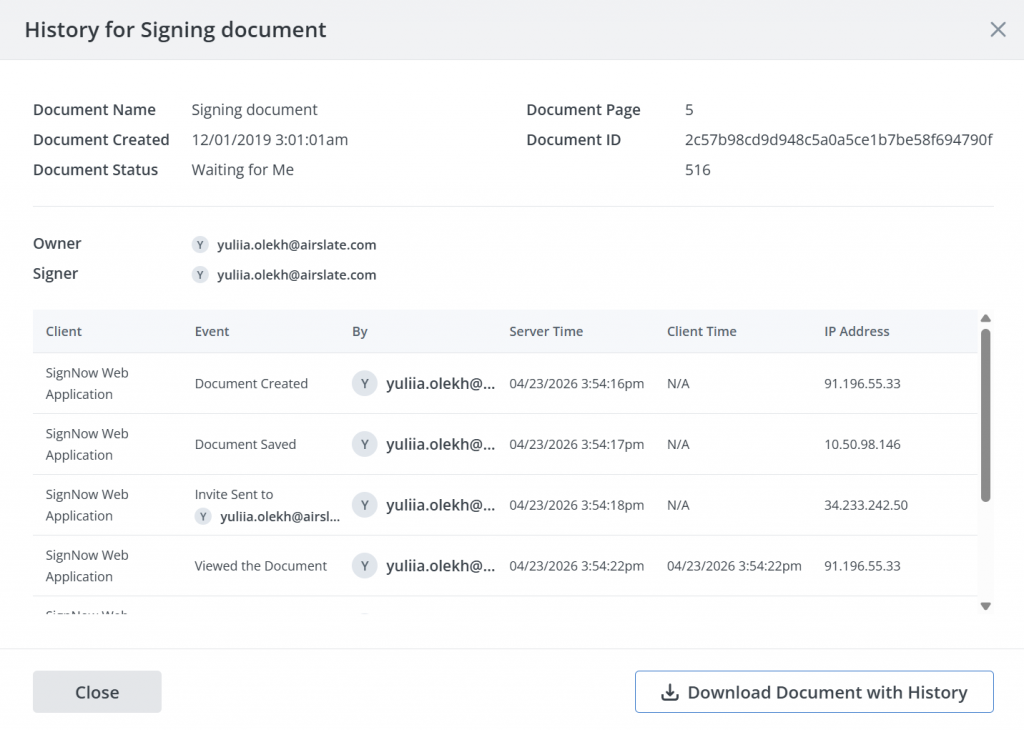
A signed document is easier to manage and defend when it comes with a clear record of signing activity. The audit trail is what helps teams see who interacted with the document, when actions happened, and how the signing process was completed.
Why it matters: The ESIGN Act allows electronic records to satisfy writing requirements when the required conditions are met, including consumer consent where applicable and record retention in a form that can be accurately reproduced. In practical terms, this makes audit trails, document history, timestamps, signer details, and retention processes important parts of a remote signing workflow.
The importance of implementing an audit trail
| Without a proper audit trail | With a documented audit trail |
| You have a signature image or completed file | You have a record of signing events and document activity |
| It is harder to confirm when the document was completed | Timestamps help show when key actions occurred |
| Version questions may be harder to resolve | Document history helps teams confirm the completed record |
| Follow-up depends on manual notes | The system records document events automatically |
For more information about the audit trail for electronic signature: remote work use cases and more, see our blog about eSignature audit trail.
How to use audit trails effectively
- Store the completed document and its completion record together.
- Review the audit trail before filing sensitive or high-value documents.
- Confirm that all required signers completed their assigned fields.
- Include audit trail review in your standard document close-out checklist.
- Retain signed records according to your internal policy and applicable regulatory requirements.
- Use audit trails to help maintain compliance with relevant regulations, internal policies, and customer requirements.
Once SignNow finalizes the document, you can access the full audit trail under the History tab. From there, you can store, download, share, or reference the completed file and its audit record for legal compliance, dispute resolution, or internal reviews.
Common mistakes to avoid with electronic signatures for remote teams
When adopting the technology (“electronic signature: remote work”), teams often make a few common mistakes that can create risk or slow down workflows.
- Assuming all platforms are equally secure: Security and compliance standards vary, so always review a vendor’s specific features before use.
- Treating scanned signatures like eSignatures: Scanned wet-ink signatures lack the detailed audit trails and authentication that eSignature technology provides, making them harder to verify.
- Ignoring jurisdictional differences: eSignature laws like ESIGN in the U.S. and eIDAS in the EU differ, so international teams must verify requirements for cross-border agreements.
- Not integrating with existing software: Failing to connect eSignature tools with systems like your CRM or cloud storage can lead to manual work and version control issues.
- Skipping signer authentication: For high-value contracts, rely on more than just email delivery; use multi-factor authentication to ensure signer identity.
- Using terms inconsistently: “Electronic signature” and “digital signature” can have distinct legal meanings, so define terms clearly in your internal policies.
Avoiding these pitfalls can help your team create more efficient, secure, and compliant eSignature processes.
How to measure the success of your paperless workflow
Three to six months after implementing electronic signatures for remote work, these metrics can help you evaluate whether the workflow is working.
- Document turnaround time: Measure the average time from when a document is sent to when it’s fully signed.
- Cost per agreement: Track the total internal cost for each agreement and compare it to your pre-eSignature baseline to estimate savings.
- Employee time recovered: Survey your team to see how many hours they save on document-related tasks. SignNow reports that automated workflows can save up to 6 hours weekly per employee.
- Completion rate: Track the percentage of documents that are completed versus abandoned. According to SignNow, automation can improve closing rates by an average of 8%.
- Mobile completion rate: Monitor how many documents are completed on mobile devices to identify potential friction points for users on smaller screens.
- Environmental impact: Track changes in paper use, printing, and mailing to measure your reduction in paper dependence for environmental sustainability.
Tracking these metrics will provide a clear, data-driven view of your e-signature ROI and operational improvements.
Examples of using electronic signatures: remote work use cases
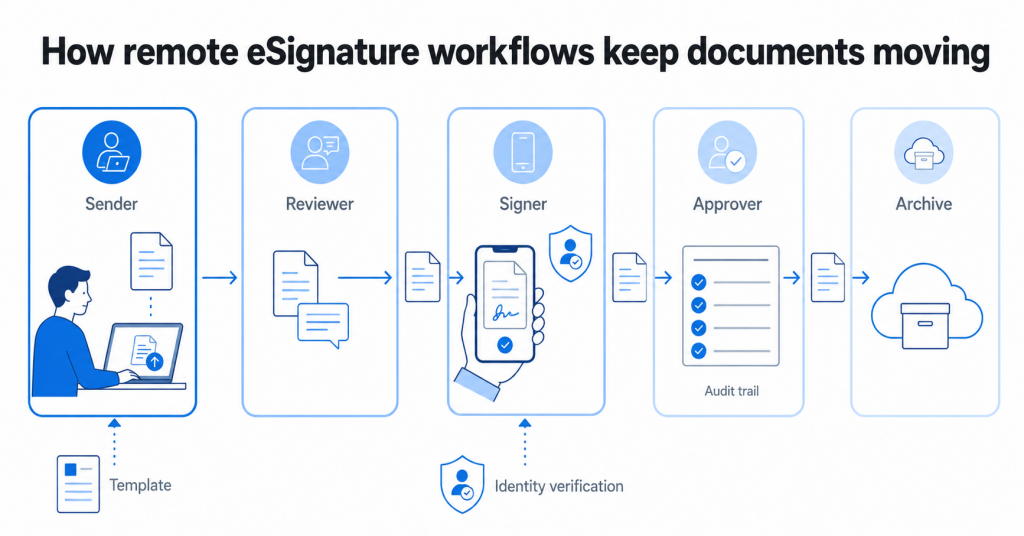
The best remote electronic signature remote workflows usually start where paper creates the most friction: documents that need input from several people, fast follow-up, or a reliable record of who approved what. This is true for many industries, here are some examples.
eSignature for remote HR teams
For HR teams, electronic signatures remote work processes are especially useful for employment contracts, onboarding forms, policy acknowledgments, and benefits documents. The key benefit is not just removing printing; it is keeping every remote employee on the same process, with required fields, signer order, and completed records stored consistently.
eSignature for remote sales and procurement teams
For sales and procurement teams, remote signing helps with vendor agreements, purchase orders, statements of work, and customer approvals that often move between legal, finance, and external parties. Templates can reduce version confusion, while audit trails help show when each party reviewed, signed, or completed the document.
eSignature for remote operations teams
For operations and claims teams, electronic signatures work best when documents must move quickly between people in different locations, such as insurance claims, service approvals, consent forms, and internal requests. A completed document with its audit record is easier to track than a scanned attachment buried in an email thread.
eSignature for remote legal teams
For legal and compliance teams, the main value is control. Standard eSignature workflows may be enough for routine agreements, while higher-risk or cross-border documents may require stronger identity verification, digital certificates, or qualified electronic signatures under frameworks such as eIDAS.
Learn how remote contract signing can streamline your workflows in our blog post: How to sign contracts online and cut document turnaround time by 80%.
Final thoughts
Remote signing works best when it is treated as a workflow, not just a way to replace a handwritten signature. The right setup should make documents easier to send, sign, verify, track, and store across remote teams.
Start with the essentials for an electronic signature: remote work requires secure platform settings, reusable templates, risk-based signer authentication, mobile access, and audit trails. These practices help teams keep important documents moving without relying on printers, scanners, mailing documents, or physical meetings.
Try SignNow today to check how well the platform fits your real remote signing process.
Glossary
Electronic signature: A digital action that shows a person’s intent to sign a document, such as typing a name, drawing a signature, or clicking an approval button.
Digital signature: A more technical signing method that uses cryptographic techniques to help verify signer identity and ensure data integrity.
Remote signing: The process of sending, reviewing, and signing documents electronically without requiring physical presence or paper documents.
Audit trail: A record of signing events, timestamps, signer details, and document activity that helps teams track how a document was completed.
Identity verification: A security step used to confirm that the signer is the intended person before they access or sign a document.
Multi-factor authentication: A method that asks signers to confirm their identity through more than one factor, such as email access and a one-time code.
Qualified electronic signature: A regulated type of electronic signature used in the European Union under the eIDAS regulation and backed by a qualified certificate.
Electronic records: Digital records connected to an electronic signing process, including signed documents, audit trails, and completion certificates.
Remote accessibility: The ability to access, review, and sign documents from different locations using an internet connection.
Signing workflow: The full process of preparing, sending, signing, tracking, and storing documents electronically.
FAQ
Which documents should remote teams avoid sending through a basic eSignature workflow?
Remote teams should be careful with documents that have special legal, regulatory, or jurisdiction-specific requirements. Examples may include certain court documents, notarized forms, wills, cross-border agreements, or records that require qualified electronic signatures. Before sending high-risk documents, confirm whether a standard electronic signature is acceptable for that use case.
What should be included in an internal electronic signature policy?
An internal policy should define which documents can be signed electronically, who can send them, which authentication settings to use, and where completed records should be stored. It should also explain when stronger identity verification, legal review, or compliance approval is required. This gives remote workers a clear process instead of leaving each team to choose its own signing method.
How can remote teams reduce signer errors?
Use templates with required fields, clear field labels, signing order, and short instructions for each signer. Test forms before sending them externally, especially on mobile devices. For recurring documents such as employment contracts, vendor agreements, purchase orders, or insurance claims, review completed documents regularly to find common mistakes and improve the template.
What happens if someone signs from another country?
Cross-border signing can raise questions about applicable law, signer identity, data transfer, and the legal effect of the signature. In the European Union, eIDAS rules may apply, while other countries may follow different electronic signature laws. For international agreements, teams should confirm the legal requirements before relying on a standard remote signing workflow.
How long should signed electronic documents be kept?
Retention periods depend on the document type, industry, contract terms, and relevant regulations. A good practice for electronic signature remote work is to store the signed document, audit trail, and related electronic records together for as long as your internal policy requires. Remote teams should also ensure records remain accessible and reproducible for later use.
Sources:
- Grand View Research: Digital signature market report
- BLS: Telework rate down for federal government workers in April 2025
- Gallup: Hybrid Work in Retreat
- NCUA: The ESIGN Act
- ESIGN Act: Federal Trade Commission
- 1. Choose a platform built on verifiable security and compliance
- 2. Standardize paperless workflows with templates and integrations
- 3. Require identity verification proportional to document risk
- 4. Build a mobile-ready electronic signature experience for every signer
- 5. Maintain audit trails that document every step of the signing process
- Common mistakes to avoid with electronic signatures for remote teams
- How to measure the success of your paperless workflow
- Examples of using electronic signatures: remote work use cases
- Final thoughts
- Glossary
- FAQ
- Sources:
